I missed one thing when I moved to Zorin: unlocking my laptop with a short PIN
instead of typing my full password every time. So I built it, and I would like
to share it in case it is useful to anyone else here.
Unlock the lock screen (Super+L) and/or log in at the login screen with a PIN.
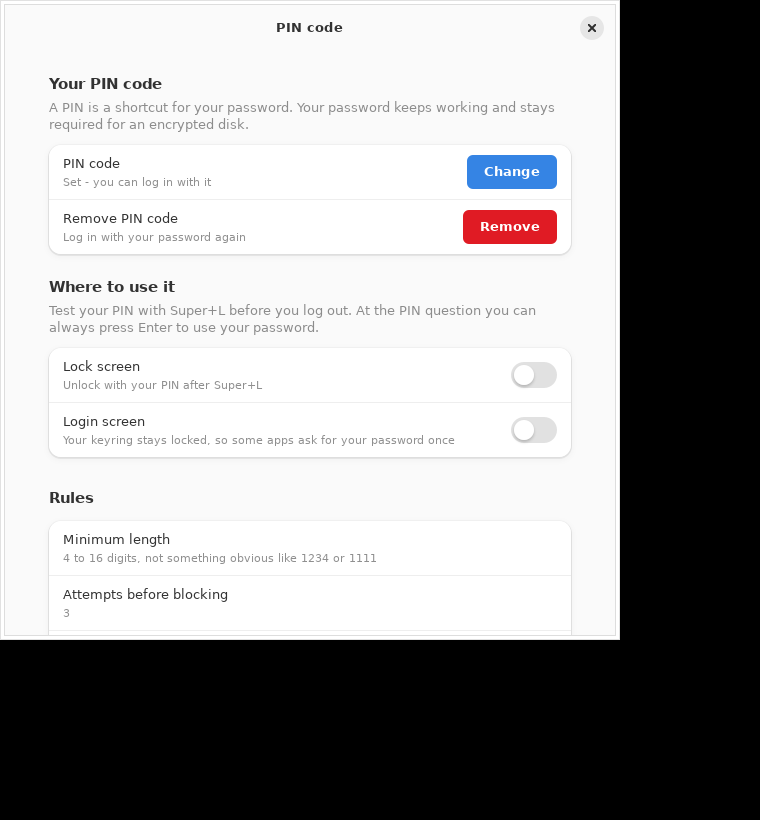
A settings window called PIN code in the menu, in the same style as GNOME
Settings, where you set your PIN and choose where it is used. Search for
"pin", "password" or "users" and you will find it.
A command line tool (zorinpin set, zorinpin status, …) if you prefer that.
Works on Zorin OS 17 and 18, and on other Ubuntu/Debian systems with GDM.
Installing
One command, also on a machine with no compiler or git installed:
I am not gonna lie this is awesome as hell and works pretty good but... Couldn't it have been possible to just make your password numbers only? or did I miss something?
(I installed it and logged in with numbers only cuz that's what pincode is)
I saw the english Language Block and I thought, I could make a german Translation. I don't have a Github Account, so I will post it here. You are free to use it. And if You don't want it, simply ignore it.
TEXT = {
    "de": {
        "title": "PIN Code",
        "your_pin": "Ihr PIN Code",
        "pin_row": "PIN Code",
        "pin_set": "Eingestellt - Sie können sich damit einloggen",
        "pin_unset": "Noch nicht eingestellt",
        "pin_blocked": "Nach zu vielen Versuchen blockiert",
        "set": "Einstellen",
        "change": "Ändern",
        "remove": "Entfernen",
        "remove_row": "PIN entfernen",
        "remove_sub": "Wieder mit dem Password einloggen",
        "where": "Wo es benutzt wird",
        "login": "Anmeldebildschirm",
        "login_sub": "Der Keyring bleibt gesperrt. Daher werden einige Apps einmalig das Password abfragen.",
        "lock": "Sperrbildschirm",
        "lock_sub": "Entsperren Sie mit Ihrem PIN nach Super+L",
        "rules": "Regeln",
        "min_len": "Mindestlänge",
        "attempts": "Versuche bis gesperrt wird",
        "lockout": "Gesperrt für",
        "seconds": "%s Sekunden",
        "until_admin": "bis ein Administrator es entsperrt",
        "new_pin": "Neuer PIN Code",
        "repeat_pin": "PIN Code wiederholen",
        "set_title": "PIN Code einstellen",
        "cancel": "Abbrechen",
        "save": "Speichern",
        "no_match": "Die zwei PIN Codes stimmen nicht überein.",
        "remove_q": "Den PIN Code entfernen?",
        "remove_body": "Sie werden sich wieder mit Ihrem Password einloggen. Sie können jederzeit einen neuen PIN einstellen.",
        "failed": "Das hat nicht funktioniert",
        "digits_hint": "%(min)s to %(max)s Stellen, nicht so etwas offensichtliches wie 1234 oder 1111",
        "test_hint": "Testen Sie Ihren PIN mit Super+L bevor Sie sich ausloggen. Bei der PIN-Abfrage können Sie immer Enter drücken, um das Password zu benutzen.",
        "password_note": "Ein PIN ist ein Kürzel für Ihr Password. Ihr Password bleibt weiterhin gültig und ist notwendig für eine verschlüsselte Festplatte.",
    }
I think it would be good if someone with programming skills could take a look at this app, since it's already listed under Tutorials. It involves very sensitive security settings.
I scanned the downloaded Github Archive and the offered .deb File (including Checksum Check) with Clam and Virustotal and it were fine. But I can contact the Other's and link this here so they can check the Scripts.
It seem proper, but honestly playing with GDM security is never a good idea, and as someones said here you can set a pin as password without installing anything.
Yes, I agree. Because of this the moderators should care that the app is safe to use and doesn't damage the system when it is put to category tutorials. There are warnings on the github site that there are security concerns because no other people have checked the app yet.
The password is set by default to digits only, but you can change it in the /etc/zorinpin/zorinpin.conf file (edit the file with root rights by entering admin:// in the pathfield of the topbar in Nautilus file manager) and set for digits_only no instead of yes.
If you like to have more freedom in the choice of your password, e.g. to set 1111, also set the line forbid_trivial from yes to no (but the password is not as safe then).
To be able to use the PIN also for sudo legitimation, run
After checking everything on the page, all files: There is no evidence of any malware, malicious intent or security failures.
I do not see anything in the code that conflicts with or bypasses the normal security of a running system.
What I do see:
From a strict security standpoint: Changing to a PIN offers lower security than using a longer and complex password and this is directly mentioned on the github page.
A PIN is easier to "guess" using brute force methods. In a corporate or industrial setting, this would be a no-go.
For an average home user; it would be acceptable.
Interestingly, the above is what makes this a more secure option than simply setting your user password to a PIN. The O.P.'s ZorinPIN option adds the PIN as a security layer, but still can rely on a more complex User Password beneath it. This allows two things; One, your user cannot be locked out and Two, the PIN If cracked by a bad actor only compromises one layer, not the whole access.
What I note most clearly in this project is that it is well thought out and rigorous.
The PIN buffer gets explicitly zeroed zp_secure_zero before free, and it's never written into PAM_AUTHTOK, so it can't leak to a later module in the stack.
Also, zp_valid_username is called before any filesystem/DB lookup which prevents any injection issues.
This is a level of professionalism that brings confidence - or security concerns.
Every thing I have checked shows that this is safe and remarkably complete. An area of concern is that the one-line installer is curl | bash from raw.githubusercontent, and there's no mention of GPG-signed releases or published checksums for the .deb. You're trusting the maintainer and GitHub's transport security, with no way to verify integrity independently.
For a home user, this is within bounds. But again, from a strict Security Audit P.O.V., the added verification of cryptographic security on the installer end would be necessary.
And this means Beware of Forks or copies of this project.
One final note: Everything checks out as Not Malware Today.
The attention to detail, well thought out future proofing and professionalism of this application stand out to me because it lacks the Novice Approach and common mistakes. Anyone using it can consider themselves Strongly advised to reaudit this code over time for any changes to commits.
It is unusual to see an application thought out at initial release to such a very high degree.
It may be that the O.P. is a very conscientious person; or they used a lot of tools and predictive considerations to weigh possibilities before introduction.
Such high level planning can provide confidence in the integrity of the work.
It also... Can show the same pattern of High Level Planning seen in the XZ Exploit.
I wrote my initial post carefully, so as to not unduly supply unwarranted suspicion on the O.P.
Because of the request to clarify this: I feel the need to point out that the GitHub Page Invites Audit and Review. A high level planner that intends to later inject in something nefarious would be very unlikely to do this.
Still, as this does deal with Security and Authorization in PAM, etc. I must suggest that regular audits of this would be necessary - to ensure it remains as transparent and robust as it is at initial release.