Hello !
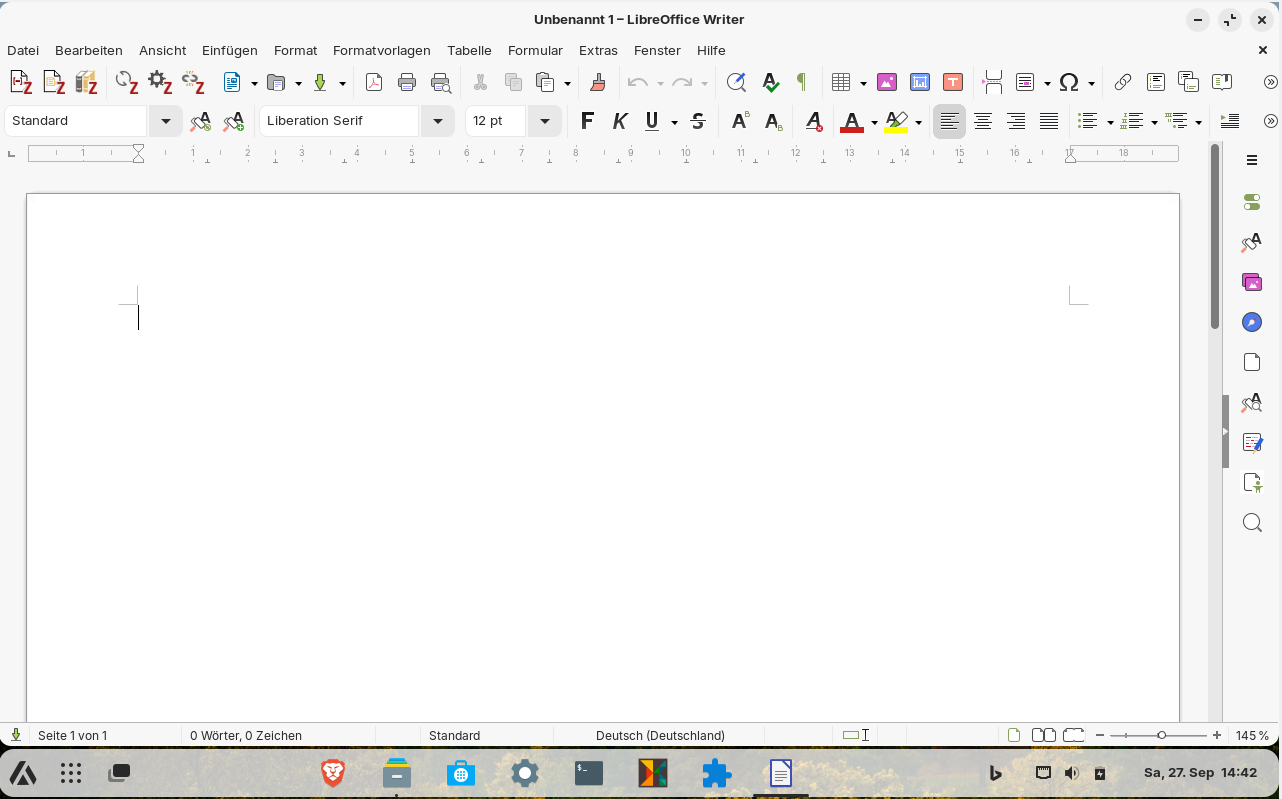
I've installed Zotero on my PC, but the plugin doesn't appear on the pre-installed LibreOffice Writer... Even if zotero website says that it should appear automatically afetr Zotero is installed.
Thank you for your help 
Hello !
I've installed Zotero on my PC, but the plugin doesn't appear on the pre-installed LibreOffice Writer... Even if zotero website says that it should appear automatically afetr Zotero is installed.
Thank you for your help
I don't remember if LibreOffice is installed as a Flatpak out of the box; that might be the reason it's not seeing the plugin.
Can you run this command in a terminal window?
flatpak list
If it shows libreoffice in the results, it's a flatpak. Next, can you describe how did you install Zotero?
Did you download the tarball or have you used zotero flatpak or zotero snap package? The best way is to download the tarball or use zotero-deb (if you have installed zotero flatpak or snap package please first remove them).
It may also help additionaly to switch to Xorg (logout and at login click on the cog wheel and set "Zorin desktop on XOrg")
If you have installed the flatpak of Zotero this instructions may help. But note that the flatpak is not supported officially by the developers:
On Zorin, LibreOffice is a native package, but Zotero from the Zorin software store is a Flatpak.
It's the 'containerization' around the flatpak which is causing the issue, blocking the integration, so you need to manually add the Zotero_LibreOffice_Integration.oxt item as mentioned in the Fedora forum discussion which @Forpli linked.
I know the guy who posted that solution for Fedora, and can confirm it works on Zorin too as I've used it myself.
There's two parts to the solution on the Fedora link... you definitely need to integrate the .oxt file, but you only need the Flatseal/Wayland part if you're having that window crash issue.
Hello !
I've searched everywhere, but I didn't find the Zotero_LibreOffice_Integration.oxt...
And I didn't find neither the forum of Forpli that you mentionned.
Thank you for your help !
This is why I remove both Snap and Flatpak if present on any OS. APT rocks! (and .deb too!).
The link to the fedora forum was added in my last post.
You didn't answer how you have installed zotero. If it isn't installed as flatpak you wouldn't find the file there.
If you have installed zotero as flatpak (you can check this in the software manager at installed)
you should find it at the places mentioned in the fedora forum.
To show the hidden files press ctrl+h after you have opened your file manager. You need them when you want to search for the zotero flatpak at
/home/USERNAME/.local/share/flatpak
(replace USERNAME with your username )
The other place where it can be stored is at
/var/lib/flatpak/
The easier way is probably to use the zotero-deb if you are not familar with tarballs. Then you don't need to search for the flatpak file. But if you want to use another installation method you should remove the flatpak/snap/tarball first.
To install zotero:
wget -qO- https://raw.githubusercontent.com/retorquere/zotero-deb/master/install.sh | sudo bash
sudo apt update
sudo apt install zotero
For the zotero libreoffice plugin you also need a java runtime environment. Maybe these steps mentioned here can help you?
I got Zotero plugin to work. These steps I did:
sudo apt install default-jre
This command installs a java runtime environment. I forgot to take a look if there is already one installed. With
java -version
you can check this.
Then I started libreoffice and went to
Extras-Options-Extended
and made sure that
Use Java Runtime Environment is enabled and a Java Runtime Environment is shown.
sudo apt install libreoffice-java-common
wget -qO- https://raw.githubusercontent.com/retorquere/zotero-deb/master/install.sh | sudo bash
sudo apt update
sudo apt install zotero
Unfortunately it did not work then. I had to search for the Zotero_LibreOffice_Integration_oxt file. I found it here:
/usr/lib/zotero/integration/libreoffice/Zotero_LibreOffice_Integration.oxt
I doubleclicked on this file, then I was asked if I want to add it to the libreoffice extensions and I said yes. Then it was added.
I restarted libreoffice and now Zotero is shown:
Maybe there is an easier way...But it works now.
I tried it with the tarball, but that is even more difficult when you want to use Zotero as a separate app. I downloaded the tarball from the Zotero homepage, extracted it and then moved the Zotero folder to /opt/.
To add the plugin in libreoffice I had to go to Libreoffice>Extras>Extensions>Add (Extension)
and then select the path of Zotero LibreOffice Integration oxt file which was saved at
/opt/Zotero_linux-x86_64/integration/libreoffice/Zotero_LibreOffice_Integration.oxt
(Or you can doubleclick on this .oxt file to install it).
Now the Zotero plugin was added to LibreOffice.
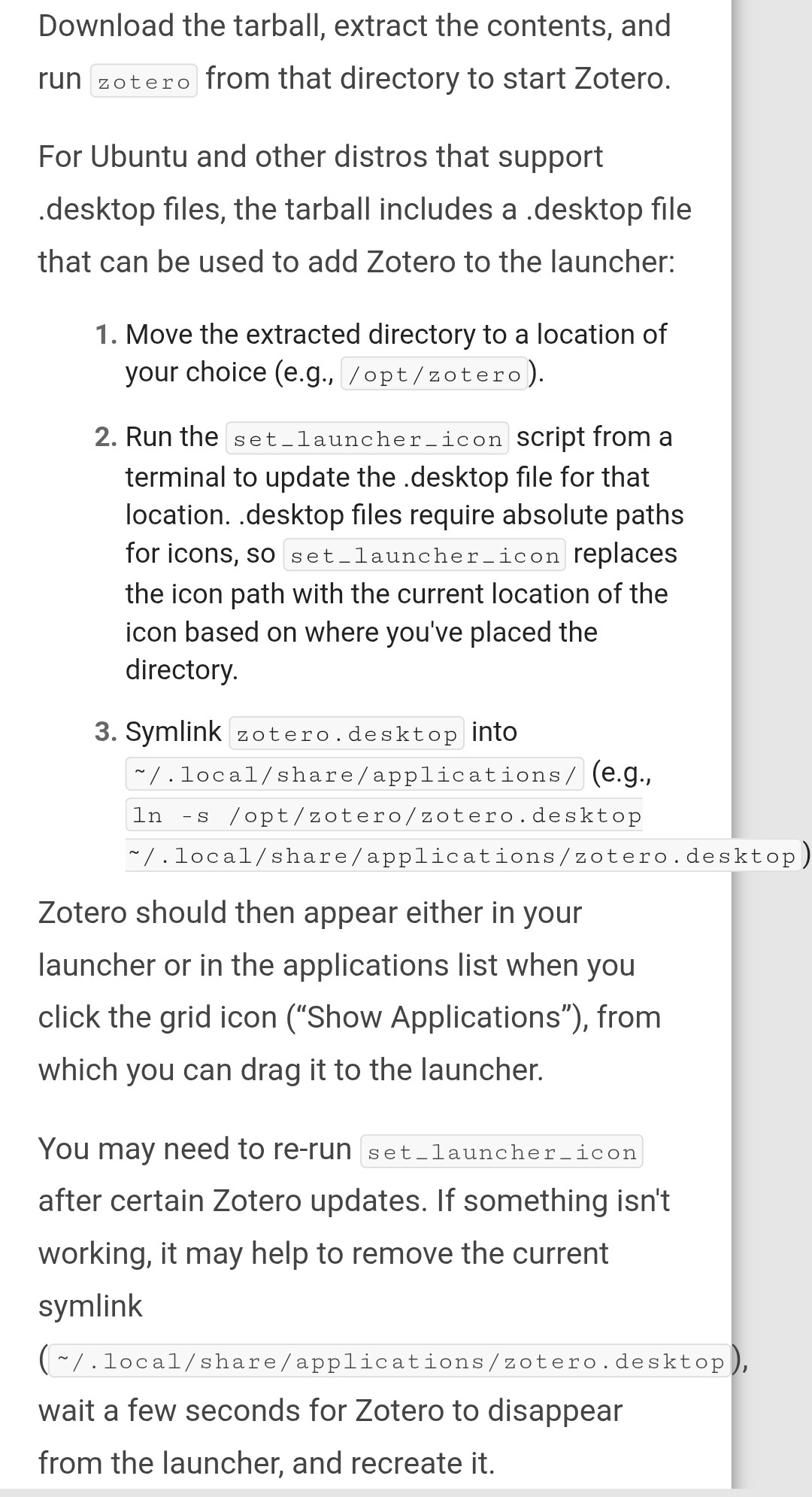
How to add a launcher to launch Zotero as standalone app?
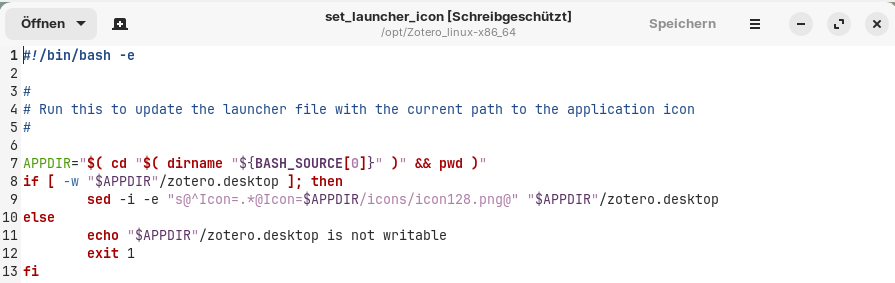
I didn't find out how to run the script set_launcher_icon in terminal.
Does someone know how to do this? I can rightclick on the parent folder and select "open in terminal", but I don't know what to enter then to run the script. The name of the file/script is "set_launcher_icon".
This is the official guide from Zotero:
This is the script:
The file doesn´t end with .sh as usual.
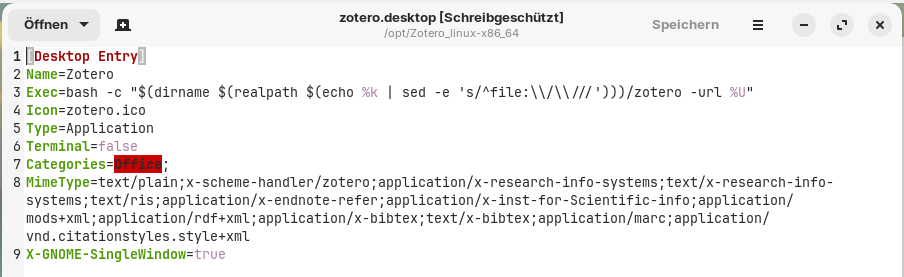
This is the .desktop file:
Edit: In wiki.ubuntuusers is a more detailed guide. I followed the guide there and managed to add the launcher.
I also read there that you get no automatic updates if you put the app into root directory (as I did by saving it at /opt/ to apply it system wide), so it is better to put it into a folder in home directory.
If you download Zotero 7 (linux-x86_64), it's in:
\integration\libreoffice\Zotero_LibreOffice_Integration.oxt
You can simply use the Zotero from the website and double-click on zotero for running it.
This topic was automatically closed 90 days after the last reply. New replies are no longer allowed.