Is it supposed to show the model of the computer three times at the prompt? 
It shows the network name of the PC, which Zorin defaults to the model as recorded in BIOS. I imagine Acer screwed up somehow, but I noticed it too. I'd be in a rush to change that, just to waste less of my command line before wrapping.
I have no idea sorry, I don’t know very much about this stuff. I shouldn’t of posted here.
2 Likes
Aww, no, please don't feel that way. You're entirely welcome here. Your prompt is just unusual, and Zenzen and I wondered why, because it takes up so much of your window. If it's a nuisance to you, we can help you shorten it, and if it's not, then there's nothing wrong with it.
4 Likes
Maybe this is a Configuration Thing for the Fish Shell.
Yea how do I shorten it?it only happens when I use the fish shell instead of Bash
You could take a Look in the Fish Shell Documentation or -if You want - use a Customization Tool. I use Starship. It works with a config File where You can set up a lot but You don't have too. When You only want it like this:

You can set that up. Of Course You can set up colors, too. If You want take a Look at this:
Huh. If it works normally in Bash, that implies that it's a fish issue (a fissue? Fishue? No?).
Normally, since the part of the prompt after the @ is your computer's name, you'd change your computer's name. The fact that it's not repeating the ASUS part is really weird though. If Fish were just repeating the name, it'd repeat that, too.
My recommendation, and this is just a first experiment since I haven't seen this before, would be to try changing your computer name to something short and suitable. I use the name of a fictional character I like for my computers. The command is:
sudo hostnamectl set-hostname followed by the name you want. You should also edit your /etc/hosts file to put the new name in there. To do that:
sudo nano /etc/hosts
Nano is a text editor, so use the arrow keys to move to wherever you see the rainbow-ASUS-BR1102FGA in there, delete that, and put the new name in its place, then hit Ctrl-O to save, and Ctrl-X to close nano.
So: if you want your computer's name to just be rainbow:
sudo hostnamectl set-hostname rainbow then
sudo nano /etc/hosts
Look near the top of the file for the long name in your shell, and replace it. Your hosts file probably looks like this:
127.0.0.1	localhost
127.0.1.1	rainbow-ASUS-BR1102FGA

# The following lines are desirable for IPv6 capable hosts
::1     ip6-localhost ip6-loopback
fe00::0 ip6-localnet
ff00::0 ip6-mcastprefix
ff02::1 ip6-allnodes
ff02::2 ip6-allrouters
So you'd get rid of everything after rainbow on that second line, then hit Ctrl-O, Ctrl-X.
You might need to restart for fish to pick it up.
If Fish is just doing something weird, let me know what your prompt looks like afterward, and we'll see what we can figure out.
My hostname was the problem not fish but i have fixed it thanks folks
1 Like
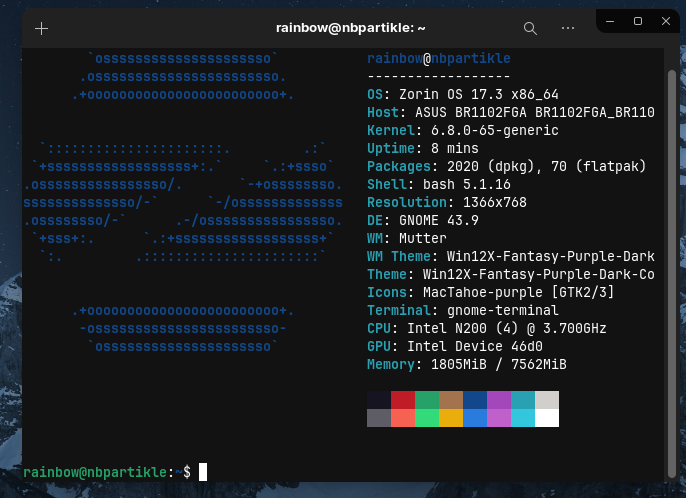
Is that after using the steps I gave above, or just after the reinstall? (I saw from your pre-edit post that you reinstalled Zorin.)
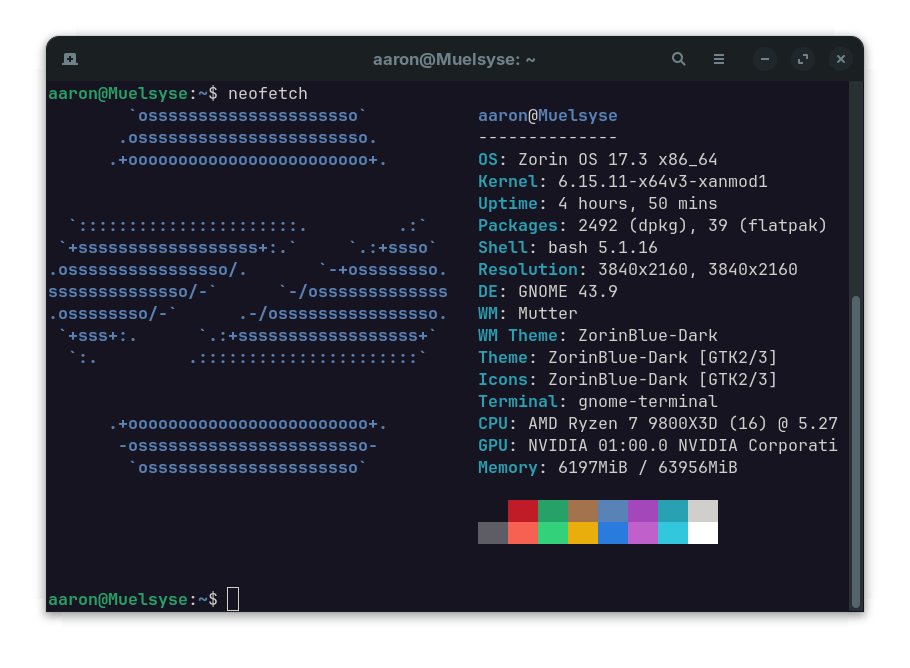
I'm genuinely interested in what's going on now, because I can see that your prompt is behaving normally, and I don't even have a host line in Neofetch.
1 Like
Yes but it made no change so since I was not fully set up after reinstall I ran reinstall again now and changed the computer name option so once my install is complete it should be all good with the name I chose. It’s easier for me this way as the editing of etc/hosts didn’t work for me.
Huh. Well, while I'm really curious what happened in the beginning, as long as things are set for you when it's done, that's what matters.
SO i installed Zorin clean, set my computer name but still this hardware model name shows up as host.

Seeing it in that line in settings, it may not be changeable. That line is usually set by the motherboard manufacturer or the OEM or system assembler if it's a pre-built computer. For example, mine says Asus System Product Name because my motherboard is Asus and the system assembler didn't have a custom firmware. My computer before this one, I believe said Xidax there, as they assembled the PC. Updating your BIOS might change it to something less weird, but there's no guarantee, and since your command prompt is normal now, it may not be worth your trouble.
1 Like
Agreed thanks @Locklear93
1 Like
In retrospect, @moderators , we (I) dragged this pretty far off topic. Mind splitting this into general help so the original conversation isn't buried?
Way to ruin everything, @zenzen...
2 Likes
@Aravisian It actually started with me, you missed my post @zenzen was replying to. My bad I'm sorry
2 Likes
You just said you were using Fish and showed a screenshot. Your post was totally on topic. Zenzen and I were the ones who dragged it off (mostly me, really). Plus, I'm almost 100% sure Aravisian is just teasing Zenzen.  We go off topic a lot here. No one really minds, but we do try to clean up after ourselves.
2 Likes