Dell XPS 8700, upgraded to Windows 10
I can go to Windows, but when I choose Zorin I get this:
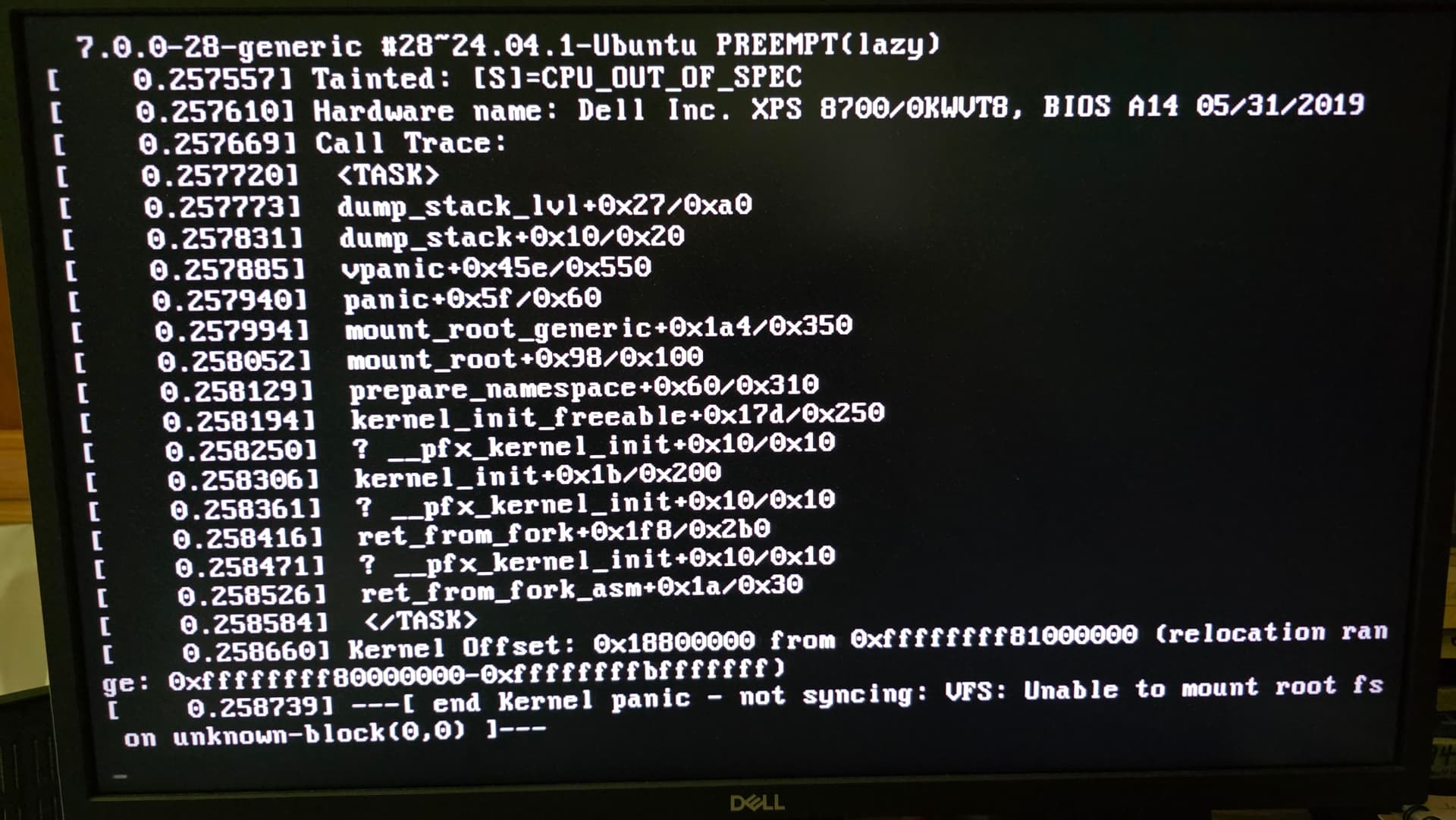
Try to boot into an older kernel in Zorin.
At grub menu select "Advanced options for Zorin", and then select an older kernel (not a recovery kernel) to boot from.
1 Like
I think the choice was 6.17 instead of 7.0...or something like that.
It worked! So, what does that mean? Is it relevant that the live Zorin works fine?
You have older hardware, and the live usb also runs with 6.17 kernel. The kernel 7.0 is very new and makes problems on some systems. You can e.g. install ga kernel 6.8 which is still supported or stay until the next update with kernel 6.17 and then try it again.
But the support for kernel 6.17 will end at 1 August, the 6.8 kernel is supported until 2029.
Do you have made all updates? There were fixes for some iisues with the kernel panic.
To install kernel 6.8:
sudo apt install linux-generic linux-headers-generic
Then reboot and in grub menu at advanced options for Zorin select kernel 6.8.
You can also set older kernels as default to boot from:
If you do this for kernel 6.8, after each kernel update go to Advanced options for Zorin and select the latest 6.8 kernel version.
When the 6.17 Kernel works, You should stay for now on that. Like @Forpli already mentioned is this new Kernel a bit ... unreliable.
You could update Your 6.17 Kernel to the current Version if it shouldn't be. To check that, type in the Terminal uname -r and when it shows 6.17.0-41-generic it is the current Version. If not, You can install it manually.
When done, You can make the Kernel as the default with these Instructions:
but what about the August 1 end of support? Is that not a reason to try 6.8?
That doesn't mean that kernel 6.17 is immediately insecure after 1 August. You just shouldn't set it as the default kernel for the long term. But older hardware is also well supported by the older 6.8 kernel, you don't need the latest kernels for your Dell XPS 8700.
1 Like
Sure, I'm not hung up on the latest at all...but part of my reason for starting this is to reduce my use of unsupported Win10...
You can take/try this one, too if You want. You can install it with:
sudo apt install linux-headers-6.8.0-136-generic linux-image-6.8.0-136-generic linux-modules-6.8.0-136-generic linux-modules-extra-6.8.0-136-generic
I refered to the 6.17 Kernel because You wrote above that it worked. But when 6.8 works for You, You can use that, too.
I'll try this as soon as I get a chance. Thanks to both of you for your quick and helpful replies!
2 Likes