Whenever i download the iso for the CORE version it always wouldnt match the SHA256 checksum.(also im installing Zorin OS from Win 10)
There are various checksums for Zorin 17.3 core, 17.3core r1 and 17.3core r2. The latest version is 17.3core r2.
You could try to download it from another download mirror.
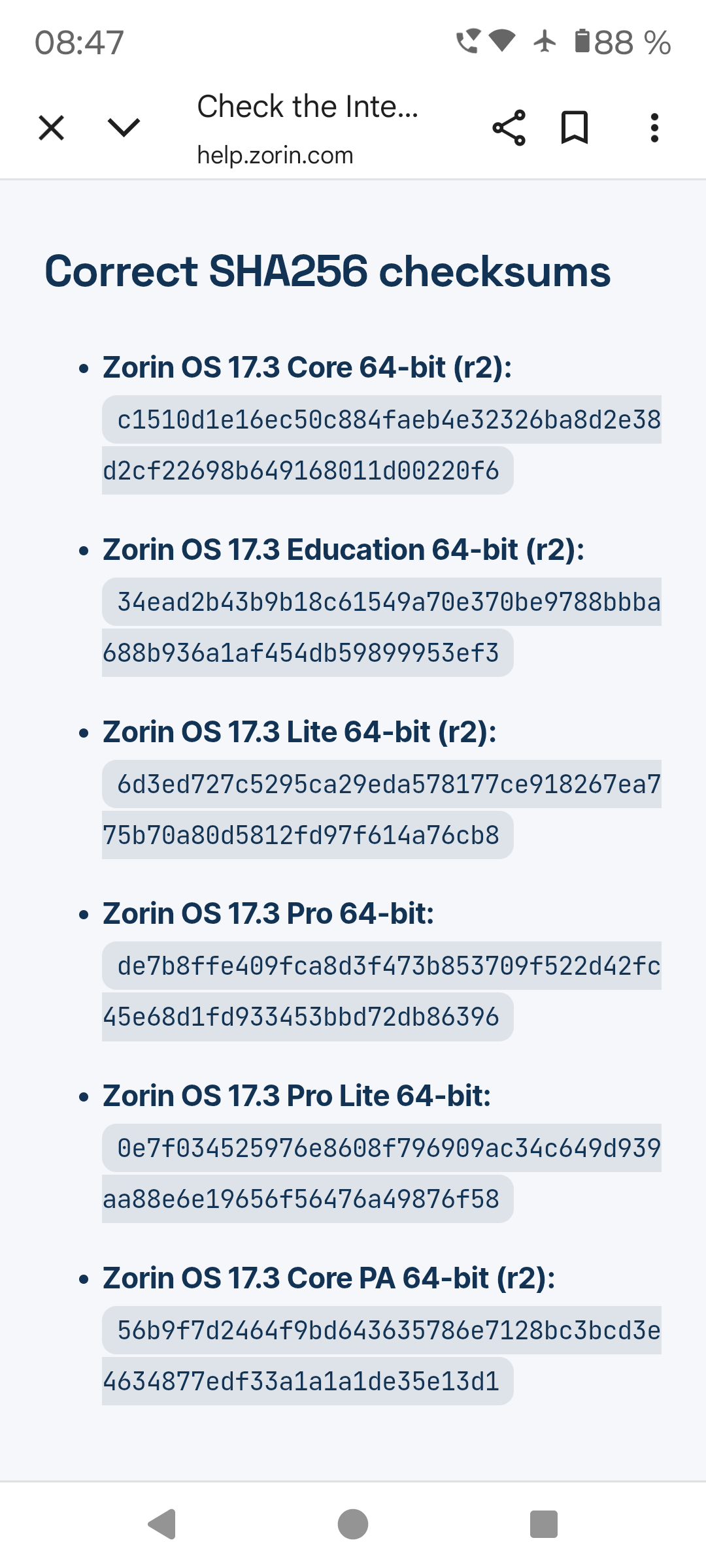
These are the checksums of the older Zorin 17.3 core versions for world mirror:

1 Like
how do i downlaod from another mirror? i openend one of the mirror link and i couldnt make up on what to do next, i dont see a dowload button.
Click on the link of the mirror, then click on index and select 17, this will lead you to Zorin 17. Then select Zorin 17.3 core r2.
The checksums are at the top of the list when you select (Zorin) 17.
Each mirror has its own checksums. So make sure that you compare your download with the checksums of the specific mirror
(I didn't know that either, which is why I changed my previous post with the checksums. They were the wrong ones).
1 Like
Welcome to the Forum!
From what Server do You download it? Or does this happened from different Servers? And how did You checked the Checksum?
That shouldn't be the Case because the ISO is on every Server the same. Of Course r1 has a different Checksum that r2 because the Files are different. But when it is Zorin-OS-17.3-Core-64-bit-r2.iso this one have to have on every Server the same Checksum. That is the Reason why the Checksum in published on the Zorin Website.
1 Like
Interesting... I actually had this exact same issue as well, a few weeks back. I had to do a complete re-install on one of my old laptops because, well, it wouldn't boot properly for some reason. I borrowed a laptop from a friend running Windows 11 to download the Debian ISO but the checksum didn't match.
Later that day I used another borrowed laptop running Zorin OS, and everything worked just fine.
Of course, I didn't think much of it. Maybe the network was bad, maybe the server was under maintenance, whatever. But to be honest I wouldn't be very surprised if Windows were torpedoing people downloading Linux.
Now, I don't want to start any conspiracies here... this is far from conclusive evidence, but I would suggest using another computer if you have the chance. And if that computer already is running Linux, all the better.
Hmm ... I have taken a Look at kernel.org, lbiblio and Web World now and the Checksum at least for r2 seems to fit. Maybe after You've added the Zorin's there were acting in the Background ...
Just see it was my mistake. I thought the name of the Zorin version is above the checksum but in the list it is below the checksum. So everything is right.
1 Like
Try downloading via Android phone, and then make bootable using EtchDroid app (available on playstore). I use this method and it works fine.
Hey Jan
Welcome to the forum 
I found out for my local area the download mirrors Indonesia has an unstable connection causing the download to fail and this the install to not work,
Absolutely try another manual mirror if it's not downloading or downloading very slow, if you can identify which mirror isn't working or failing you can let the team at Zorin Know and they can fix it, not all of these mirrors are first party so you can run into unstable downloads that can and will fail
It will be great if Zorin team also add torrent as an alternate option for downloading the iso. I'm sure some users will find this helpful, It will have better pause and resume support and the chances of corrupted iso will be very minimal. Other Linux distros like Ubuntu, Debian and Linux mint are already providing their official way to download their isos via torrent. So why not Zorin?
Right now the torrent of Zorin isos are available(unofficially) on Fosstorrents, which most of the user may unaware of.
As of now It's only providing the isos of base Zorin 17.3 and not the updated r2 isos (probably the maintainer has no idea about the updated isos yet). If Zorin makes it official then adding the updated r2 isos to the torrent will be not an issue I believe.
And if we look here: Free Open-Source Distributions Torrents, Zorin is one of the most Downloaded distribution.
I hope its ok to tag @AZorin to have a look on this suggestion.
Hello everyone i have successfully installed Zorin OS it turns out i just have to use a new USB drive, the previous one was old and theres probably something wrong with it. Thank you to everyone who tried to help me
But right now i have another problem i have Zorin installed but whenever i boot up my pc it just went straight to windows, instead of asking me if i want to boot Windows or Zorin.
Whenever i boot up my pc i have to go the boot manager then choose Zorin Os. Why is it like that? (ill make a new post for this problem)
Is ubuntu set at first boot position in your BIOS and saved this setting?
If yes and it does not work, you could boot from Zorin live USB stick, choose "Try Zorin" and then search for "boot repair" in the start menu and run it.
Please also run gparted from Zorin USB live stick (Try Zorin mode) and take a screenshot of your partitions here.
@jan_v I replied to your other thread:
theres no option for the ubuntu only Windows is showing
yes i chose to install it alongside windows
wait i just realized i have Secure Boot Enabled what do i do?
Disable it. Boot again.
Then try running "Boot Repair" from "Try Zorin" off the Zorin USB.
( I suggest you use the other thread Booting straight to Windows after installing Zorin, as this one is for another issue that is already marked as "solved")
2 Likes
In your BIOS make sure that the boot order for ubuntu at first position is set permanently not only for the next boot.