sudo apt autoremove --dry-run
This command simulates the removal process without deleting any packages, allowing you to review which packages are marked for removal.
sudo apt autoremove --dry-run
This command simulates the removal process without deleting any packages, allowing you to review which packages are marked for removal.
But as a "simple user" I have no idea what they do anyway, so is it better to avoid that all together?
Any other, safer command for "cleanig out" whats unneccessary?
Sorry for the off-topic...
You can use it. But it is good to check what would be removed. When accidentielly something was uninstalled that had important System Dependency Relations, it could be that they are on the autoremove List. When there would be for Example suddenly zorin-os-desktop or gnome-shell on the List and You would simply delete it, You would have a big Problem.
So, using it is okay. But check what would be deleted.
sudo apt-get clean
Clears out the local repository of retrieved package files.
sudo apt-get autoclean
Removes package files that can no longer be downloaded and are thus useless.
May 4th 2026 05:00pm EDT - All components are Operational
Note: Terminal updating appears slow and might take awhile for full functionality.
Speak of the devil..
Well I need to lay off here for awhile with the updates because it's a roller coaster ride.
looks like this is still on going
https://status.canonical.com
best of luck Steve ..
If thats a possibility I rather avoid it!
But whats the use of this command if it would remove necessary stuff?!
Thank you, will try that!
Or is there a downside too here?
Why Somes packages are down?
It appears key elements of security and archive are down today, but everything else operational (even launchpad.net):
Do not trust their web site, the status page is often misleading. If you want to know the actual status of their resources, try to update your software and see what you get.
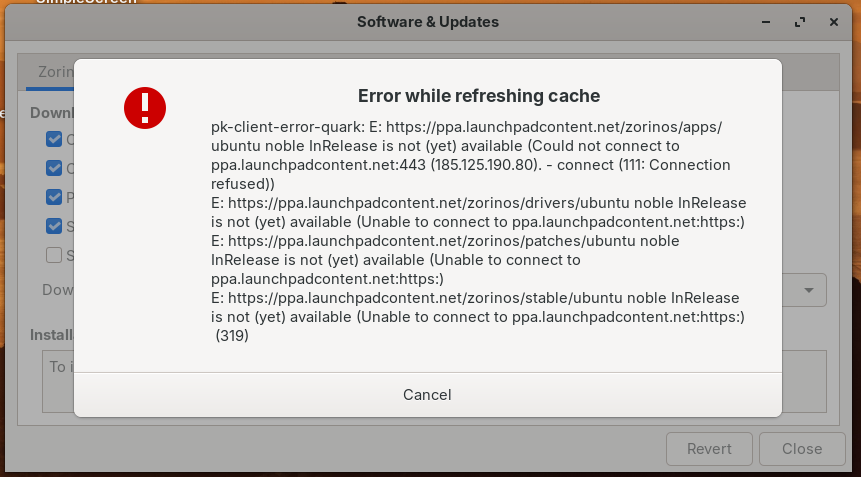
Here's the real status of their system now:
Could not connect to ppa.launchpadcontent.net:443 (185.125.190.80). - connect (111: Connection refused)
The Command itself is for removing Packages that are no longer needed. So, this can be useful. I use it, too. But I check the List before deleting the Packages.
Yeah. I had trouble today with launchpad also
Just beeb able to update everything without a problem. Maybe it is fixed!
Agree. seems the wave of all trying to update/download has slowed down...some of the servers are still sluggish but its not as bad now
I am not an expert Linux user. Can someone tell me that why can't I still update whereas others can?
It often only works at certain times. There are also different download servers, so it might depend on that as well. At Software&Updates you can select a server to download from and try a different one.
Welcome to the Forum!
Unfortunately the whole thing seems to be still unstable. I have had the Experience that it sometimes worked and sometimes not - like a couple Minutes ago. So, we have to wait until it entirely works again.
Hi and welcome.