sometimes in some theme there is more than one .grid-search-result, try to see if you find more, and .grid-search-result:hover, .grid-search-result:active, .grid-search-result:focus, you can force everywhere you find this entries
1 Like
I looked for these and found some. I changed but it didn't helped. then, I simply took these Values and added them as an own Block and add the text-shadow Value to it:
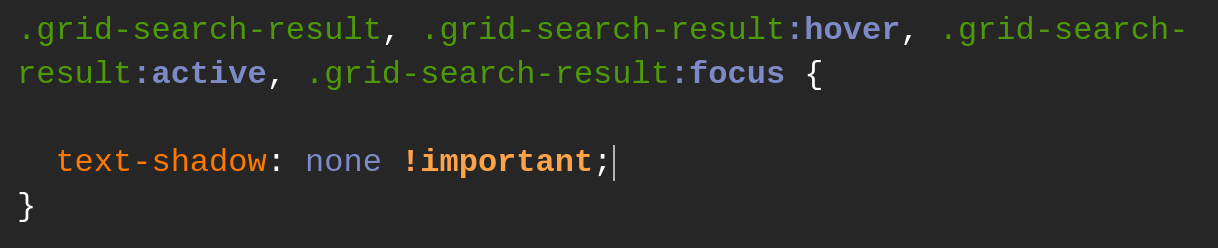
but this unfortunately didn't helped, too. I found these Valuse on other Places but there it was related to #dash and #dashtodockContainer where I thought that it isn't relate. Or is it?
1 Like
If you add your block, do it at the end of your file , because of CSS cascade.
You can try for #dash and #dashtodockContainer maybe a key is behind that
1 Like
Okay, I tried it with adding text-shadow: none toevery Entry what I could found (58 in total) and it didn't changed anything. Then I added the Block at the End of the css Fils and that didn't worked, too. But I'm thankful that at least the App Grid looks normal again.
try with this key
.list-search-result
2 Likes
Bingo! That helped! I searched in the css File for that and had 13 hits. I added that and now no Glow anymore. Thanks!
1 Like
My pleasure, and sorry it took me time to find the right key...
3 Likes
No Sorry needed.
1 Like
Thank you so much for your help! Your edits worked!
Sorry for the late response, But I wanted to try out the solutions before responding.
P.S. There was a small section on the search that still had that shadow issue, I gave your solution to chatgpt - yes, it can be dumb and confident often, but it can surprise you if you are able to give it some direction, which your solutions provided. after some back and forth testing, it finally settled on
#overview *,
.search-controller * {
    text-shadow: none !important;
}
which seems to be a very broad override, but it worked for the theme. Think I'll just use your solution.
Thanks again, everyone.
3 Likes