Asus Chromebook CX1405CKA - Unable to Get Sound Working on Zorin

System Details

  • Device: Awasuki
  • OS: Zorin OS 18.1 Core
  • Firmware Type: UEFI Full ROM
  • Firmware Version: MrChromebox-2603.2
  • Internal storage type:

Summary of the Issue

No sound after install

Steps to Reproduce

  1. Fresh install
  2. Run audio fix script, no errors
  3. Only dummy audio detected

Expected Behavior

Detect correct drivers and play audio

Replaced ChromeOS with Zorin. I’ve tried so many suggestions I can’t even remember. No Idea if anything made it better or worse.

lspci -v | grep Audio
00:1f.3 Multimedia audio controller: Intel Corporation Jasper Lake HD Audio (rev 01)
Subsystem: Intel Corporation Jasper Lake HD Audio

aplay -l
aplay: device_list:277: no soundcards found…

inxi -A
Audio:
Device-1: Intel Jasper Lake HD Audio driver: sof-audio-pci-intel-icl
API: ALSA v: k7.1.3-070103-generic status: kernel-api
Server-1: PipeWire v: 1.0.5 status: active

pactl list sinks
Sink #33
State: SUSPENDED
Name: auto_null
Description: Dummy Output
Driver: PipeWire
Sample Specification: float32le 2ch 48000Hz
Channel Map: front-left,front-right
Owner Module: 4294967295
Mute: no
Volume: front-left: 57672 / 88% / -3.33 dB, front-right: 57672 / 88% / -3.33 dB
balance 0.00
Base Volume: 65536 / 100% / 0.00 dB
Monitor Source: auto_null.monitor
Latency: 0 usec, configured 0 usec
Flags: DECIBEL_VOLUME LATENCY
Properties:
node.name = “auto_null”
device.description = “Dummy Output”
audio.rate = “48000”
audio.channels = “2”
audio.position = “FL,FR”
media.class = “Audio/Sink”
factory.name = “support.null-audio-sink”
node.virtual = “true”
monitor.channel-volumes = “true”
factory.id = “18”
clock.quantum-limit = “8192”
client.id = “32”
node.driver = “true”
factory.mode = “merge”
audio.adapt.follower = “”
library.name = “audioconvert/libspa-audioconvert”
object.id = “33”
object.serial = “33”
Formats:
pcm

pactl info | grep ‘^Server Name’
Server Name: PulseAudio (on PipeWire 1.0.5)

inxi -SMA
System:
Host: asus-Awasuki Kernel: 7.1.3-070103-generic arch: x86_64 bits: 64
Desktop: GNOME v: 46.0 Distro: Zorin OS 18.1 noble
Machine:
Type: Laptop System: Google product: Awasuki v: rev3
serial:
Mobo: Google model: Awasuki v: rev3 serial:
UEFI: coreboot v: MrChromebox-2603.2 date: 05/17/2026
Audio:
Device-1: Intel Jasper Lake HD Audio driver: sof-audio-pci-intel-icl
API: ALSA v: k7.1.3-070103-generic status: kernel-api
Server-1: PipeWire v: 1.0.5 status: active

amixer sset Master unmute
Simple mixer control ‘Master’,0
Capabilities: pvolume pswitch pswitch-joined
Playback channels: Front Left - Front Right
Limits: Playback 0 - 65536
Mono:
Front Left: Playback 57672 [88%] [on]
Front Right: Playback 57672 [88%] [on]
amixer sset Speaker unmute
amixer: Unable to find simple control ‘Speaker’,0

amixer sset Headphone unmute
amixer: Unable to find simple control ‘Headphone’,0

Hi and welcome.

Zorin 18 is based on Ubuntu 24.04 so I used it in my search criteria using Brave search engine via Mojeek search engine. Brave A.I. results in:

" For Chromebooks with Intel ICL (or similar SOF audio controllers) running Ubuntu 24.04 , audio is typically enabled by installing the SOF firmware and configuring the DSP driver .

1. Install SOF Firmware

The kernel module sof-audio-pci-intel-icl requires specific firmware blobs which are not always installed by default. Install the firmware-sof-signed package:

sudo apt update
sudo apt install firmware-sof-signed

2. Configure DSP Driver

If audio still does not work after installing the firmware, you may need to force the kernel to use the correct DSP driver. Create or edit the modprobe configuration file:

sudo nano /etc/modprobe.d/audio.conf

Add the following line to the file:

options snd-intel-dspconfig dsp_driver=3

Save the file and reboot the system.

3. Verify and Configure Output

After rebooting, verify that the sound card is detected:

aplay -l

If the internal speakers or headphones are not automatically detected (common on some models like the Samsung Chromebook Sasukette ), use PulseAudio Volume Control (pavucontrol ) to manually select the correct output profile (e.g., Pro Audio ) and sink. For persistent headphone jack detection issues, community scripts like linux-front-audio-fix may be required to force a headphone sink.

AI-generated answer. Please verify critical facts."

Welcome to the Forum!

Are Secure Boot and Fast Boot in BIOS disabled? Did You tried Pulse Audio Volume Control? It is a Tool to set up Ausio Input and Output. You can install it with sudo apt install pavucontrol via Terminal.

When installed, check the Configuration and Output Tab's for Audio Options and Profiles.

Did you make any edits to your grub file, for example acpi=off to get past a black screen hang or something? I had that and it was preventing binding the driver to my Tiger Lake sound card. acpi=noirq was the solution.

I already have firmware-sof-signed and it's still not recognizing soundcard after adding the suggested line.

sudo apt install firmware-sof-signed
Reading package lists... Done
Building dependency tree... Done
Reading state information... Done
firmware-sof-signed is already the newest version (2023.12.1-1ubuntu1.11).
0 upgraded, 0 newly installed, 0 to remove and 0 not upgraded.
lsmod
Module Size Used by
ccm 20480 2
snd_seq_dummy 12288 0
snd_hrtimer 12288 1
rfcomm 110592 4
snd_soc_dmic 12288 0
algif_hash 20480 1
algif_skcipher 12288 1
af_alg 32768 6 algif_hash,algif_skcipher
bnep 32768 2
snd_hda_codec_intelhdmi 24576 0
snd_hda_codec_hdmi 65536 1 snd_hda_codec_intelhdmi
snd_hda_intel 65536 0
snd_sof_pci_intel_icl 12288 0
snd_sof_pci_intel_cnl 20480 1 snd_sof_pci_intel_icl
snd_sof_intel_hda_generic 40960 2 snd_sof_pci_intel_icl,snd_sof_pci_intel_cnl
soundwire_intel 86016 1 snd_sof_intel_hda_generic
snd_sof_intel_hda_sdw_bpt 20480 1 soundwire_intel
snd_sof_intel_hda_common 204800 4 snd_sof_intel_hda_sdw_bpt,snd_sof_pci_intel_icl,snd_sof_intel_hda_generic,snd_sof_pci_intel_cnl
snd_soc_hdac_hda 20480 1 snd_sof_intel_hda_common
snd_sof_intel_hda_mlink 49152 4 snd_sof_intel_hda_sdw_bpt,soundwire_intel,snd_sof_intel_hda_common,snd_sof_intel_hda_generic
snd_sof_intel_hda 24576 2 snd_sof_intel_hda_common,snd_sof_intel_hda_generic
soundwire_cadence 53248 1 soundwire_intel
snd_sof_pci 24576 3 snd_sof_pci_intel_icl,snd_sof_intel_hda_generic,snd_sof_pci_intel_cnl
snd_sof_xtensa_dsp 12288 1 snd_sof_intel_hda_generic
snd_sof 442368 7 snd_sof_intel_hda_sdw_bpt,snd_sof_pci,snd_sof_pci_intel_icl,snd_sof_intel_hda_common,snd_sof_intel_hda_generic,snd_sof_intel_hda,snd_sof_pci_intel_cnl
snd_sof_utils 16384 1 snd_sof
snd_soc_acpi_intel_match 147456 3 snd_sof_pci_intel_icl,snd_sof_intel_hda_generic,snd_sof_pci_intel_cnl
snd_soc_acpi_intel_sdca_quirks 12288 1 snd_soc_acpi_intel_match
soundwire_generic_allocation 24576 1 soundwire_intel
snd_soc_sdw_utils 135168 1 snd_sof_intel_hda_generic
snd_soc_acpi 20480 2 snd_soc_acpi_intel_match,snd_sof_intel_hda_generic
soundwire_bus 1187840 4 soundwire_intel,snd_soc_sdw_utils,soundwire_generic_allocation,soundwire_cadence
snd_soc_sdca 131072 2 snd_soc_acpi_intel_sdca_quirks,soundwire_bus
intel_rapl_msr 24576 0
x86_pkg_temp_thermal 20480 0
crc8 12288 1 soundwire_cadence
cros_usbpd_charger 24576 0
snd_soc_avs 233472 0
cros_usbpd_logger 16384 0
intel_powerclamp 28672 0
snd_soc_hda_codec 24576 1 snd_soc_avs
coretemp 24576 0
rtw89_8852be 12288 0
rtw89_8852b 372736 1 rtw89_8852be
cros_ec_hwmon 20480 0
cros_charge_control 16384 0
snd_hda_ext_core 36864 7 snd_sof_intel_hda_sdw_bpt,snd_soc_avs,snd_soc_hda_codec,snd_sof_intel_hda_common,snd_soc_hdac_hda,snd_sof_intel_hda_mlink,snd_sof_intel_hda
rtw89_8852b_common 77824 1 rtw89_8852b
snd_hda_codec 221184 7 snd_soc_avs,snd_hda_codec_hdmi,snd_soc_hda_codec,snd_hda_intel,snd_soc_hdac_hda,snd_sof_intel_hda,snd_hda_codec_intelhdmi
cros_ec_chardev 16384 0
kvm_intel 548864 0
uvcvideo 147456 0
cros_ec_debugfs 20480 0
leds_cros_ec 12288 0
cros_ec_sysfs 16384 0
gpio_cros_ec 12288 0
led_class_multicolor 16384 1 leds_cros_ec
videobuf2_vmalloc 20480 1 uvcvideo
kvm 1548288 1 kvm_intel
uvc 12288 1 uvcvideo
snd_hda_core 155648 10 snd_soc_avs,snd_hda_codec_hdmi,snd_soc_hda_codec,snd_hda_intel,snd_hda_ext_core,snd_hda_codec,snd_sof_intel_hda_common,snd_soc_hdac_hda,snd_sof_intel_hda,snd_hda_codec_intelhdmi
rtw89_pci 118784 1 rtw89_8852be
cmdlinepart 16384 0
snd_soc_rt5645 188416 0
snd_intel_dspcfg 45056 5 snd_soc_avs,snd_hda_intel,snd_sof,snd_sof_intel_hda_common,snd_sof_intel_hda_generic
videobuf2_memops 16384 1 videobuf2_vmalloc
rtw89_core 1363968 3 rtw89_8852b,rtw89_pci,rtw89_8852b_common
snd_intel_sdw_acpi 16384 2 snd_intel_dspcfg,snd_sof_intel_hda_generic
spi_nor 180224 1
snd_soc_rl6231 16384 1 snd_soc_rt5645
snd_hwdep 24576 1 snd_hda_codec
snd_seq_midi 20480 0
snd_soc_core 458752 10 snd_soc_avs,snd_soc_hda_codec,soundwire_intel,snd_sof,snd_soc_sdca,snd_sof_intel_hda_common,snd_soc_sdw_utils,snd_soc_hdac_hda,snd_soc_rt5645,snd_soc_dmic
mtd 110592 5 spi_nor,cmdlinepart
irqbypass 16384 1 kvm
snd_seq_midi_event 16384 1 snd_seq_midi
mac80211 1982464 2 rtw89_core,rtw89_pci
snd_rawmidi 57344 1 snd_seq_midi
aesni_intel 98304 3
videobuf2_v4l2 40960 1 uvcvideo
btusb 81920 0
snd_compress 40960 2 snd_soc_avs,snd_soc_core
ac97_bus 12288 1 snd_soc_core
btmtk 40960 1 btusb
btrtl 36864 1 btusb
snd_pcm_dmaengine 20480 1 snd_soc_core
cros_ec_typec 45056 0
btbcm 24576 1 btusb
gf128mul 16384 1 aesni_intel
spi_intel_pci 12288 1
snd_seq 126976 9 snd_seq_midi,snd_seq_midi_event,snd_seq_dummy
videobuf2_common 94208 4 videobuf2_vmalloc,videobuf2_v4l2,uvcvideo,videobuf2_memops
btintel 77824 1 btusb
qrtr 53248 2
cros_ec_dev 12288 0
cfg80211 1597440 3 rtw89_core,mac80211,rtw89_8852b_common
snd_seq_device 16384 3 snd_seq,snd_seq_midi,snd_rawmidi
videodev 393216 2 videobuf2_v4l2,uvcvideo
snd_pcm 212992 15 snd_soc_avs,snd_hda_codec_hdmi,snd_hda_intel,snd_hda_codec,soundwire_intel,snd_sof,snd_soc_sdca,snd_sof_intel_hda_common,snd_compress,snd_sof_intel_hda_generic,snd_soc_core,snd_sof_utils,snd_soc_rt5645,snd_hda_core,snd_pcm_dmaengine
intel_cstate 20480 0
typec 135168 1 cros_ec_typec
spi_intel 36864 1 spi_intel_pci
mc 94208 4 videodev,videobuf2_v4l2,uvcvideo,videobuf2_common
snd_timer 53248 3 snd_seq,snd_hrtimer,snd_pcm
i915 5132288 25
bluetooth 1138688 34 btrtl,btmtk,btintel,btbcm,bnep,btusb,rfcomm
libarc4 12288 1 mac80211
snd 155648 16 snd_seq,snd_seq_device,snd_hda_codec_hdmi,snd_hwdep,snd_hda_intel,snd_hda_codec,snd_sof,snd_soc_sdca,snd_timer,snd_compress,snd_soc_sdw_utils,snd_soc_core,snd_pcm,snd_rawmidi
thunderbolt 577536 1 typec
tpm_tis_spi 20480 0
soundcore 16384 1 snd
binfmt_misc 24576 1
drm_buddy 12288 1 i915
ttm 163840 1 i915
intel_pmc_core 151552 0
int3403_thermal 16384 0
processor_thermal_device_pci_legacy 12288 0
cros_ec_lpcs 20480 0
drm_display_helper 319488 1 i915
cros_ec 20480 1 cros_ec_lpcs
pmt_telemetry 16384 1 intel_pmc_core
processor_thermal_device 24576 1 processor_thermal_device_pci_legacy
pmt_discovery 24576 1 pmt_telemetry
processor_thermal_wt_hint 16384 1 processor_thermal_device
int3400_thermal 24576 0
cec 106496 2 drm_display_helper,i915
platform_temperature_control 20480 1 processor_thermal_device
pmt_class 20480 2 pmt_telemetry,pmt_discovery
processor_thermal_soc_slider 16384 1 processor_thermal_device
processor_thermal_rfim 40960 1 processor_thermal_device
intel_pmc_ssram_telemetry 16384 1 intel_pmc_core
intel_scu_pltdrv 12288 0
intel_vsec 24576 2 intel_pmc_ssram_telemetry,pmt_telemetry
processor_thermal_rapl 20480 1 processor_thermal_device
rc_core 81920 1 cec
mei_me 61440 0
i2c_algo_bit 20480 1 i915
intel_rapl_common 57344 2 intel_rapl_msr,processor_thermal_rapl
mei 192512 1 mei_me
processor_thermal_wt_req 12288 1 processor_thermal_device
processor_thermal_power_floor 16384 1 processor_thermal_device
processor_thermal_mbox 12288 4 processor_thermal_power_floor,processor_thermal_wt_req,processor_thermal_rfim,processor_thermal_wt_hint
int340x_thermal_zone 16384 2 int3403_thermal,processor_thermal_device
intel_soc_dts_iosf 20480 1 processor_thermal_device_pci_legacy
acpi_thermal_rel 24576 1 int3400_thermal
nls_iso8859_1 12288 1
joydev 32768 0
input_leds 12288 0
mac_hid 12288 0
serio_raw 20480 0
sch_fq_codel 28672 1
msr 12288 0
parport_pc 53248 0
ppdev 24576 0
lp 32768 0
parport 81920 3 parport_pc,lp,ppdev
efi_pstore 12288 0
nfnetlink 24576 1
dmi_sysfs 28672 0
ip_tables 32768 0
x_tables 69632 1 ip_tables
autofs4 61440 2
spi_pxa2xx_platform 12288 0
dw_dmac 12288 0
hid_multitouch 36864 0
dw_dmac_core 45056 1 dw_dmac
hid_generic 12288 0
spi_pxa2xx_core 32768 1 spi_pxa2xx_platform
8250_dw 20480 0
mmc_block 65536 2
rpmb_core 20480 1 mmc_block
video 77824 1 i915
wmi 36864 1 video
intel_lpss_pci 28672 2
sdhci_pci 106496 0
i2c_hid_acpi 12288 0
sdhci_uhs2 40960 1 sdhci_pci
intel_lpss 16384 1 intel_lpss_pci
sdhci 106496 2 sdhci_uhs2,sdhci_pci
i2c_hid 40960 1 i2c_hid_acpi
cqhci 40960 1 sdhci_pci
idma64 20480 0
cros_ec_keyb 24576 0
hid 290816 4 i2c_hid,hid_multitouch,snd_soc_sdca,hid_generic
matrix_keymap 12288 1 cros_ec_keyb
cros_usbpd_notify 20480 2 cros_ec_typec,cros_usbpd_charger
cros_ec_proto 65536 15 leds_cros_ec,cros_ec_lpcs,cros_usbpd_notify,cros_ec_typec,cros_ec,gpio_cros_ec,cros_ec_dev,cros_ec_debugfs,cros_ec_keyb,cros_ec_hwmon,cros_usbpd_logger,cros_ec_sysfs,cros_ec_chardev,cros_charge_control,cros_usbpd_charger
pinctrl_jasperlake 20480 3
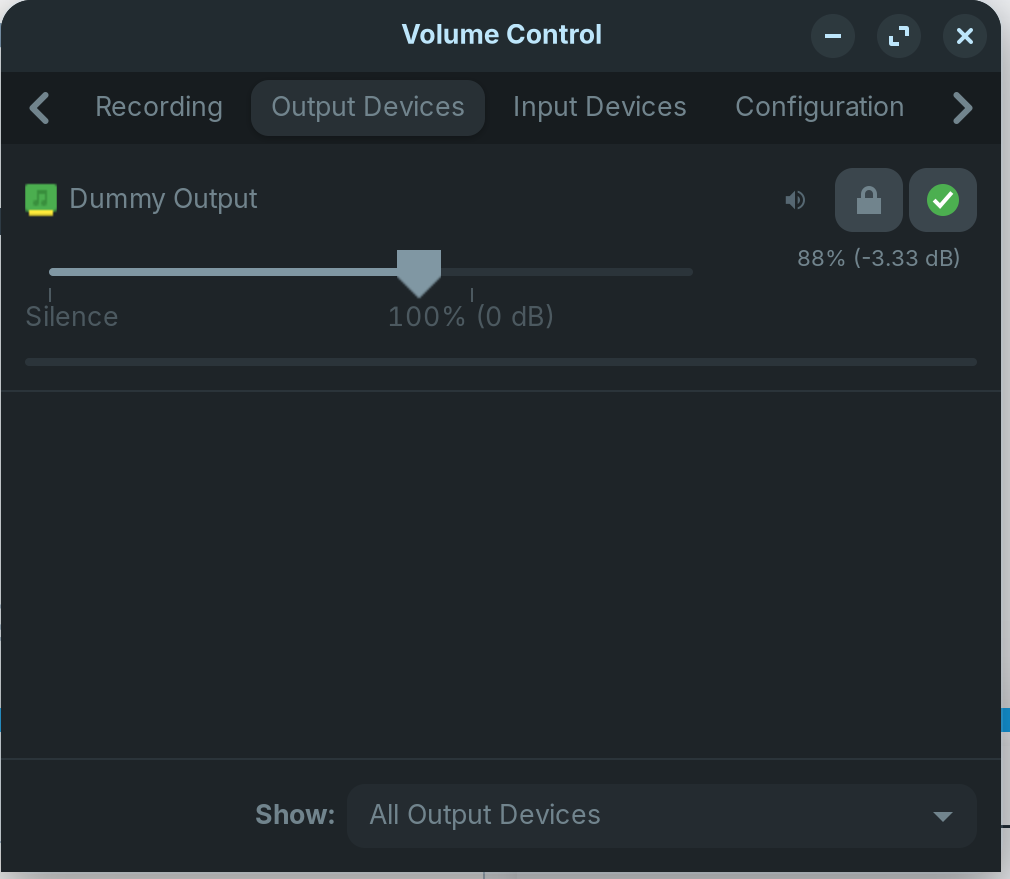
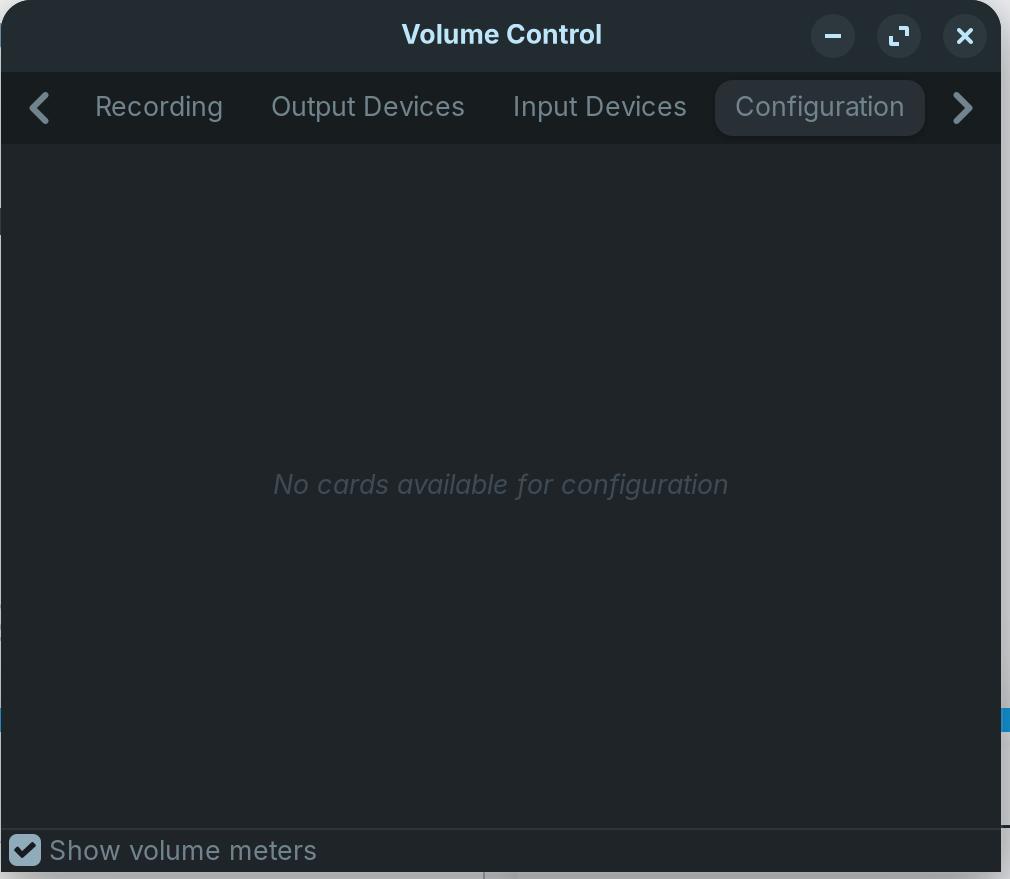
I see that
snd_hda_intel 65536 0
and
snd_sof_pci_intel_icl 12288 0
must be where the problem is but can't figure out the fix.

I'm not sure how to access BIOS, I only have UEFI. I have Pulse Audio as well and it only shows Dummy Output.


My only issues were with audio and the touch pad so I don't thing anything I did involved acpi=off .

Did you follow Step 2. of ny post on configuring the DSP driver?

Yes, it's still not recognizing soundcard after adding the suggested line.

Hi, please open a terminal and enter:

sudo nano /proc/asound/modules 

and post back the results please.

I did a fresh install last night to start clean after all the previous fixes I had attempted from posts I saw online and redid your suggestions but it's still not being recognized.
The result from the command you just requested is a blank window, the module as nothing on it.

what does sudo lshw -C multimedia show?

I noticed you have the sof-audio-pci-intel-ici driver. My similar card has the snd_hda_intel driver so I asked Brave AI what was the best driver for your card and got the following response:

The best driver for the Intel Jasper Lake sound card in Zorin OS 18.1 is the snd_hda_intel driver, as the default sof-audio-pci-intel-icl driver often causes "Dummy Output" issues.

Might be worth try changing. Again from Brave AI:

To force this driver, add snd-intel-dspcfg.dsp_driver=1 to the GRUB_CMDLINE_LINUX_DEFAULT line in /etc/default/grub , then run sudo update-grub and reboot. Alternatively, booting into an older kernel (such as 6.8 ) during the upgrade process may also allow the system to correctly identify the card using the snd_hda_intel driver.

And, yes, I do use the older 6.8 kernel because a couple of things didn't work in the default kernel.

Hope this helps.

1 Like

On this help site are some informations what you can try when you get a dummy output:

I was originally trying to get it work with the snd-hda-intel driver but was having any success so that's why I tried going with sof-audio-pci-intel-icl and when that didn't work i decided to just restart from 0. I didn't have any success after adding the suggested line to grub but after switching to 6.8 at least now the soundcard is being recognized.

aplay -l
**** List of PLAYBACK Hardware Devices ****
card 0: PCH [HDA Intel PCH], device 3: HDMI 0 [HDMI 0]
Subdevices: 1/1
Subdevice #0: subdevice #0
card 0: PCH [HDA Intel PCH], device 7: HDMI 1 [HDMI 1]
Subdevices: 1/1
Subdevice #0: subdevice #0
card 0: PCH [HDA Intel PCH], device 8: HDMI 2 [HDMI 2]
Subdevices: 1/1
Subdevice #0: subdevice #0
card 0: PCH [HDA Intel PCH], device 9: HDMI 3 [HDMI 3]
Subdevices: 1/1
Subdevice #0: subdevice #0

Pulse Audio still only shows Dummy Audio though.

Other users have had success using a more recent distribution and then running a Linux audio script for Chromebooks to get the sound working.

If nothing else works, you could try that.

1 Like

That's how I ended up here. I was running the newest kernel Zorin pushed and already used that WeirdTreeThing script as instructed by the Chrultrabook

You probably need a non-LTS distribution to get the script to work.

I did some research using Brave search engine about whether Q4OS has been deployed in the Enterprise arena. Whilst no specific details of where such undertakings were made reference was made to a Library that had 300 Chromebooks that needed saving from landfill and Q4OS was the only distribution that installed without issue. Bearing in mind that these were for a Library, no guarantee that sound would be present!

5.9 is good until June 2028.