Auto Dual Boot on HP Zbook 15 G2 and unrecognized NVMe M.2 SSD

I told my friend about Zorin OS 16 and he wants to try it. But, his system is setup with an unorthodox way to force it to use an unsupported NVMe drive. He uses an EFI Script to instruct the system to boot up by pointing it at the Boot Manager. (Windows or Linux.)

Anyone have any suggestions on how to edit the script to present an operating system choice at startup?

Link to his actual post.

Thanks for anyone willing to assist him!

1 Like

Is it possible that he could install Zorin OS to an external SSD drive, and then just instruct the BIOS to boot off of the USB drive every time? If his computer is modern, USB 3.1 - 3.2 ports are connected via PCIE Gen 3 or Gen 4 standards, making it every bit as fast as an installed internal drive, connected to the same PCIE lanes.

@StarTreker

I'm not sure how all the new UEFI and EFI stuff work. It's after my time at being a computer hobbyist. I stopped when BIOS was still the main thing in ~2003.

He'll be replying in this forum soon after making an account.

Thanks for your input!

Hey, I hear ya, the last computer training I got was in the 2000's as well. Everything I have learned since is self taught, either through trial and error experience, or by looking at posts on the net.

1 Like

Yes, I could add a third hard drive to my system in that manner via USB, however that wouldn't provide me with a boot-up menu to select booting off of the two existing systems.

1 Like

I wonder if rEFInd might help you:

2 Likes

I take no credit for the script as I didn't write it, I agree with you - I obviously appreciate the hard work done by the original writers in the clever method of loading the driver to allow the system to see the M2 hard drive, without it I wouldn't be able to use M2 NVMe SSD's in my laptop as bootable device - neither would all of the other people that have been using this method since 2016.

There is nothing in the nvme.txt file, it's an empty file that the creator of the script added in his final revision of the script – from my understanding of the script, it acts as a pointer to locate the 350 MB EFI partition on the 'discovered' M2 Drive during the script’s execution after the NVMe driver has been loaded into memory and a device refresh/discovery is done to locate and load devices previously unavailable to the system. I originally did not copy the nvme.txt file to the appropriate partition when I set up my laptop and of course the script stopped telling me it couldn’t locate the NVMe Drive as it’s scripted.

From my own testing I can direct the script at " EFI\Microsoft\Boot\bootmgfw.efi " original script or " EFI\Ubuntu\grubx64.efi " modified script and it loads Windows or Linux Mint, in testing I haven’t been able to get either to show a boot menu. I wonder if I could call a batch file to present an option 1 or 2.

2 Likes

Welcome to the forum Darien217! Can I please take a moment to tell you how smart I think you are? :slightly_smiling_face:

Regarding the NVME driver, this reminds me of the Windows XP and earlier days. Back in those days, the ATAPI driver for optical drives, didn't come pre-loaded on the installation disk standard.

You literally had to have the ATAPI driver at the ready on a disk, or you weren't going to install Windows. And if the machine you are installing too was the only one that could access the internet, and you didn't have the driver, you were screwed lol.

Yep, I call them times, the PITA days. Its so much easier now when installation medium, comes with the drivers to make installation more simple. We take a lot for granted now days with computers. Kids today have no idea how easy they got it.

When you have to hunt down a bunch of drivers for all your components before a OS installation, it makes you appreciate what we have today.

2 Likes

Thank you, the boot up process is a bit complex to say the least, I remember it took me a bit to figure it out myself well enough that I could understand it to be able to explain it to someone else. :sweat_smile:

It's probably the most unique method I've seen personally of booting up a computer, I'd say most computers follow the standard / normal set up of having the BIOS or UEFI pick up the Bootmanger which in turns loads up the Bootloader for the operating system start-up process. etc.

I don't believe I ever had that issue with Windows XP and ATAPI drivers, I must have missed that one somehow and I've been using Windows since the 95/98SE days. @YukKevChuHau You ever have this issue with ATAPI's across your machines?

It is funny that you mention Windows XP; my laptop's boot-up process always reminds me of the Windows XP/Server 2003 Operating System Install process of "Press F6 if you wish to install a Third-Party SCSII or Raid Controller device", in which you needed to have the third-party SCSII or Raid Controller driver on a floppy disk or pre-added into the disc image in order to install Windows XP/Server 2003 on systems with third-party storage devices. (Been there, done that one too across a few systems.) You can consider my laptop's boot-up process similar to the F6 / SCSII-Raid Controller process, every time I boot it up and restart it, it locates a driver for the NVME SSD and then boots itself up off that, as it's scripted, no need to Press F6. The original writer of the script initially was booting up manually as I recall prior to making the automated script, he actually needed to manually type in all the commands to boot up his laptop. :grinning:

Eventually he got it scripted / automated.

Swapping the two lines below will boot the corresponding operating system as I mentioned in the original post. I haven't found either one to give me a Operating System menu which is what I'm after. It'll boot Linux Mint, it won't give me boot up menu either when I've tried it.

\EFI\Microsoft\Boot\bootmgfw.efi
\EFI\Ubuntu\grubx64.efi

This makes a lot of sense to me.

2 Likes

Yup. I remember those days, especially in MS-DOS days. Needed a 5.25" or 3.25" floppy to boot up to load an ATAPI driver for the CD-ROM, and sometimes for SCSI too. Otherwise, the system won't be able to access CD-ROM or SCSI interface before anything. There were quite a few things requiring this back then like Iomega Zip drives. It was back before pretty GUI Win95 days where they started driver initialization automation behind the scenes with the splash screen.

I miss MS-DOS, Windows 3.0 & 3.11 so much now. Windows 2.0 * 2.1x was, meh. I loaded Win1.0 in the past just for fun to see how it looked like. Everything was so much easier back then. LOL.

2 Likes

I sometimes wish I forced myself to continue to learn programming for real. But, then I think again. Nah! :rofl:

Only actual computer lessons I had was with QBASIC in High School for a semester. No lessons before or after.

@337harvey You're a genius! :hamburger:

1 Like

I remember those fun days, especially before the internet. But, having 9600 baud dial-up isp service often didn't really help. I remember even when I had 56k modem, before broadband, downloading what was it a few megabytes toook ages. When the connection was disconnected midway or someone need to use the telephone, it was argghhh. LOL.

I remember a computer teacher was downloading something for two days on a 14k dial-up modem back in the early 1990s, then lost the connection midway. He wanted to kill someone. LOL.

I sound like gramps now. Reminiscing about the good ole' days. LOL

I miss those days too! When I had a 56K dialup modem, I thought I was hot banana's back then. If you recall, we had like 16k and I think it was 22k that predated the 56k modems, and they were even slower. They were huge ISA cards too, remember the ISA slots? They weren't much good except for computer fax use.

56K is when most people really started getting into the internet. But even on a 56k modem, it would take like an entire day to download a 100mb file, and thats if, a big giant if, the telephone ISP didn't dissconnect you cause they were throwing a temper tantrum over your extended use.

People in modern day with cable internet would find that hard to believe that an ISP would do that. But telephone companies were nutorious for being the biggest deeeks of the universe, and they got away with it, government did nothing to curb their power.

It wasn't until people got a second phone line, did things improve within the home, if someone wanted to use the phone while you were on the net the same time. I was such a family that got a second phone line, costed us about 10 dollars more per month if I am not mistaken.

I never did AOL service cause they were like 20-dollars a month, way beyond my ability to afford at the time for slow as a slug and a snail on a sidewalk internet service. I went with Juno cause I could get it for 10 dollars per month, which made way more sense for a kid on a budget who mows the neighborhood lawns for their internet money lol.

But yes, those were the days, the ATAPI drivers, it was always something wasn't it? FYI, I still own my 250MB Iomega Zip drive, its a really cool looking thing, still to this day I think its look holds up, and they were made well too. Trouble is, it uses the parallel port, which computers don't use anymore.

I would need some kind of adapter to adapt it to a USB port. But using the drive in modern day would be more then a nostalgia trip more then anything else. The reason I say that is, why would you want to mess with a 250MB disk drive, when you have access to a 128GB or more SSD USB 3.0+ drive?

2 Likes

This looks viable, I'll try this tonight, thank you - I'll report back and let you know.

Yeh we were the same with internet. We started with 9800, then 14.4k then 28.8k, then later 56k. It was amazing with each jump. We started with AOL in their beginning when they were cheap. Ultimately, jumped around from Juno to AT&T Worldnet, to others. I also used those free ones with advertisments bars for a while. Ultimately, tried to get FreeDSL. They actually sent me the modem, but never had anyone to come install. :rofl:

I miss getting those floppies and then cdroms every few days. Should have kept them. They're worth money now.:joy:

Those ISA cards where so thick and massive. It was hard to break them. Had to blow dust off them too.

Remember we used to have to install EDO RAM in parallel? Don't forget 100MB HDD were a luxury and massive too. The first real video card I bought was a Savage S4 with 8MB RAM :rofl:

One of my brothers bought a Evergreen 586 133Mhz CPU upgrade because it was cheap. Lasted him a year or so too.

I've been doing some testing and it appears the startup.nsh script is necessary due to my laptop's setup.

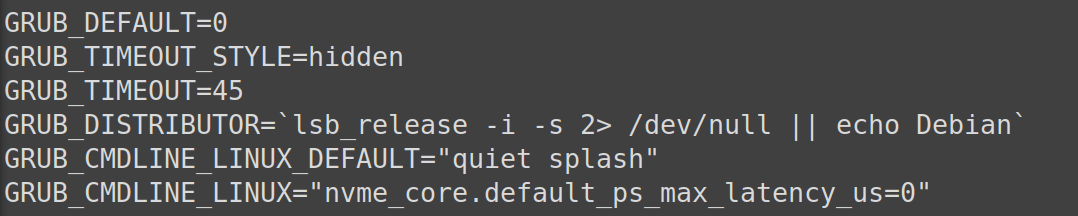
I changed the GRUB bootloader timeout setting to -1 which as I understand is suppose to stop it until a selection is made, my laptop stopped and never moved past the screen that executes the startup script. I timed it and then pressed a few keys and it seems to react and move to loading up Linux. I changed the timeout to 45 and I noticed that it took longer to boot up, still no menu. When I first set up my laptop I noticed if I didn't set a time delay on the UEFI selection for executing the startup script the script would execute then the Windows logo would appear in the middle of the text and start loading before the scripts text disappeared. I believe it might be something similar with the GRUB menu, I've read that you can change and make a background to add some style to the boot up menu. Maybe I need a picture to get the screen to change off the script text?

The entry is there, I can't see the menu to make a selection however, see below.


1 Like

Awwww...