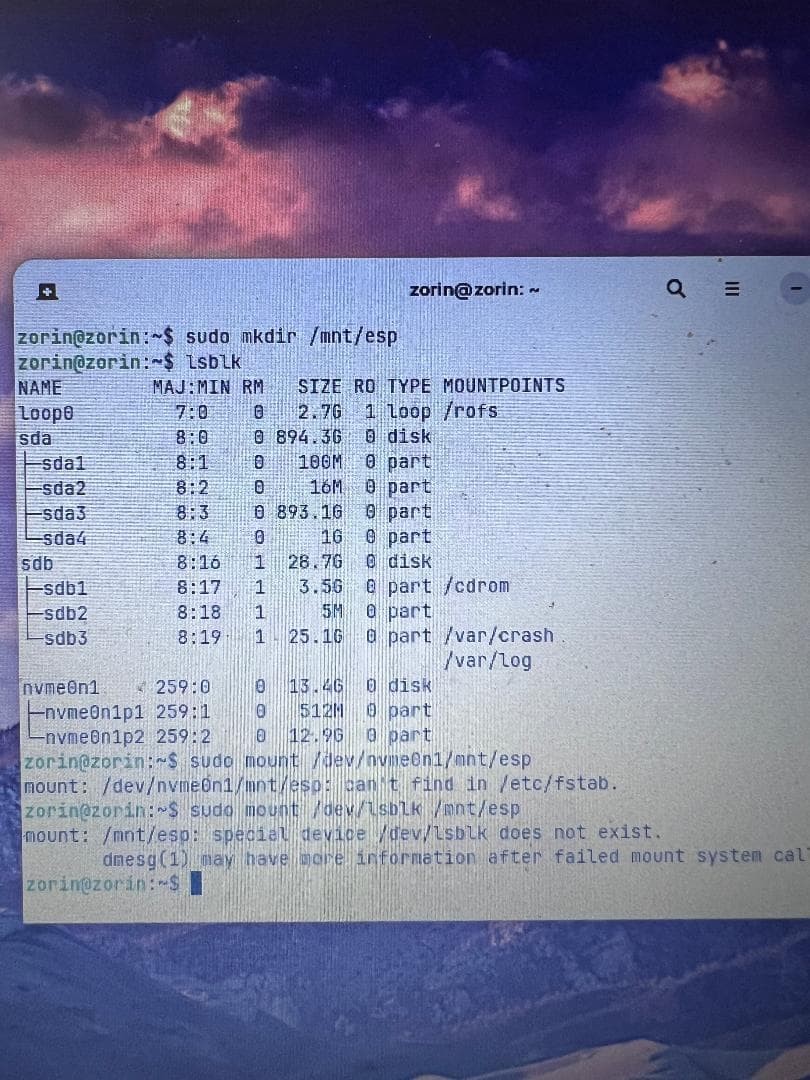
I am attempting to install Zorin on my hubby's Acer Aspire laptop. Secure boot and fast boot are both disabled and I have changed RST to AHCI following some online instructions. I know that my USB drive for installing Zorin is OK because I have now used it on 2 other computers. I do not want to continue running Windows but just want Zorin on this laptop.
I managed to "install Zorin" (1st attempt at putting Zorin on the laptop), and then "try Zorin" (2nd attempt), and ran "Boot Repair" from the app menu, and both times when it was completed, it said "Repair successful." It also said, "Locked - NVram detected. Please do not forget to make your UEFI firmware Boot on the Zorin OS 18 (18) entry (nvmeOn1p1/efi/ubuntu 64.efi file)! I have no idea what this means or how to do it.
When rebooting after both boot repair attempts (during which I was instructed to remove the USB drive), I got a Windows error message: "Starting automatic repair." The boot repair has clearly not worked, despite running it twice. In each case I closed down the computer.
After the first boot repair attempt, after it said "Boot successfully repaired," it added "A new file (/var/log/boot-repair/20260318_165356/boot-info_20260318_1653.text will open in your text viewer." In case you still experience boot problem, Ubuntu Pastebin Indicate this URL to boot.repair@gmail.com or to your favourite support forum."
After the second boot repair, I was given the same URL.
I thought I had done everything correctly. Is there something I have missed, and what can I do to get this to work?
Because when I attempted to reboot, I got the windows message saying "starting automatic repair." The computer obviously thinks Windows is still installed on it... Please see my 3rd paragraph.
This is the problem. With non-volatile RAM locked, it cannot overwrite the boot order. So, it is trying to load Windows OS.
Boot the computer, then start jabbing the F2 key to pull up the Boot Order Menu
Move the "Ubuntu" entry to the top.
Save and Exit (Probably F10)
I'm afraid that didn't work. I reinstalled Zorin and rebooted the computer and got the BIOS loaded via F2, and in the Boot Order menu, all that is listed is Windows stuff. Ubuntu is not there. When I rebooted, I got the same Windows message that it was starting the automatic repair. I did a full shut down by keeping the power button pressed, and rebooted from cold, and it still gave me the Windows message.
I forgot to mention that I did enter a temporary password before, and I was able to make the USB drive go to the top but after it was removed, it was just windows stuff that showed in the boot order. I can't see how to add any new boot entries.
I tried booting from the USB drive and again reinstalled Zorin, and then realised that of course I'd have the same problem when I was instructed to reboot. I started again, and this time selected "try" rather than "install" and now all I've got is a blank black screen and the only thing visible is the mouse cursor.
Sigh... weird.
When you initialize the LiveUSB, at the Grub Screen where you select the Try or Install option - tap the e key.
Using arrow keys, locate "quiet splash" and add nomodeset
Should look like: "quiet splash nomodeset"
OK...I thought maybe when I put the USB drive back in after the previous time, I used a different port. I put it back where I thought it originally was, and was able to select "try Zorin" so from there, I started to put in what you'd said to put in the Terminal. Typing in lsblk to find out the name of the drive, I was presented with a whole lot of stuff I couldn't understand, starting with loop 0, and sda1-4, and sdb1-3 and nvme0n1 p1 and p2. I seleced nvme0n1 as the most likely as it said the type was "disk" (although sda also said "disk") - I chose this because I think it might be nvidia (nv?) but the Terminal said it couldn't find it in /etc/fstab. I really don't know what any of this means and what the name of the drive is. At least I can get to the main screen now and access the Terminal! Progress... of a kind!
Oops - certainly don't want Hazardous... I typed in sudo mount /dev/lsblk /mnt/esp It responded with: mount: /mnt/esp: special device /dev/lsblk does not exist. dmesg(1) may have more information after failed mount system call.
The lsblk is List Blocks - it is a sole command to list your device blocks. It is not your Device I.D.
The sequence is:
lsblk
This lists the drives and partitions. Here, you can find and see your Device I.D.
If you can relay that output here, we can help you find the EFI partition Device Partition I.D.
Well, there is a clear EFI partition, setup by Windows OS, the Windows OS shows on that bootloader, the Firmware is blocking the EFI Zorin Entry and the USB Stick was burned as EFI.
You raise a good solid question and are right to check this. It helps a lot when some of us helping get in a hurry.