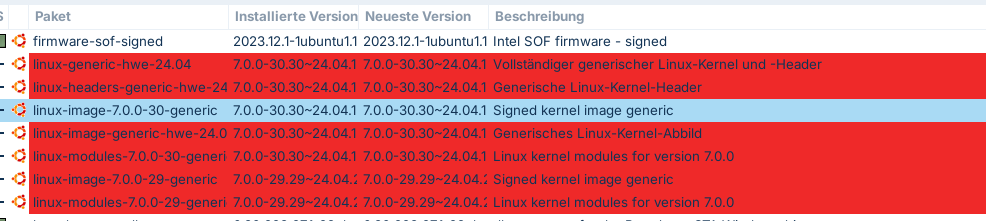
Hello everyone, I
have an Acer Aspire with a Nvidia GT 730M and am trying since some days to get it running. I installed Zorin fresh on it and used the Nvidia Option eiththe 580 Drivers, that dont Support the GPU (and state it at restart)
I followed all the steps that are specified in this post:
So. I downgraded the Kernel to 6.8, I installed the 470-Drivers, I disabled Auto-Boot (mokutil --sb-state says so), I start Zorin OS 18.1 Lite in X11 (which should be Xorg, right? Always reminding me of Buzz Lightyear btw)
BUT the Sysinfo I get is CPU: Intel-Core i53230 and GPU: Mesa Intel HD Graphics 400. Obviously it should say Nvidia
AND: I dont get an Output for additional/proprietary drivers to select in "Software & Updates" like I saw in some posts. I just dont get anything.
So obviously I can install the drivers, I followed all the steps and hints I read about, but nothing happens. and yes: I rebooted quite some times.
I dont have any clue where to look, because all the boxes are checked and still nothing works
Ok..just so I and others understand you added in the kernel 6.8 then shutdown then at startup you went into the grub,hit advanced options, booted into the 6.8 kernel installed the 470 drivers restarted making sure you are in X11 aka Xorg and drivers did not install nor are they in the additional drivers area?......correct?
Also, is Nvidia set on Prime Select? Because if set to On Demand, then you will see your Intel GPU primarily, with Nvidia only kicking in during high demand use.
I used the command given in the above mentioned post, which pretty much covered my case.
If i use any nvidia related command I also get the info that none such exists.
I dont have any in depth IT knowledge so i am just in the dark and grasping at anything i find.
I also have now the hypothesis that the downgraded specific 6.8 kernel from the post above doesnt cover the 470 drivers, so i thought I might look for another Kernel.
if I enter sth like nvidia-smi it says: "NVIDIA-SMI has failed because it couldn't communicate with the NVIDIA driver. Make sure that the latest NVIDIA driver is installed and running."
the 580 drivers are also installed (directly with Zorin at the beginning), i've been thinking if either downgrading the Kernel to another 6.8.0 Version or / and trying to remove all Nvidia Drivers and then reinstall might help.
Allthough its curios that i cant see any entry for proprietary drivers in the "Software and Updates" Section
hey, thanks for bearing with me.
so i used the first command, if I enter the 2nd it basically wants to install the 580 Driver, which is useless, so I skipped it. Or is this still the way to go?
Aspire-V3-571G:~$ sudo apt install nvidia-driver-470 nvidia-dkms-470

Paketlisten werden gelesen… Fertig
Abhängigkeitsbaum wird aufgebaut… Fertig
Statusinformationen werden eingelesen… Fertig
Die folgenden Pakete wurden automatisch installiert und werden nicht mehr benötigt:
  libfwupd2 libwoff1 linux-headers-7.0.0-29-generic
  linux-hwe-7.0-headers-7.0.0-29 linux-image-7.0.0-29-generic
  linux-modules-7.0.0-29-generic linux-objects-nvidia-580-7.0.0-29-generic
  linux-signatures-nvidia-7.0.0-29-generic
Verwenden Sie »sudo apt autoremove«, um sie zu entfernen.
Die folgenden zusätzlichen Pakete werden installiert:
  libnvidia-cfg1-580 libnvidia-common-580 libnvidia-compute-580
  libnvidia-decode-580 libnvidia-egl-wayland1 libnvidia-encode-580
  libnvidia-extra-580 libnvidia-fbc1-580 libnvidia-gl-580
  libnvidia-gl-580:i386 nvidia-compute-utils-580 nvidia-dkms-535
  nvidia-dkms-580 nvidia-driver-535 nvidia-driver-580
  nvidia-firmware-580-580.173.02 nvidia-kernel-common-580
  nvidia-kernel-source-580 nvidia-prime nvidia-settings nvidia-utils-580
  xserver-xorg-video-nvidia-580
Die folgenden NEUEN Pakete werden installiert:
  libnvidia-cfg1-580 libnvidia-common-580 libnvidia-compute-580
  libnvidia-decode-580 libnvidia-egl-wayland1 libnvidia-encode-580
  libnvidia-extra-580 libnvidia-fbc1-580 libnvidia-gl-580
  libnvidia-gl-580:i386 nvidia-compute-utils-580 nvidia-dkms-470
  nvidia-dkms-535 nvidia-dkms-580 nvidia-driver-470 nvidia-driver-535
  nvidia-driver-580 nvidia-firmware-580-580.173.02 nvidia-kernel-common-580
  nvidia-kernel-source-580 nvidia-prime nvidia-settings nvidia-utils-580
  xserver-xorg-video-nvidia-580
0 aktualisiert, 24 neu installiert, 0 zu entfernen und 39 nicht aktualisiert.
Es müssen noch 986 kB von 445 MB an Archiven heruntergeladen werden.
Nach dieser Operation werden 1.338 MB Plattenplatz zusätzlich benutzt.
Möchten Sie fortfahren? [J/n] n
Abbruch.
Hm....Maybe the installation of 470 no longer works because they have dropped the support in June.
The 470 drivers seems to be a transitional package now which leads to another driver.
I thought, it would be 535, but some users reported some time ago, that the installation of driver 535 leads to 580.
Sorry, I'm at a loss. Perhaps the Nouveau driver is your only remaining option. But I'm not sure. I think, your card doesn't support the higher nvidia drivers.
yea. I knew about this. But i thought if one uses an older Kernel that you can still install the driver. I dont understand the "architecture" of how you obtain drivers etc. So probably it doesnt work, because its not officially supported any more.
And yes, my card can only be supported by the 470 Drivers.
Yes, it has worked so far with kernel 6.8.
But I haven't seen any cases here from the last two months. All the reports I've found online suggest that users were advised to prevent the update in June, because otherwise the 470 drivers would be upgraded to the newer Nvidia driver versions, and certain graphics cards that rely on the 470 driver would no longer work. Maybe it’s still possible to find a 470 driver somewhere to download manually (not the Ubuntu transition package), and then lock that driver. But I’m not familiar with that process and I'm not sure if that would be safe to use without updates.
yea me neither. the use case is a htpc with gaming option, but might still be good to be regularly updated.
i followed your link and came to the nvidia legacy .run file. this can only be executed with a Wayland session and I cant change to Wayland, bc each time I enter the Password it resets.
Its driving me crazy, hours of hours just for a stupid driver.
Thanks for stayin with me though.
Each workaround seems to bring another workaround. So now I have to figure out how to get into Wayland... jeez..
The current Nvidia 470 Driver Package is changed to a Transitional Package unfortunately. But, You can download manually the fitting older Version which isn't a Transitional Package. You go to this:
And here, You look for 2 Files:
Download these 2 and install them on the 6.8 Kernel.
thanks for the links. so now i have new things i have to download, because of unfullfiled (?) dependencies.
and no idea where to get them. is it easy to sort this out?
thanks for your help guys, btw.
You probably get the idea, even when its in german:
wozi@wozi-Aspire-V3-571G:~$ sudo apt install '/home/wozi/Downloads/nvidia-dkms-470_470.103.01-0ubuntu2_amd64.deb'
Paketlisten werden gelesen… Fertig
Abhängigkeitsbaum wird aufgebaut… Fertig
Statusinformationen werden eingelesen… Fertig
Hinweis: »nvidia-dkms-470« wird an Stelle von »/home/wozi/Downloads/nvidia-dkms-470_470.103.01-0ubuntu2_amd64.deb« gewählt.
Einige Pakete konnten nicht installiert werden. Das kann bedeuten, dass
Sie eine unmögliche Situation angefordert haben oder, wenn Sie die
Unstable-Distribution verwenden, dass einige erforderliche Pakete noch
nicht erstellt wurden oder Incoming noch nicht verlassen haben.
Die folgenden Informationen helfen Ihnen vielleicht, die Situation zu lösen:

Die folgenden Pakete haben unerfüllte Abhängigkeiten:
 nvidia-dkms-470 : Hängt ab von: nvidia-kernel-source-470 (<= 470.103.01-1) aber 470.256.02-0ubuntu0.24.04.5 soll installiert werden
                   Hängt ab von: nvidia-kernel-common-470 (<= 470.103.01-1) aber 470.256.02-0ubuntu0.24.04.5 soll installiert werden
E: Probleme können nicht korrigiert werden, Sie haben zurückgehaltene defekte Pakete.
wozi@wozi-Aspire-V3-571G:~$ sudo apt install '/home/wozi/Downloads/nvidia-driver-470_470.103.01-0ubuntu2_amd64.deb'
Paketlisten werden gelesen… Fertig
Abhängigkeitsbaum wird aufgebaut… Fertig
Statusinformationen werden eingelesen… Fertig
Hinweis: »nvidia-driver-470« wird an Stelle von »/home/wozi/Downloads/nvidia-driver-470_470.103.01-0ubuntu2_amd64.deb« gewählt.
Einige Pakete konnten nicht installiert werden. Das kann bedeuten, dass
Sie eine unmögliche Situation angefordert haben oder, wenn Sie die
Unstable-Distribution verwenden, dass einige erforderliche Pakete noch
nicht erstellt wurden oder Incoming noch nicht verlassen haben.
Die folgenden Informationen helfen Ihnen vielleicht, die Situation zu lösen:

Die folgenden Pakete haben unerfüllte Abhängigkeiten:
 nvidia-driver-470 : Hängt ab von: libnvidia-gl-470 (= 470.103.01-0ubuntu2) soll aber nicht installiert werden
                     Hängt ab von: nvidia-dkms-470 (<= 470.103.01-1)
                     Hängt ab von: nvidia-kernel-common-470 (<= 470.103.01-1) aber 470.256.02-0ubuntu0.24.04.5 soll installiert werden
                     Hängt ab von: nvidia-kernel-source-470 (= 470.103.01-0ubuntu2) soll aber nicht installiert werden
                     Hängt ab von: libnvidia-compute-470 (= 470.103.01-0ubuntu2) soll aber nicht installiert werden
                     Hängt ab von: libnvidia-extra-470 (= 470.103.01-0ubuntu2) soll aber nicht installiert werden
                     Hängt ab von: nvidia-compute-utils-470 (= 470.103.01-0ubuntu2) soll aber nicht installiert werden
                     Hängt ab von: libnvidia-decode-470 (= 470.103.01-0ubuntu2) soll aber nicht installiert werden
                     Hängt ab von: libnvidia-encode-470 (= 470.103.01-0ubuntu2) soll aber nicht installiert werden
                     Hängt ab von: nvidia-utils-470 (= 470.103.01-0ubuntu2) soll aber nicht installiert werden
                     Hängt ab von: xserver-xorg-video-nvidia-470 (= 470.103.01-0ubuntu2) soll aber nicht installiert werden
                     Hängt ab von: libnvidia-cfg1-470 (= 470.103.01-0ubuntu2) soll aber nicht installiert werden
                     Hängt ab von: libnvidia-ifr1-470 (= 470.103.01-0ubuntu2) soll aber nicht installiert werden
                     Hängt ab von: libnvidia-fbc1-470 (= 470.103.01-0ubuntu2) soll aber nicht installiert werden
                     Empfiehlt: nvidia-settings soll aber nicht installiert werden
                     Empfiehlt: nvidia-prime (>= 0.8) soll aber nicht installiert werden
                     Empfiehlt: libnvidia-compute-470:i386 (= 470.103.01-0ubuntu2)
                     Empfiehlt: libnvidia-decode-470:i386 (= 470.103.01-0ubuntu2)
                     Empfiehlt: libnvidia-encode-470:i386 (= 470.103.01-0ubuntu2)
                     Empfiehlt: libnvidia-ifr1-470:i386 (= 470.103.01-0ubuntu2)
                     Empfiehlt: libnvidia-fbc1-470:i386 (= 470.103.01-0ubuntu2)
                     Empfiehlt: libnvidia-gl-470:i386 (= 470.103.01-0ubuntu2)
E: Probleme können nicht korrigiert werden, Sie haben zurückgehaltene defekte Pakete.
wozi@wozi-Aspire-V3-571G:~$