Hi, sorry to bounce back on what is announced to be a solution as this doesn't work for me.
Last updates (LibreOffice 26.2 - especially Writer) and OS 18.1 were disastrous for my computer (using a nvidia GeForce GT 710).
So, I decided to reinstall Zorin from scratch, hoping it can solve the issues (in case my OS is somewhat corrupted).
But, quite logically, when it start installing OS 18.1, at a certain moment, the screen simply crashes (as 18.1 uses a kernel posterior to 6.8) and I can't complete the installation. So can't of course set kernel 6.8 as default.
I then tried to install Zorin OS 17.3 that I had on an old USB. Same issue as OS 17.3 is based on ... kernel 6.11.
I would like to try with OS 17.2, which is based on kernel 6.8, but I can't find a copy of 17.2 in the archives: when selecting OS 17 in the archives, I get a download of the last version of OS 17 = OS 17.3...
Any suggestion when I could find an iso of OS 17.2?
Or other tries I could do to install Zorin with the limitation associated to my graphics card?
Thank you in advance
S
Hi, you can download it from kernel.org here:
Scroll down the list to 17.2 Core.
Welcome to the Forum!
You can go to the List of official Zorin Mirror Servers:
And there look for one near You and click on it. Then click on 17 and there You should get a List with all Zorin 17 ISO's:
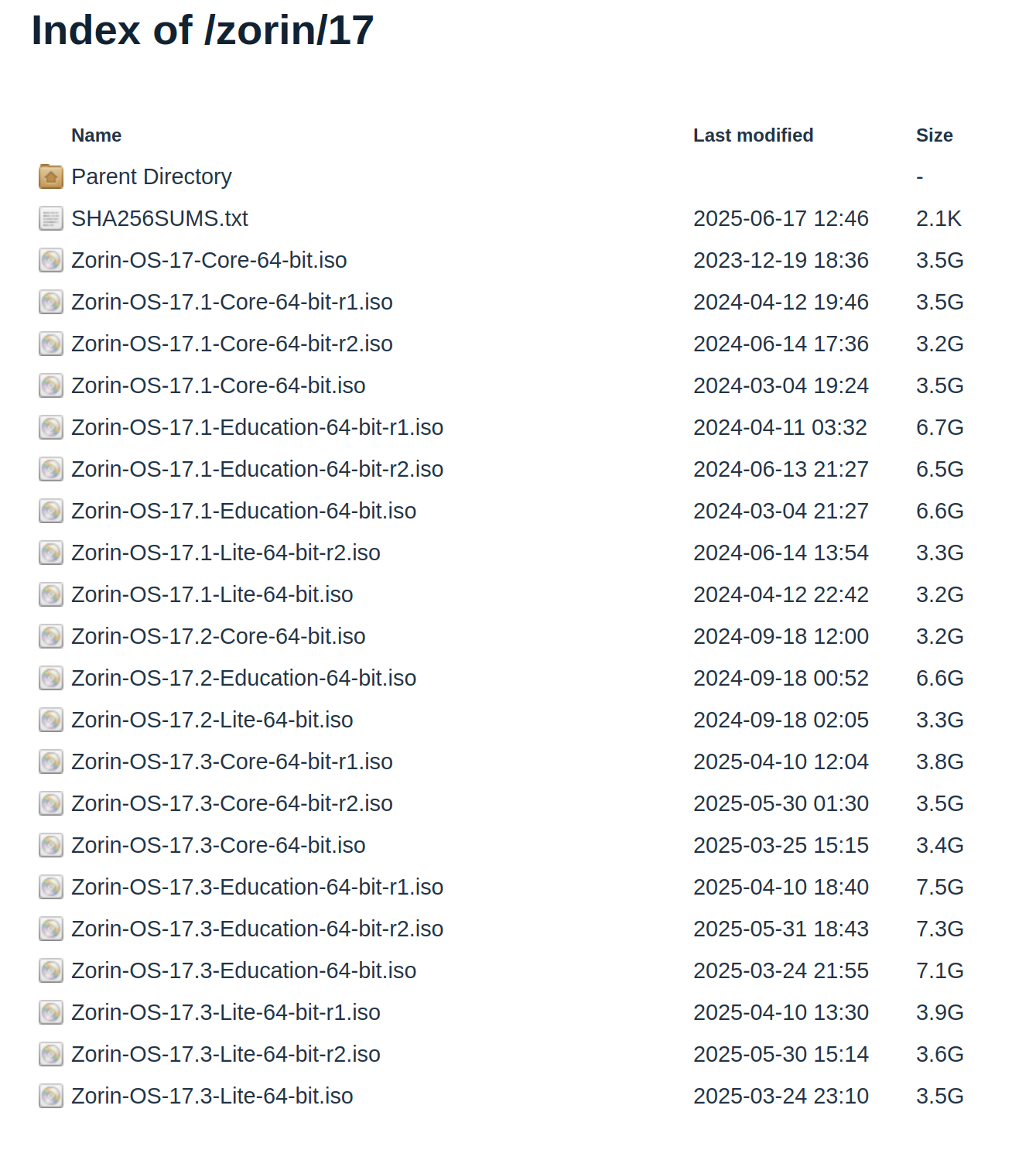
Form Zorin 17 to 17.3 is all there. So, You could theoretically go to Zorin 17.0 and take that if You want.
Zorin 17.3 is based on kernel 6.8. Are you sure about the 6.11 kernel?
In case this can be of any help, here is my config:
Intel Core i3-6100
MB Gigabyte B150M-D3H-CF - 8 Mb
GC Asus "GEFORCE 210" Silent (0 dB cooling)
1 SSD (system) + 1 HDD (data)
Zorin OS 18.1 Core - 64 bits - Wayland
Kernel Linux 6.8.12-060812-generic
Hi Forpli, this is what I initially thought, too.
And the information is not so clear. Some articles mention 6.8 all across OS 17 versions, other mention 6.5, 6.8 and 6.11 for respectively 17.1, 17.2 and 17.3.
See for example Why will Zorin OS 17.3 have the 6.11 kernel ...?
And now is the time for me to apologize for being totally wrong at initial/
with the GeForce 210 Silent, it is absolutely NOT the GT 710
So, I'm restarting my quest for info and apparently, there is a simpler fix;
with an open-source "nouveau" driver
So, apologies from a Zorin newbee.
Unclear to me why it worked during a few months with a wrong fix, but I don't plan to investigate so deep.
You can use Nouveau, yes. To do, simply uninstall the Nvidia Driver and then reboot. then Nouveau is taken automatically by default.
Or di You want now Instructions for the GeForce 210 Card?
And to this:
This doesn't look like the normal 6.8 Kernel. Did You used Mainline to install it?
Hi Ponce-De-Leon,
Thanks for answering.
I just raised a separate topic (Ensure "Nouveau" driver is active) as I didn't want to pollute this one with something obviously different.
You will see that I'm trying using Nouveau, but not sure that I' succeeding, as inxi - Ga gives driver: N/A and alternate: nvidiafb, nouveau, nvidia_drm, nvidia
So, unclear to me if Nouveau is active.
And of course, if you have recommendation on how to have an install compatible enough with GeForce 210 that I can select reso 2560 x 1080, I would be more than happy  as currently, I'm blocked at 1024 x 768
Kind regards
PahiZoFo
I looked for Your GeForce 210 Card and it seems that it would need the Driver 340 which is a pretty olde one and not available in the Repo's. But there is a PPA what offers the Driver for newer Kernels.
So, I would suggest the following Way:
- Install the 6.8 Kernel from the Repos
- Add the PPA to install the 340 Driver for Your Card
So, first install the 6.8 Kernel with the Command:
sudo apt install linux-headers-6.8.0-124-generic linux-image-6.8.0-124-generic linux-modules-6.8.0-124-generic linux-modules-extra-6.8.0-124-generic
When installed, reboot and on the GRUB Menu choose ''Additional Options'' and there choose this Kernel (without the Recovery Option). When booted and loged in, type in Terminal uname -r to check that You really in this Kernel. To set that Kernel as default, follow these Instructions:
Then add the PPA with
sudo add-apt-repository ppa:kelebek333/nvidia-test
and then make a sudo apt update to refresh the Sources. To install the Driver type
sudo apt install nvidia-graphics-drivers-legacy-340xx
But when You are find with the Nouveau Driver, of Course, You don't have to do that all. Then ignore it.
The kelebek333 ppa doesn't work in ubuntu noble (there are no 340 drivers for noble). Even on jammy there are problems with that ppa and the 340 drivers. I would first try if it is possible to get the right resolution with nouveau.
Yes, Your're right. I corrected the PPA.