This company considers all of their drivers Proprietary - so they are well maintained on Windows OS.
But as they will not release their drivers to Linux, support is sadly lacking.
There are some open source drivers (this will make you flinch):
And one of them will not work on the Wayland Display Manager and Compositor that Zorin OS 17 (and soon 18) defaults to.
So, you switched to GnuLinux and this is the welcome that you got.
What we can try first
USB Autosuspend may cause this - if the power management disables the input device, it would seem to work, then stop working.
We can test if this is the case with a boot parameter.
Launch terminal and run>
sudo -i
This elevates you to root permissions. Launch the file manager:
nautilus
In the left pane, click on "Other locations"
In the right pane, click on "Computer"
Now, you will be in Root Directory and you should see "etc" folder. Double click to open. The double click "default" folder.
Now right click on the file named "grub" and select "Open with text editor"
Go to the line GRUB_CMDLINE_LINUX_DEFAULT= and add the following parameter to it: usbcore.autosuspend=-1. It will look exactly like this when you are finished: GRUB_CMDLINE_LINUX_DEFAULT="quiet splash usbcore.autosuspend=-1"
Save the file.
Close the text editor after saving, close the Nautilus Files manager. In that terminal type
update-grub
Or, if you already closed that terminal, run in a new terminal window
Thank you very much but it dit not solve the problem, the mouse behaves the same, works for 5 sec and stops!
should i change back the text in the grub file?
And when i started nautilus i got these warnings:
** (org.gnome.Nautilus:3913): WARNING **: 20:33:07.172: Unable to get contents of the bookmarks file: Fel vid öppning av filen /root/.gtk-bookmarks: Filen eller katalogen finns inte
** (org.gnome.Nautilus:3913): WARNING **: 20:33:07.172: Unable to get contents of the bookmarks file: Fel vid öppning av filen /root/.gtk-bookmarks: Filen eller katalogen finns inte
These are normal. Since you launched in Root, the file manager could not access your Saved Bookmarks which are in your home user account. This is not harmful since you would not be accessing them in Root anyway...
What makes this frustrating is that most migrants to GnuLinux will encounter issues that are unfamiliar but easily fixed.
In your case, you have an issue that is complex and may have a complicated fix; sending you into deep waters upon arrival. I wish it was not so but...
Let's check with LiSt USB devices command in terminal and see how it identifies your mouse. Please relay the output of
Her is the info for the comand lsusb:
us 004 Device 001: ID 1d6b:0003 Linux Foundation 3.0 root hub
Bus 003 Device 004: ID 04f3:0c6e Elan Microelectronics Corp. ELAN:Fingerprint
Bus 003 Device 007: ID 258a:000c Hailuck Co.,Ltd USB Keyboard
Bus 003 Device 005: ID 256f:c658 3Dconnexion CadMouse Compact Wireless
Bus 003 Device 003: ID 05e3:0610 Genesys Logic, Inc. Hub
Bus 003 Device 006: ID 8087:0026 Intel Corp. AX201 Bluetooth
Bus 003 Device 002: ID 13d3:56ef IMC Networks USB2.0 HD UVC WebCam
Bus 003 Device 001: ID 1d6b:0002 Linux Foundation 2.0 root hub
Bus 002 Device 002: ID 05e3:0626 Genesys Logic, Inc. USB3.1 Hub
Bus 002 Device 001: ID 1d6b:0003 Linux Foundation 3.0 root hub
Bus 001 Device 001: ID 1d6b:0002 Linux Foundation 2.0 root hub
Good, this shows it as fully recognized.
Can you run
lsmod | grep hid
with the mouse connected and see if it is listed or only relayed as "generic"?
If it is listed, can you log in on Xorg instead of Wayland? Given this proprietary blob, Wayland may not be fully configured for libinput to handle the mouses specific reports.
From the login screen click the gear icon to choose between Zorin Desktop and Zorin on Xorg (If you do not see the gear icon, click to login as another user - this will make it appear, then just login as yourself).
Your terminal output shows it has no loaded driver.
Looking at their website - they do offer one:
64bit is available, that is what you need.
It arrives as a compressed .tar.gz
Once it fully downloads, go to your home Downloads folder to it and right click that compressed file and select "Extract here"
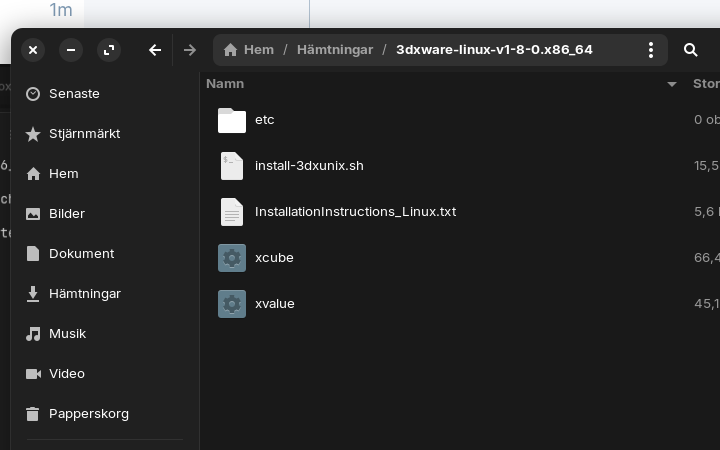
Once extracted. double click the 3dxware-linux-v1-8-0.x86_64 folder to open it.
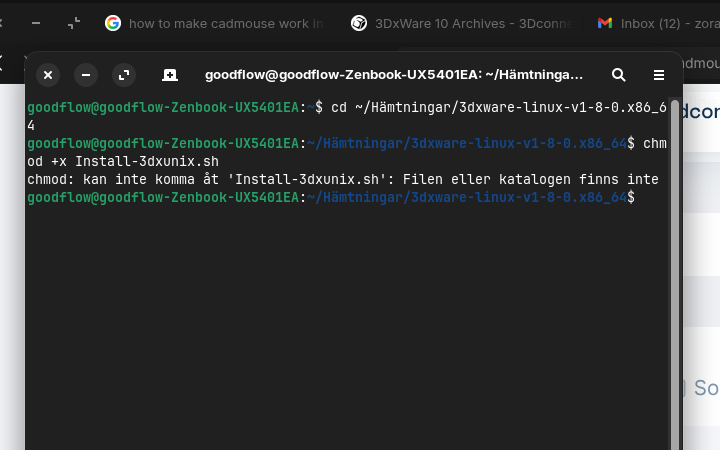
Inside, double click the file "Install-3dxunix.sh" to run the installer..
If it is just opening it as a text file - right click the file instead.
Then select Properties.
In the window that pops up - move to Permissions
Check the box for "Allow executing as a program" to on
Then double click the file - if this causes a prompt - select "Run"