Hello - I recently loaded Zorin Lite onto an old Win10 system; I wiped the disc clean during install, so Zorin Lite is the only OS on my machine - I'm having trouble with the Clocks app. and I can't figure it; I'm pretty sure I have toggled and played with all the volume control settings... At this point I'm looking for some troubleshooting insights and feedback from the Zorin forum...
My Clocks app will sound off with a normal chime when I set a timer and the time runs out, but the alarms will not sound off with a chime; when an alarm goes off, all I hear is a very faint/quiet clicking noise - I can only hear the clicking when I'm right next to a speaker. (not from across the room)
Any ideas as to what may be blocking or preventing the chime sound from sounding? (thank you!)
Thank you Aravisian - I installed the alarm-clock applet you suggested and it works! The only draw back I have run into is the snooze setting, I can only set it for the 10 minute default; the arrow for the drop down menu is grayed out, so i can't set the snooze for any other duration.
Thank you again Aravisian, but I am not finding anything related to the alarm-clock app in my home folder .config files; what should I be looking for in .config?
Maybe that is the old way.
If your version is the newer version, it has migrated to use gsettings, instead.
Try (300 seconds is five minutes; adjust as needed)
gsettings set com.github.alarm-clock-applet snooze-duration 300
Apparently I do have a newer version of Zorin Lite, I have a "Run gsettings" in my Start menu, but for some reason it does not open anything when I click on it; should I install one of the software packages that are available?
apt search alarm-clock-applet                                                                  ─╯
Sorting... Done
Full Text Search... Done
alarm-clock-applet/noble 0.4.1-5build2 amd64
  alarm clock panel indicator
This is my basis.
Major Changes:
The application has been ported to GTK 3, and will thus look slightly different.
Old GTK Tray Icon support has been removed. A desktop environment with support for AppIndicators/StatusNotifierItem is required. Alarms have been migrated to GSettings.
(Under all news for 4.1):
What is your version?
alarm-clock-applet --version
It is possible that while they have migrated some things to gsettings, not everything is.
I... do not use snooze...
I think I need to look into this further. The documentation on github is not very clear about this configuration.
The version of my alarm-clock app is 4.1, the full version is listed as "0.4.1+dev202505221135.341.b795011-0~ubuntu22.04.1"; I followed the github link you provided and read various docs - I'm thinking I might need to install an earlier version of the alarm-clock app; maybe 3.4 or 3.3 ???
I was able to install kalarm which is technically for Zorin OS (core), I have not been able to set it up; I am visually impaired and the text/font is incredibly small, and my enlarged display settings and magnifier do not apply to kalarm for some reason.
At least I have a functioning alarm that actually sounds off (thank you!); if I have to set the snooze in 10min increments (by default) so be it... OR I can just open the Clocks app and set a timer for a snooze reminder; I can not get the timer function in the alarm-clock app to work. (only the alarm)
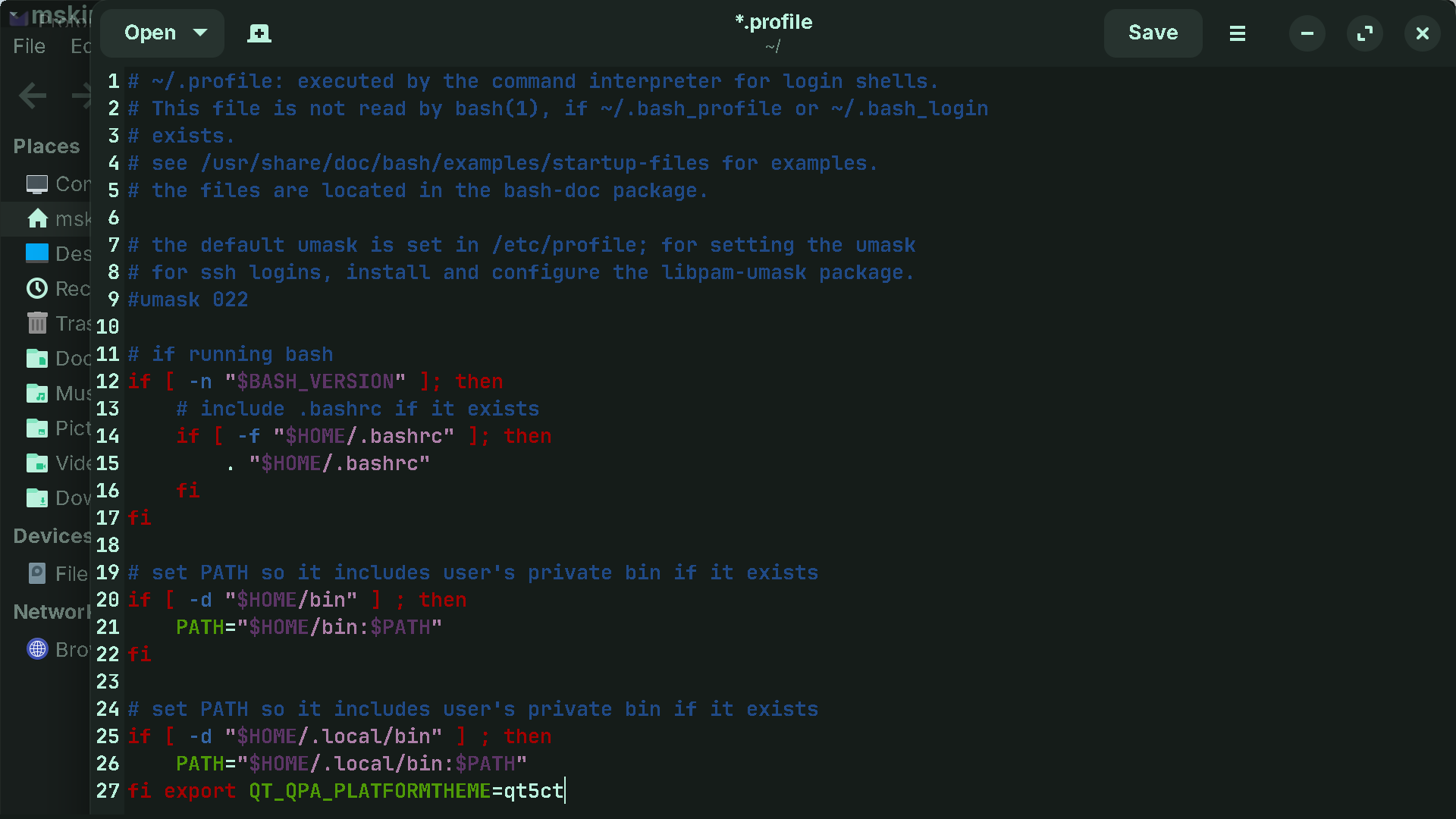
Aravisian - Thank you for the link to the topic "How to increase interface font size", although I'm not sure it will work on Zorin Lite like it works for you and feng; you have Zorin OS 18, and feng has Zorin Pro - I installed "sudo apt install qt5ct", but I'm not sure how to add "export QT_QPA_PLATFORMTHEME=qt5ct" to .profile in Home - My .profile has a list of 27 entries, and I do not see an option to "add", all I have is an option to "create a new document" then "save" the document to my computer. (is this the same as "adding"?)
I have not tried to install an earlier version of the alarm-clock app, I hesitate because 4.1 is said to be the "latest stable version" of the app; this may suggest that earlier versions are not as stable ???
It will work; I only use Zorin OS Lite.
While it is true I am on Zorin OS 18 - I installed XFCE and set everything up my way.
Move the cursor to the very bottom of the document and paste the line export QT_QPA_PLATFORMTHEME=qt5ct at the bottom as the new final line.
Then save the file. On next reboot, it will take effect.
What it is: Exporting an environmental variable.
Wording is fun. Every new release gets called the latest stable version; so all previous versions were their latest stable versions until the new one came along...
Well, I was able to paste/save export QT_QPA_PLATFORMTHEME=qt5ct at the bottom of the list in Home, but when I reboot I got an error message; I highlighted and copied the error, but it was not on my clip board once I got to the desktop (so can't share) - The error was directly related to a token error in .profile, and the error message specifically noted the export QT_QPA_PLATFORMTHEME=qt5ct entry while advising me to fix it immediately. (I deleted it from .profile)
Any thoughts as to what went wrong?
And, thank you for the explanation on word play, I had a feeling the term "latest" referred to any/all new versions as released, but one can never be to sure; you may have noticed my play on words as I edited my last post a couple hours after posting it, as I realized I misquoted the stable version of the alarm-clock app as being "the first" when it should have been quoted as "the latest" - I will try installing an earlier version soon. (thank you!)
Without being able to see a lot of this on your screen... it is hard to say.
It may have been a slight mispaste - a letter cut off - or not placed inline.
What you can do is show a screenshot before saving the file for confirmation.
And there is more than one way to set an environment variable. So other options can be explored, too.
In Root, there is an environment file which I use extensively... But setting it in your home folder for now is the safest and easiest path.
Bingo! Your suggestion to drop it down inline worked (I think), I made it to my desktop without an error message so that's a good sign; is there a tutorial or other doc that explains how to use the qt5ct utility to enlarge the size of interface font? Where do I find the package/folder? How do I launch it?