/dev/sda2 mounting as read-only

I'm reformatting my windows machine to install Zorin.

I boot to a latest bootable USB, and install onto a drive choosing to erase the entire drive before installation.

The installation completes and tells me to reboot, which I do.
The pre-boot screen comes up and tells me to remove the USB, which I do.
The boot sequence then hangs
I press the reboot button and it boots to a login page, and I can log in.
/dev/sda2 is mounted as read-only due to all different sorts of disk errors under the various scenarios described below.

I have 4 S/HDDs installed, two in a mirrored raid and two other drives, one HDD and one SSD.
SATA is configured into RAID mode

So I tried a different SSD (same make/model), reinstall there and I get the same result. I remove this device and try installing onto the second HDD drive.
This behaves the same.

I remove the RAID disks, and change the SATA config to AHCI, reinstall, same.

Switch to IDE mode, reinstall, same.

Switch to a different (3rd) SATA port and cable, same result.

I updated my BIOS part way through this process, had no discernable effect.

All tested drives/cables/ports etc have been running Windows, untouched in this same machine for 8+ years. So I think its unlikely theres a hardware fault, but not impossible.

No amount of fscking has any effect, despite it finding issues and reportedly fixing them.

I'm using an MSI Z97 Gaming 3 Mobo with latest 2.10 BIOS.
Latest Zorin bootable ISO

Bit stuck really, whats going on? Any ideas?
  • Are Secure Boot and Fast Boot in BIOS disabled?
  • Is Your BIOS in UEFI or Legacy Mode?
  • What Tool did You use to create the Bootstick?
  • Did You checked the Checksum of the ISO?
  • Could You start Zorin in Live Mode, open GParted and post a Pictured of the Partitions of the Drives?
1 Like

Right, I think this is all a red herring.

I think my real issue is with the 6.17 kernel, as 6.14 seems to work fine.

6.17 immediately locks up (causing the start of this disk-error adventure)

I'll investigate separately

Thanks

2 Likes

Ah, yes. That can be. Some People have Problem with the 6.17 Kernel where it helped to go back to the 6.14 Kernel. So, maybe use this for now.

I'm also experiencing serious issues, on a freshly installed copy of Zorin OS 18 Core, where the file system is either read-only as soon as I login, or becomes read-only after a few minutes.

  • This occurs when using the 6.17.0-14-generic kernel.
  • This does not occur with the 6.14.0-33-generic kernel.

I suspect there might be some kind of incompatibility between the 6.17 kernel and some hardware configurations. (Specific SSDs, or SATA controllers?)

dmesg reports a lot of write errors, such as:

[   42.994164] DMAR: DRHD: handling fault status reg 3
[   42.994170] DMAR: [DMA Read NO_PASID] Request device [00:1f.2] fault addr 0xd7c00000 [fault reason 0x0c] non-zero reserved fields in PTE
[   43.001906] ata3.00: exception Emask 0x70 SAct 0x10000 SErr 0x400900 action 0x6 frozen
[   43.001911] ata3.00: irq_stat 0x28000000, host bus error, interface fatal error
[   43.001913] ata3: SError: { UnrecovData HostInt Handshk }
[   43.001916] ata3.00: failed command: WRITE FPDMA QUEUED
[   43.001917] ata3.00: cmd 61/00:80:00:e0:da/20:00:1b:00:00/40 tag 16 ncq dma 4194304 ou
                        res 40/00:00:00:00:00/00:00:00:00:00/00 Emask 0x70 (host bus error)
[   43.001921] ata3.00: status: { DRDY }
[   43.001924] ata3: hard resetting link
[   43.310647] ata3: SATA link up 6.0 Gbps (SStatus 133 SControl 300)
[   43.311052] ata3.00: supports DRM functions and may not be fully accessible
[   43.344894] ata3.00: supports DRM functions and may not be fully accessible
[   43.378238] ata3.00: configured for UDMA/133
[   43.388441] ata3: EH complete
[   43.388637] ata3.00: Enabling discard_zeroes_data
[   43.397701] DMAR: DRHD: handling fault status reg 3
...

Here are the specs of the PC encountering those issues:

  • Motherboard: Gigabyte H97M-D3H
  • RAM: 8 GB
  • CPU: Intel Core i5-4690
  • GPU: Integrated Intel HD Graphics 4600 (no discrete GPU)
  • System drive: Crucial MX100 256 GB (SATA)
    • Model: Crucial_CT256MX100SSD1
    • Partition table: GPT
    • /dev/sda1: Windows recovery (NTFS) = 523 MB
    • /dev/sda2: /boot/efi = 105 MB
    • /dev/sda3: Microsoft Reserved = 17 MB
    • /dev/sda4: Windows 10 (NTFS) = 131 GB
    • /dev/sda5: Zorin OS Core 18 = 125 GB
  • Data drive: Western Digital WD Green 1 TB (SATA)
    • Model: WDC WD10EZRX-00L4HB0
    • Partition table: MBR
    • /dev/sdb1: NTFS data = 1 TB
    • Unallocated = 18 MB

Notes:

  • BIOS is in UEFI mode (not Legacy)
  • Secure Boot and Fast Boot are disabled
  • This is a dual boot system (Windows 10 / Zorin OS 18)
  • Fast Startup is disabled in Windows 10
  • The data drive is not currently set up to be mounted automatically when Zorin OS boots.

I installed Zorin OS 18 Core using the exact same USB key I used back in October on another PC, that didn't have these "write errors" / "read-only" issues.

(A Win10 / Zorin dual-boot laptop, with only 1 HDD, and no SSD).

I used Rufus back in October to create the USB key (Zorin-OS-18-Core-64-bit.iso), and didn't reformat it in between.

I then downloaded the most recent ISO (Zorin-OS-18-Core-64-bit-r3.iso), checked the SHA-256 checksum, and wrote it to the USB key using the "Disks" app from Zorin OS (on a working PC).

Unfortunately, the fresh re-install has the same symptoms.


I might keep investigating, to determine whether I should:

  • Update the BIOS (UEFI)
  • Tweak some AHCI settings in the UEFI
  • Or just avoid kernel 6.17 altogether

You may wish to look at this:

1 Like

Updating the BIOS/UEFI did not solve the problem.
(Gigabyte GA-H97M-D3H, upgraded from version F2 to version F7).

There were actually no useful AHCI options in the UEFI.
Compatibility options exist for xHCI and EHCI, but they apply to USB devices, not SATA drives.


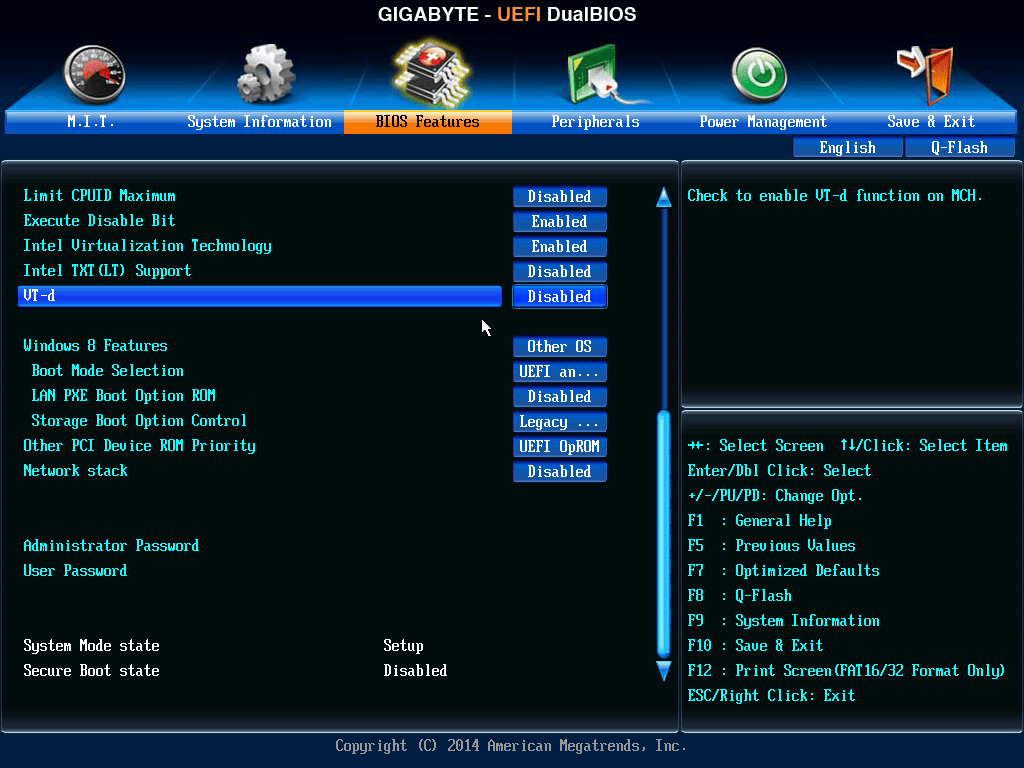
Interestingly, disabling Intel VT-d seems to fix the problem.

I can now run kernel 6.17 without any write errors showing up in dmesg.

I got the idea about disabling VT-d from:


Finally, I appreciate the info about GRUB defaults.

GRUB_DEFAULT=saved
GRUB_SAVEDEFAULT=true

In addition to kernel versions, it even saves the "Windows Bootloader" option as default when selected, which can be useful for dual-boot systems.