Failed to download repository information on Zorin OS 16.3

I wanted to try @Aravisian 's recommendation first because it appeared that should be done 1st. But maybe not. But I just now tried your suggestion and deleted both "linuxmint-daily-build-team" from stacer. And this is now what I get below when I try to install Nemo:

The following packages have unmet dependencies:
nemo : Depends: libnemo-extension1 (= 4.4.2-2ubuntu2) but 5.8.4-unstable-202308021446~ubuntu20.04.1 is to be installed
Depends: nemo-data (= 4.4.2-2ubuntu2) but 5.8.4-unstable-202308021446~ubuntu20.04.1 is to be installed
Recommends: nemo-fileroller (>= 4.4) but it is not going to be installed
E: Unable to correct problems, you have held broken packages.

So, it is still there ... Okay, then we have to take a Look manually on this. For this You have to look in 4 Folders:

  • /etc/apt/sources.list.d/
  • /etc/apt/preferences.d/
  • /etc/apt/trusted.gpg.d/
  • /etc/apt/keyrings/

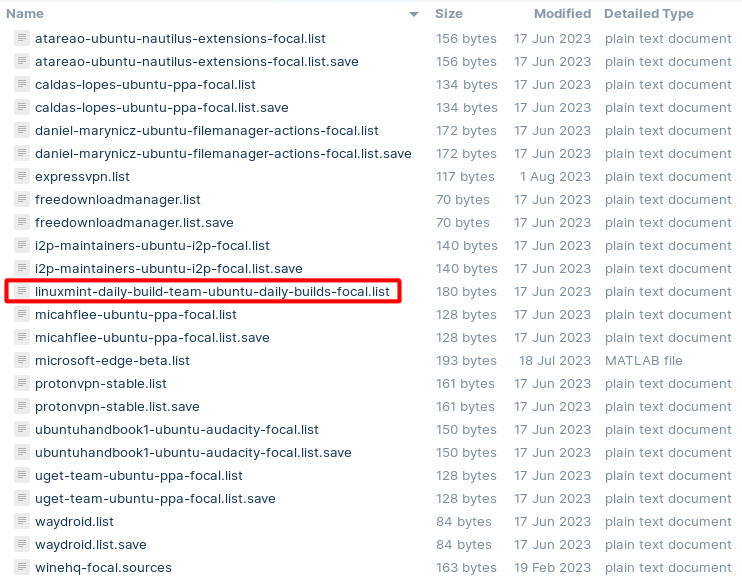
For the first one You have posted it here. There You should look if the marked One is still there:

In the other Folders You should look if there are Files that are related to that. Maybe with an similar File Names.

And then is there the File /etc/apt/sources.list which You should open with the Text Editor to look if there is this linuxmint-daily-build Repo listed.

1 Like

You need to show your full /etc/apt/sources.list.d/ and /etc/apt/sources.list contents.

1 Like

@Aravisian , @Ponce-De-Leon ,

1.) /etc/apt/keyrings (ONLY HAS ONE FILE)

/etc/apt/keyrings/winehq-archive.key

2.) /etc/apt/preferences.d/
EMPTY

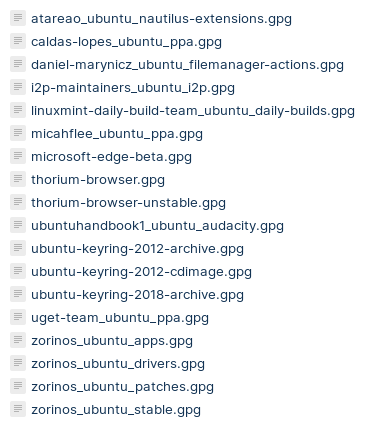
3.) /etc/apt/trusted.gpg.d/
image

4.) /etc/apt/sources.list.d

Summary

atareao-ubuntu-nautilus-extensions-focal.list
atareao-ubuntu-nautilus-extensions-focal.list.save
caldas-lopes-ubuntu-ppa-focal.list
caldas-lopes-ubuntu-ppa-focal.list.save
daniel-marynicz-ubuntu-filemanager-actions-focal.list
daniel-marynicz-ubuntu-filemanager-actions-focal.list.save
expressvpn.list
freedownloadmanager.list
freedownloadmanager.list.save
i2p-maintainers-ubuntu-i2p-focal.list
i2p-maintainers-ubuntu-i2p-focal.list.save
linuxmint-daily-build-team-ubuntu-daily-builds-focal.list
micahflee-ubuntu-ppa-focal.list
micahflee-ubuntu-ppa-focal.list.save
microsoft-edge-beta.list
protonvpn-stable.list
protonvpn-stable.list.save
ubuntuhandbook1-ubuntu-audacity-focal.list
ubuntuhandbook1-ubuntu-audacity-focal.list.save
uget-team-ubuntu-ppa-focal.list
uget-team-ubuntu-ppa-focal.list.save
waydroid.list
waydroid.list.save
winehq-focal.sources
zorin.list
zorin.list.save
zorinos-ubuntu-apps-focal.list
zorinos-ubuntu-apps-focal.list.save
zorinos-ubuntu-drivers-focal.list
zorinos-ubuntu-drivers-focal.list.save
zorinos-ubuntu-patches-focal.list
zorinos-ubuntu-patches-focal.list.save
zorinos-ubuntu-stable-focal.list
zorinos-ubuntu-stable-focal.list.save

5.) /etc/apt/sources.list

Summary
# deb cdrom:[Zorin-OS 16.2 Core 64bit]/ focal main restricted

# See http://help.ubuntu.com/community/UpgradeNotes for how to upgrade to
# newer versions of the distribution.
deb http://us.archive.ubuntu.com/ubuntu/ focal main restricted
# deb-src http://us.archive.ubuntu.com/ubuntu/ focal main restricted

## Major bug fix updates produced after the final release of the
## distribution.
deb http://us.archive.ubuntu.com/ubuntu/ focal-updates main restricted
# deb-src http://us.archive.ubuntu.com/ubuntu/ focal-updates main restricted

## N.B. software from this repository is ENTIRELY UNSUPPORTED by the Ubuntu
## team. Also, please note that software in universe WILL NOT receive any
## review or updates from the Ubuntu security team.
deb http://us.archive.ubuntu.com/ubuntu/ focal universe
# deb-src http://us.archive.ubuntu.com/ubuntu/ focal universe
deb http://us.archive.ubuntu.com/ubuntu/ focal-updates universe
# deb-src http://us.archive.ubuntu.com/ubuntu/ focal-updates universe

## N.B. software from this repository is ENTIRELY UNSUPPORTED by the Ubuntu 
## team, and may not be under a free licence. Please satisfy yourself as to 
## your rights to use the software. Also, please note that software in 
## multiverse WILL NOT receive any review or updates from the Ubuntu
## security team.
deb http://us.archive.ubuntu.com/ubuntu/ focal multiverse
# deb-src http://us.archive.ubuntu.com/ubuntu/ focal multiverse
deb http://us.archive.ubuntu.com/ubuntu/ focal-updates multiverse
# deb-src http://us.archive.ubuntu.com/ubuntu/ focal-updates multiverse

## N.B. software from this repository may not have been tested as
## extensively as that contained in the main release, although it includes
## newer versions of some applications which may provide useful features.
## Also, please note that software in backports WILL NOT receive any review
## or updates from the Ubuntu security team.
deb http://us.archive.ubuntu.com/ubuntu/ focal-backports main restricted universe multiverse
# deb-src http://us.archive.ubuntu.com/ubuntu/ focal-backports main restricted universe multiverse

## Uncomment the following two lines to add software from Canonical's
## 'partner' repository.
## This software is not part of Ubuntu, but is offered by Canonical and the
## respective vendors as a service to Ubuntu users.
# deb http://archive.canonical.com/ubuntu focal partner
# deb-src http://archive.canonical.com/ubuntu focal partner

deb http://security.ubuntu.com/ubuntu focal-security main restricted
# deb-src http://security.ubuntu.com/ubuntu focal-security main restricted
deb http://security.ubuntu.com/ubuntu focal-security universe
# deb-src http://security.ubuntu.com/ubuntu focal-security universe
deb http://security.ubuntu.com/ubuntu focal-security multiverse
# deb-src http://security.ubuntu.com/ubuntu focal-security multiverse

# This system was installed using small removable media
# (e.g. netinst, live or single CD). The matching "deb cdrom"
# entries were disabled at the end of the installation process.
# For information about how to configure apt package sources,
# see the sources.list(5) manual.
deb https://dl.winehq.org/wine-builds/ubuntu/ focal main
# deb-src https://dl.winehq.org/wine-builds/ubuntu/ focal main

You never removed this repository.
You need to remove it.

1 Like

@Aravisian , okay this is what i get now:

The following packages have unmet dependencies:
nemo : Depends: libnemo-extension1 (= 4.4.2-2ubuntu2) but 5.8.4-unstable-202308021446~ubuntu20.04.1 is to be installed
Depends: nemo-data (= 4.4.2-2ubuntu2) but 5.8.4-unstable-202308021446~ubuntu20.04.1 is to be installed
Recommends: nemo-fileroller (>= 4.4) but it is not going to be installed
E: Unable to correct problems, you have held broken packages.

Okay, thank You. Like @Aravisian wrote is the linuxmint-daily-build Repo still there. So, You have to remove them manually. If You shouldn't know how to do that, I write You the Commands for the Terminal:

sudo rm /etc/apt/sources.list.d/linuxmint-daily-build-team-ubuntu-daily-builds-focal.list

sudo rm /etc/apt/trusted.gpg.d/linuxmint-daily-build-team_ubuntu_daily-builds.gpg

That will delete the Repo File and the Signing Key for the Repo. After You have removed these Files do a sudo apt update in the Terminal.

sudo apt update

sudo apt --fix-broken install

I did sudo apt-get update and got the above results. is there a difference between sudo apt-get update AND sudo apt update?

@Aravisian , i just did all that, including "sudo apt --fix-broken install" and still get:

The following packages have unmet dependencies:
nemo : Depends: libnemo-extension1 (= 4.4.2-2ubuntu2) but 5.8.4-unstable-202308021446~ubuntu20.04.1 is to be installed
Depends: nemo-data (= 4.4.2-2ubuntu2) but 5.8.4-unstable-202308021446~ubuntu20.04.1 is to be installed
Recommends: nemo-fileroller (>= 4.4) but it is not going to be installed
E: Unable to correct problems, you have held broken packages.

In this, no.
The programs apt and apt-get are two different pieces of software included in Debian and Ubuntu and derivatives of the above two distros to access APT (Advanced Package Tool) through the terminal.
So you can use apt or apt-get for most basic functions without noticing any difference.
The apt software is newer than apt-get and as such, offers more comprehensive dependency resolution and better user-friendliness than apt-get. You will usually not notice a difference until you run advanced commands are are running advanced package troubleshooting.

If you still had the LinuxMint Daily Builds repository added... and you had previously run system upgrades - then it likely added a Mint Specific Source file to your computer.

This is why I warn users that if they add another Distros repository solely for the purpose of installing one piece of software, that they immediately remove that repo once that software is installed.

You might search your computer for the mintsources file. With Nemo lacking, you may need to use a different search application to make that easier.
If you find it - or are uncertain if it is present or not... You can try running (For FOCAL):

sudo apt remove --purge software-properties-gtk software-properties-common python3-software-properties -y

sudo apt autoremove mintsources

sudo apt update && sudo apt install -y adwaita-qt gir1.2-appstreamglib-1.0 gnome-software-common libappstream-glib8 python3-pycurl gnome-software python3-software-properties software-properties-common software-properties-gtk zorin-os-default-settings

sudo apt --fix-broken install

sudo apt install nemo

So, did You delete the Files? Without that it will not get Process.

The Difference between apt and apt-get is: apt has a wider range of Operations. apt-get is more specific. It is more a Difference in Details. But sometimes it all depends on the Details. And it seems that we now have this Case.

When You have deleted the Files, try it please with sudo apt update and after that with sudo apt install nemo

You just gave me five terminal commands to do, you want me to do exactly these commands? and will they harm my OS in anyway?

Yes, when I post commands, they are specific.

It is necessary to remove any changes made by system software (like software-properties-gtk) by the mintsources package.

If everything is as it should be, then the commands will not harm the existing O.S. software. We differentiate software because none of the commands posted will harm the computer, in any way.
But there is always an element of risk on any OS when a user replaces packages.
Right now, your best bet is to face that minimal risk to correct the packaging issue.

The other option is to re-install your Operating system, restore any personal file back-ups - then install Nemo.

1 Like

@Ponce-De-Leon , I did delete all the files in those folders. And then i did: sudo apt update and after that with sudo apt install nemo

And this i what i got:
The following packages have unmet dependencies:
nemo : Depends: libnemo-extension1 (= 4.4.2-2ubuntu2) but 5.8.4-unstable-202308021446~ubuntu20.04.1 is to be installed
Depends: nemo-data (= 4.4.2-2ubuntu2) but 5.8.4-unstable-202308021446~ubuntu20.04.1 is to be installed
Recommends: nemo-fileroller (>= 4.4) but it is not going to be installed
E: Unable to correct problems, you have held broken packages.

@Aravisian , I did everything exactly as you said, I do want to point out a few things, your 5 commands didnt include "sudo apt-get update", maybe that was your intention though.

And 2.) Noteworthily when i did sudo apt --fix-broken install
Results were:
0 upgraded, 0 newly installed, 0 to remove and 3 not upgraded.

And at the end of all 5 of your commands this is the result:

The following packages have unmet dependencies:
nemo : Depends: libnemo-extension1 (= 4.4.2-2ubuntu2) but 5.8.4-unstable-202308021446~ubuntu20.04.1 is to be installed
Recommends: cinnamon-l10n (>= 4.4) but it is not going to be installed
Recommends: nemo-fileroller (>= 4.4) but it is not going to be installed
E: Unable to correct problems, you have held broken packages.

That is pretty weird ... did You controled that they are deleted? Please don't understand me wrong: I am now on a Point where I can't help You anymore because I have no Idea's anymore. To delete the Sources File and the Key and then a sudo apt update should make it work again. In preferences.d isn't a File so there it couldn't be, too.

The only Thing that I could suggest You would be to save Your Data and make a fresh Install. But You have the Suggestion from @Aravisian. I hope this will help You.

1 Like

What did the terminal print out as a result of this command?

What I am seeing here is:

The dependency set by the package contained within your repos is for 4.4.2, yet, the source is trying to install 5.8.4 unstable.
This clearly indicates that you have a source directing to that later package.

We need to really know if the mintsources package was added due to retention of the Mint Daily Builds repo.
The MintSources package is a bit pernicious...

@Aravisian , > What did the terminal print out as a result of this command? sudo apt autoremove mintsources"

Summary

sudo apt autoremove mintsources

Reading package lists... Done
Building dependency tree
Reading state information... Done
The following packages will be REMOVED:
adwaita-qt apturl-common cabextract catdoc chromium-codecs-ffmpeg-extra
cinnamon-desktop-data cinnamon-l10n coinor-libcbc3 coinor-libcgl1
coinor-libclp1 coinor-libcoinmp1v5 coinor-libcoinutils3v5 coinor-libosi1v5
exif filemanager-actions filemanager-actions-data filemanager-actions-libs
fonts-wine gir1.2-appstreamglib-1.0 gir1.2-xapp-1.0 gist
gnome-software-common gstreamer1.0-plugins-good:i386 gstreamer1.0-vaapi
gstreamer1.0-x:i386 hddtemp heif-gdk-pixbuf html2text hwdata icoutils id3
inxi iso-flags-png-320x240 jq libaa1:i386 libaom0:i386 libappstream-glib8
libaribb24-0 libavc1394-0:i386 libavutil56:i386 libcaca0:i386 libcapi20-3
libcapi20-3:i386 libcinnamon-desktop4 libcodec2-0.9:i386 libdv4:i386
libfaudio0 libfuse3-3 libgomp1:i386 libgsm1:i386
libgstreamer-plugins-good1.0-0:i386 libgudev-1.0-0:i386 libheif1
libiec61883-0:i386 libjq1 libmp3lame0:i386 libmpg123-0:i386 libmypaint-1.5-1
libmypaint-common libnuma1:i386 libonig5 libopenal1:i386 libopenjp2-7:i386
libpython2.7 libraw1394-11:i386 libshine3:i386 libshout3:i386 libslang2:i386
libsnappy1v5:i386 libsndio7.0:i386 libsoxr0:i386 libspeex1:i386 libstb0
libstb0:i386 libswresample3:i386 libtag1v5:i386 libtag1v5-vanilla:i386
libtwolame0:i386 libva-wayland2 libvdpau1:i386 libvkd3d-shader1
libvkd3d-shader1:i386 libvkd3d1 libvkd3d1:i386 libvpx6:i386 libwavpack1:i386
libwebpmux3:i386 libwine libx264-155:i386 libx265-179:i386 libxapp1
libxmlsec1 libxmlsec1-nss libxslt1.1:i386 libxv1:i386 libxvidcore4:i386
libz-mingw-w64 libzvbi0:i386 mesa-vdpau-drivers:i386 mint-common
mint-translations mintsources nautilus-extension-fma nemo-data
nemo-extension-fma odt2txt playonlinux python-gi python-software-properties
python-wxgtk3.0 python-wxversion python3-pycurl python3-xlrd ruby-json tree
untex vdpau-driver-all:i386 vkd3d-compiler:i386 wine64 xapps-common
zorin-windows-app-support-desktop-files
WARNING: The following essential packages will be removed.
This should NOT be done unless you know exactly what you are doing!
mintsources python3-pycurl (due to mintsources)
mint-common (due to mintsources) gir1.2-xapp-1.0 (due to mintsources)
iso-flags-png-320x240 (due to mintsources) inxi (due to mintsources)
0 upgraded, 0 newly installed, 121 to remove and 3 not upgraded.
After this operation, 797 MB disk space will be freed.
You are about to do something potentially harmful.
To continue type in the phrase 'Yes, do as I say!'
?] Yes, do as I say!
(Reading database ... 336885 files and directories currently installed.)
Removing adwaita-qt:amd64 (1.1.1-2) ...
Removing apturl-common (0.5.2ubuntu19) ...
Removing playonlinux (4.3.4-1ubuntu1+zorin1) ...
Removing cabextract (1.9-3) ...
Removing catdoc (1:0.95-4.1) ...
Removing chromium-codecs-ffmpeg-extra (1:85.0.4183.83-0ubuntu0.20.04.3) ...
Removing libcinnamon-desktop4:amd64 (5.8.0-unstable-202306101544~ubuntu20.04.1)
...
Removing cinnamon-desktop-data (5.8.0-unstable-202306101544~ubuntu20.04.1) ...
Removing cinnamon-l10n (5.8.2-unstable-202307081604~ubuntu20.04.1) ...
Removing coinor-libcoinmp1v5:amd64 (1.8.3-2build1) ...
Removing coinor-libcbc3 (2.10.3+repack1-1build1) ...
Removing coinor-libcgl1 (0.60.3+repack1-2) ...
Removing coinor-libclp1 (1.17.5+repack1-1) ...
Removing coinor-libosi1v5 (0.108.6+repack1-1) ...
Removing coinor-libcoinutils3v5 (2.11.4+repack1-1) ...
Removing exif (0.6.21-2) ...
Removing filemanager-actions (3.4-2) ...
Removing filemanager-actions-data (3.4-2) ...
Removing nemo-extension-fma:amd64 (3.4-2) ...
Removing nautilus-extension-fma:amd64 (3.4-2) ...
Removing filemanager-actions-libs:amd64 (3.4-2) ...
Removing fonts-wine (6.0.3~repack-1+zorin2) ...
Removing python-software-properties (2.0.1-unstable-202005251357~ubuntu20.04.1)
...
dpkg: warning: overriding problem because --force enabled:
dpkg: warning: this is an essential package; it should not be removed
Removing mintsources (2.2.5-unstable-202308231141~ubuntu20.04.1) ...
dpkg: warning: while removing mintsources, directory '/usr/lib/linuxmint/mintSou
rces' not empty so not removed
Removing mint-common (2.3.0-unstable-202309211554~ubuntu20.04.1) ...
dpkg: warning: while removing mint-common, directory '/usr/lib/python3/dist-pack
ages/mintcommon' not empty so not removed
dpkg: warning: while removing mint-common, directory '/usr/lib/linuxmint' not em
pty so not removed
Removing gir1.2-appstreamglib-1.0 (0.7.16-1ubuntu1) ...
Removing gir1.2-xapp-1.0 (2.6.1-unstable-202308011652~ubuntu20.04.1) ...
Removing gist (5.0.0-4ubuntu1) ...
Removing gnome-software-common (3.36.1-0ubuntu0.20.04.1+zorin1+old1) ...
Removing gstreamer1.0-plugins-good:i386 (1.16.3-0ubuntu1.2) ...
Removing gstreamer1.0-vaapi:amd64 (1.16.2-2) ...
Removing gstreamer1.0-x:i386 (1.16.3-0ubuntu1.3) ...
Removing hddtemp (0.3-beta15-53) ...
Removing heif-gdk-pixbuf (1.6.1-1build1) ...
Removing html2text (1.3.2a-25) ...
Removing hwdata (0.333-1) ...
Removing icoutils (0.32.3-3) ...
Removing id3 (1.1.0-3) ...
Removing libxapp1:amd64 (2.6.1-unstable-202308011652~ubuntu20.04.1) ...
Removing xapps-common (2.6.1-unstable-202308011652~ubuntu20.04.1) ...
Removing inxi (3.0.38-1-0ubuntu1) ...
Removing iso-flags-png-320x240 (1.0.2-1) ...
Removing jq (1.6-1ubuntu0.20.04.1) ...
Removing libaa1:i386 (1.4p5-46) ...
Removing libaom0:i386 (1.0.0.errata1-3+deb11u1build0.20.04.1) ...
Removing libappstream-glib8:amd64 (0.7.16-1ubuntu1) ...
Removing libaribb24-0:amd64 (1.0.3-2) ...
Removing libavc1394-0:i386 (0.5.4-5) ...
Removing libswresample3:i386 (7:4.2.7-0ubuntu0.1) ...
Removing libavutil56:i386 (7:4.2.7-0ubuntu0.1) ...
Removing libcaca0:i386 (0.99.beta19-2.1ubuntu1.20.04.2) ...
Removing libcapi20-3:amd64 (1:3.27-3) ...
Removing libcapi20-3:i386 (1:3.27-3) ...
Removing libcodec2-0.9:i386 (0.9.2-2) ...
Removing libdv4:i386 (1.0.0-12) ...
Removing wine64 (6.0.3~repack-1+zorin2) ...
Removing libwine:amd64 (6.0.3~repack-1+zorin2) ...
Removing libfaudio0:amd64 (20.04-2) ...
Removing libfuse3-3:amd64 (3.9.0-2) ...
Removing libsoxr0:i386 (0.1.3-2build1) ...
Removing libgomp1:i386 (10.5.0-1ubuntu1~20.04) ...
Removing libgsm1:i386 (1.0.18-2) ...
Removing libgstreamer-plugins-good1.0-0:i386 (1.16.3-0ubuntu1.2) ...
Removing libgudev-1.0-0:i386 (1:233-1) ...
Removing libheif1:amd64 (1.6.1-1build1) ...
Removing libiec61883-0:i386 (1.2.0-3) ...
Removing libjq1:amd64 (1.6-1ubuntu0.20.04.1) ...
Removing libmp3lame0:i386 (3.100-3) ...
Removing libmpg123-0:i386 (1.25.13-1) ...
Removing libmypaint-1.5-1:amd64 (1.5.1-1) ...
Removing libmypaint-common (1.5.1-1) ...
Removing libx265-179:i386 (3.2.1-1build1) ...
Removing libnuma1:i386 (2.0.12-1) ...
Removing libonig5:amd64 (6.9.4-1) ...
Removing libopenal1:i386 (1:1.19.1-1) ...
Removing libopenjp2-7:i386 (2.3.1-1ubuntu4.20.04.1) ...
Removing libpython2.7:amd64 (2.7.18-1~20.04.4) ...
Removing libraw1394-11:i386 (2.1.2-1) ...
Removing libshine3:i386 (3.1.1-2) ...
Removing libshout3:i386 (2.4.3-1) ...
Removing libslang2:i386 (2.3.2-4) ...
Removing libsnappy1v5:i386 (1.1.8-1build1) ...
Removing libsndio7.0:i386 (1.5.0-3) ...
Removing libspeex1:i386 (1.2~rc1.2-1.1ubuntu1.20.04.1) ...
Removing libstb0:i386 (0.0~git20190817.1.052dce1-1) ...
Removing libstb0:amd64 (0.0~git20190817.1.052dce1-1) ...
Removing libtag1v5:i386 (1.11.1+dfsg.1-0.3ubuntu2) ...
Removing libtag1v5-vanilla:i386 (1.11.1+dfsg.1-0.3ubuntu2) ...
Removing libtwolame0:i386 (0.4.0-2) ...
Removing libva-wayland2:amd64 (2.7.0-2) ...
Removing vdpau-driver-all:i386 (1.3-1ubuntu2) ...
Removing mesa-vdpau-drivers:i386 (21.2.6-0ubuntu0.1~20.04.2) ...
Removing libvdpau1:i386 (1.3-1ubuntu2) ...
Removing vkd3d-compiler:i386 (1.3~focal-1) ...
Removing libvkd3d1:i386 (1.3~focal-1) ...
Removing libvkd3d-shader1:i386 (1.3~focal-1) ...
Removing libvkd3d1:amd64 (1.3~focal-1) ...
Removing libvkd3d-shader1:amd64 (1.3~focal-1) ...
Removing libvpx6:i386 (1.8.2-1ubuntu0.3) ...
Removing libwavpack1:i386 (5.2.0-1ubuntu0.1) ...
Removing libwebpmux3:i386 (0.6.1-2ubuntu0.20.04.3) ...
Removing libx264-155:i386 (2:0.155.2917+git0a84d98-2) ...
Removing libxmlsec1-nss:amd64 (1.2.28-2) ...
Removing libxmlsec1:amd64 (1.2.28-2) ...
Removing libxslt1.1:i386 (1.1.34-4ubuntu0.20.04.1) ...
Removing libxv1:i386 (2:1.0.11-1) ...
Removing libxvidcore4:i386 (2:1.3.7-1) ...
Removing libz-mingw-w64 (1.2.11+dfsg-2) ...
Removing libzvbi0:i386 (0.2.35-17) ...
Removing mint-translations (2023.07.07-unstable-202307071615~ubuntu20.04.1) ...
Removing nemo-data (5.8.4-unstable-202308021446~ubuntu20.04.1) ...
Removing odt2txt (0.5-1build3) ...
Removing python-gi (3.36.0-1) ...
Removing python-wxgtk3.0 (3.0.2.0+dfsg-8build1) ...
Removing python-wxversion (3.0.2.0+dfsg-8build1) ...
Removing python3-pycurl (7.43.0.2-1ubuntu5) ...
Removing python3-xlrd (1.1.0-5) ...
Removing ruby-json (2.3.0+dfsg-1build1) ...
Removing tree (1.8.0-1) ...
Removing untex (1:1.2-6) ...
Removing zorin-windows-app-support-desktop-files (1.6.6) ...
Processing triggers for mime-support (3.64ubuntu1) ...
Processing triggers for hicolor-icon-theme (0.17-2) ...
Processing triggers for gnome-menus (3.36.0-1ubuntu1) ...
Processing triggers for libglib2.0-0:amd64 (2.64.6-1~ubuntu20.04.7) ...
Processing triggers for libglib2.0-0:i386 (2.64.6-1~ubuntu20.04.7) ...
Processing triggers for libc-bin (2.31-0ubuntu9.16) ...
Processing triggers for man-db (2.9.1-1) ...
Processing triggers for libgdk-pixbuf2.0-0:amd64 (2.40.0+dfsg-3ubuntu0.5) ...
Processing triggers for shared-mime-info (1.15-1) ...
Processing triggers for desktop-file-utils (0.24-1ubuntu3) ...

YUP, there's your problem. The repo was retained - which the daily builds notates that that repo is for the Latest Builds and Packages - which resulted in it installing the MintSources packages for Mint, not your existing Operating System, creating package conflict.

You can try ensuring any existing Nemo files or packages are purged... You might use Synaptic to seek and destroy all Mint, Cinnamon and Nemo files and packages. Once everything is purged, then try reinstalling from the Main Universe Repo that came default with your installed O.S.

Other than that... I can only recommend reinstalling the O.S. as lesson learned that when using another distros specific repo to install a package, to never forget to remove that repo before running system upgrades.

And for the record, I have made this mistake, myself. It is how I know about the MintSources fiasco that gets its tendrils deeply embedded in the system. I successfully removed it at that time...