I would be interested to know whether the number of password prompts depends on the file manager or only on the desktop environment. I find it terrible how often I am asked for my password within a few minutes when using nautilus in gnome. For every file I want to open with root privileges I am asked separately, and then usually twice if I want to edit/move/copy/remove it.
Since my VM is extremely slow with 4 GiB, I lose root access in between and have to enter the password again. This is very annoying.
In XFCE, this prompt is much less frequent and I can open and edit multiple files after entering the password after I have opened thunar as root.
Is there a solution for this that speeds up my work, e.g., a different file manager? I have already installed nautilus admin but often there is no "open as administrator" when I rightclick on a file and I have to go back to the parent folder. And the password seems to be only for this folder and not for other ones.
I'd like to enter once my password to get root access to nautilus and then to be able to do all things I want to do without password requests. Is this not possible with gnome? Even not with
"sudo -i"
"nautilus"
?
An alternative would be Nemo. There You have all built-in.
The Passwords in Nautilus ... It can happen that you get 2 Prompts because the first one gives You access and the second one lets you change Stuff.
You could try to open it in the Terminal with sudo nautilus but then it can look like the Vanilla Gnome Theme and not Your chosen Theme - not even a Zorin Theme.
I get this warning when I try to launch Nautilus with sudo so I guess this is no longer allowed:
========================================================
This app cannot work correctly if run as root (not even
with sudo). Consider running `nautilus admin:/` instead.
========================================================
Now, you can use nautilus admin:/ and you can also specify the location afterwards, for example:nautilus admin:///usr/share/applications (that's 3 forward slashes).
To bypass the password prompt (except the initial one) create a polkit rule as described in this wiki page. Make sure to change the group name from "wheel" to "sudo".
Careful when doing this to delete files, as they won't be sent to any trash location and they'd be deleted entirely.
Thank you Ponce-De-Leon and Zenzen for your contributions. I will try this out. I avoid "sudo nautilus" because Aravisian said it is not safe to open a GUI with sudo. But pkexec that works with thunar in XFCE doesn't work with nautilus. So I'll try nautilus admin:/// - maybe a bookmark can help.
Since this is a Zorin Lite VM installation with gnome-desktop, I would also like to try if the frequency of queries changes if I set thunar as the default file manager in gnome. Do I have to reinstall thunar in gnome or can thunar from Zorin lite desktop be used? How can I set it to default file manager? Is this the right command?
xdg-mime default thunar.desktop inode/directory application/x-gnome-saved-search
In XFCE there's Default Applications where you can control this:
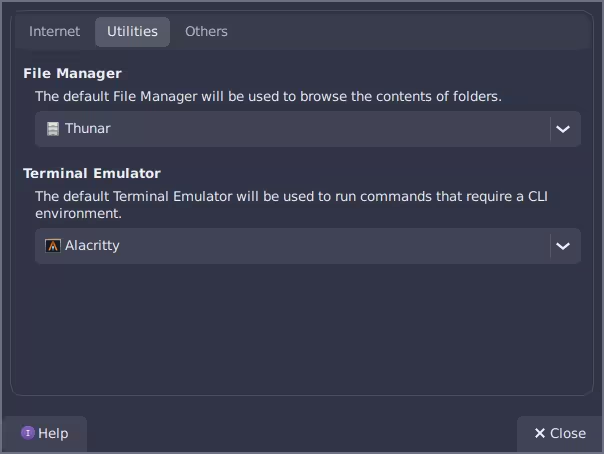
There's probably something similar in Zorin OS Lite, as well. I think the command is okay, though.
My question was about how to change it in gnome (I have XFCE desktop and gnome desktop).
In the VM, You have to install Thunar. Because of the default File Manager Setup, I don't know. I thought this isn't possible.
The command you posted should work, as @zenzen noted. You do not need to install Thunar as it is already installed.
Oh, yeah I saw Zorin OS Lite and assumed that you were using XFCE.
I had forgotten that I had already installed nemo. It was not recognizable in the installed apps because it has exactly the same name as nautilus, namely "Files". So there are two launchers in the Zorin start menu with the same name Files, one for nemo and one for nautilus, that's not so practical, and then there is Thunar, which fortunately has an own name "Thunar file manager".
I have found out that it works better with nemo than with nautilus and also "pkexec nemo" can be used, but not "pkexec nautilus" (Gtk warning cannot open display). I think nemo is a good file manager for the use in Zorin core as already open as root is integrated.
When I open Nautilus normally I have to enter my password three times until I can edit e.g. /etc/default/grub. That's too much. It is not visible in color that I am moving with root right, as it is the case with the other file managers by a colored top bar. I suspect this is due to the two desktops.
I tried nautilus admin:/ but I lose the root rights after a short time as soon as I move around in the file system.
I think there's package called nautilus-admin that creates an entry in the context menu (when you right-click on a file or folder) to edit files as admin. I'm not sure if it works for Zorin OS 18 but it should work fine in Z17. Perhaps that's a better option.
pkexec is the polkit CLI; it's like sudo but with its own set of privilege rules. Did you try adding the rules as per the Arch wiki link? That would effectively give you a clear way to do whatever you want (use at your own risk).
I have had nautilus admin already installed. It does not offer the same possibilities as nemo and thunar. If I open nemo or thunar normally, then right-click on a folder in the root directory, e.g. /etc/, and select "open as root", I can edit files in this directory and also switch to other directories, e.g. /usr/ and edit something there without entering the password again.
In Nautilus I lose the root rights as soon as I move away from /etc/ and need a new authentication for each directory.
The polkit rules from Arch wiki I haven't tried yet as thunar and nemo fulfill my needs and are more secure, but I'll take a look. I have now set up Thunar as the default file manager.
Edit: I found out that I only lose the root rights in nautilus when I click on my personal home folders that are shown on the left side of nautilus. When I stay in root directory the root rights are kept. But for each file that I want to open/edit I need a second separate authentication.
Okay. I took a look at polkit rules. I wanted to follow this guide here
but I don't find a output for nautilus when I enter "pkaction" in terminal, only
for nemo and thunar:
org.nemo.root
org.xfce.thunar
Perhaps I have overlooked it. What is it called?
Thank you, that worked. Now nemo is shown as nemo in startmenu.
Try org.gnome.nautilus, or maybe uppercase Nautilus.
There is no such registered service for nautilus here. There is no output when I enter "pkaction | grep nautilus". Presumably the authentication for nautilus is not controlled via pkexec in gnome.
I found a guide here to create a pkexec rule for nautilus but it is from 2021 and not for ubuntu. Would it work in Zorin and is it safe to do this?
I found an old 2015 article, not sure if still relevant:
Thank you, swarfendor437. That one uses another action id. I hope someone can take a look if they will work.
I link the file directly:
raw.githubusercontent.com/hotice/webupd8/master/org.gnome.nautilus.policy
How can I get folders of the same grey color everywhere? All my file managers show the desktop folder in blue instead of grey. Is this normal? The theme is Zorin light grey.
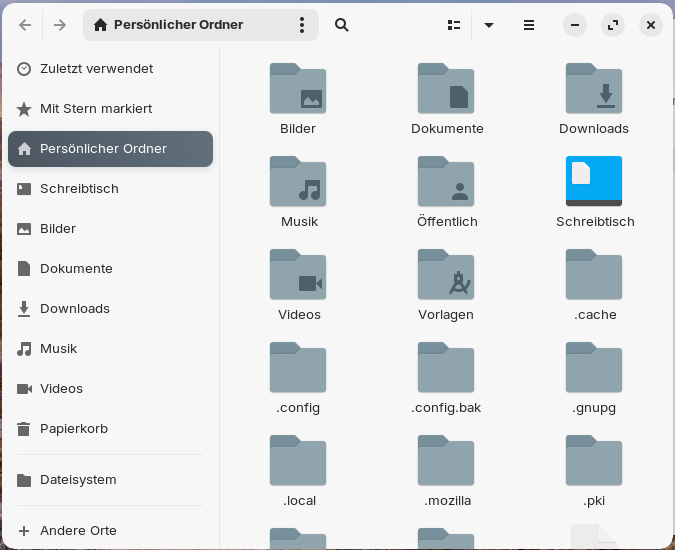
Maybe something got messed up when I used the filemanager as root because suddenly there were locked theme folders on my system as e.g. ~/.themes. I changed the permissions and I can read and write.
Edit: I made some tests and found out that when the filemanager is opened as root and I create folders, the owner is always root and my user has no write permissions, even not in /home. So it is better to create the folders as normal user or to change the permissions afterwards.
How can I take ownership of ~/.icons and ~/.themes, which now belong to root?
I tried with "sudo chown USERNAME
PATH-TO-FOLDER" and now I'm the owner. Is this right?