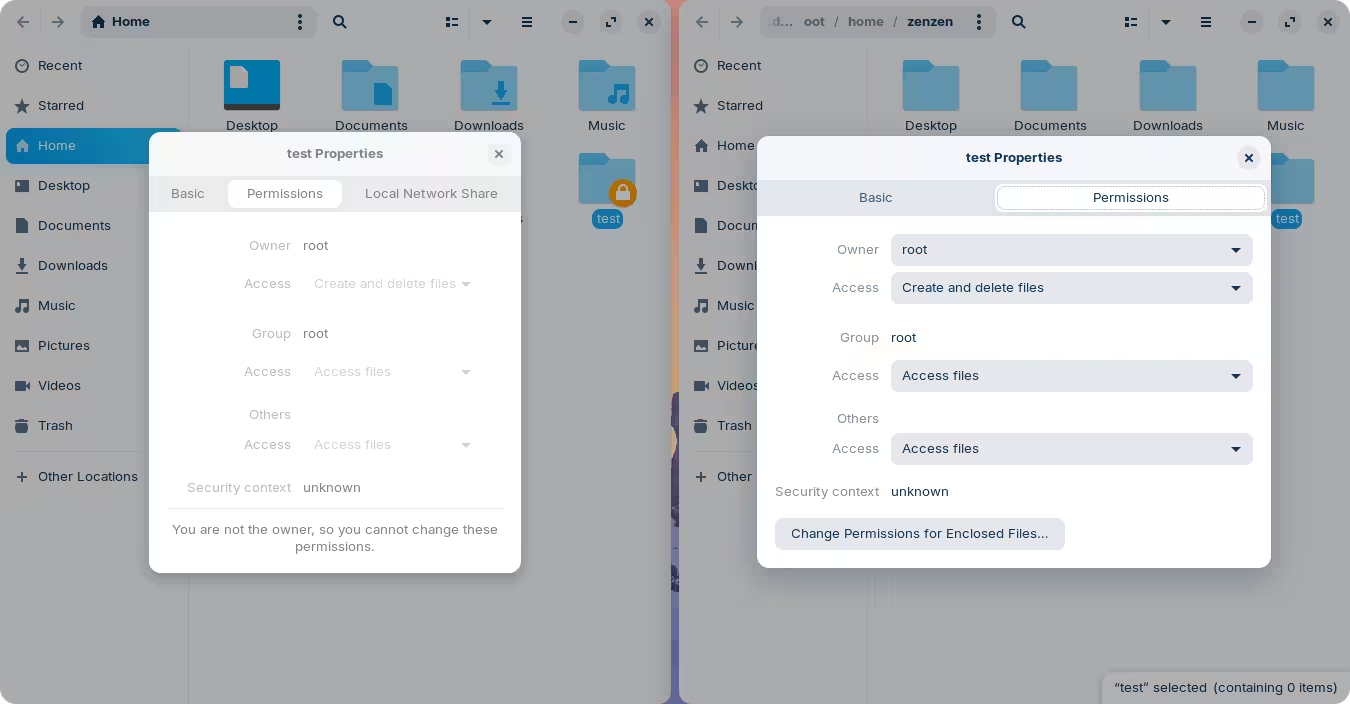
You'd have to launch Nautilis as root once again, and right-click those files/directories → Properties → Permissions. Or, through the terminal:
sudo chown $USER: ~/.icons ~/.themesYou'd have to launch Nautilis as root once again, and right-click those files/directories → Properties → Permissions. Or, through the terminal:
sudo chown $USER: ~/.icons ~/.themesDo I have to add -R? I didn't find a way to change the ownership in the GUI of filemanager, only the permissions.
If you already have contents in those directories, then yes, the -R flag will run this on all files recursively.
On the left, without root permissions, you can see it's grayed out. On the right, launched through the terminal as nautilus admin:///home/zenzen you can see that I have access to change ownership, as well as permissions:
The same is true for Thunar, it just looks a little different.
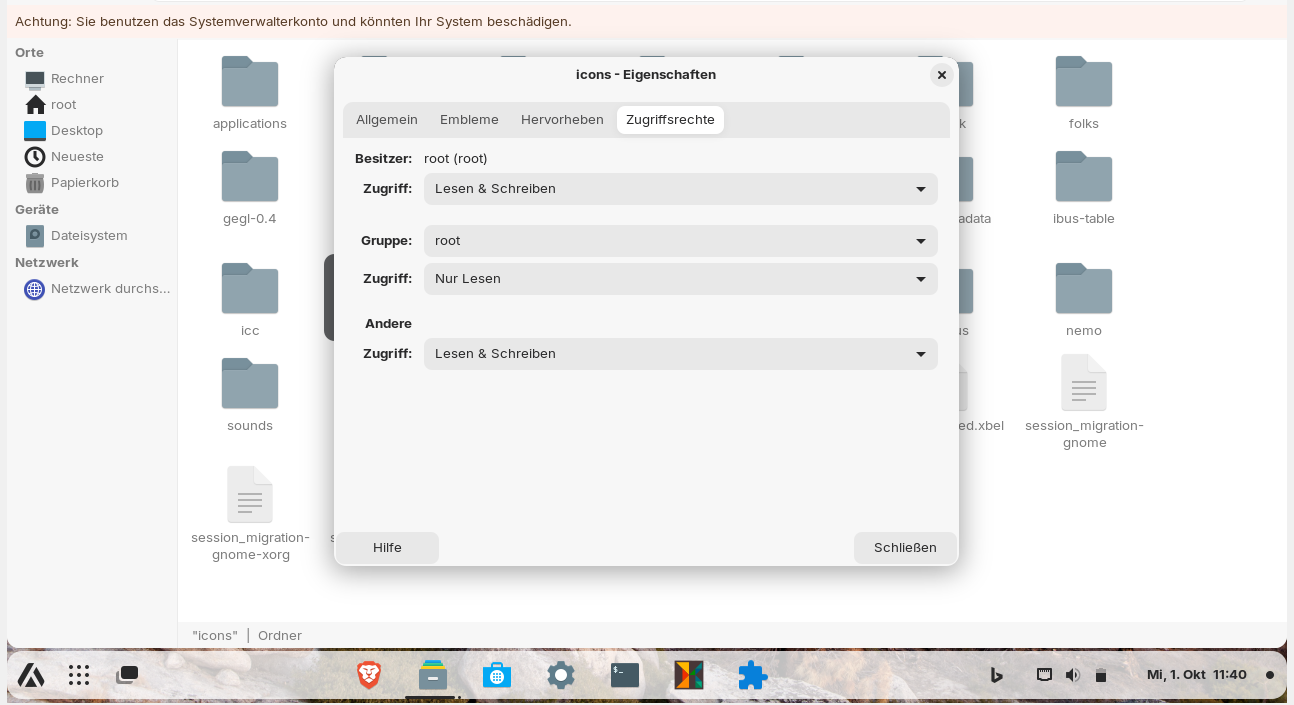
In thunar it is not the same. I can´t change the owner. I have opened ~/.local/share as root and this are the properties of the icons folder here:
I also can't edit the owner when I launch thunar via "pkexec thunar" in terminal.
Oha, in nemo it works!!! There is the possibility to edit ownership.
Also in nautilus it works this way.
Huh, that might be one of the rare occasions where Nautilus does something that Thuanr can't. @Aravisian would be disappointed 
In that case, just run that command through the terminal. You are not supposed to be running the file manager as root anyway; as the warning says: you might harm your system. And if you know what you are doing editing system files, then you ought to know how to the same through the terminal.
Aravisian prefers nemo. Now I understand why. Nemo already has everything you need to set up with the others.
Can someone please tell me if the policy rules for nautilus from #17 or #18 will work in Zorin 17 and are safe to use?
I have looked into it more closely. Nautilus-admin does not use pkexec for authentication but gvfs. Is it possible to run the authentication processes for nautilus via pkexec or do you have to edit the rules for gvfs instead, e.g.
/usr/share/polkit-1/rules.d/org.gtk.vfs-file-operations.rules?
Perhaps the file to change the password prompts for nautilus is
/usr/share/polkit-1/actions/org.gtk.vfs.file-operations.policy
@Aravisian Can you please tell me if it is okay to use this file or is it dangerous?
I know, it is not the best, but is it more dangerous than running "pkexec thunar"?
I have added it to my system as described in the link and now I can run "pkexec nautilus" which was not possible before and I'm only asked for my password once (what I wanted to achieve).
Is it possible to add a warning that nautilus is opened as root? Unfortunately you can't see it visually.
Sounds like a success to me.
Neither is inherently dangerous.
What is considered 'best practice' may exclude this. But let's be realistic...
It is considered 'not best practice' because complex answers get simplified and take on assumptions.
If on a Shared Computer, where you added an action as policy, that you authenticate (enter your password and run); then leave unattended... Where other people twirling their mustaches and emitting goblin giggles have nefarious intentions... then you might have just given them access to root, maybe.
And... the powers that be consider any time that a user elevates to root to be "not best practice".
From the moment you joined the Zorin Forum, you have been an active and attentive learner and helper. Yes, you may make mistakes in Root, but never let that stop you.
You are not the sort to be inhibited by others lack of trust in your willingness to research and learn.
If you are the only person using your computer and are at home; you can utterly ignore the blanket coverage assumptions made by guides that fear End Users controlling their own computers.
This is actually part of the system theme and it is something I always add in my own made themes.
You can add something easily.
The gtk.css class is
infobar.warning, infobar.error {

}
The common practice is to paint the background or give the border a red color. For example:
 infobar.warning, infobar.error {
     background:red;
     border: 1px solid red;
}
But you can be creative. I tend to give a Gold Border - since I see red as too catastrophic.
Or you can keep the border and background the same, but change the text color to a noticeable color.
Thank you very much for your encouraging words, Aravisian! I'll try my best not to do any damage to the system and will be careful what I do when I have my file manager opened as root. I can now understand a little better why Zorin does not have the "open as root" function integrated in the file manager like Linux Mint, for example. You can quickly cause unintentional damage with it, as I had to experience myself when my folders which I created as root in /home were not writable for my user.
I had no peace with the fact that the file managers handle authentication so differently - of which Nautilus secures everything most strictly. I think some protection is important, but I don't want to feel like I'm in a security prison when I'm using my own computer at home and I have to beg for permission every time I want to do something. In gnome with nautilus I feel like a prisoner.
I don't yet understand why this is/needs to be different with Nautilus than with Thunar and Nemo on the same DE.
I use the Zorin theme and have no colored warning in nautilus, only in nemo and thunar. With nautilus admin:/ in the titlebar is shown "Administrator-Wurzelordner" (admin root folder), but when the path is longer, then it gets invisible. Nautilus opened with the pkexec rule has no colored warning nor notice, you can just see that the home folders on the left side are missing.
I'll try to add it to the Zorin css theme file tomorrow.
You can add it to your ~/.config/gtk-3.0 and ~/.config/gtk-4.0 folders as gtk.css.
No need to add it to the Zorin Theme directly.
Setting the banner in the theme is a theme creators choice. There are many... for example button action destructive, giving that button a different appearance.
Philosophy of the developer and the Gnome Philosophy is that the users are complete idiots and must be tightly controlled...
Good thing I now know how to work around these restrictions in gnome by using another file manager or by adding my own rules so that they interfere less with the workflow.
Thank you for sharing your knowledge with all of us and for taking time!
When You try Stuff, damaging the System belongs to the Experience.
The colored warning does not work in nautilus. I have put the gtk.css files 3.0 and 4.0 from my zorin theme into the .config folder of /home, cleaned the content of the files and put your code into it.
It doesn´t work.
Then I tried to add your code to the Zorin theme directly in usr/share/themes but also no change when I open nautilus as root.
Doesn't Nautilus offer the ability to add something like custom actions/modules in the context menu like Thunar and Nemo or customize the existing ones? Then I could change the command for "Open as system administrator" to pkexec.
The plugin packages nautilus-actions and filemanager-actions seem to have ended. I just found this on github:
Is it good? Has anyone ever tried it in Zorin?
@zenzen You wrote a guide about this extension. Did you test it on Zorin 17 and did it work?
It looks still supported and developed. You can download the .deb File from the github Page:
and then use Gdebi to install it to see for the Dependencies and if there are available. And then You could simply test it.
Gdebi showed "all dependencies fulfilled". I have installed the .deb file, but using the Actions for Nautilus Configurator is extremely difficult. Something with JSON. My right-click menu now shows a few other contents of the sample file, but I have not yet managed to add the commands I would like.
Edit:
I got it to work so that I can open nautilus by rightclicking as root and not gvfsd-admin is used but pkexec.
But I'm not sure why my system froze two times today so that I had to kill the virtual machine in Windows taskmanager. If it stays that way, I will undo everything. However, both times I had not opened the file manager as root.