I will confess...
I would not do what you are doing. I feel like you are flirting with a lit match.
Not because the risk is inherently great. It would be, in other circumstances.
But because tinkering and learning are fine things, but polkit is Highly Sensitive.
I understand why you are doing it - I find it to be a novel approach. But I would not recommend this to anyone.
Yes, it works with org.freedesktop.policykit.pkexec.run-nautilus.
I have also seen that nemo uses auth_ admin_keep in its policy, whereas thunar only uses auth_admin. So I think I can change my policy to admin_auth because I had never problems that thunar threw me out.
Here you will find descriptions of actions that come with Ubuntu by default, and your own actions must also be stored here, as there are no other folders for them in version 0.105 of polkit."
I tested it with the other policy that uses the action id org.gnome.nautilus after I had taken a look at the policies of gparted and nemo and saw that their action ids contained no pkexec.
It works, too, there was just no message at authentication login, but I can add one to the file (line message).
I think pkexec was used, not gvfs, because there was no message about gvfs and I didn't need a password to open the texteditor.
The icon for nautilus I still didn't find. I looked at /usr/share/icons/ZorinGrey-Light but I'm not sure which size and if it is at actions, mimetypes, panel, places...
I skimmed through them all, even yesterday, but couldn't find what I was looking for. There are no thumbnails to see the images.
Edit: Finally I have found it. It was not at ZorinGrey-Light but at Zorin
/usr/share/icons/Zorin/...(choose a size)/apps
There are all images of the preinstalled apps.
I wanted to try it, but I deleted all my wayland sessions when I tidied up the system so that I don't have so many entries to choose from when I log in. Now I can't choose wayland anymore and there are no files at wayland-sessions.
Is it possible to install the wayland session?
When I want work a on file, I would open the Terminal and use nano with sudo nano File Path. Or navigate in Nautilus to the file Path and then open it in Termal and type sudo nano File-Name
These 2 are for me an easy and direct Way. nano might not be the best Terminal Editor but for me it is enough.
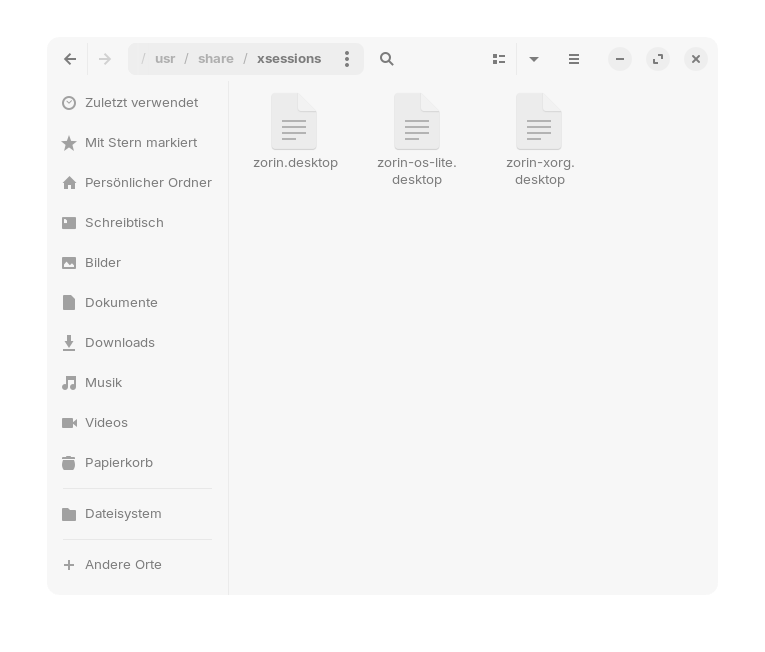
Can please someone copy the the content of the wayland-session of Zorin 17.3 core (the file /usr/share/wayland-sessions/) and post it here (or make a screenshot)? If the file contains the name and command in many languages, [de] or [en_GB] are enough. I only have three entries at xsessions but my wayland-sessions folder is empty, probably I have deleted all entries there.
Can you please post the content of these two files I'm not sure which one I need? I have probably deleted mine when I cleaned up the many login entries. Presumably I thought I wouldn't need them anymore. But now I'd like to use them for tests and I only have a Zorin lite bootstick which probably doesn't contain these files.
Thank you, Aravisian and Ponce-De-Leon! Is it possible that wayland doesn't work at all on Zorin lite even when Zorin desktop (gnome) is installed? I added the file but it doesn't work. When I try to select it at login it is not possible.
I added only the zorin.desktop of ponce. Do I have to put both files to wayland-sessions?
Edit: I also added the xorg session but when I select them they are not applied. Did I something wrong? I put the text into an empty textdocument.
xfce doesn't have a Wayland Session - at least not the Version that Zorin uses. And when You have the Gnome Desktop installed, You will not get a Wayland Session for xfce. It is not shared. You only have Xorg for xfce. If Gnome or another Desktop offers a Wayland Session doesn't matter.
I tried to see if another user could use my policy. This is not the case if the user only has a Destop user account and does not belong to the sudo group (and does not know my user password). They cannot obtain root rights.
@Aravisian I am a little unsure after reading your post/warning about removing password prompts in another thread.
Do you think it is a good thing that Gnome implements these strong security measures with gvfs in Nautilus, where every step/program requires its own authentication? I have often seen you write about how Gnome deliberately and unnecessarily restricts users and removes features.
Are these security levels necessary? Why don't other desktop environments (Cinnamon, XFCE) require such strict rules for their file managers Thunar and Nemo? Why isn't gvfs used to manage the rules for the filemanager when installing Thunar and Nemo in Gnome and why does Gnome allow less stricted rules for them?
Wouldn't you recommend using an special administrator account?
While I definitely stand by the claim that Gnome restricts users and removes features (both of which are well documented Gnome behaviors), this does not mean it applies here.
Gnome uses their own in-house system; GVFS, which is based on the Gnome Desktop environment having been stripped of its features, but secondarily relying on Gnome Extensions.
This sets Gnome apart from other Desktop Environments in that the other Environments tend to be meshed and filled out, full featured desktops. GNome is not.
Gnome and its ecosystem rely heavily on third party extensions rather than developer vetted desktop components. For this reason, Gnome is more strict and more focused on hardening given the prolific introduction of a large array of desktop extensions developed by independent outside parties.
GVFS is Gnome Virtual File System - and is therefor deeply integrated into Gnome Desktop environment.
Next, Gnome is geared toward Wayland.
And while a lot of talk on the internet is about Xorg being old and less secure, this is misleading.
Yes, there is the potential for exploiting the display manager in Xorg; however, it requires several factors to be overcome - and must be done locally from a user accessing the machine in most cases. Even then, it slams into the X-server, which contains it.
The entire point of the now almost seventeen year old Wayland is to do away with the (x)server, the middle man. It does not have one. It communicates directly with the kernel to the display.
And if it is hacked, there is no server to buffer that.
The developers know this - if you hack Wayland, you get access to the entire system.
Since Gnome is pushing for Wayland, they will harden their desktop in order to better support that weak link in the Wayland chain.
Do I agree with it? I have to. I think a long series of bad choices led to this and now, so invested, they are stuck with it.
Thank you for your explanation, Aravisian.
Does that mean it is less secure to use file managers other than nautilus in gnome?
And is it better not to use much third party gnome extensions because you don't know what they really do and may damage the system?
Realistically, however, we have not reached that point.
Talk of hypothetical security concerns revolves around there being concerns. Having a concern is not the same thing as having an advantageous attack vector.
The concerns are valid. However, there is little actual real world interest in hacking Gnome, right now.
Linux still has a tiny percentage of the market share.
Wayland is only just now being applied as a new default.
The primary threat in Gnome extensions is not due to malice, but due to accidental bugs and due to changes made by Gnome that deprecate or break extensions. Not hackers.
By far, the vast majority of Gnome Extension creators and developers are white hat - with good intentions and they follow security procedures in submitting extensions.
And Most sources of Gnome Extensions are vetted; just not all.
It just is not really a problem, right now.
But in the future, it can become one. If interest grows, it will bring malice with it.
I do support the existence of Gnome Extensions in principle because they are providing a good service. I would advise a certain bit of caution - since it is also reasonably common that extensions can have unwanted side effects, bugs or conflicts with Gnome, especially after updates.
As a security threat? Not yet.
Does it have potential? You bet. Is Gnome anticipating that? Yes. They would be foolish not to.
And you can keep ears to the tracks and eyes on the horizon - Gnome will maneuver to put an end to extensions in the future, just as they have ended so much already, or created soft-blocks like LibAdwaita. They have voiced distaste for extensions for years.