Right-clicking and selecting a text editor opens the xml file. Thanks you! I haven't tried that yet.
So json is not dangerous if I use it?
Right-clicking and selecting a text editor opens the xml file. Thanks you! I haven't tried that yet.
So json is not dangerous if I use it?
Intrinsically, no. You can think of it as a configuration file. I mean... what you do with it can be dangerous... but this is true of many things...
But it is not free running, self governing or dependent on a browser or internet.
I tried to move the policy file to /etc/polkit-1/actions.
This folder didn't exist so I created one and put the file into it. But with the file saved there it doesn't work to run pkexec nautilus.
One directory is for Policy and affects system-wide.
The other is for Rules - and this is per user.
But it may be that an .xml file is needed in order to define a Rule whereas a JOSN file would not be recognized. Sorry if I am leading like the white rabbit here.
Your project has us sailing unfamiliar waters. I am about ready to put a patch over one eye and grab some rum.
I'm sorry for confusing you. I didn't use the terms correctly when I was talking about polkit rule. I only have one xml file, and this defines a policy action. The two instructions that are available on the internet place this xml file under /usr/share/polkit-1/actions. This applies system-wide. I'm not sure if there is another location for a user installation of the policies, I haven't found anything.
If I have understood correctly, this only works with rules, and these must be saved in javascript format.
Unfortunately, I don't really have a clear understanding of this.
I don't understand why my policy doesn't belong there as the policies of nemo and thunar are also stored there. Another user who is not part of the sudo group would probably not be able to use the pkexec nautilus command because authentication would fail, wouldn't it? My police doesn't offer more rights than the already existing ones in nautilus or nemo - I believe. Please correct me if I'm wrong. And the police doesn't override the existing one of gvfs.
I'd like to have both on my system for the case an update overrides my policy.
I haven't quite decided how to set it up yet. Either
sh -c "pkexec env DISPLAY=$DISPLAY XAUTHORITY=$XAUTHORITY nautilus %f"Try it with open the Terminal and type sudo nano /usr/share/appdata/nautilus-sendto.metainfo.xml
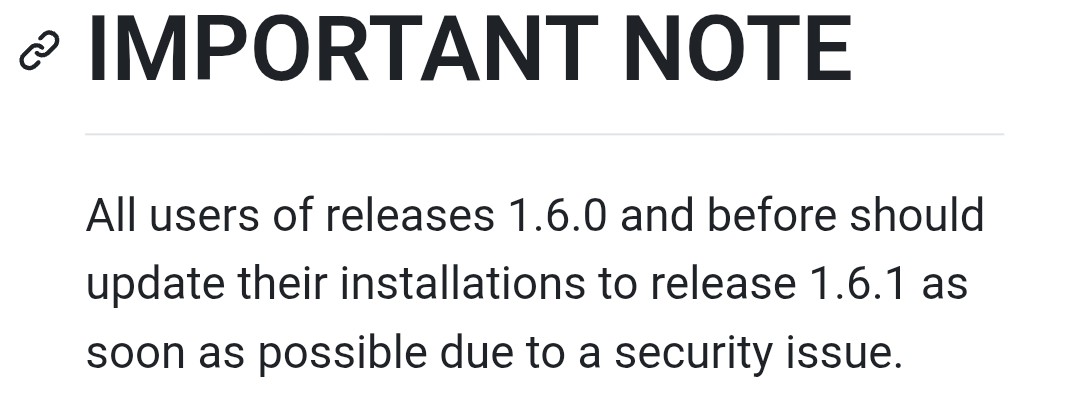
I'm a bit scary of using the .deb file for nautilus-actions because of this warning on github
and .deb files often are not automatically updated. I might miss the fact that a new version has been released that closes a security leak.
So I'm wondering if I could just create a launcher for "Nautilus as root" on the desktop that contains the complicated command
sh -c "pkexec env DISPLAY=$DISPLAY XAUTHORITY=$XAUTHORITY nautilus".
Edit:
It worked to create a starter for nautilus as root in startmenu and to add it to the desktop. I didn't find the icon for nautilus in mainmenu editor when I had to choose a location. Where is it saved? On the desktop the icon for nautilus could easily be found with the icon search "nautilus" and be changed, but not for startmenu.
I tried to purge and reinstall nemo, but it didn´t help. When launching nemo via terminal this is shown:
The dbind warning appears with all file managers, but the gtk warning only with nemo.
Is nemo laggy because of this warnings?
Why does nemo not support Zorin themes? How can it be solved?
That is the Reason why You should take Version 1.7.1.
On Startmenu, you have to navigate to the File. So, You have to go to /usr/share/icons/ and there in the Theme and look there for Nautilus.
I mean in future, will I be informed that I must update the program?
Does it have a graphical Interface? If yes, You could look for a Update Notification Option. If not or it doesn't have such a Notification Option, You have to look manually.
@Ponce-De-Leon answered the location; the icon is named nautilus.
No, it is not relevant. Each of those are non-performance issues.
When you launch the file manager in home directory - it will not access Root configurations, so you see that warning.
And Nemo is not integrated with Gnome Shell, so you will see that one.
Visually, you can see that the Zorin themes all work perfectly fine.
Why you see the warning: The Mint developers decided that if a system theme does not explicitly contain nemo centric field data, that it will throw that warning.
A bit dramatic...
It is informational and has no effect on performance.
Getting rid of the warning is harder. My themes all contain Nemo Window properties and it still throws that warning.
Which authority method of these three is the safest/ best? Which one would you prefer (commands simplified)?
sudo -i
nautilus
or
pkexec env display xauthority nautilus
or
pkexec nautilus with added policy for nautilus
I don't like it so much that a separate program for the user-defined actions of nautilus is needed, which is only available as .deb (if you want to bypass gkvs), but it offers the advantage of starting directly at the file to be edited and you don't have to care to close the terminal at the end.
This one is the most stable option, and in your situation, the most secure.
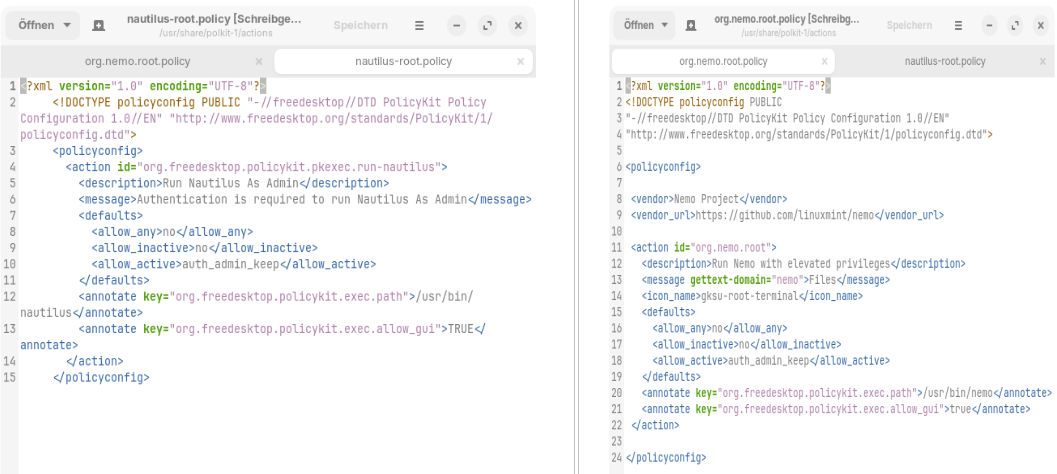
Is it really wrong to place them in usr/share/polkit-1/actions? I don't understand why the policies for thunar and nemo are allowed to be stored there and mine for nautilus is not and why it is overwritten by system updates as it is a brand new policy and not an existing one that has been modified.
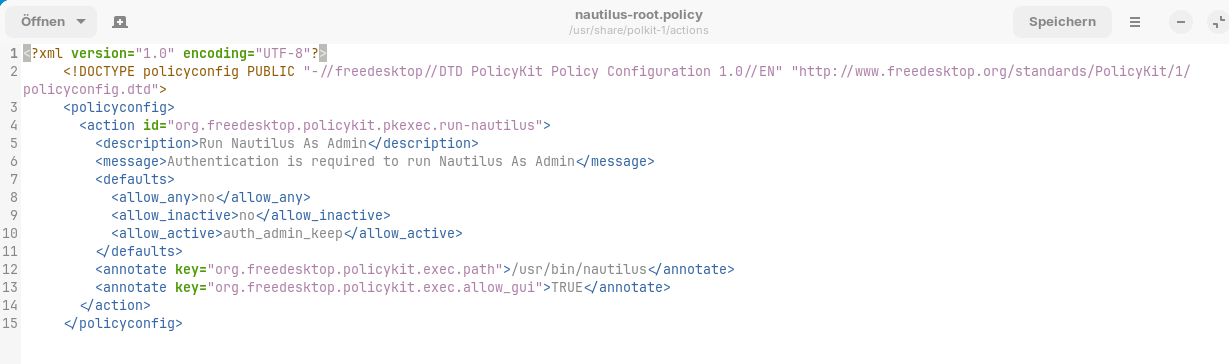
Thank you very much for your assessment, Aravisian! As the policy is the best, I´d like to ask again which one is better. This one I have tested:
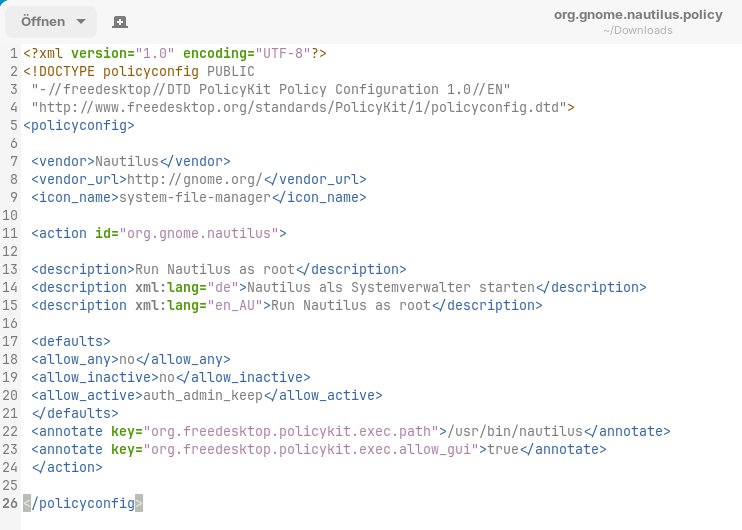
But I also found this one (I have modified it a little bit):
Does the action id name play a role?
It is not wrong - it can risk being overwritten by an update.
It also can allow system wide access, rather than per - user.
These are Vendor Supplied - therefor signed and versioned as part of their package definitions.
Root is considered, in general, owned by root, not you. Anything in PolKit is considered Root Owned.
Package management will clean out that root owned folder on the assumption it is safe to do so, to ensure remaining files cannot conflict with new updated files placed inside.
This is a basic function call, not an intelligent action.
But it makes sense. Very few users would do what you are doing...
But for the majority of users, unsigned, non vendor files in root can represent a security risk. It is foreign material.
GnuLinux Really Is More Secure than Windows - and this topic sheds light on one example of the many layers of security at work.
For clarity:
I have never done what you are doing either (and I thought I was a tinkerer), so I am following the Documentation on this.
Which sets /usr/share/polkit-1/actions as the location for System and Vendor actions.
But there is a place specified for User Defined actions: /etc/polkit-1/actions which is considerd Local Admin group. These are not cleaned during updates and are loaded after /usr/share/polkit-1/actions.
Why it did not work for you -
Given that the documentation says it would, and it works on Kali, I had to look up why it isn't. I doubted you made a mistake, so assumed it validly was not working.
And you were right:
Ubuntu/Debian builds typically use
--sysconfdir=/etc, but they do not enable an/etc/polkit-1/actionsscan by default — only/usr/share/polkit-1/actions.
Arch, Fedora, and openSUSE often do include/etc/polkit-1/actions.
So - the /usr/share/polkit-1/actions directory is your only choice...
Oops, that makes me doubt this plan if not even you have ever tinkered with these files.
I know it's tricky, so I'm trying to make sure as best I can that what I'm doing is right and safe.
Yes, it is critical. That is your lookup key. It must match the vendors pattern for the package.
Your two options:
org.freedesktop.policykit.pkexec.run-nautilus
Does this work since nautilus is not attached? I would think: org.freedesktop.policykit.pkexec.run-nautilus nautilus
org.gnome.nautilus
This one would not be associated with pkexec, defeating the purpose you are aiming for.
If you are trying to customize it in a way to not conflict with a vendor supplied file and get cleaned out:
org.forpli.nautilus.pkexec nautilus
And keep your fingers crossed.