"Files" (Nautilus) is not responding & Unkillable Process

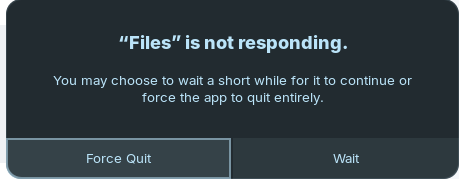
I use Zorin OS 18 (with fresh install) and sometimes when I open Nautilus, it gives 'Files' is not responding pop-up. Most of the time even though I select "Force Quit", it doesn't quit.

I used commands like "sudo kill -9 ID" and "sudo pkill -9 nautilus" etc but it's not even killable. (I guess since it's stuck in a system call into the kernel, cannot be interrupted, so the call is in uninterruptible sleep.) The only way is rebooting.

I created a bug report in Gnome Nautilus Gitlab Repo but they told me that GNOME 46.4 is too old for them and is no longer supported.

What should I do? Zorin OS 18 is too new but Gnome version it's based on isn't. Would upgrading the gnome version create problem?

During stucks, I can use other file managers such as Nemo and it's working perfectly fine. But it looks so old-fashioned so I prefer to use fixed Nautilus.

Did You tried it with a Reinstall?

sudo apt reinstall nautilus

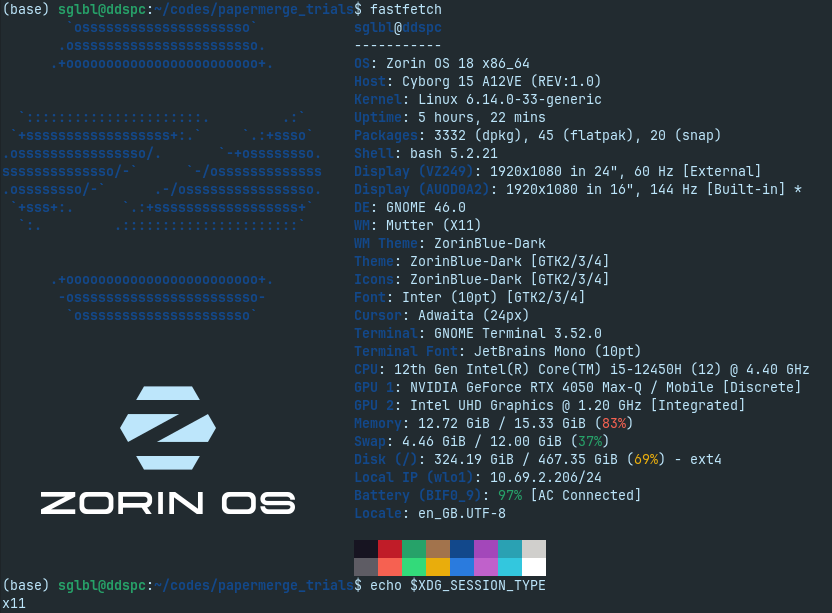
And did You installed any Nautilus Add-ons? Can You post Your Hardware Specs? Does Your System run in Wayland or X11?

Also see: Nautilus Freeze

My system:


I reinstalled it, if it happens again; I'll write here.

@Ponce-De-Leon I don't have any add-ons except this script to add "Open with VSCode" context menu item (https://raw.githubusercontent.com/cra0zy/code-nautilus/master/install.sh).
I had to install python3-nautilus first.

Okay, the System runs in X11. And only this Script for Nautilus ... What Nvidia Driver You have installed?

I have the same problem - sometimes Nautilus freezes and I have to force close it, which requires me to log back in. I had this issue with Zorin OS, and now I've been using Debian for a week - I'm still having the same problem (there with GNOME 46, here with GNOME 48). Of course, I have some similar extensions, and I've now disabled all but one or two of them. And I also have the Zorin OS Python Colors extension on Debian - maybe the issue is with reading Nautilus Python extensions.

1 Like

I only found solutions for nautilus to set an environment variable for gsk renderer, but I'm not familar with this.

About NVIDIA:

(base) sglbl@ddspc:~$ dpkg -l | grep nvidia
ii  libnvidia-cfg1-580:amd64                               580.65.06-0ubuntu0.24.04.4                   amd64        NVIDIA binary OpenGL/GLX configuration library
ii  libnvidia-common-580                                   580.65.06-0ubuntu0.24.04.4                   all          Shared files used by the NVIDIA libraries
ii  libnvidia-compute-580:amd64                            580.65.06-0ubuntu0.24.04.4                   amd64        NVIDIA libcompute package
ii  libnvidia-compute-580:i386                             580.65.06-0ubuntu0.24.04.4                   i386         NVIDIA libcompute package
ii  libnvidia-decode-580:amd64                             580.65.06-0ubuntu0.24.04.4                   amd64        NVIDIA Video Decoding runtime libraries
ii  libnvidia-decode-580:i386                              580.65.06-0ubuntu0.24.04.4                   i386         NVIDIA Video Decoding runtime libraries
ii  libnvidia-egl-wayland1:amd64                           1:1.1.17-0ubuntu0~gpu24.04.1                 amd64        Wayland EGL External Platform library -- shared library
ii  libnvidia-egl-wayland1:i386                            1:1.1.17-0ubuntu0~gpu24.04.1                 i386         Wayland EGL External Platform library -- shared library
ii  libnvidia-encode-580:amd64                             580.65.06-0ubuntu0.24.04.4                   amd64        NVENC Video Encoding runtime library
ii  libnvidia-encode-580:i386                              580.65.06-0ubuntu0.24.04.4                   i386         NVENC Video Encoding runtime library
ii  libnvidia-extra-580:amd64                              580.65.06-0ubuntu0.24.04.4                   amd64        Extra libraries for the NVIDIA driver
ii  libnvidia-fbc1-580:amd64                               580.65.06-0ubuntu0.24.04.4                   amd64        NVIDIA OpenGL-based Framebuffer Capture runtime library
ii  libnvidia-fbc1-580:i386                                580.65.06-0ubuntu0.24.04.4                   i386         NVIDIA OpenGL-based Framebuffer Capture runtime library
ii  libnvidia-gl-580:amd64                                 580.65.06-0ubuntu0.24.04.4                   amd64        NVIDIA OpenGL/GLX/EGL/GLES GLVND libraries and Vulkan ICD
ii  libnvidia-gl-580:i386                                  580.65.06-0ubuntu0.24.04.4                   i386         NVIDIA OpenGL/GLX/EGL/GLES GLVND libraries and Vulkan ICD
ii  libnvidia-ml-dev:amd64                                 12.0.140~12.0.1-4build4                      amd64        NVIDIA Management Library (NVML) development files
ii  linux-modules-nvidia-580-6.14.0-33-generic             6.14.0-33.33~24.04.1                         amd64        Linux kernel nvidia modules for version 6.14.0-33
ii  linux-modules-nvidia-580-generic-hwe-24.04             6.14.0-33.33~24.04.1                         amd64        Extra drivers for nvidia-580 for the generic-hwe-24.04 flavour
ii  linux-objects-nvidia-580-6.14.0-33-generic             6.14.0-33.33~24.04.1                         amd64        Linux kernel nvidia modules for version 6.14.0-33 (objects)
ii  linux-signatures-nvidia-6.14.0-33-generic              6.14.0-33.33~24.04.1                         amd64        Linux kernel signatures for nvidia modules for version 6.14.0-33-generic
ii  nvidia-compute-utils-580                               580.65.06-0ubuntu0.24.04.4                   amd64        NVIDIA compute utilities
ii  nvidia-cuda-dev:amd64                                  12.0.146~12.0.1-4build4                      amd64        NVIDIA CUDA development files
ii  nvidia-cuda-gdb                                        12.0.140~12.0.1-4build4                      amd64        NVIDIA CUDA Debugger (GDB)
ii  nvidia-cuda-toolkit                                    12.0.140~12.0.1-4build4                      amd64        NVIDIA CUDA development toolkit
ii  nvidia-cuda-toolkit-doc                                12.0.1-4build4                               all          NVIDIA CUDA and OpenCL documentation
ii  nvidia-cuda-toolkit-gcc                                12.0.1-4build4                               amd64        NVIDIA CUDA development toolkit (GCC compatibility)
ii  nvidia-dkms-580                                        580.65.06-0ubuntu0.24.04.4                   amd64        NVIDIA DKMS package
ii  nvidia-driver-580                                      580.65.06-0ubuntu0.24.04.4                   amd64        NVIDIA driver metapackage
ii  nvidia-firmware-580-580.65.06                          580.65.06-0ubuntu0.24.04.4                   amd64        Firmware files used by the kernel module
ii  nvidia-kernel-common-580                               580.65.06-0ubuntu0.24.04.4                   amd64        Shared files used with the kernel module
ii  nvidia-kernel-source-580                               580.65.06-0ubuntu0.24.04.4                   amd64        NVIDIA kernel source package
ii  nvidia-opencl-dev:amd64                                12.0.140~12.0.1-4build4                      amd64        NVIDIA OpenCL development files
ii  nvidia-prime                                           0.8.17.2                                     all          Tools to enable NVIDIA's Prime
ii  nvidia-profiler                                        12.0.146~12.0.1-4build4                      amd64        NVIDIA Profiler for CUDA and OpenCL
ii  nvidia-settings                                        510.47.03-0ubuntu4                           amd64        Tool for configuring the NVIDIA graphics driver
ii  nvidia-utils-580                                       580.65.06-0ubuntu0.24.04.4                   amd64        NVIDIA driver support binaries
ii  nvidia-visual-profiler                                 12.0.146~12.0.1-4build4                      amd64        NVIDIA Visual Profiler for CUDA and OpenCL
ii  screen-resolution-extra                                0.18.3ubuntu0.24.04.1                        all          Extension for the nvidia-settings control panel
ii  xserver-xorg-video-nvidia-580                          580.65.06-0ubuntu0.24.04.4                   amd64        NVIDIA binary Xorg driver
(base) sglbl@ddspc:~$ inxi -G
Graphics:
  Device-1: Intel Alder Lake-P GT1 [UHD Graphics] driver: i915 v: kernel
  Device-2: NVIDIA AD107M [GeForce RTX 4050 Max-Q / Mobile] driver: nvidia
    v: 580.65.06
  Display: x11 server: X.Org v: 21.1.11 with: Xwayland v: 23.2.6 driver: X:
    loaded: modesetting,nvidia unloaded: fbdev,nouveau,vesa dri: iris gpu: i915
    resolution: 1: 1920x1080~60Hz 2: 1920x1080~144Hz
  API: EGL v: 1.5 drivers: iris,nouveau,nvidia,swrast
    platforms: gbm,x11,surfaceless,device
  API: OpenGL v: 4.6.0 compat-v: 4.5 vendor: intel mesa
    v: 25.0.7-0ubuntu0.24.04.2 renderer: Mesa Intel Graphics (ADL GT2)
(base) sglbl@ddspc:~$ modinfo nvidia | grep version
version:        580.65.06
srcversion:     D7C8C442C3BCE53CF3296D3
vermagic:       6.14.0-33-generic SMP preempt mod_unload modversions 
(base) sglbl@ddspc:~$ sudo lshw -c display
[sudo] password for sglbl:  
  *-display                 
       description: VGA compatible controller
       product: AD107M [GeForce RTX 4050 Max-Q / Mobile]
       vendor: NVIDIA Corporation
       physical id: 0
       bus info: pci@0000:01:00.0
       logical name: /dev/fb0
       version: a1
       width: 64 bits
       clock: 33MHz
       capabilities: pm msi pciexpress vga_controller bus_master cap_list rom fb
       configuration: depth=32 driver=nvidia latency=0 mode=1920x1080 visual=truecolor xres=1920 yres=1080
       resources: iomemory:600-5ff iomemory:620-61f irq:186 memory:54000000-54ffffff memory:6000000000-61ffffffff memory:6200000000-6201ffffff ioport:4000(size=128) memory:55000000-5507ffff
  *-display
       description: VGA compatible controller
       product: Alder Lake-P GT1 [UHD Graphics]
       vendor: Intel Corporation
       physical id: 2
       bus info: pci@0000:00:02.0
       logical name: /dev/fb0
       version: 0c
       width: 64 bits
       clock: 33MHz
       capabilities: pciexpress msi pm vga_controller bus_master cap_list rom fb
       configuration: depth=32 driver=i915 latency=0 resolution=1920,1080
       resources: iomemory:620-61f iomemory:400-3ff irq:185 memory:6204000000-6204ffffff memory:4000000000-400fffffff ioport:5000(size=64) memory:c0000-dffff memory:4010000000-4016ffffff memory:4020000000-40ffffffff
(base) sglbl@ddspc:~$ nvidia-smi
Fri Nov 14 14:02:22 2025       
+-----------------------------------------------------------------------------------------+
| NVIDIA-SMI 580.65.06              Driver Version: 580.65.06      CUDA Version: 13.0     |
+-----------------------------------------+------------------------+----------------------+
| GPU  Name                 Persistence-M | Bus-Id          Disp.A | Volatile Uncorr. ECC |
| Fan  Temp   Perf          Pwr:Usage/Cap |           Memory-Usage | GPU-Util  Compute M. |
|                                         |                        |               MIG M. |
|=========================================+========================+======================|
|   0  NVIDIA GeForce RTX 4050 ...    Off |   00000000:01:00.0 Off |                  N/A |
| N/A   41C    P3            590W /   35W |      15MiB /   6141MiB |     16%      Default |
|                                         |                        |                  N/A |
+-----------------------------------------+------------------------+----------------------+

+-----------------------------------------------------------------------------------------+
| Processes:                                                                              |
|  GPU   GI   CI              PID   Type   Process name                        GPU Memory |
|        ID   ID                                                               Usage      |
|=========================================================================================|
|    0   N/A  N/A            3923      G   /usr/lib/xorg/Xorg                        4MiB |
+-----------------------------------------------------------------------------------------+
(base) sglbl@ddspc:~$ 

Did You already tried:

Yes I already tried that.
Today, the error occured again.
This time it's because of rclone (rsync for cloud) onedrive connection problem.
Other file managers give error message but clicking on one button is enough to use the rest of the functionalities.

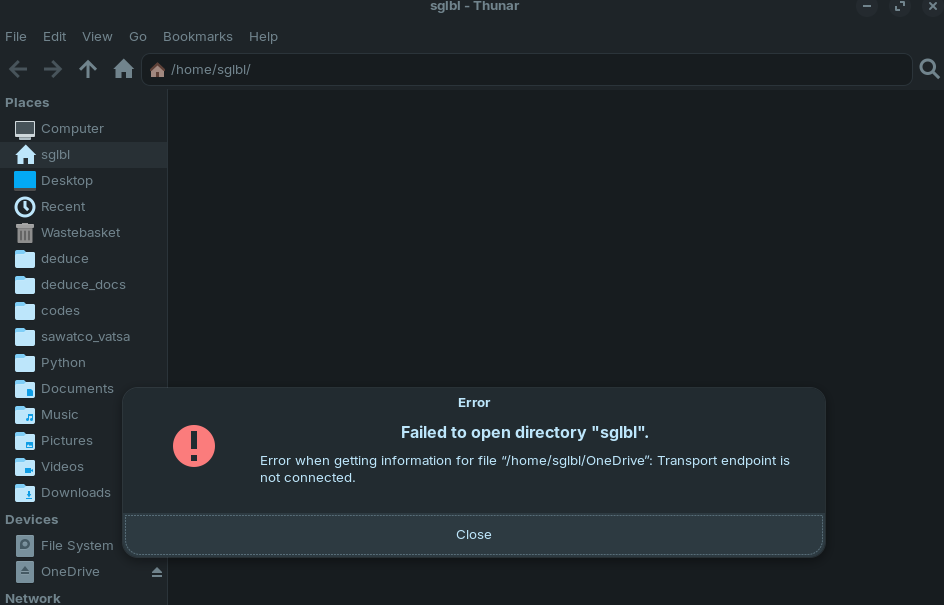
Nautilus:

Thunar:


In thunar, clicking on close closes the popup and the rest works.

Nemo:


Nemo does not even throw error unless I open OneDrive folder. (which should be the expected and the best case)

Note: I use a startup script to connect to OneDrive:
sh -c "rclone --vfs-cache-mode writes mount onedrive: ~/OneDrive"

Back to the main question, can I upgrade nautilus version?
Or will be there Zorin OS 18.1 with a more robust file manager/version than Nautilus 46?
Developers of Nautilus refuse to help for v46.4.

No. This will stay on this Version.

But when You have this Problem in 3 File Managers, maybe the Problem isn't the File Manager. Maybe it is the OneDrive Integration.

Onedrive connection problem doesn't happen so often. So when it happens it's problem of onedrive. But the issue is it's blocking all nautilus, not just that folder. That's a serious bug, other file managers don't have this problem.

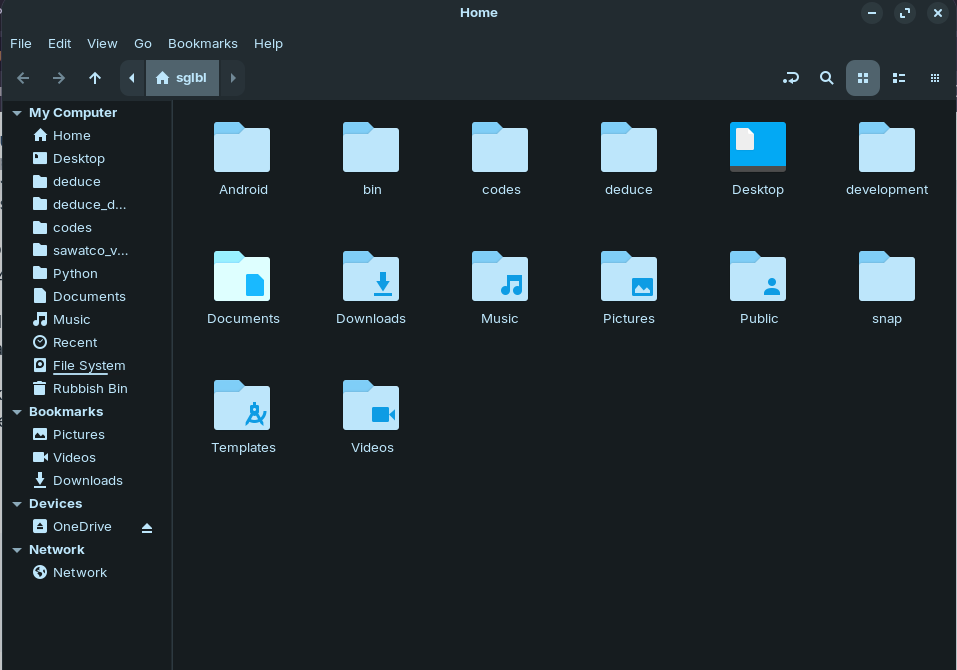
Yesterday I tried to make nemo as default but unfortunately it had even more problems especially Bookmarks (like in the screenshot, it's mixing bookmarks with home folders and sometimes it doesn't show home/). I switched back to nautilus. Instead of a launch-at-startup script, I created a script file that launches OneDrive.
(Unfortunately GNOME developers also removed the ability to run a script from nautilus via double clicking.)

Thank you for the help.

You could try if it helps to increase the check-alive-timeout, but I'm not sure.

1 Like

I think, You have to make it executable before. To do that, make a Right-Click on the Script, click on Properties and on the Properties Site is at the bottom a Toggle, You have to activate to make it run as a Program.

I used chmod +x ~/bin/OneDrive. But it doesn't become executable by click. Only with terminal or right click -> run as a program.
But I created a desktop item/entry opt
pn to be able to set as default opener.

cat <<EOF > ~/.local/share/applications/bash-launcher.desktop
[Desktop Entry]
Name=Bash Launcher
Exec=bash -c 'bash "%f"; $SHELL'
Terminal=true
Type=Application
MimeType=application/x-shellscript;text/x-shellscript;
Icon=utilities-terminal
EOF
# Then update desktop entries:
update-desktop-database ~/.local/share/applications/

Also one of the other problems (off-topic) Linux File Managers have is none of them is able to "Show Recent Folders". They only can show recent files.

Actually Browser File Chooser (not nautilus) had this option, but GNOME developers also removed this feature. But they forgot to remove shortcut to show it, at least it's still possible to see recent directories by clicking on Alt R on Gtk File Chooser. I heard that they changed the file chooser on GNOME 47 but I haven't able to try it yet.

Yes, they have. Until this Nautilus and the File Picker were seperate Programs. So, even when the File Picker looked similar to Nautilus, it wasn't Nautilus. With Gnome 47, they have changed that.

You might be right, even though my OneDrive is disabled I got the "Files" is not responding error again. I'm removing both python3-nautilus and ~/.local/share/nautilus-python/extensions/ directory to make sure.
1 Like

After re-enabling my extensions today, I encountered another error, but it was for a new extension

1 Like