Hello friends, I've noticed that Nautilus still freezes from time to time, and it's always random. Do you have any idea what might be causing it?
I've no idea, but I have a similar problem with my file managers sometimes not loading correctly. It helps to press ctrl+r to reload it.
Did you try to switch to Xorg?
Do you have only local files or included network shared files?
Do you use other third party gnome shell extensions?
1 Like
Does it happen with a lot of Files in a Folder? Or a lot of Folders and Files in a Directory?
1 Like
Hi, um, that's how it is: when I start Nautilus, every now and then it just freezes randomly. I don't know why, but it was already happening in beta. Sometimes the background in Zorin OS also disappears from the desktop; when I restart the desktop, it comes back. I only use Nautilus Admin as an add-on, but it was like that before. I meant the crashes. I use Wayland.
Hmm ... You could try it with switching to Xorg like @Forpli already wrote. Or You could try it with a Reinstall:
sudo apt reinstall nautilus
Or as an Alternative: Try a different File Manager. Nemo is a nice one in my Opinion. If you want try it, You can install it with sudo apt install nemo or You install it to compare if the Freezes happens with it, too.
Oh, and could You post Your Hardware Specs please?
1 Like
Hi, sorry that I'm just now answering.I've been testing it since then and, strangely enough, this only happens very rarely at the moment, but I've noticed that the nvidia simply creates bugs, for example when starting up, sometimes the lock screen just doesn't come on and I have to go into standby for a moment and then it, without the nvidia it doesn't seem to happen, that's really strange.
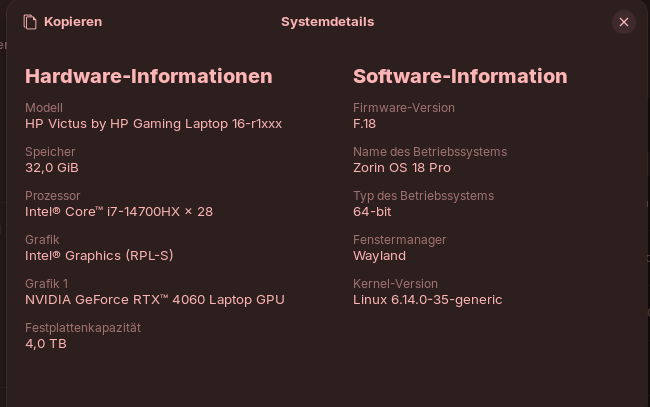
Hello. Hybrid GPU here with Nvidia drivers - there is a similar know issue with Files (aka Nautilus) - at least on Ubuntu and Ubuntu based distro with Gnome (cannot find out the bug report, sorry).
I have this problem too but only on Xorg. I never experienced it on Wayland, i use it daily.
This problem made me used Kubuntu in the past months - i do like it a lot but i prefer Gnome so far ; i started using Linux on Gnome 2 ! 
So i had to find a balance, because i have to use Xorg with Krita which is not ready yet for Wayland support (shortcuts such as zoom; rotate, make it crash).
On Zorin18, this bug looks even worst than on Ubuntu. With Ubuntu, Files and gnome-terminal also, just don't launch when you click on it. Have to wait a bit. It's not the normal way even on Xorg with this kind of computer ...
On Zorin it's kind of "freezing" ... But it rarely happens actually.
I will check if it happen only with Nvidia On demand / Performance or if it does happen with Intel.
On Nvidia "on demand" mode, animation with Files looks strange sometimes when you minimize - forgot if this happens also on both Wayland and Xorg.
Did it help to switch to Xorg?
On Your Picture, I can see that Your system runs in Wayland. I would suggest to switch to Xorg. To do that, go to the Login Screen (not the Lock Screen). click on Your Profile so that the Password Fieeld appears. When it is appeared, You should see a Gear Icon in the bottom right Corner. Click on it and choose the Option ''Zorin Desktop on Xorg'' and then log in.
And what Nvidia Driver did You have installed?
2 Likes
Strange animations of Nautilus disappear on Xorg / Intel when disabling "animations" from > Zorin settings > effects.
I tried on the laptop of my daughter (T460 Lenovo).
So, I noticed that when I switch to X11, nothing seems to change except that the icons on the desktop move again and not under Wayland. Nautilus only rarely lubricates. I haven't noticed it under X11 at the moment. I'm back at wayland right now.
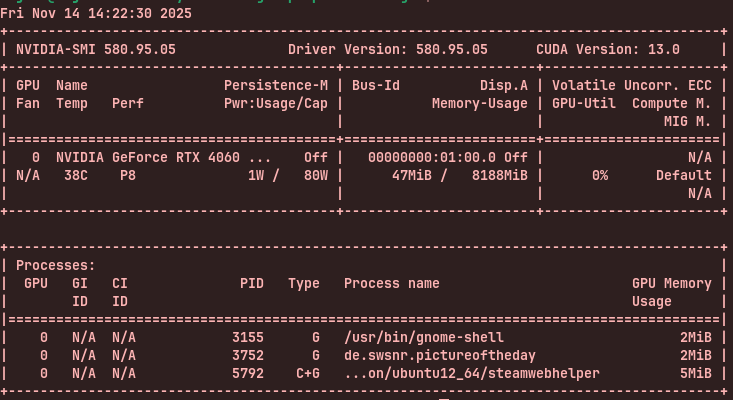
Hi,
I have had the same freezing up and not being able to restart Nautilus since I installed Zorin 18 Pro (not ever an issue with Zorin 17.3 Pro). Not sure what the root cause is, so I tried the 'Thunar File System' app and that is really nice and no problems so far! Another little annoying bug I found with the Files in Zorin 18 was that a Windows Share on my network (SMB protocol - 2TB WD Passport hooked up to my ASUS router) needs to be re-connected every time I log in now (I power down every night). What is up with that? I don't see an option for 'persistence' on Nautilus for this.
3 Likes
Hey my Zorin friends, I seem to have found out the problem and it only happens if you leave a Google Drive or NextCloud account attached, for example. At least it happens then, if they are not hooked, it does not happen afterwards. This is my current state.
1 Like
For me, this solved it: Nautilus (file manager) in Zorin 18 randomly stuck and thumbnails problem
Uninstalling folder-color no longer causes Nautilus to freeze.
1 Like
Hybrid card here. Problems of freeze seems to disappeared on Wayland session. I only have Zorin in VM right now, so i cannot tell much, but i have experienced the same kind of trouble on many Ubuntu's versions. It never happended with Dolphin (Kubuntu), Nemo (Mint) or others files manager. I wish this bug was fixed in new versions ...
This topic was automatically closed 90 days after the last reply. New replies are no longer allowed.