I recently switched back to Zorin OS from Debian, and this issue is driving me crazy. I usually encounter this problem 6 to 7 times a day and have to open the terminal and run killall -9 nautilus so the file manager closes completely and I can reopen it. It’s really frustrating for an operating system
1 Like
Even though I solved the issue with what I said before, I was still getting error sometimes.
I found the issue that python3-nautilus still had some leftovers.
Debugging it was easy, just run nautilus on the terminal and it's gonna show some warning such as:
_ImportError: could not import gobject (error was: 'No module named gi.*gobject’)*
(nautilus:5395): Nautilus-Python-WARNING: pygobject initialization failed*
(nautilus:5395): Nautilus-Python-WARNING: nautilus_python_init_python failed*
This initialization was causing the issues. Removing everything about this solved my issue.
Hope it helps @Abdulhalim @fegauthier
1 Like
Hi. Using Zorin 18 Pro on my Dell G7 7700 (work machine). LUKS enabled, full M.2 drive used with default FS. 32Gb RAM, no emulation enabled, clean install, fully patched as of today. Trying to backup my work data in increments to an external USB3 Transcend 4Tb drive with NTFS enabled and Bitlocker. Copy starts with high throughput then trickles down to almost nothing. I cannot kill Nautilus. Kill, Terminate, nothing works. CLI commands do nothing. I did not try and reinstall Nautilus though. I love Zorin, I've paid for it, but I cannot use it if a basic 32Gb batch copy fails like this, with me having to run CHKDSK on a Windows OS to correct forcefully dismounting the external drive just to shut down Zorin. I'm not a linux guru but this has happened to me on Zorin Pro on my desktop at home with a different external. What does work is using a 3.5" external drive with AC power. The copy always works done this way with a powered external drive. Zorin is not ready for the Enterprise environment, as much as I wish it were, and for me to have to go back to Windows is out of the question. File copying.... How much more basic an operation can one get and hope to have work, but it doesn't. At least not for me with the 2.5" USB drives and my various machines. I wish I could use an app like SuperCopier on Zorin but I suspect it will use Nautilus and not resolve my issue. Not even opening the terminal and executing Sync helps the situation.
Can confirm the same issue occurring randomly.
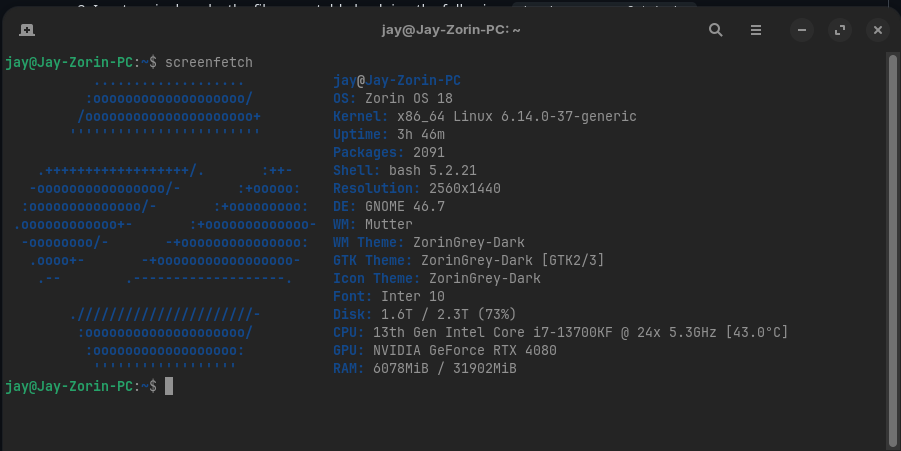
ZorinOS is installed on my primary 500GB SSD, with a second data 2TB SSD with my files/games etc. on. No Python errors when running nautilus on the terminal.
Second disk is mounted automatically to /media/data/. Fstab was modified using the built in mount options in the Disks app, not by hand.
/dev/disk/by-uuid/78e06637-c5df-4e72-a7f5-dd036820944e /media/jay/Data auto nosuid,nodev,nofail,x-gvfs-show 0 0
1 Like
UPDATE: Hi all. I installed Krusader (looks just like Total Commander). I've copied over 300Gb of data to the same external drive without one issue today. It just works. It needs Kate for text file viewing within the application if that's important to you. Consider my whining over.
Hi,
I'm having similar issues with nautilus, as in: It won't open anymore at all. I'm using dolphin right now to navigate, but Nautilus is kinda important for this OS..
If I try to open it from the terminal, it freezes while "Connecting to org.freedesktop.Tracker3.Miner.Files". I've tried re-installing, killing, restarting the system. So far nothing helped.
This install of Zorin 18 Core is no two weeks old and I haven't added anything (knowingly) to Nautilus. Happy to try "Files" (Nautilus) is not responding & Unkillable Process - #22 by sglbl but I don't know how exactly. @sglbl could you elaborate on how to remove the directories?
Thank you!
Take a look at this:
3 Likes
My case was specific to extensions and OneDrive integration.
Yours probably have another issue.
Unfortunately they refuse to help and blame us:
You can make other file explorer such as thunar (or dolphin..) default:
2 Likes
Thank you man, that did the trick!
3 Likes
At this point it's better if the Zorin team just ditch Gnome and find another solution. I'm having the same problem, brand new system, everything works, and then you try to open the File explorer, and it doesn't work anymore. The only solution for me is the reinstall command, but that's not how things works.
I was considering paying for PRO, but paying for a system that doesn't work properly? Better to just go back to Ubuntu and chose a flavor that doesn't use Gnome at all.
2 Likes
As a final note, I just gave up. I use the system for work, so I need it to work consistently, and right now, hard formatting this to another Linux distro will be a pain, and so far it seems the Nautilus Version Zorin uses is an older one and only Zorin maintains it, so whatever is happening here, it's something they need to fix it, so I searched for solutions. If you're interested this is what I did:
I installed Nemo and I forced it as the default files opener. Since Nemo is also based on Nautilus, it shares the same icon, so I did this:
sudo apt install nemo
After installing Nemo, around what? 37MB of space, I went down into fixing things because because the system still uses Nautilus, and we can't just purge Nautilus, I'm sure it will break the whole system if we do.
So, I did this, in order, one command at a time:
xdg-mime default nemo.desktop inode/directory application/x-gnome-saved-search
Followed by these two (one at a time too):
gsettings set org.gnome.desktop.background show-desktop-icons false
gsettings set org.nemo.desktop show-desktop-icons true
I'm pretty sure this should also 'Remove' Nautilus from search, but for me it didn't. However it did the trick, even if I click on the start menu shortcuts, it uses Nemo instead of Nautilus, so I just pinned Nemo to my taskbar, and unpinned Nautilus.
I really hope this gets fixed, a lot of people came here from Windows, lots of these users don't want to dance around solutions until they find something that sticks, you know?
Either way, this worked for me, now I have a file manager that is not suddenly not opening for no reason and stays in a loop of "Kill process or wait" and never fixes itself. I'm tired of reinstalling Nautilus for it to fix the situation for a random amount of hours until its back to not working again.
Hope this helps any of you who are having issues with the Files being stubborn. 
maybe this could help :
1 Like
Unfortunately my biggest problem with Zorin was also nautilus:
I managed to make a zorin-like theme on Dolphin:
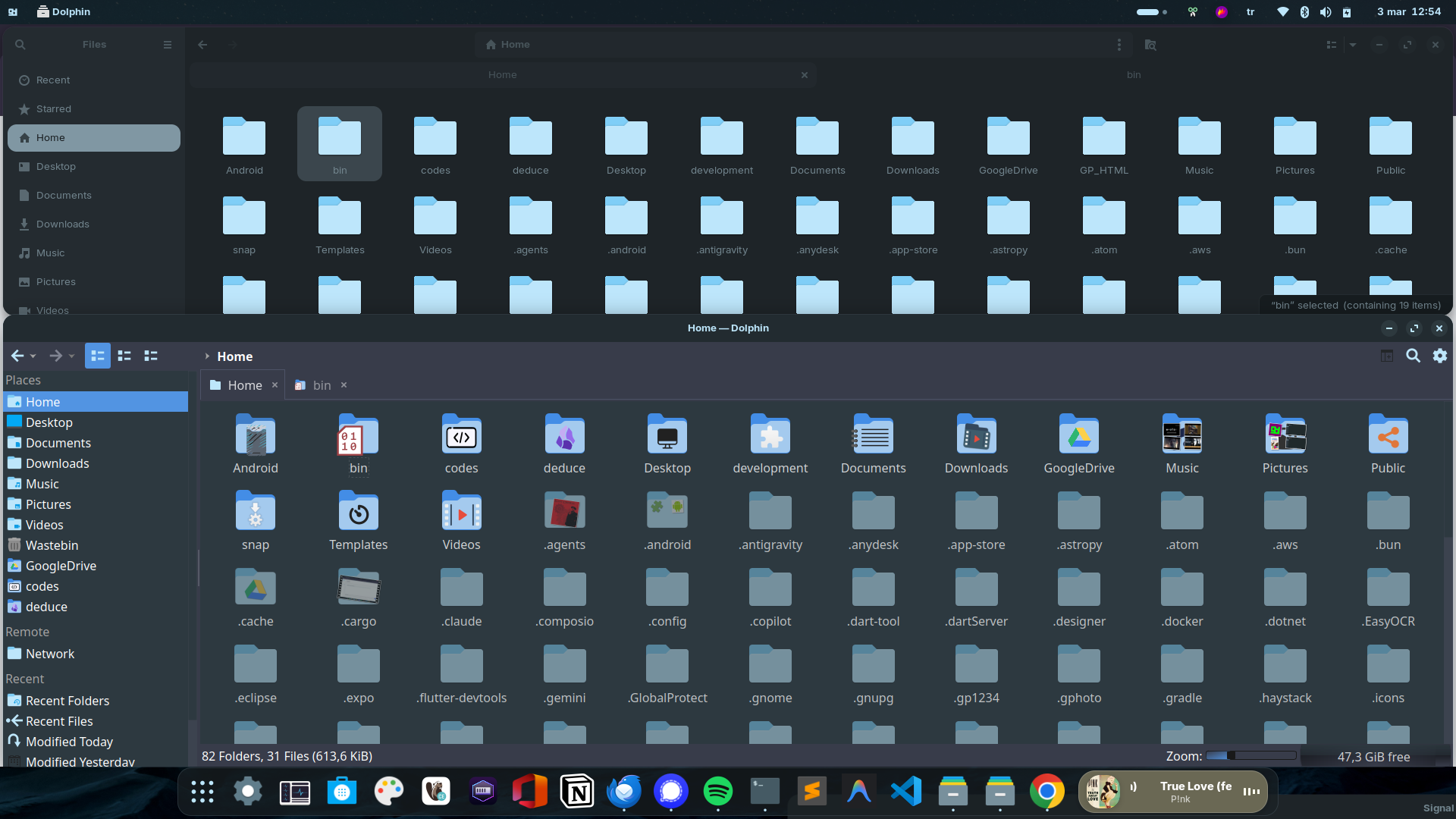
Compared to Nautilus, Dolphin has these features:
- Show hidden items with a different color
- Select predefined icons for folders (similar to Windows)
- Show recently accesed folders (not just files, none of the file managers had this feature)
- Show folder content thumbnails + previews (similar to Windows)
- Run desktop files
- Start file manager from the latest state (windows,folders,tabs) on startup
- Support typeahead search instead of searching recursively on all subfolders when you press a key
- It doesn't lag randomly unlike nautilus
@AZorin @zorink I think Dolphin must be the default file manager on Zorin OS 18.1, nautilus prioritizes minimalism to the point of removing genuinely useful functionality.
1 Like
So, to fix an issue, I have to not use a feature?
Wow.
I had the same issue on Ubuntu 24.04 (GNOME 46) so I think issue is directly related to GNOME. Since they refuse to help for this version, I am not sure if it'll be fixed on next month's Ubuntu 26.04 (GNOME 50)
it's not a feature but an extension, they follow Ubuntu LTS so they removed it since this extension, but many other things you've installed may cause a nautilus crash, gnome extensions, another nautilus extension, pending update, kernel, etc...
Zorin wlll not update to 26.04, they only use LTS, so for now 24.04
Yes, nautilus is really problematic. instead of running asynchronously, anything on a random thing can block nautilus to work.
I'm maybe lucky because since I removed folder-color, no more crash of nautilus
1 Like