First impressions trying (and failing) to move from Win10

I'm a decades-long Windows user (and not a complete noob) and every couple of years I find myself trying to switch to Linux and then quickly giving up and going back to Windows. Usually I try Ubuntu, but this time (triggered by the forced Win10-Win11 upgrade) I chose to try ZorinOS.

A couple of first impressions, and my conclusion: nope, not this time either :face_with_diagonal_mouth:.

The installation. After a succesful 'live' run from a USB-stick, I decided to try a dual-boot install, and keep my Win10. Although I had enough free space on my C-drive, it was all reserved by Windows, so I had to shrink the partition under Windows, which was impossible because of several files that were unmovable. A hibernation file, a paging file, whatever. After some googling and tinkering and defragging (where the average Windows user would already have given up imo), I managed to shrink the Windows partition enough to have room for ZorinOS. In BIOS I disabled the secure boot-thing because I read somewhere that it could mess with Nvidia drivers, not sure. The ZorinOS install from the USB-stick then went flawlessly :+1:.

First impression: this looks familiar, just like Windows :smiley:! It even has the Start-button and key shortcuts like Win-E opens a file explorer, nicely done! Resolution looks good, sound is playing, many (but not all) video files even play out of the box without having to install codecs etc. My usual browser Brave was already installed by default, and it's easy to sync and get all (well, most) of my settings and extensions going again. Steam wasn´t hard to install either, and a quick install of a simple game also worked. Good, good...

GPU fans became a bit loud though and I saw somewhere that thermal throttling was set at 95C, a bit high and apparently impossible to easily change :neutral_face:. Under Windows I have several tricks (Afterburner etc) to change this behaviour. Not so easy apparently under Linux, but okay, something to figure out later...

Next, trying to see and access other machines on my LAN, a Win10 laptop, a NAS, etc. Nope, doesn´t work. It seems there is no Samba installed. Had to google how to install Samba. Still nothing. Change the Workgroup name in a config file, okay. Still nothing. Stopping, restarting services, rebooting, nope. Adding other stuff from tutorials like Sharing Files between Ubuntu 22.04 and Windows Systems with Samba – Answertopia Nope, still nothing. Wait, it says I can right-click on a folder to enable Local sharing. But that option doesn´t even exist, maybe it's for an older Zorin version? Argggh :face_with_spiral_eyes:!

And see, here is where it all quickly fallls apart again. Within an hour I find myself googling, copying error messages, pasting magical sudo-formulas I found on a forum into terminal windows in the hope of getting things to work...

I'm sorry (really am), but again: the annoyance and frustration of trying to climb the Linux learning curve for me is larger than the annoyance and frustrations of being forced to upgrade to Windows11 with its stupified interface, and then disabling all of its telemetry and AI :poop:. Although ZorinOS looks great, it's still not ready for the average Windows user, unless that user has some Linux-savvy friend who sets it all up for him, or unless that user enjoys spending hours browsing online forums to look for answers.

Maybe I'll try again in a couple of years :neutral_face:.

At least you tried, kudos to you for that. Although I certainly would've liked that you asked here first to see if we could've helped you out.

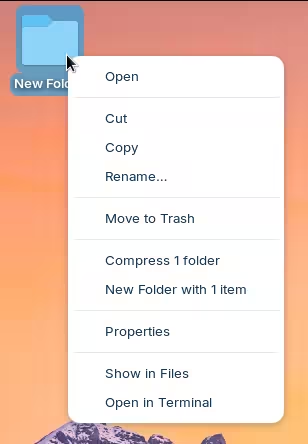
Samba is not installed, but the file manager has its own implementation for establishing network shares. This is both good and bad. One the one hand, this can be confusing because the option to create a network share will not appear if you right-click a folder directly on the desktop:

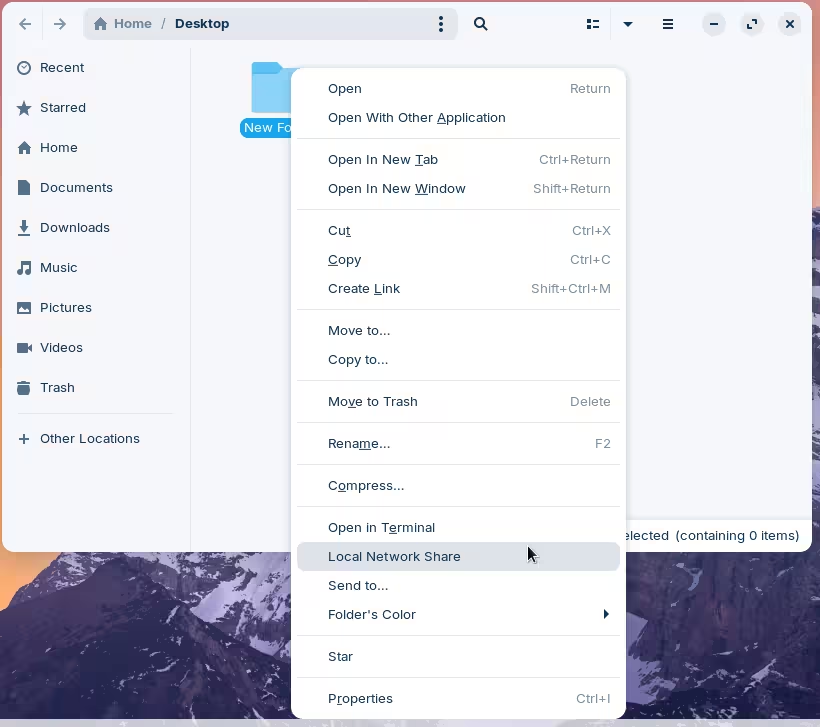
But if you do the same through the file explorer, it will give you that option:

On the other hand, it requires no configuration or anything.

If you think Windows is free of this type of nonsense, let me share my experience setting up Windows 10 after years of successfully doing the same with Linux:

2 Likes

That shouldn't be neccessary. When You install Zorin, You can use the Option ''Install Zorin alongside Windows''. then You get in the next Screen a toggle for how much Disk Space You want use and the Rest makes the Installer automatically.

Yes, some codecs and Packages have to be installed. That is right. Especially the proprietary Software. The most Stuff, you can find in Gnome software when You scroll down, there is a Botton called ''Codecs''. For the other Stuff, You need the Terminal but that would only one Command to install it all.

What GPU do You have? Nvidia? AMD? Intel? For AMD and Nvidia, you could try the Tool LACT.

I can give You a suggestion: Try Linux Mint. It is made for Beginners, too but offers even more graphical Ways to handle stuff - especially with the Codecs. there you have a Welcome Screen with a driect Link to install them. You only have to click.

1 Like

Thanks for the reply. My main intention was to give some (well-intended) feedback, that all this unfortunately still isn´t quite ready for Win10 users. Not without extensive browsing and searching or asking on forums for things that are imo basic for a smooth transition. And I also needed to vent some frustration that after all these years I still almost immediately end up going down a dark rabbit hole of browsing forums for (outdated) solutions and copy/pasting (outdated) sudo-formulas in terminal windows hoping this would magically solve something. (install samba, okay, which one... maybe it worked? try something called findsmb?... doesn´t exist anymore... now smbtree or something... etc etc etc.)

With many things in the browser and clouds nowadays, it gets easier for Windows users to try something else. With sound and graphics working, Steam games working, Linux is almost there imo. (Personally I also need Ableton and Fusion360 to work, I haven´t tried installing those yet.)

Two things I've quickly noticed that don´t work yet (and which imo Windows users expect):

  • The new Linux pc should have access to the existing LAN people probably have in their homes. With other pc's, NAS, discoverable and accessable, file sharing etc.
  • For me the keyboard doesn´t work like it does in Windows. I've set it to ¨US International with dead keys". But unlike this exact same setting in Windows, here it also puts accents on for example the Ĺ„ or the Ĺ•. It seems I need to edit some xmodmap for these keys, or change my entire way of typing, meh.

When Zorin does its best to resemble Windows, it should imo also fix these two things.

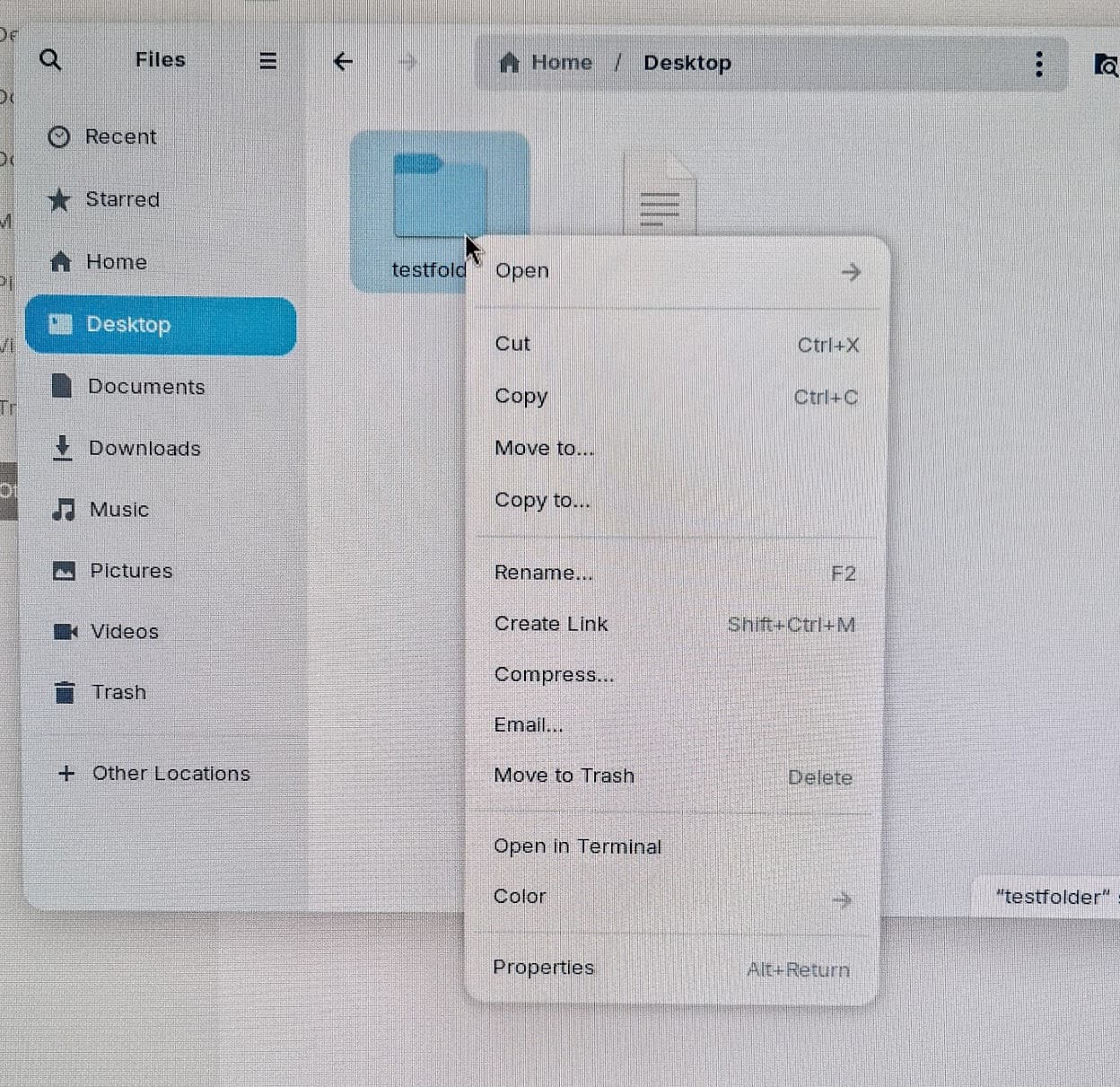
For me that option doesn´t show, as I tried to say. I don´t know how to make a screenshot with the context-menu open, so here's... a photo :grimacing:. Looks entirely different.

Windows is getting worse every year since Win7. Trying to force online Microsoft accounts on people, Outlook, OneDrive, the telemetry, and now the AI nonsense. You've got to jump through an increasing number of hoops to remove all the bloat. There's good reason to try to move to alternatives. My intention isn't to say that Windows or Linux (or Zorin) is better. My intention is to say that after all those years, there's quite some work to still do if you want to lure Windows users to Linux. And times like these, with forced Win11 upgrades, seems like great opportunities.

Really great that Cyberpunk2077 now runs ( :+1:), and I can click a familiar Start-button (personally I would happily learn a new GUI btw), but when users (like me) still quickly end up having to open black terminals to enter commands or edit config-files, Linux is far from ready.

Maybe (I don´t know if this is ever being done) the Zorin (or other distros) devs should simply quietly sit next to a (savvy) Windows user for a couple of hours and observe all the hurdles that still exist :face_with_diagonal_mouth:.

2 Likes

I'm not sure but I don´t think Zorin (Linux) can 'steal' disk space that has locked Windows files on it.

If Linux distros want to lure Windows users and create a seamless transition (at these Win11 times), this should be an easy clickable option during or immediately after installation (iirc there was already a question to install some proprietary stuff?) and not need the Terminal for anything. Just like regular Windows users don´t need to open CMD or edit the registry or edit config-files in text-editors. Just making a nice Start-button in the bottom-left corner isn´t enough.

Thanks for the tip.

Thanks, maybe I'll give that one a try too. I just installed Ubuntu on an old laptop, and somehow I managed to get it to access my LAN and see my Win10 pc, although not automatically.

1 Like

Thanks for providing your valuable feedback, I hope the Zorin dev team takes a look at it, and can think of some improvements they can make, in order to provide a more seamless experience, out of the box. :+1:

When I first joined Zorin OS, I started with OS9, which was released in 2014. It was a learning curve for me absolutely. It did help that I was already a tech user, coming from Windows 7. (Literally best Windows OS that Microsoft ever made, IMHO)

You are correct however, I did have to do forum searches, ask questions, learn new things. I've been on Linux for 11 years now, I skipped the Windows 10-11 BS, and I am happy to be here. With a few bumps in the road, my experience has been mostly positive.

Now, technically, the first time I tried Linux, was back in the 2000's with Suse Linux, the one in the green box. I absolutely hated Suse Linux back then, because I couldn't get anything to work! My CDROM drive, nor the internet was working out of the box.

I was put into a catch 22 with Suse Linux circa 2000's. If Suse needed a driver to make internet access work in the browser, I couldn't download it from the net. Since it needed a CDROM drive, well, driver, then I couldn't load a driver from the ROM drive either.

It was that truly awful experience, that made me say, nope, screw this, going back to Windows. It wasn't till my Windows 7 installation became corrupt, no way to fix it, a couple years later, I tried Zorin OS 9, and wouldn't you believe it, everything just worked, right out of the box.

The only real issue OS 9 was well known to have, is the boot logs/info/loader whatever, got filled up, and system would no longer boot, until a terminal command was inputted, to clear that boot cache. Once OS 12 was released, it fixed that problem with automation cleaning.

I stayed on OS 12 for the longest time, longer then most! Then I switched to OS 16, and I'm only still on it today, as I am waiting for the upgrader to be ready, so I can simply upgrade to 18, instead of a traditional wipe and install.

Yes, I've tried other Linux distros, like POP OS, and Makulu Lindoze, but I always returned to Zorin OS, because for me, it is the best. :slightly_smiling_face:


1 Like

Switching from Windows to Linux involves a learning curve. Zorin makes the transition easier. You can learn a lot in the process.

3 Likes

True that! I'd still be a happy Windows user if it had continued on track.

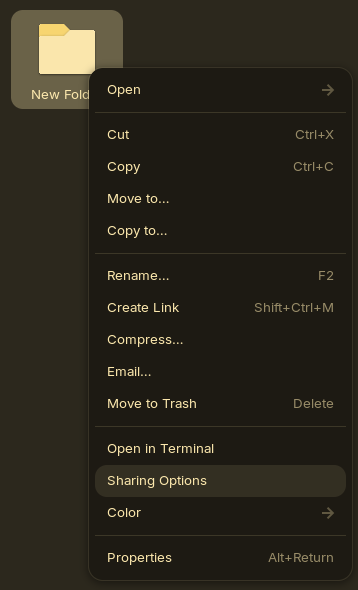
By the way, I've just finished installing Zorin OS 18 and noticed that the share option is not there by default. My previous screenshot was on a VM running Zorin OS 17, which has that by default. That is definitely an oversight on the Zorin OS developers. Although I wouldn't go too hard on them as they iron these things out shortly after release.

To get that fixed yourself, you can install nautilus-share from the command line:

sudo apt install nautilus-share

And that should do it (though still only visible through the file manager, not the desktop directly). I still have to test this more thoroughly in regards to connectivity, but I've been busy these past weeks. I'll try to post an update or a more comprehensive tutorial for it.

1 Like

I agree, there's still a ways to go. The fact that many people are trying Linux - and a few are sticking with it despite the learning curve - shows just how badly Microsoft is doing.

I flip-flopped between Zorin and Mint in my first year of using Linux. I eventually stuck with Mint and have been happy with that choice. I've had fewer hardware and compatibility issues with it compared to other distros.

I've now been on Linux fulltime over two years. Here's my secret for how I stuck with it: when I hit a problem I couldn't easily look up, I came here or to the Mint forum and posted my question. It's a pain at first, but the reason I always gave up on it in the past was that I was trying to figure things out alone.

3 Likes

The only true windows alternative distro is MINT, nothing even zorin can come close to it, if you want to try linux for the first time thats the only option. In my opinion mint even surpasses windows on how easy to use it is.

I do give credit to Mint, but not everyone has multiple desktops (not saying that shouldn't be covered) but you should really take a look at Q4OS and its Look Switcher. Also let's not forget that Zorin only has 2 devs, a lot less than Mint.

I think it is always going to take a bit of an upfront effort to convert from Windows to Zorin and this probably means that there will be a lot of people who will just put up with the lack of privacy, data donation and all the other indignities Microsoft imposes on them.

The biggest problem is that most non-Mac computers are built for windows and come with the current version pre-installed. That makes it "easy" to continue with what you have always done, notwithstanding that it takes about a day to get all the settings and customizations to what you want.

Windows computers put a number of roadblocks in the way of those who want to convert. Fast boot, secure boot, RAID settings in BIOS, components that don't have available Linux drivers, proprietary apps that don't work perfectly in a non Windows environment and so on.

Working around this stuff takes a bit of determination that many don't have so Linux isn't going to supplant Windows for the mass market in the foreseeable future and we shouldn't feel it has failed when it doesn't. For things to change we are going to need more manufacturers selling linux ready computers at a mass market price point. That is unlikely just because of the relative sizes of the markets and the pressure monopolists like microsoft can apply to vendors of both hardware and software.

That said, once you have made the investment of time and effort, drawing on the wonderful help of people on this forum, you will be very glad you did. You'll get that you never want to go back and you will have learnt a lot of things you never knew you didn't know.

I speak as someone in their 70s with 40 years of windows both in home and work environments. What pushed me over the edge after about a year of thinking about it was the Microsoft and apple's assault on our privacy. I now have a Zorin computer, a graphene "ghost phone" and when I get a bit more money saved up I'm going to change out my ten year old ipad for a "ghost tablet".

3 Likes

This topic was automatically closed 90 days after the last reply. New replies are no longer allowed.