OK... I have hit a wall here. I have gone as far as I can on my own with AI assistance.
The GRUB menu on my machine has worked fine. A few weeks ago I even themed it. It was beautiful!
Been having issues with Kodi hitching on playback, and audio cutouts, etc. That's where AI came in. Between gemini and claude we got it figure out. However, during the troubleshooting, the trial and error, gpu config fixes, bios tweaks, etc, in this maze, I lost display at the time of the grub menu. To be clear, grub IS there. It works. I can interact with it from memory as long as I don't go too crazy with the arrow keys and get lost. It simply won't display. I have been trying to get it back for 3 weeks.
I can't see either the grub or uefi on hdmi. But I could see them on DP with my DP-HDMI adapter. The adapter was bought to get me 4k60, but that didn't pan out. So after having it in the circuit for almost a year, I thought, why am I even using this. It's not giving me what I wanted anyway, and it makes the picture too dark. So I took it out and just went HDMI.
It was fine, till I had to reboot and noticed that I could no longer see my grub menu. Plug the DP back in and there it is. So this is what started the whole thing. I wanted to be able to have my grub menu over hdmi without having to change cords every time I need it. As I mentioned, we did a lot to try and figure it out. In the end though, I was left with no display at grub time on either hdmi or DP. My last snapshot already includes the borked configuration, so restoring doesn't fix it. I have tried reinstalling grub, reinstalling firmware, new kernels, old kernels, reverting configs that we changed, flashing bios again, all of it. I have tried everything I cna think to try and a bunch of things I claude suggested, and nothing.
Has anyone had this happen?
Maybe we should check the GRUB File first to see how there are the current Settings. Open the File Manager and in the Pathline type /etc/default/ and there look for the grub File. It is simply called grub with no Filetype Addition. Open it with Text Editor and post the Content here.
Depending on that we can see if it might only need some Changes. Alternatively, You could start the Zorin Bootstick, go into Live Mode and search there for Boo Repair and let it run. But I would suggest to take a Look at the grub File first.
Besides that: Are Secure Boot and Fast Boot in BIOS disabled?
we've tried a lot of changes, and back, and changes again in the grub file. And yes, SB and FB both disabled.
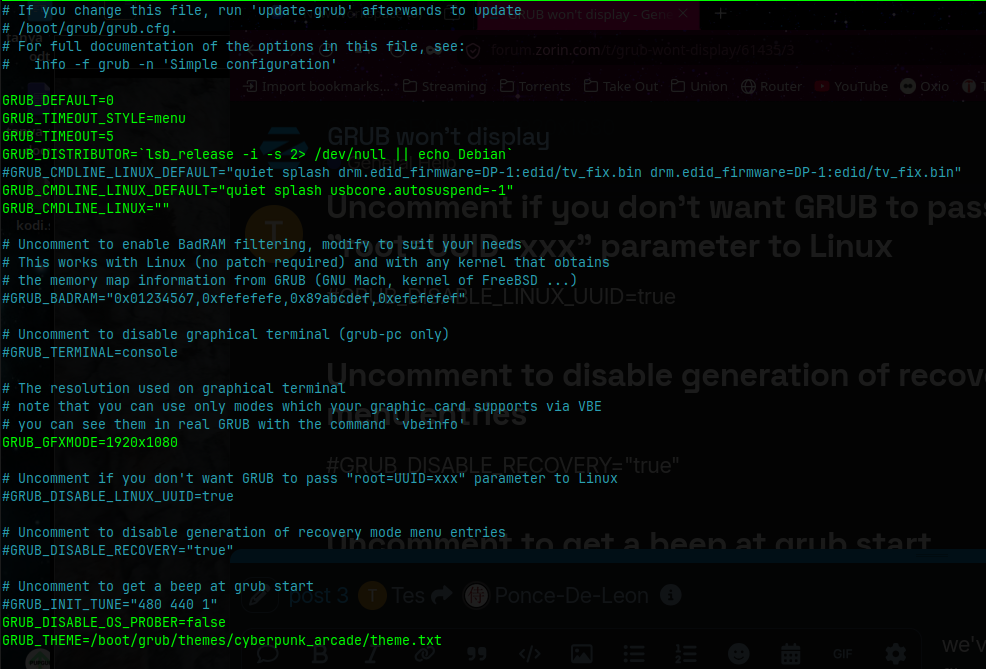
I even tried replacing this with a default Zorin OS Grub file and it still did not help.
Maybe this is your fix: Always show Grub menu on boot?
The Grub Timeout is set to 5 which means the Grub Menu only appears 5 Seconds. Maybe this is a bit less. You could increase it to 20 or 30 for Example. Or You set it to -1 to have it permanently until You make an Input.
To make a Change type in the Terminal sudo nano /etc/default/grub and change the 5 to a different Value. then press ctrl+o to save, Enter to confirm and ctrl+x to exit. Then type sudo update-grub to make the Changes affect. Don't forget that! Then reboot to see if it works.
Can you try with
GRUB_GFXMODE=1920x1080
commented out?
Then run
sudo update-grub
The reason I ask is that this is an early firmware level of graphics.
Thank you, no. It is showing the grub. It's just not displaying it. If I hit, say, the down arrow, which interrupts the 5 second countdown, it will stay there, on that black screen, until I hit up again, and enter. Grub is there. Just hiding.
It's always worked though, up until we broke it. The 5 sec countdown gives me about 4 seconds of onscreen grub to make my selection. But, full transparency, I did play with that as well. Set it all the way to 30 seconds. No difference. So I put it back to 5 for time's sake.
Yeah, we did all that too. But for the sake of argument I did it here, again, and no change. I need a way to log what's happening before the kernel starts, before any gfx driver is loaded, before the hand-off ever takes place. Because here's the best part. If I put it over to DP as I mentioned in my op, I can still hit del and get into the uefi bios menu. I can see it just as clear as day. hit F10, exit, wait, nothing until the zorin logo.
I have reset the bios, reflashed bios, reinstalled grub, reinstalled amdgpu firmware, removed and reinstalled my card, changed ever setting you see in my grub config, that's why there is so much commented out. I started using the # as a toggle to turn different things on and off, trying to track this thing down. Even ClaudeAI eventually, after 4 days, told me, look, i'm sorry, but I've exhausted everything I can think to do and everything I'm looking at says it should work, and is working.
And it was right. So that was as far as I got.
I know the theme worked for a while - but I am thinking now that it is the next most likely culprit.
We can check (I also have a grub line with my own theme - so do not worry, I am not blaming themes.) by commenting out the Theme line and replacing it with the Zorin default grub theme.
If that works - it shows that the Grub Theme has something missing - or a changed font package it is calling on - that is causing grub to not display.
Hey, sorry been away for a bit.
Weird update... I bought a new gpu and that fixed it.... for a bit.
Different issue now, but i lived with no grub for so long i decided just to put up with this one...
I installed a 9060XT and whenI rebooted everythign was fine! GRUB, UEFI, all of it was visible.
After the usual tinkering, I had to reboot at some point (this was a few days after my last post) and suddenly everything was green. My theme is mostly green, if I turn it off, the plain black background is now all green. I can read the grub though. The font is still white. But the green confuses me.