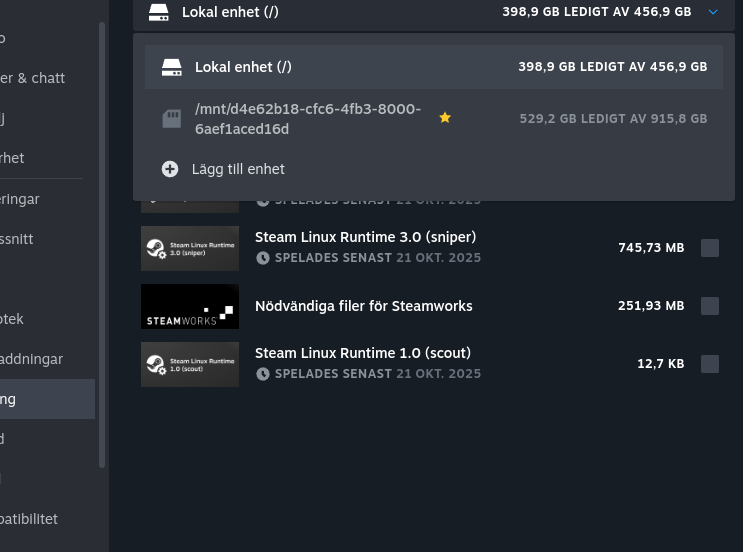
Hard drive mounting issues

This issue has been driving me mad over the last couple of years, and i really don't get it why this have to be an issue.

Coming from the Windows world, where you can freely choose where to install your games and software, ending up on Linux is becoming a nightmare. At least when it comes to handling multiple harddrives.

I have an SSD for my installation where i put OS, apps and personal files.
I have another for Games, and yet another for backups of important files.

On every distro i have tried there's always additional steps to take to get a harddrive mounted on boot. Either by editing a file or messing around with the partitioning tool. This is NOT how you make an OS user friendly.

Some may stress it's for the best of the user, but the everyday user will never even try if that's the issue. They wont even look at it and go back to windows or Mac.

An OS should offer additional security for the user to activate if wanted, but should certainly offer direct access to the computers harddrives out of the box, no questions asked.

It should never be required to go into the file manager, partitioning tool or a text editor/terminal to get everyday stuff working.

I want to install my OS, after install i choose where my games and downloads and personal files should land, and then go on my merry ways feeling good about life and enjoying using my computer.

The only distro this far that has this sorted out is Bazzite, take a look at them and learn how it should work......

Yes, i'm sounding bot bitter and angry because i am.

Every YouTube channel and forum is shouting about "Year Of The Linux Takeover"!!

That's never going to happen if you're not focusing on the user experience!

Zorin had everything going for them the last couple of years, and the OS feels amazing, but if a simple thing such as this can't be resolved immediately Linux will remain a 2-3% OS forever.
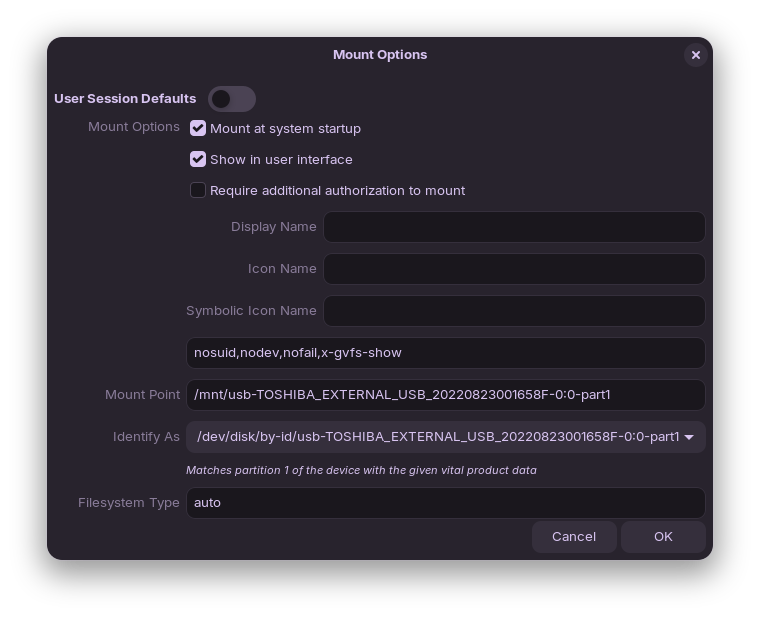
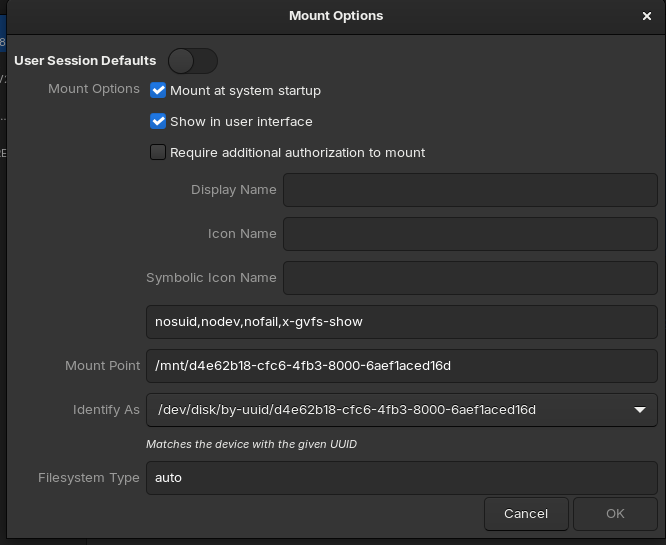
It is a GUI tool with one checkbox to click.

I am amazed you were able to write so much about clicking one checkbox.

I, too, came from Windows OS, where most things I set out to do felt like pulling teeth, I needed to fight with the system, admin privileges and regedit more often than get any actual work done.

I'll take the One Clicked Checkbox over that. Hands down.

1 Like

It is not about just klicking one button. I have tried it, and yet after reboot i have to add the gaming drive to Steam, every time.

I did not just go on here because i felt particularly grumpy, i did it because this really should be a non issue.

An OS should always see and be able to work on any drive in the system, at least when it comes to an consumer OS.

System operators and admins are welcome to use whatever tools they want to hide drives or increase their security, but from a new install a consumer should not have to read forum threads or support tickets to get a fully working OS.

Which is why you should never take people very seriously when they make a living out of whatever happens to be trendy at the moment, or depend on hyping whatever the mighty algorithm™ tells them.

With that said, what have you tried to fix this issue? Yes, you need to tell the system to turn on external drives but it's just a toggle inside the Disks menu:

Uncheck "User Session Defaults" and enable "Mount at system startup", everything else as it is by default will work fine.

EDIT: Ah, I see where the confusion can be. If you've set your Steam account to save files to the external drive, and then make it so that it automounts at boot, the location might be different.

For example, on my screenshot you can see that the mount point starts with /mnt. That's the typical location used for permanent set ups, whereas temporary drives and peripherals usually are mounted at /media.
Therefore, if your Steam settings are still pointing to that location over at /media, it might not work after you've done this.

You can change the mount point as needed in the Disks control panel, however. Give that a try and see if it works.

1 Like

I have been experiencing this lately, too - and this is something new. I never needed to - ever before.
It has only been doing this for the past month or so. Drives me crazy.
This is due to a change in Steam however. You notice that the drive automounts as it is supposed to.

1 Like

My screenshot looks exactly the same as yours do, but still, i don't think the drives get mounted in the right order or maybe after the steam services are loaded, because it's always removed from steam when i reboot the computer.

I was just typing an edit on my first reply, I'll copy it here :backhand_index_pointing_down:

EDIT: Ah, I see where the confusion can be. If you've set your Steam account to save files to the external drive, and then make it so that it automounts at boot, the location might be different.

For example, on my screenshot you can see that the mount point starts with /mnt. That's the typical location used for permanent set ups, whereas temporary drives and peripherals usually are mounted at /media.
Therefore, if your Steam settings are still pointing to that location over at /media, it might not work after you've done this.

You can change the mount point as needed in the Disks control panel, however. Give that a try and see if it works.

1 Like

As you can see in my screenshot i have it set to the /mnt/ variable, and are using the UUID to adress the drive, but it will still not work.

Mine, as well. In Disks app, it is set properly as /mnt...

But Steam, when adding the drive, only offers /media...

1 Like

And to get to the point of my original post, what would it take to get the OS to do this as default? The fact that i will have to search for answers online and in forums, is what sent me here from the beginning.

And i feel it's addressing it the wrong way, when you ask users to figure stuff like this out, instead of trying to fix the OS instead.

Please see:

This is due to a change in Steam.
It arrived along with the new feature that Steam automatically enables Proton Compatibility.

It is not the O.S.

It is Steam.

2 Likes

Mine is not. It's set to the /mnt/ point.

And just to see, even though this was my third reboot this time around, i did it again, and now it seems to be fixed.

Drives mounted correctly, and still registered and working for installation in steam.

I honestly can't tell what did it, but since i have nothing more to add to this topic, i'll finish this discussion and consider it as solved.

If having a look at my screenshots and trying to match the methods, feel free to do so, but i am not an admin in any degree and are only doing what i read from around the web.

I guess this saved me from doing yet another install, and since i love how the rest of this OS works, i'll stay on it and see what else it can offer.

Thank you for helping me out.
Have a great day.

2 Likes

To be honest, i'm not at all sure it's about Steam.
I think it's about how the system choose to mount the drives originally that's the issue.

Mine are now mounted as /mnt/UUID, and doing it that way also seems to give that address to Steam, and it now looks like it get's remembered.

This is only my speculations though, but that's how my machine is configured now, after my little raging session.

1 Like

When you set the drive in Steam, does it show as /media or /mnt?

On mine, I do not have the option of naming the drive, but selecting it from the file picker. It automatically sets it as /media, though in Disks it is /mnt

This was my procedure, for getting Steam flatpak to work, with my externally connected USB NVME drive. Before you ask, yep it was /mnt too.

These types of issues, will most certainly confuse Linux newbies, its part of the learning curve, when they break away from the shackles & chains, that Microsoft had them in prior.


1 Like