I've heard everybody talking about installing WhatsApp on Zorin using a web client. But web client doesn't support video or voice calls, and I need to call someone on my PC when needed.
Can anyone tell me how to install WhatsApp on Linux with Wine or something? I'm really confused on this and can't figure out to do this.
I think running Windows in a virtual machine on Zorin would be the best option.
Welcome to the Forum!
You would have the Option to install a Client for WhatsApp. You can find several in Gnome Software:
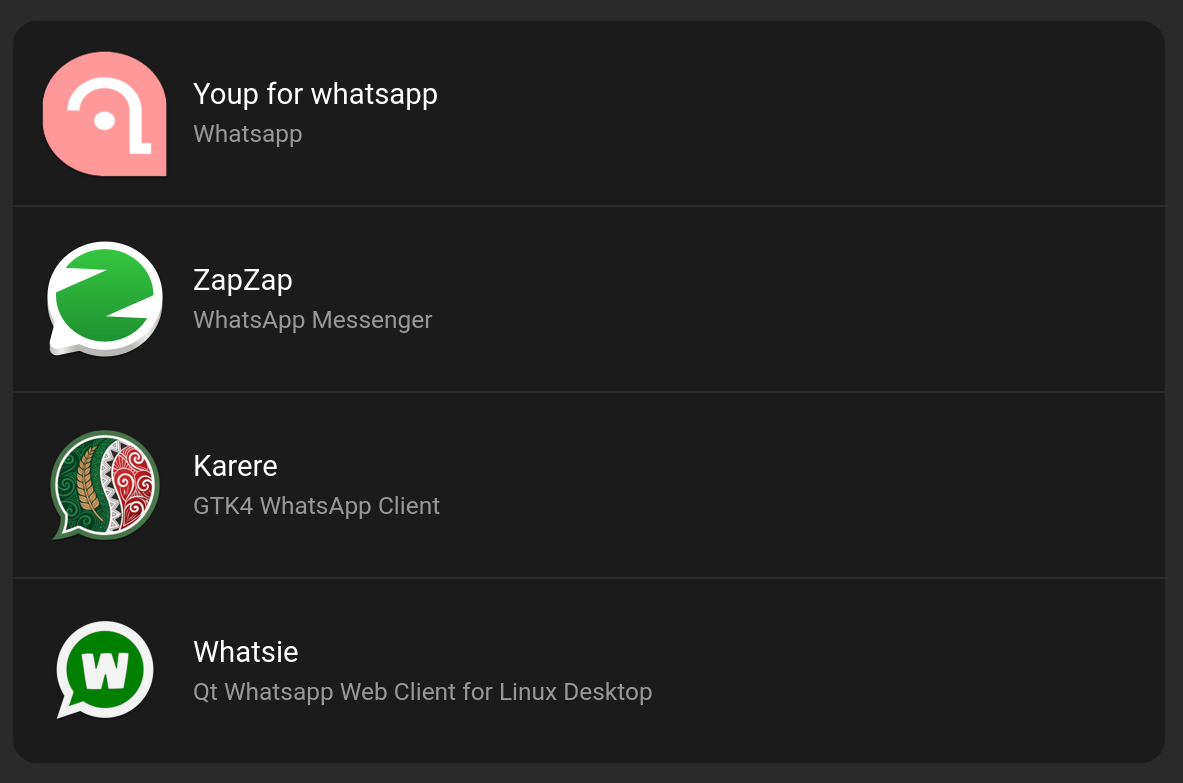
But to be clear: These are Third-Party Programs. It seems that there is no official WhatsApp Support for Linux.
They don't offer the possibility to make videocalls or voice calls.
I don't even understand what the big deal is with WhatsApp from the very get go. Everybody has a cell phone these days, can't ya just call someone on the phone, or text them?
Back in my day, we didn't even have cell phones, and if you wanted to make a call, there was generally 1 land line phone per household. If you wanted to make a call, you had to share the phone.
And even if you had a 2nd phone, with a single only line, you still had to share. Today couldn't be easier with cell phones. So I don't get the point of WhatsApp?

1 Like
Hey install Ópera or insatall Zoom with Flatpack in software
Award winning Zoom brings video conferencing, online meetings and group messaging into one easy-to-use application.
• One consistent enterprise experience for all use cases
• Engineered and optimized to work reliably
• Up to 500 video participants and 10,000 viewers
• Easy-to-use, buy and scale
• Most affordable, straightforward pricing
NOTE: This wrapper is not verified by, affiliated with, or supported by zoom.us.
Just curious. Would you know if they are using WhatsApp via Zorin Connect?
That you don't get it isn't really the point, if you'll beg my pardon. I've used it a lot in helping to trouble shoot a new online course for my boss. it was not only necessary but fast, intuitive, secure and convenient. WhatsApp Web is a fantastic utility for many people. If you don't "get it", that's fine but please, try to be helpful and understanding of genuine issues that people face when trying to make the switch to Linux. It is one of the few, but insurmountable, reasons that I still need to use Windows!
1 Like
@0Picass0 I hear ya, its a generational thing, I thought my post made that obvious. Your going to get more of this in the future from other's who are old too. The wider the generational gap, the more will not be understood, thats just reality.
Do whatever you want, you are the pilot of your own life, I just know, I'll never be using any sort of social networking apps. Nobody is telling you what to do either, I'm entitled to my opinion based on my life, just as much as you are entitled to yours, in your life circumstances.
i have successfully installed WhatsApp on linux zorin using the WhatsApp mod by Aero you can use your original WhatsApp account with this mod.
Or you can use whatsapp web version on firefox app that also working for me
2 Likes
That's great news, thanks for sharing @rajajana. One more step forward to making Linux my only OS!
@StarTreker , WhatsApp isn't really a social networking app. Not in the sense of Facebook and Instagram or Tik-Tok, and you shouldn't tell people to pick up a phone when it's not relevant to the original post; it's judgemental and irrelevant, and not at all helpful or welcoming to the community, many of whom are new to Zorin and Linux. They are trying to migrate their daily lives over to Zorin, and being able to use WhatsApp Web is an important part of that which shouldn't be dismissed because someone doesn't recognise its importance.
I got my work contract, my monthly pay slips, a quote from a builder, and my car insurance company send my policy, all by WhatsApp. PDFs and text docs are safely sent and received.
It is far more like an email service with voice notes, voice calls and video calls, and it is end-to-end encrypted, which means no one can access your messages and data except you, not even WhatsApp. I live off grid, there is no cell phone service at all, although I do have a booster, so I can receive 2-factor authentication, push messages, and emergency information from the local health centre, severe storm warnings or forest fire information. I rely completely on WhatsApp to keep in touch with my family and people in my contacts / address book. My family, many now in their 80's (in fact, 3 generations) also use it, some are in England, some in Spain, others in Australia and South Africa. To many people around the world, it is an essential part of every day life, as well as their work life.
I don't touch What's App with a barge pole as it has been the platform where youngsters in this country have led to teenage suicides. Jitsi Meet is much better than Zoom as it has always been E2E, unlike Zoom who claimed from day 1 of its launch it was E2E. Remember the Th-shirts with Richard Milkhouse Nixon with the slogan, "Would you buy a second hand car from this man?" I only trust Jitsi which needs a Chrome based browser or an Android phone. Web chats are free for personal use, just go to https://meet.jit.si
I will never use any Meta Apps or Zoom period. The only thing you do need to setup a conference is a GitHub account. Other rhings to consider is VOIP apps such as Linphone where you make calls via internet instead of using your mobile data but others obviously need to have it installed on their phones too.
1 Like
This topic was automatically closed 90 days after the last reply. New replies are no longer allowed.