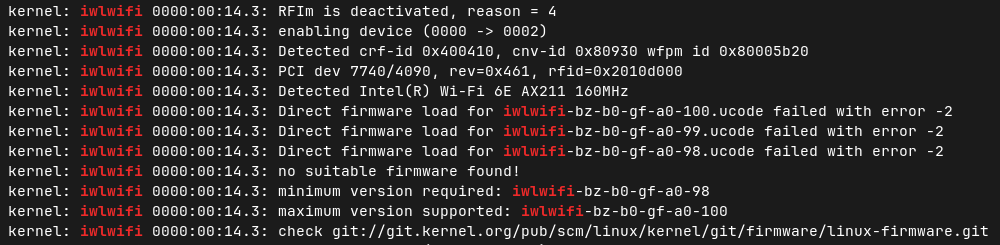
Zorin OS core 18 on a DELL Pro 13 Plus PB13250 laptop.
After updates and reboot, I (and 3 other colleagues with same equipment) lost our wifi controler this week.
Hi and welcome to the forum.
Recent Software Update included a new version linux kernel 6.17... That may have regressions for some hardware.
You can test this by Restarting your machine.
Then from grub Menu,
Select menu item "Additional Options for Zorin".
Then
Select an older kernel-generic version. (probably 6.14... instead of newest 6.17 in the list)
Boot with that kernel and see effect on WiFi.
Indeed, according to the dpkg.log that day, the linux kernel 6.17 has been installed.
Maybe something went wrong ?
Do you see something special in the logs ?
2026-02-10 08:42:07 startup archives unpack
2026-02-10 08:42:07 upgrade linux-libc-dev:amd64 6.8.0-94.96 6.8.0-100.100
2026-02-10 08:42:07 status half-configured linux-libc-dev:amd64 6.8.0-94.96
2026-02-10 08:42:07 status unpacked linux-libc-dev:amd64 6.8.0-94.96
2026-02-10 08:42:07 status half-installed linux-libc-dev:amd64 6.8.0-94.96
2026-02-10 08:42:08 status unpacked linux-libc-dev:amd64 6.8.0-100.100
2026-02-10 08:42:08 upgrade linux-tools-common:all 6.8.0-94.96 6.8.0-100.100
2026-02-10 08:42:08 status half-configured linux-tools-common:all 6.8.0-94.96
2026-02-10 08:42:08 status unpacked linux-tools-common:all 6.8.0-94.96
2026-02-10 08:42:08 status half-installed linux-tools-common:all 6.8.0-94.96
2026-02-10 08:42:08 status triggers-pending man-db:amd64 2.12.0-4build2
2026-02-10 08:42:08 status unpacked linux-tools-common:all 6.8.0-100.100
2026-02-10 08:42:08 startup packages configure
2026-02-10 08:42:08 configure linux-libc-dev:amd64 6.8.0-100.100
2026-02-10 08:42:08 status unpacked linux-libc-dev:amd64 6.8.0-100.100
2026-02-10 08:42:08 status half-configured linux-libc-dev:amd64 6.8.0-100.100
2026-02-10 08:42:08 status installed linux-libc-dev:amd64 6.8.0-100.100
2026-02-10 08:42:08 configure linux-tools-common:all 6.8.0-100.100
2026-02-10 08:42:08 status unpacked linux-tools-common:all 6.8.0-100.100
2026-02-10 08:42:08 status half-configured linux-tools-common:all 6.8.0-100.100
2026-02-10 08:42:08 status installed linux-tools-common:all 6.8.0-100.100
2026-02-10 08:42:08 trigproc man-db:amd64 2.12.0-4build2
2026-02-10 08:42:08 status half-configured man-db:amd64 2.12.0-4build2
2026-02-10 08:42:08 status installed man-db:amd64 2.12.0-4build2
2026-02-10 08:42:12 startup archives unpack
2026-02-10 08:42:13 install linux-modules-6.17.0-14-generic:amd64 6.17.0-14.14~24.04.1
2026-02-10 08:42:13 status half-installed linux-modules-6.17.0-14-generic:amd64 6.17.0-14.14~24.04.1
2026-02-10 08:42:13 status unpacked linux-modules-6.17.0-14-generic:amd64 6.17.0-14.14~24.04.1
2026-02-10 08:42:13 install linux-image-6.17.0-14-generic:amd64 6.17.0-14.14~24.04.1
2026-02-10 08:42:13 status half-installed linux-image-6.17.0-14-generic:amd64 6.17.0-14.14~24.04.1
2026-02-10 08:42:13 status unpacked linux-image-6.17.0-14-generic:amd64 6.17.0-14.14~24.04.1
2026-02-10 08:42:13 install linux-modules-extra-6.17.0-14-generic:amd64 6.17.0-14.14~24.04.1
2026-02-10 08:42:13 status half-installed linux-modules-extra-6.17.0-14-generic:amd64 6.17.0-14.14~24.04.1
2026-02-10 08:42:14 status unpacked linux-modules-extra-6.17.0-14-generic:amd64 6.17.0-14.14~24.04.1
2026-02-10 08:42:14 upgrade linux-generic-hwe-24.04:amd64 6.14.0-37.37~24.04.1 6.17.0-14.14~24.04.1
2026-02-10 08:42:14 status half-configured linux-generic-hwe-24.04:amd64 6.14.0-37.37~24.04.1
2026-02-10 08:42:14 status unpacked linux-generic-hwe-24.04:amd64 6.14.0-37.37~24.04.1
2026-02-10 08:42:14 status half-installed linux-generic-hwe-24.04:amd64 6.14.0-37.37~24.04.1
2026-02-10 08:42:14 status unpacked linux-generic-hwe-24.04:amd64 6.17.0-14.14~24.04.1
2026-02-10 08:42:14 upgrade linux-image-generic-hwe-24.04:amd64 6.14.0-37.37~24.04.1 6.17.0-14.14~24.04.1
2026-02-10 08:42:14 status half-configured linux-image-generic-hwe-24.04:amd64 6.14.0-37.37~24.04.1
2026-02-10 08:42:14 status unpacked linux-image-generic-hwe-24.04:amd64 6.14.0-37.37~24.04.1
2026-02-10 08:42:14 status half-installed linux-image-generic-hwe-24.04:amd64 6.14.0-37.37~24.04.1
2026-02-10 08:42:14 status unpacked linux-image-generic-hwe-24.04:amd64 6.17.0-14.14~24.04.1
2026-02-10 08:42:14 install linux-hwe-6.17-headers-6.17.0-14:all 6.17.0-14.14~24.04.1
2026-02-10 08:42:14 status half-installed linux-hwe-6.17-headers-6.17.0-14:all 6.17.0-14.14~24.04.1
2026-02-10 08:42:16 status unpacked linux-hwe-6.17-headers-6.17.0-14:all 6.17.0-14.14~24.04.1
2026-02-10 08:42:17 install linux-headers-6.17.0-14-generic:amd64 6.17.0-14.14~24.04.1
2026-02-10 08:42:17 status half-installed linux-headers-6.17.0-14-generic:amd64 6.17.0-14.14~24.04.1
2026-02-10 08:42:18 status unpacked linux-headers-6.17.0-14-generic:amd64 6.17.0-14.14~24.04.1
2026-02-10 08:42:18 upgrade linux-headers-generic-hwe-24.04:amd64 6.14.0-37.37~24.04.1 6.17.0-14.14~24.04.1
2026-02-10 08:42:18 status half-configured linux-headers-generic-hwe-24.04:amd64 6.14.0-37.37~24.04.1
2026-02-10 08:42:18 status unpacked linux-headers-generic-hwe-24.04:amd64 6.14.0-37.37~24.04.1
2026-02-10 08:42:18 status half-installed linux-headers-generic-hwe-24.04:amd64 6.14.0-37.37~24.04.1
2026-02-10 08:42:18 status unpacked linux-headers-generic-hwe-24.04:amd64 6.17.0-14.14~24.04.1
2026-02-10 08:42:18 install linux-hwe-6.17-tools-6.17.0-14:amd64 6.17.0-14.14~24.04.1
2026-02-10 08:42:18 status half-installed linux-hwe-6.17-tools-6.17.0-14:amd64 6.17.0-14.14~24.04.1
2026-02-10 08:42:18 status unpacked linux-hwe-6.17-tools-6.17.0-14:amd64 6.17.0-14.14~24.04.1
2026-02-10 08:42:18 install linux-tools-6.17.0-14-generic:amd64 6.17.0-14.14~24.04.1
2026-02-10 08:42:18 status half-installed linux-tools-6.17.0-14-generic:amd64 6.17.0-14.14~24.04.1
2026-02-10 08:42:18 status unpacked linux-tools-6.17.0-14-generic:amd64 6.17.0-14.14~24.04.1
2026-02-10 08:42:18 startup packages configure
2026-02-10 08:42:18 configure linux-modules-6.17.0-14-generic:amd64 6.17.0-14.14~24.04.1
2026-02-10 08:42:18 status unpacked linux-modules-6.17.0-14-generic:amd64 6.17.0-14.14~24.04.1
2026-02-10 08:42:18 status half-configured linux-modules-6.17.0-14-generic:amd64 6.17.0-14.14~24.04.1
2026-02-10 08:42:20 status installed linux-modules-6.17.0-14-generic:amd64 6.17.0-14.14~24.04.1
2026-02-10 08:42:20 configure linux-hwe-6.17-tools-6.17.0-14:amd64 6.17.0-14.14~24.04.1
2026-02-10 08:42:20 status unpacked linux-hwe-6.17-tools-6.17.0-14:amd64 6.17.0-14.14~24.04.1
2026-02-10 08:42:20 status half-configured linux-hwe-6.17-tools-6.17.0-14:amd64 6.17.0-14.14~24.04.1
2026-02-10 08:42:20 status installed linux-hwe-6.17-tools-6.17.0-14:amd64 6.17.0-14.14~24.04.1
2026-02-10 08:42:20 configure linux-image-6.17.0-14-generic:amd64 6.17.0-14.14~24.04.1
2026-02-10 08:42:20 status unpacked linux-image-6.17.0-14-generic:amd64 6.17.0-14.14~24.04.1
2026-02-10 08:42:20 status half-configured linux-image-6.17.0-14-generic:amd64 6.17.0-14.14~24.04.1
2026-02-10 08:42:21 status installed linux-image-6.17.0-14-generic:amd64 6.17.0-14.14~24.04.1
2026-02-10 08:42:21 status triggers-pending linux-image-6.17.0-14-generic:amd64 6.17.0-14.14~24.04.1
2026-02-10 08:42:21 configure linux-modules-extra-6.17.0-14-generic:amd64 6.17.0-14.14~24.04.1
2026-02-10 08:42:21 status unpacked linux-modules-extra-6.17.0-14-generic:amd64 6.17.0-14.14~24.04.1
2026-02-10 08:42:21 status half-configured linux-modules-extra-6.17.0-14-generic:amd64 6.17.0-14.14~24.04.1
2026-02-10 08:42:22 status installed linux-modules-extra-6.17.0-14-generic:amd64 6.17.0-14.14~24.04.1
2026-02-10 08:42:22 configure linux-tools-6.17.0-14-generic:amd64 6.17.0-14.14~24.04.1
2026-02-10 08:42:22 status unpacked linux-tools-6.17.0-14-generic:amd64 6.17.0-14.14~24.04.1
2026-02-10 08:42:22 status half-configured linux-tools-6.17.0-14-generic:amd64 6.17.0-14.14~24.04.1
2026-02-10 08:42:22 status installed linux-tools-6.17.0-14-generic:amd64 6.17.0-14.14~24.04.1
2026-02-10 08:42:22 configure linux-hwe-6.17-headers-6.17.0-14:all 6.17.0-14.14~24.04.1
2026-02-10 08:42:22 status unpacked linux-hwe-6.17-headers-6.17.0-14:all 6.17.0-14.14~24.04.1
2026-02-10 08:42:22 status half-configured linux-hwe-6.17-headers-6.17.0-14:all 6.17.0-14.14~24.04.1
2026-02-10 08:42:22 status installed linux-hwe-6.17-headers-6.17.0-14:all 6.17.0-14.14~24.04.1
2026-02-10 08:42:22 configure linux-image-generic-hwe-24.04:amd64 6.17.0-14.14~24.04.1
2026-02-10 08:42:22 status unpacked linux-image-generic-hwe-24.04:amd64 6.17.0-14.14~24.04.1
2026-02-10 08:42:22 status half-configured linux-image-generic-hwe-24.04:amd64 6.17.0-14.14~24.04.1
2026-02-10 08:42:22 status installed linux-image-generic-hwe-24.04:amd64 6.17.0-14.14~24.04.1
2026-02-10 08:42:22 configure linux-headers-6.17.0-14-generic:amd64 6.17.0-14.14~24.04.1
2026-02-10 08:42:22 status unpacked linux-headers-6.17.0-14-generic:amd64 6.17.0-14.14~24.04.1
2026-02-10 08:42:22 status half-configured linux-headers-6.17.0-14-generic:amd64 6.17.0-14.14~24.04.1
2026-02-10 08:42:31 status installed linux-headers-6.17.0-14-generic:amd64 6.17.0-14.14~24.04.1
2026-02-10 08:42:31 configure linux-headers-generic-hwe-24.04:amd64 6.17.0-14.14~24.04.1
2026-02-10 08:42:31 status unpacked linux-headers-generic-hwe-24.04:amd64 6.17.0-14.14~24.04.1
2026-02-10 08:42:31 status half-configured linux-headers-generic-hwe-24.04:amd64 6.17.0-14.14~24.04.1
2026-02-10 08:42:31 status installed linux-headers-generic-hwe-24.04:amd64 6.17.0-14.14~24.04.1
2026-02-10 08:42:31 configure linux-generic-hwe-24.04:amd64 6.17.0-14.14~24.04.1
2026-02-10 08:42:31 status unpacked linux-generic-hwe-24.04:amd64 6.17.0-14.14~24.04.1
2026-02-10 08:42:31 status half-configured linux-generic-hwe-24.04:amd64 6.17.0-14.14~24.04.1
2026-02-10 08:42:31 status installed linux-generic-hwe-24.04:amd64 6.17.0-14.14~24.04.1
2026-02-10 08:42:31 trigproc linux-image-6.17.0-14-generic:amd64 6.17.0-14.14~24.04.1
2026-02-10 08:42:31 status half-configured linux-image-6.17.0-14-generic:amd64 6.17.0-14.14~24.04.1
2026-02-10 08:42:39 status installed linux-image-6.17.0-14-generic:amd64 6.17.0-14.14~24.04.1
2026-02-10 08:42:43 startup packages remove
2026-02-10 08:42:43 status installed linux-image-6.14.0-33-generic:amd64 6.14.0-33.33~24.04.1
2026-02-10 08:42:44 remove linux-image-6.14.0-33-generic:amd64 6.14.0-33.33~24.04.1
2026-02-10 08:42:44 status half-configured linux-image-6.14.0-33-generic:amd64 6.14.0-33.33~24.04.1
2026-02-10 08:42:44 status half-installed linux-image-6.14.0-33-generic:amd64 6.14.0-33.33~24.04.1
2026-02-10 08:42:45 status config-files linux-image-6.14.0-33-generic:amd64 6.14.0-33.33~24.04.1
2026-02-10 08:42:45 status installed linux-modules-extra-6.14.0-33-generic:amd64 6.14.0-33.33~24.04.1
2026-02-10 08:42:45 remove linux-modules-extra-6.14.0-33-generic:amd64 6.14.0-33.33~24.04.1
2026-02-10 08:42:45 status half-configured linux-modules-extra-6.14.0-33-generic:amd64 6.14.0-33.33~24.04.1
2026-02-10 08:42:45 status half-installed linux-modules-extra-6.14.0-33-generic:amd64 6.14.0-33.33~24.04.1
2026-02-10 08:42:45 status config-files linux-modules-extra-6.14.0-33-generic:amd64 6.14.0-33.33~24.04.1
2026-02-10 08:42:45 status installed linux-modules-6.14.0-33-generic:amd64 6.14.0-33.33~24.04.1
2026-02-10 08:42:45 remove linux-modules-6.14.0-33-generic:amd64 6.14.0-33.33~24.04.1
2026-02-10 08:42:45 status half-configured linux-modules-6.14.0-33-generic:amd64 6.14.0-33.33~24.04.1
2026-02-10 08:42:45 status half-installed linux-modules-6.14.0-33-generic:amd64 6.14.0-33.33~24.04.1
2026-02-10 08:42:46 status config-files linux-modules-6.14.0-33-generic:amd64 6.14.0-33.33~24.04.1
2026-02-10 08:42:46 startup packages configure
2026-02-10 08:42:49 startup packages remove
2026-02-10 08:42:49 status installed linux-headers-6.14.0-33-generic:amd64 6.14.0-33.33~24.04.1
2026-02-10 08:42:49 remove linux-headers-6.14.0-33-generic:amd64 6.14.0-33.33~24.04.1
2026-02-10 08:42:49 status half-configured linux-headers-6.14.0-33-generic:amd64 6.14.0-33.33~24.04.1
2026-02-10 08:42:49 status half-installed linux-headers-6.14.0-33-generic:amd64 6.14.0-33.33~24.04.1
2026-02-10 08:42:50 status config-files linux-headers-6.14.0-33-generic:amd64 6.14.0-33.33~24.04.1
2026-02-10 08:42:50 status not-installed linux-headers-6.14.0-33-generic:amd64
2026-02-10 08:42:50 startup packages configure
2026-02-10 08:42:53 startup packages remove
2026-02-10 08:42:53 status installed linux-hwe-6.14-headers-6.14.0-33:all 6.14.0-33.33~24.04.1
2026-02-10 08:42:53 remove linux-hwe-6.14-headers-6.14.0-33:all 6.14.0-33.33~24.04.1
2026-02-10 08:42:53 status half-configured linux-hwe-6.14-headers-6.14.0-33:all 6.14.0-33.33~24.04.1
2026-02-10 08:42:53 status half-installed linux-hwe-6.14-headers-6.14.0-33:all 6.14.0-33.33~24.04.1
2026-02-10 08:42:54 status config-files linux-hwe-6.14-headers-6.14.0-33:all 6.14.0-33.33~24.04.1
2026-02-10 08:42:54 status not-installed linux-hwe-6.14-headers-6.14.0-33:all
2026-02-10 08:42:54 startup packages configure
2026-02-10 08:42:57 startup packages remove
2026-02-10 08:42:57 status installed linux-tools-6.14.0-33-generic:amd64 6.14.0-33.33~24.04.1
2026-02-10 08:42:58 remove linux-tools-6.14.0-33-generic:amd64 6.14.0-33.33~24.04.1
2026-02-10 08:42:58 status half-configured linux-tools-6.14.0-33-generic:amd64 6.14.0-33.33~24.04.1
2026-02-10 08:42:58 status half-installed linux-tools-6.14.0-33-generic:amd64 6.14.0-33.33~24.04.1
2026-02-10 08:42:58 status config-files linux-tools-6.14.0-33-generic:amd64 6.14.0-33.33~24.04.1
2026-02-10 08:42:58 status not-installed linux-tools-6.14.0-33-generic:amd64
2026-02-10 08:42:58 startup packages configure
2026-02-10 08:43:01 startup packages remove
2026-02-10 08:43:01 status installed linux-hwe-6.14-tools-6.14.0-33:amd64 6.14.0-33.33~24.04.1
2026-02-10 08:43:01 remove linux-hwe-6.14-tools-6.14.0-33:amd64 6.14.0-33.33~24.04.1
2026-02-10 08:43:01 status half-configured linux-hwe-6.14-tools-6.14.0-33:amd64 6.14.0-33.33~24.04.1
2026-02-10 08:43:01 status half-installed linux-hwe-6.14-tools-6.14.0-33:amd64 6.14.0-33.33~24.04.1
2026-02-10 08:43:01 status config-files linux-hwe-6.14-tools-6.14.0-33:amd64 6.14.0-33.33~24.04.1
2026-02-10 08:43:01 status not-installed linux-hwe-6.14-tools-6.14.0-33:amd64
2026-02-10 08:43:02 startup packages configure
Hi and Welcome to @Alarmyst . @zabadabadoo and @Ponce-De-Leon .
The OP solved the issue themselves by installing a fix. Suggest this be moved to Tutorials and Guides for other users and retitled:
"How to restore wi-fi after kernel update to 6.17"
The 6.17 kernel update brought quite a few regressions and bugs.
What the iwlwifi package does is call upon included firmware, which is placed in the directory you used during kernel install.
I could not get this to work for me. I found the file and when I clicked on it, it just displayed the contents on the file. So then I right clicked and selected "save link as" and gave it the name as above. I copied the file from my Downloads folder to /lib/firmware using sudo cp iwl. . . . I noticed that all of the other files in this folder had a .ucode.zst extension. Do I need to rename this file to .zst? Also, do I need to chmod the file?
Could you please outline all steps taken to resolve this issue for us new to Linux/non-software engineers (ha)? I have downloaded the wi-fi file suggested above but have no idea on where to go next.
Thanks in advance!
It sounds as you need to copy the file. You need root rights to do this, so please enter in terminal
nautilus admin://
This command will open the file manager with administrator rights.
Then copy the downloaded file in your Downloads folder.
On the left side click on "other locations" and search the filesystem (I'm not sure what the name is on your system). You can also enter / in the adress bar at the top bar of your filemanager .
Then go to folder "lib", open it, and then open folder "firmware". Paste your downloaded file there.
Then reboot.
Thank you for this, but when trying it I get a message pop up saying that permission is denied. I tried copying the file, copy to location, move to location but still being denied.
Any ideas on how to get around that?
Okay, lets try another method. Open your filemanager. Copy your downloaded file. Click in the topbar of the filemanager into the adress bar where are shown the paths. Remove the complete path there until the field is empty. Then type admin://
there and press enter. You are prompted for your password.
You are in root directory (/) now. Click on 'lib', then on 'firmware' and paste the copied file into the firmware folder.
Edit: The method with starting the filemanager from terminal is a bit tricky.
If you click on a folder in the home directory on the left side of the file manager, e.g., Downloads, you lose root privileges and are kicked out, so to speak.
The only way to get around this is to not use the bookmarks on the left side to go to the Downloads folder, but instead go from the root directory to home > your username > Downloads ...and then use the back arrow to return to the root directory and go to lib > firmware.
That worked in getting the file into firmware! Restarted the computer and still no wi-fi. Double checked the file was the correct one listed above, and it is. Quite the challenge...
Have you tried to boot with an older 6.14 kernel as shown in post #2 of this thread?
If the grub menu isn't displayed at boot, press continuosly esc (or left shift key when you have a legacy BIOS) during boot, then grub menu will be shown.
No, that are packages which need to be unzipped.
I'm not sure if the guide was completely with the path or if the package need to be put into one of the intel folders. I'm not familar with this topic.
This solution only helps when you have an Intel WIFI card which uses the Iwlwifi driver. For other WLAN cards this method doesn't help.