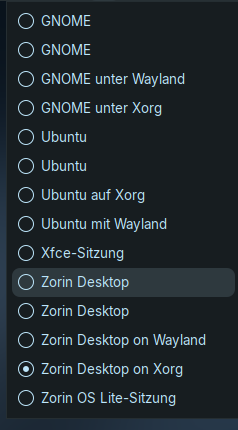
Today I have installed Zorin OS desktop on my virtual machine (virtualbox) with Zorin lite. As display manager I set lightdm.
It installed everything fine but at loginscreen there is no cog icon to switch to gnome desktop.
How can I get into Zorin core?
A reboot was made.
I used the command
"sudo apt install zorin-os-desktop"
Is something missing there?
I found a way to login into gnome. I reconfigured lightdm to gdm (don't know if this was needed) and clicked on Zorin icon at the titlebar of loginscreen there I could choose it.
On Core.
I switched back to lightdm. The message appears that gdm wasn´t installed.
At login I can choose so many options. Perhaps I set the wrong here.
I installed also gnome session because it hadn´t work. Was this wrong?
You can install it with sudo apt install gdm3 if you want.
Yeah, becasue you have installed the Zorin desktop and Gnome, You have both Options. and it seems to have installed the Ubuntu Desktop, too. I think, You should concentrate on these:
Because You are in a VM, it should be bad when You play a bit. It shouldn't be problematic when something breaks. Then You can set up a new VM. So, you could try to uninstall the Gnome and Ubuntu Options with:
I can't see through it. I have tried all the login options, only the ones with ubuntu and gnome in the name were gnome DEs the others XFCE, but the layouts could not be installed or chosen, although everything looked like zorin desktop and not like ubuntu or vanilla gnome.
I tried uninstalling ubuntu desktop and vanilla gnome desktop, but the message appeared that they were not installed.
Then I removed the zorin-os-desktop and reinstalled zorin-os-lite-desktop at the same time.
The entries in loginscreen were still there so I tried to remove the gnome and ubuntu ones from usr/share/xsession, but they don't want to disappear...
I give up for the moment.
It produced chaos on my virtual machine...Installing zorin-os-lite-desktop on Zorin core was easier and made less problems.
Why wasn't there a cog to switch between the DEs? Always I read that there should be a cog to switch between Wayland and XOrg at the right bottom of the screen...Here it was an eye or Zorin Z icon at the titlebar of loginscreen...Mysterious..
Doesn't VirtualBox support snapshots? I use this feature all the time in KVM to make all kinds of tests, and then rollback my VM to a previous snapshot where things worked.
As for using another desktop... I think you can install it, but then there are other settings that you'd have to configure and packages to install, to get it to look and feel exactly like it does in a fresh install. Best to just install a parallel VM with Core.
You need to first login to your account, and then log out.
I meant why was there no cogwheel but an eye or Zorin start icon? I had logged out and logged in again.
Unfortunately, I haven't set up timeshift yet... That would have been really useful now.
The Cog wheel only exists on GDM3, and even then, sometimes it makes you jump through hoops to see it.
This is why I prefer LightDM as it stably shows all available desktops, each time - no hoops.
These are listed at the login screen, upper right side - as you already discovered.
I can only speculate why installing the zorin-os-desktop package (Core) resulted in missing Zorin Applications like Zorin Appearance. Possibly the mirror you used (Regional) is missing packages.
Running in a VM with constrained resources may explain a lot of these troubles and Gnome on Wayland on a VM is highly likely to have a lot of trouble.
Wayland requires proper hardware acceleration, often not present in VMs unless you install Guest Additions/Enhancements and enable 3D acceleration.
This is also the likely reason that you show Duplicates - so many sessions listed in the Login Screen session manager.
@Aravisian This idea also came to me when it didn't work, and I checked to see if the main server was set. It was, at least on the lite desktop. I don't know whether this also applies to the core desktop.
Thank you for the explanations. Now it is clear why there wasn't a cog.
4 GB RAM (I have only 8GB) and I am not quite sure at the moment 50 GB space and there is nearly nothing installed, it is just for advising here in forum.
Is it not possible to use gnome on Xorg on the virtual machine?
I have not been able to install the guest extensions. It never worked, neither with Mint as VM nor with Zorin. But I am completely new to VM.
And the VM is no fun on my system...runs terribly slow, and I only start it when absolutely necessary. Today I thought I install core desktop that I can better advice when there are questions about gnome.
I have always had trouble with Guest Additions.
Gnome and especially Gnome on Wayland depends heavily on Guest Additions if run in VM.
4 gigs of RAM may be too low, given the virtual environment, as well.
You may be seeing OOM failures.
But I can't get higher than 4 GB, or? Win 11 needs probably also minimum 4 GB.
Do you know why there was not warning that gdm3 couldn't be set when I reconfigured dpkg for lightdm? I was asked which display manager I want to choose and set gdm3 (I thought it could cause the problem so I wanted to try). Then the shell was ready. I thought it was set.
But when I later went back and reconfigured it again to go back to lightdm there was a message ...not installed.
I am not sure I am following this... LightDM was not installed or GDM3 was not?
I know LightDM was installed at one point because of your screenshot.
If it asks you to set the Display Manager, offering LightDM or GDM, this prompt appears when you install another Display Manager - which means it had to appear due to the installation of GDM.
That it later showed as 'not installed' is baffling.