Gdm3.
When I installed zorin-os-desktop I choose lightdm.
Then I didn't found a way to get into this desktop because I searched only for a cog, and wanted to change it to gdm3.
I used the command sudo dpkg-reconfigure lightdm and then set gdm3.
Well, the issue of finding how to switch Sessions is now solved. So up to you if you still want GDM to be set.
That said, it is quite clear that something failed with the install of the core desktop environment. Zorin Specific apps are missing. GDM was missing.
But Gnome was installed. It even created duplicate entries (The Ubuntu Entries are due to Ubuntu being the base, but normally, those entries would not be created, only the Zorin Entries: Zorin Desktop on Xorg and Zorin Desktop on Wayland
The only solution I can think of, other than a fresh reinstall (I am not sure how you are using this VM) is to purge gnome and apt cache.
sudo apt remove --purge zorin-os-desktop gnome
Zorin OS Core D.E. may not be installed, but still run:
sudo apt remove --purge gnome
Also - clear out ALL duplicate entries in
/usr/share/xsessions/
/usr/share/wayland-sessions/
Check your sources.
cat /etc/apt/sources.list
ls /etc/apt/sources.list.d
to make sure you have all the correct ones.
Summary
# deb cdrom:[Zorin-OS 16 Core 64bit]/ jammy main restricted

# See http://help.ubuntu.com/community/UpgradeNotes for how to upgrade to
# newer versions of the distribution.
deb http://archive.ubuntu.com/ubuntu jammy main restricted
# deb-src http://us.archive.ubuntu.com/ubuntu/ jammy main restricted

## Major bug fix updates produced after the final release of the
## distribution.
deb http://archive.ubuntu.com/ubuntu jammy-updates main restricted
# deb-src http://us.archive.ubuntu.com/ubuntu/ jammy-updates main restricted

## N.B. software from this repository is ENTIRELY UNSUPPORTED by the Ubuntu
## team. Also, please note that software in universe WILL NOT receive any
## review or updates from the Ubuntu security team.
deb http://archive.ubuntu.com/ubuntu jammy universe
# deb-src http://us.archive.ubuntu.com/ubuntu/ jammy universe
deb http://archive.ubuntu.com/ubuntu jammy-updates universe
# deb-src http://us.archive.ubuntu.com/ubuntu/ jammy-updates universe

## N.B. software from this repository is ENTIRELY UNSUPPORTED by the Ubuntu
## team, and may not be under a free licence. Please satisfy yourself as to
## your rights to use the software. Also, please note that software in
## multiverse WILL NOT receive any review or updates from the Ubuntu
## security team.
deb http://archive.ubuntu.com/ubuntu jammy multiverse
# deb-src http://us.archive.ubuntu.com/ubuntu/ jammy multiverse
deb http://archive.ubuntu.com/ubuntu jammy-updates multiverse
# deb-src http://us.archive.ubuntu.com/ubuntu/ jammy-updates multiverse

## N.B. software from this repository may not have been tested as
## extensively as that contained in the main release, although it includes
## newer versions of some applications which may provide useful features.
## Also, please note that software in backports WILL NOT receive any review
## or updates from the Ubuntu security team.
deb http://archive.ubuntu.com/ubuntu jammy-backports main restricted universe multiverse
# deb-src http://us.archive.ubuntu.com/ubuntu/ jammy-backports main restricted universe multiverse

## Uncomment the following two lines to add software from Canonical's
## 'partner' repository.
## This software is not part of Ubuntu, but is offered by Canonical and the
## respective vendors as a service to Ubuntu users.
deb http://archive.canonical.com/ubuntu jammy partner
# deb-src http://archive.canonical.com/ubuntu jammy partner

deb http://archive.ubuntu.com/ubuntu jammy-security main restricted
# deb-src http://security.ubuntu.com/ubuntu jammy-security main restricted
deb http://archive.ubuntu.com/ubuntu jammy-security universe
# deb-src http://security.ubuntu.com/ubuntu jammy-security universe
deb http://archive.ubuntu.com/ubuntu jammy-security multiverse
# deb-src http://security.ubuntu.com/ubuntu jammy-security multiverse

# This system was installed using small removable media
# (e.g. netinst, live or single CD). The matching "deb cdrom"
# entries were disabled at the end of the installation process.
# For information about how to configure apt package sources,
# see the sources.list(5) manual.
deb [arch=amd64] https://packages.microsoft.com/repos/vscode stable main
# deb-src [arch=amd64] https://packages.microsoft.com/repos/vscode stable main
Then try a reinstall.
sudo apt install zorin-os-desktop
Thank you very much for your time and help, @Aravisian.
I have no access to this computer at the moment but I'll try tomorrow.
"sudo apt remove --purge zorin-os-desktop" and "sudo apt remove --purge gnome-session" I've already done.
Are all desktop files that have the same name really the same? I don't want to delete the wrong. Is it possible to find out which one of them (at xsession) is currently in use? Because I have deleted some entries and then nothing happend when I logged in and clicked on taskbar icons - so some of the options of Lite desktop are broken now.
What is broken?
There is a possibility of cached sessions.
LightDM does not actively cache, like GDM or SDDM do. However... You are running in a Virtual Machine - so LightDM may not be fully restarting when you launch, because it is a saved VM session itself (VirtualBox saved states). You have virtualization layers with session helpers... VM really complicates things.
You might try from the launched session terminal
sudo systemctl restart lightdm
Again, I am not sure of your use case... Is this VM also your daily driver?
No, it isn't my daily driver. Just to explore things that I can't do with Zorin live stick.
It is not a problem that some of the selectable entries on the login screen no longer work. I still found an entry where I could start the start menu and the apps normally. I just don't want to delete it by mistake. I'm not sure if I really want to give another try with core desktop and when I don't have multiple desktops I never enter the desktop selection at login, so it doesn't matter which entries are there.
I see from your avatar you are dual-booting Win 11 with Mint xfce. I would use virt-manager in Mint over VB. I also understand that VMWare is now free to use.
1 Like
The dualboot of LM XFCE and Win 11 that's shown in my profile is on my other laptop. Next time when VM of Zorin is broken, I'd coose anothother VM tool.
I have since learnt from you that other tools are better.
But it took ages to install and also every update, so I use it until it stops working.
I removed all entries at xsessions and waylandsessions except for one. It had to be done with root rights, perhaps because of this it yesterday didn't work when I used normal user (but no error message was shown yesterday that it couldn't be deleted). Everything went well  .Now there is only one option at loginscreen: Zorin desktop on Xorg.
I also removed gnome, but there was said it wasn´t installed.
This are the sources. It ist normal that there are no universe/multiverse repositories? Why are they missing? I didn't change anything here and use main server... All updates made.
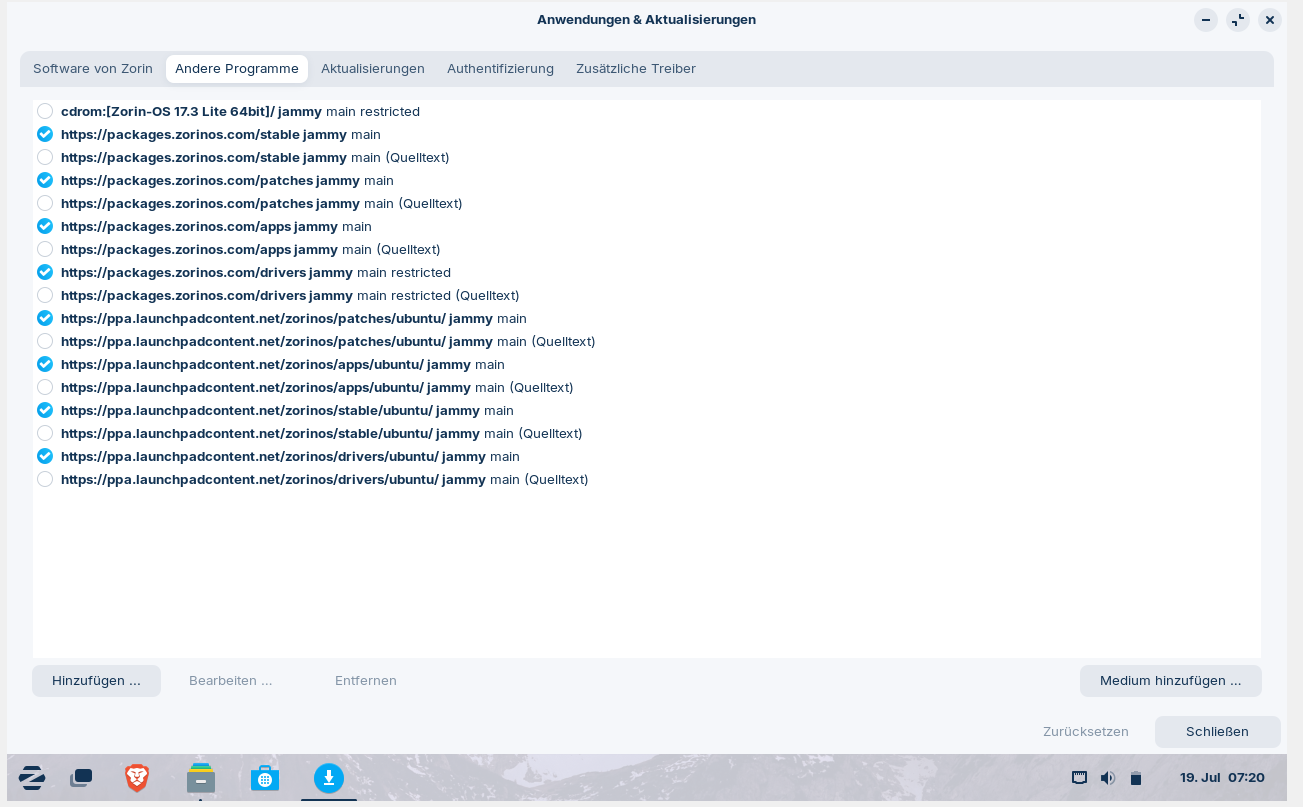
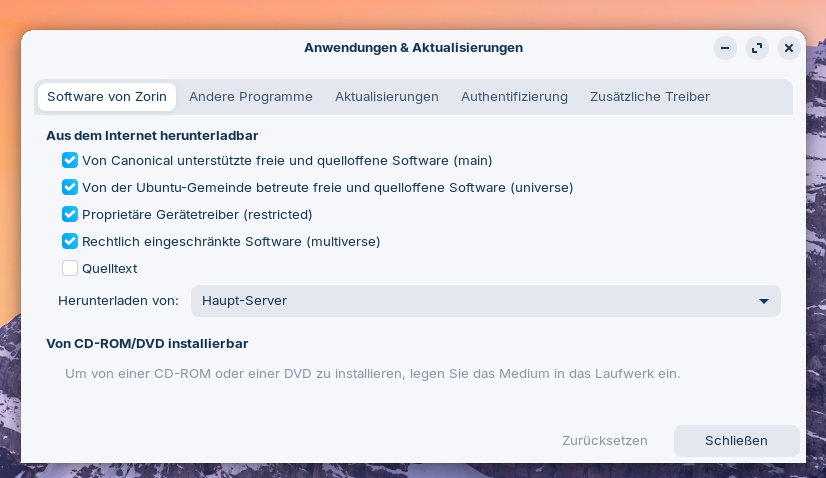
This looks normal to me - at least, it looks as how it would look on a fresh install.
Zorin OS links directly to the universe (main) repository.
1 Like
I don't understand the world anymore...I didn't keep the right version of the desktop file after all (but luckily the others I didn't want anymore were still saved in my home directory for caution).
Now I just realised that it is the gnome version. Why gnome is still there after I removed zorin-os-desktop and removed gnome-vanilla-desktop and ubuntu and gnome...Unbelievable. When they are installed several times do they have to removed several times??? That is not possible.
But Zorin core is there and works, has no layout themes but at least a taskbar at the bottom the way I want it.
I was able to have a look at the extension manager and tweaks in "real life" for the first time and try out Burn my Windows😀.
Exciting...
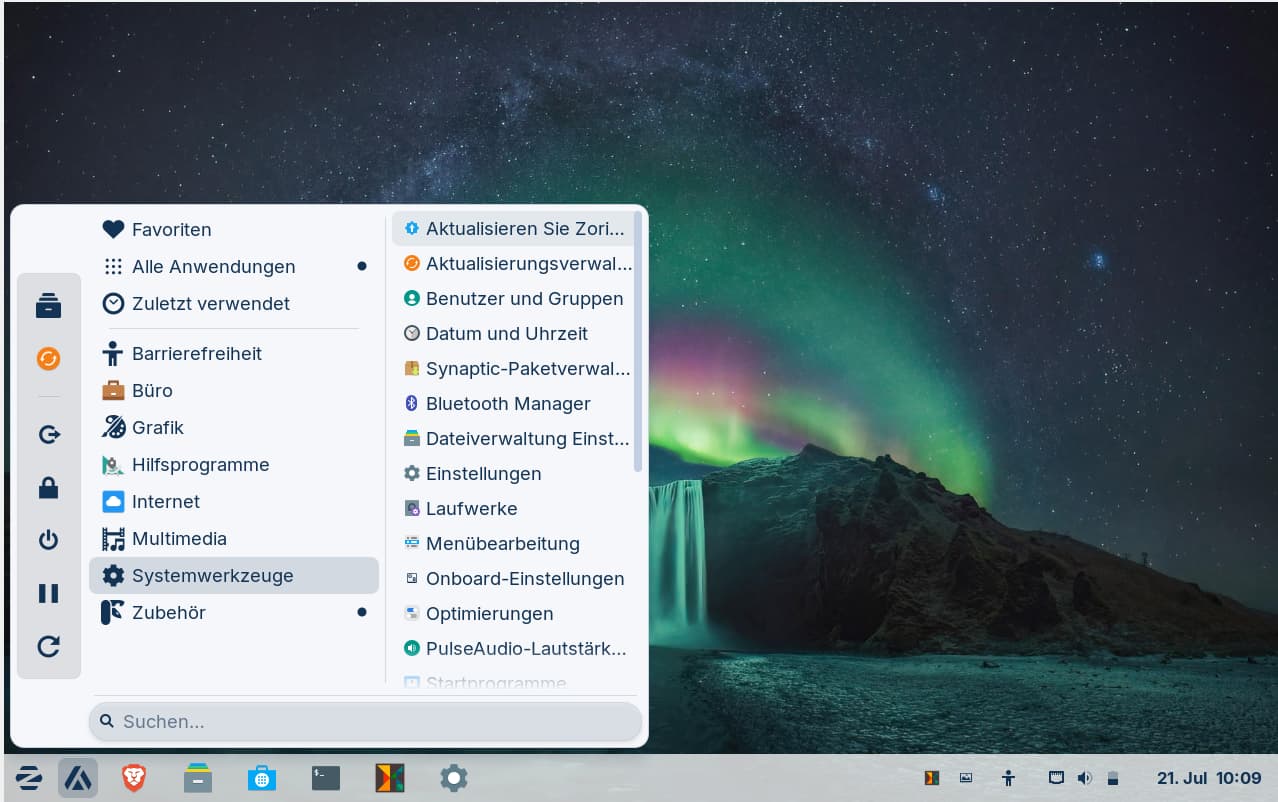
Playing a bit around with gnome in my virtual machine. Installed extension manager, gnome tweaks, arc menu, burn my windows and variety and deleted snaps. As I have no fullscreen with my virtual machine eyerything is a bit small on 14'' so I use large text.
I wanted to change the sort order of Zorin packages, flatpaks and snaps in gnome-software-manager, but I have not found the thread with the instructions. Does anyone happen to know how I can find the thread or what the terminal command is (it's a command where the order of the package formats is specified in a bracket). I want to set .deb packages at first position.
Edit: I found the command but it has no effect although rebooting. I don't know why:
gsettings set org.gnome.software packaging-format-preference "['deb', 'flatpak:flathub', 'flatpak', 'snap']"
Perhaps the VM doesn't follow my commands.
It is set when I make sure with gsettings get... or in dconf-editor. Is there needed more space between the words in the command?
Does someone know the command for changing package sort order in gnome-software for Zorin lite?
With Gnome, there is a lot of System Integration in order to lock the end user in.
Settings like package prioritization might not have effect without GNOME Shell integration or systemd user session tracking.
There is no terminal command that can change this...
1 Like
Does this mean that this command does not work neither in Zorin core nor Zorin lite? I had read about it in several threads here in Zorin forum and wanted to give it a try. I wonder if it is a problem with my VM or if it is not possible to change the sort order in gnome-software.
I'm also still very unsure how it is when using two desktop environments. Which settings affect both DE and which only affect one? I wonder if I have to make all the settings twice in core and lite for them to take effect?
I can't really imagine what the interaction between the two DEs is like.
It may work in Zorin Core; because Core has the integrated Gnome Desktop.
However... The Gnome Software Store in Zorin OS 17 is one of the very few GTK4 only application and I make no guarantees about that portion of how it will respond to things.
1 Like
Have you ever tried it and did it work?
Did gnome-software in Zorin 16 use gtk3 so that this command is perhaps old and doesn't work anymore on Zorin 17?
Do you know what software-manager LM XFCE does use? How it is called? It seems to be a fork of gnome-software. Are there the same commands valid as for gnome-software?
I have not... I remove Snapd and Flatpak as First Actions and I rarely ever launch the Gnome Software Store.
Gnome created both Flatpak and the Software Store; this is the reason the Software store defaults to installing Flatpak's as First Priority.
I do not know this answer; but would not be surprised if the newer software store has had the functionality of altering that priority removed by Gnome. But I cannot find any direct information on this...
2 Likes
Thanks for the information! Unfortunately, I could not find any useful information on whether it is possible to install another software store in Zorin (apart from synaptic package manager), e.g. that of Linux Mint.
There are not many that are a GUI with big images; Elementary OS offers this one:
I had already looked at this thread, which was also about elementary and apper. But it seemed to have been difficult.
I am interested if the software store of Mint would work in Zorin (without missing dependencies), perhaps using Mints 21 version of software manager not the current one. I like Mint software manager more because this software manager prioritises native packages and can exclude unverified packages and you can determine if all packages should be displayed or only native ones.