HP LaserJet Pro MFP M283fdw
Office / Document Scan doesn't show in the menu.
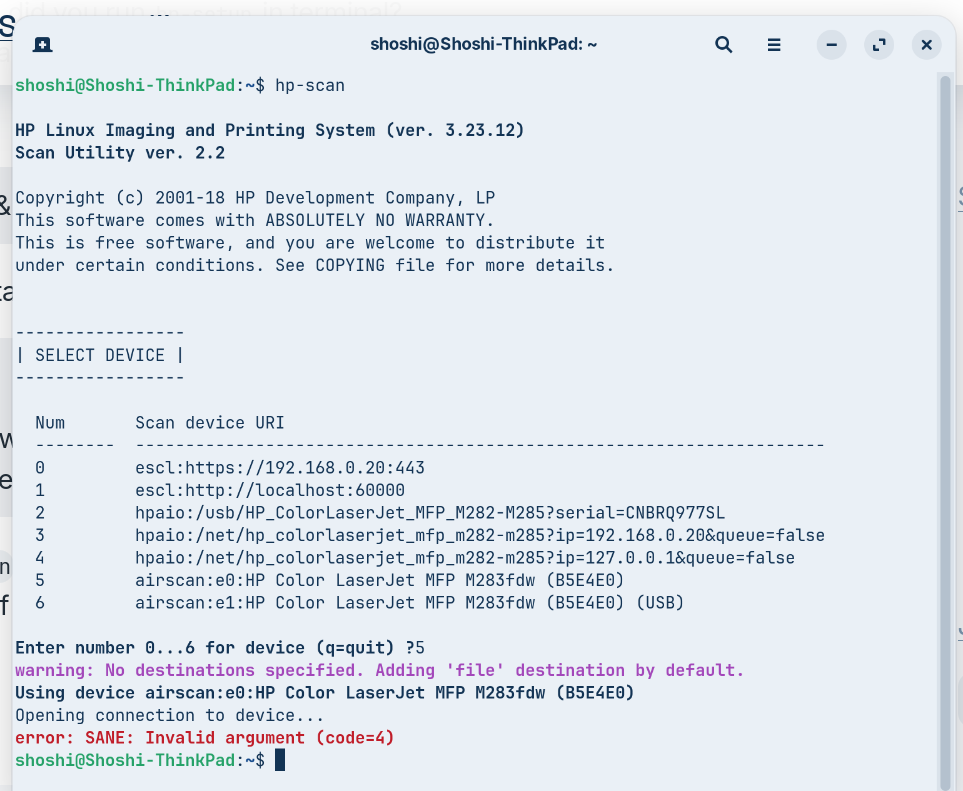
Searched through the help and eventually got this on Terminal:
!
jORIK449LLG8NhKeCB3iQR7WObO.png)
Can you help please. All at sea.
HP LaserJet Pro MFP M283fdw
Office / Document Scan doesn't show in the menu.
Searched through the help and eventually got this on Terminal:
!
Did you try 3 ?
No, I didn't. It had a different number from my printer.
It's close to a year ago now and my memory is a bit fuzzy but for my HP printer I think I had to load a separate plug in beyond HPLIP to get the scanner function working. Can anyone fill in the blanks? Brave AI says to do sudo hp-plugin and that kind of sounds like the sort of thing I did.
OK. I don't have an HP all-in-one but for scanning it always has to be escl.
So the question is, is the device connected wirelessly or USB? If networked (wireless) choose '0’ if USB '1’.
One other piece of advice, if the wall socket that the MFP is plugged into has a switch, never turn it off or you will lose all your network settings and have to start afresh. At the school where I worked in the Integrated Resource, one of my tasks was to power down equipment at the end of the day. The students had access to usb printer and a wireless HP mfp, but only used for printing. One day a TA (Teaching Assistant) said they would save me a job and turn off the printers.
They turned them off at the printer, then turned off at the wall socket. Next day my manager asked me to find out why students could not connect to the mfp to print. Had to set it all up again. It wasn't until I had done the same mistake with our home Canon MFP that I twigged why the isdue arose at School!
When using Zorin Document Scanner it might show the Printer first, you need to scroll down to ensure you select escl followed by device name.
Interesting article on eSCL here:
Hmm if it is pluged in with a usb plug try selecting #2 its only one on the list with a usb connection
" If we connect and turn on an IPP-over-USB printer, ippusbxd gets started and makes the printer available under the IPP URI
ipp://10.0.0.1:60000/ipp/print
the scanner (if the device has one built-in) under
http://10.0.0.1:60000/eSCL
and its web administration interface under
http://10.0.0.1:60000/
"