Hi,
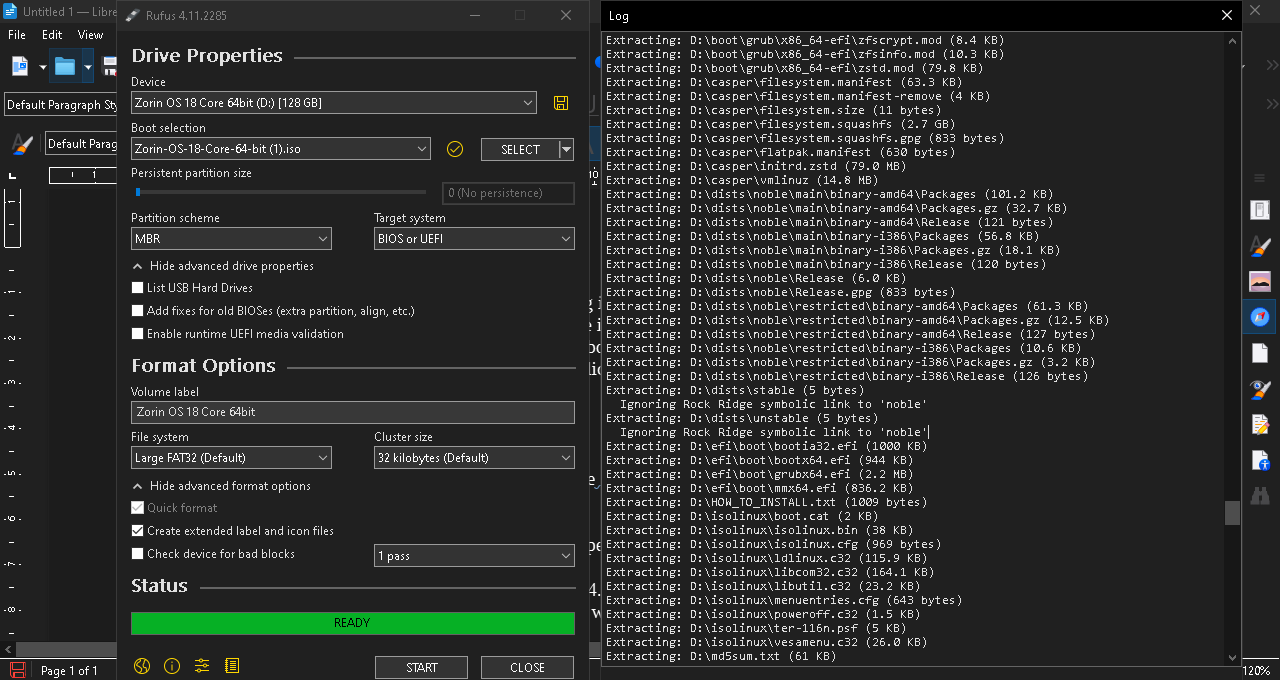
I’m looking for possible workaround to solve an ongoing technical issue that I’m having in trying to create a bootable USB stick of Zorin OS 18 using Rufus 4.11 on Windows 10 Pro. I'm an average Windows user and a Linux noob, I have a lot to learn and trying to create a bootable USB stick of Zorin OS 18 is proving difficult.
It’s just when I tried to create a bootable USB stick of Zorin OS 18 using Zufus 4.11 on a Dell laptop Windows 10 Pro, [according to the Rufus log files] Rufus 4.11 failed to replicate two Zorin OS 18 .iso files & ‘Ignored’ 5 bytes per file [10 bytes total], because of file system limitations in replicating symbolic links. In layman terms, I think Rufus 4.11 has managed to create a bootable USB stick of Zorin OS 18 with 99.9% of the data intact but has ‘ignored’ 10 bytes of data from the original Zorin OS 18 .iso file.
I did try to create the bootable USB stick using Rufus 4.11 in DD Mode following helpful advice from both “Aravisian” & “Forpli” [in a previous separate post] but every time I tried this it made the USB stick unbootable.
I’m just wondering if I should try to use the bootable USB that has 99.9% data intact and try to install Zorin OS 18 as is on a fresh M.2 NVME SSD? and if that works, if there is then a way for Zorin OS 18 to verify its own installation and download the missing files? or if that would be a very, very bad idea!
I'm in over my head can anyone help?