First, english is not my first language so sorry for mistakes.
I'm sure this kind of topic was created dozens of time but I have a few specifics questions. Plus, maybe some details have changed with the recent 18 version.
So i'm from windows and just bought a new PC, I would like to go Linux on it for protection of my own datas.
I do desktop tasks with a little developpement for my informatic school (Visual Basic, MySQL, later java, etc).
I'd like to have a PC who can run recent games too, when i'll have the time.
Is there a site where I can check wich application is available on Zorin, or what I have to do to make it compatible?
I found a tuto for installing Zorin OS with Rufus but I'd like to know if there is specific settings to get in mind when I'll do so.
A friend of me (who is on Mint) talk about Secure Boot, pilots, codecs and Timeshift (I don't even know what that is).
Beside, I'd like to get a virtual machine with Windows 11 in case some application works only on win.
I see dual boot everywhere but my aim is to stay most of time on Zorin. Plus I think it would be more secure this way.
What do you think of this?
I'm not against some terminal scripts and I saw a topic on it, I'll check it later.
To be fair, I'm a little intimidated by this.
Hope this message won't bother old dogs on this forum who already responds to this a lot of time.
If your friend is using Mint then may be useful for helping you as both are based on Ubuntu. I would point you towards this pre-installation advice thread as a start point: Before you install
If you have bought a new PC, then maybe your very new hardware may not be fully supported by ZorinOS.
Best to create a ZorinOS installation USB (suggest using Rufus not Balena) and boot that to "Try Zorin" mode first, to see how ZorinOS works on your PC, before performing a full install.
That doesn't exist in this Way. But when You use Windows Programs and You want see in common Linux Alternatives, You could use this Page:
Timeshift is for making a BackUp. Codecs are for Support of Audio and Video Formats. Secure Boot is in BIOS an a Function for starting certified Software. What is meant with ''pilots'' I don't know.
For using Rufus, I would recommend first to take a Look in the BIOS and disable there Secure Boot and Fast Boot. This helps avoid Issues for installing and using Linuux/Zorin. If You should let Windows installed, disable Fast Start-Up in Windows, too.
Creating a Bootstick with Rufus is pretty simple. You take an USB Stick (I would recommend 32GB or less) format it to FAT32 and then use it. In Rufus there is an Option called ''Partition Sheme''. That needs Attention. When Your BIOS is in UEFI Mode selsct there GPT. When it is in Legacy Mode select MBR. And then let Rufus do it's Thing.
Like @zabadabadoo already wrote, it would be a good Idea to start Zorin first in Live Mode. To do that, choose on the Screen ''Try Zorin''. Then You can test if Your Hardware runs so far. The Performance might be not so well because it runs on the USB Stick, but for testing it is okay. And You can see if Your Hardware is supported. When You have very new Hardware, it could be that You would need a newer Kernel that the one that Zorin uses for better Hardware Support.
Well, this is at the End up to You. Before I went to Linux-only, I used Dual-Boot and had no Issues with it. But that doesn't mean, You can't get Issues. It can happen that a Windows Update could overwrite the Boot Partition. Then You can start in Windows, but no longer in Zorin. If Your PC offers enough Hardware Power, You can use a Windows VM, sure. Another Option would be to use something like WINE or Bottles to run Windows Program in Zorin. Or there is a new Program called WinBoat what You could use too. At the End, You have to look with what You are fine. You have the Choice.
I followed all the steps in the "Before you install" topic.
I have now Zorin working on my USB drive.
I cheked in the system detail and I can see the model if my motherboard, my processor and the quantity of RAM.
I also have access to my two ssd.
My only concern is about my GPU which is just named "AMD Radeon Graphics" and not the name of the model.
There is also the same name of my processor under "Graphics 1".
Is it normal?
Do I have to check anything else before installing Zorin on my system?
Could be because of the Live Mode. What AMD Graphics Card do You have? When in Live Mode open the Terminal and type sudo lshw -C video and post the Output here please.
Your graphics card is a really new one so you may need a later kernel. But in the live session you can't test how a later kernel would work because it requires a reboot.
When Zorin is installed you can install a later kernel and add a ppa for the latest mesa drivers if wanted.
If you are afraid of installing other kernels you could also use another non-LTS- distribution which offers a current kernel.
Yes, when You have 2 Graphics Card Modules, You get 2 Outputs.
Like @forpli already wrote, ist Your Card a relatively new Model. So, a newer Kernel could offer a better Hardware Support. But: Your System runs. So, that is for now a good Sign.
I would suggest to try it with a Dual-Boot System first. Then, you have still windows at the Side. And You have Zorin installed on the Machine. So, You get the Experience with Your actual Machine how it runs on it.
So I choosed to install te liquorix kernel but when I write the command
ssudo add-apt-repository ppa:damentz/liquorix
I have this message in the end:
TimeoutERror: [Errno 110] Connection timed out
I asked help from chatgpt and he tried to help me installing liquorix manually. But he ended telling me that liquorix is too fast for Zorin 18 because liquorix is Python 3.11 and Zorin = Python 3.10.
Seems strange to me because on the tuto you've sent, it's on zorin 17 which is obviously older than the 18 version.
This is completely wrong and fundamentally flawed. Liqourix (or any) kernel has zero dependency on the Python version.
And "too fast"? That makes zero sense.
These are both normal. The kernel will list what shows in PCI I.D. It won't show a marketing name.
Graphics 0 and graphics 1 are your Integrated GPU and Dedicated (AMD) GPU.
I'm sorry I still have difficulties to interpret This kind of response from the terminal.
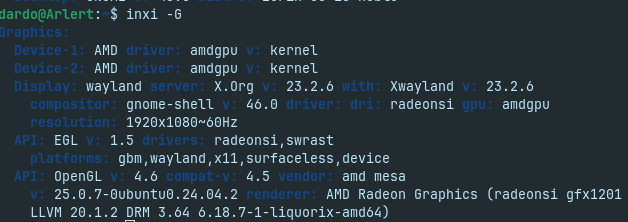
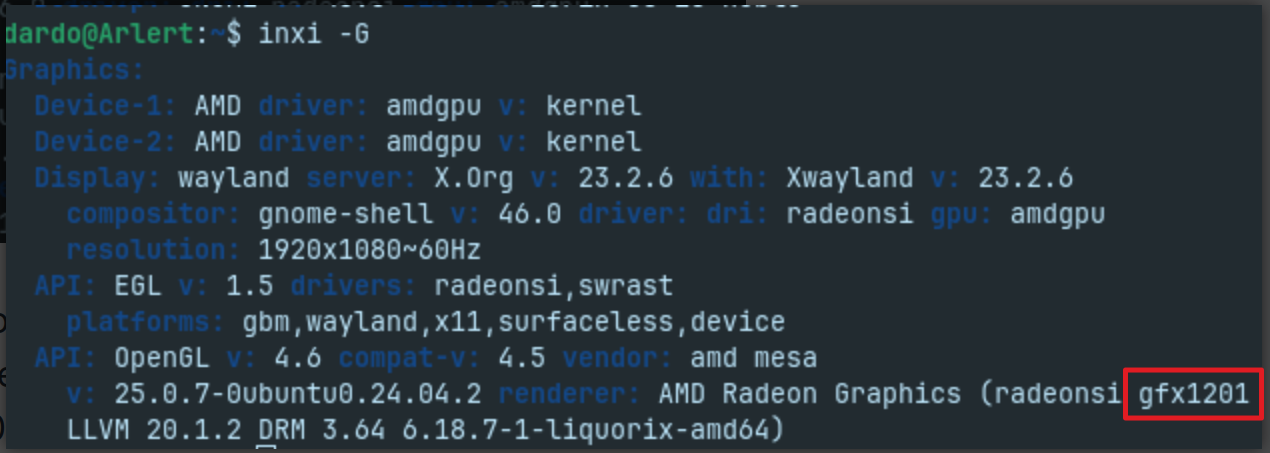
The 2 devices seems to have the same name. How do I know my GPU is correctly detected has a Radeon RX 9070 XT?
In your screenshot, it shows your AMD device using the built in AMDGPU driver.
It shows Mesa 25 in use.
By these, we know it is detecting the card and supplying the kernel supplied driver. AMDGPU is the name of the driver, that is not generic.