I don't know for .libadwaita, I don't use it...
I had hoped that with yaru theme the look of the apps in Zorin is more consistent, but it isn't.
This worked better on Zorin OS 17. But on 18, LibAdwaita is more persistent and invasive.
I have not confirmed that Yaru is the issue... but for now, testing if you think it is, is the right move.
Very Strange.
Did you test multiple boots?
1 Like
I tested two times, a reboot and a shutdown with fresh boot.
Like @Aravisian said it's very strange, because disabling this service can't affect the boot time in a slower way.
Anyway did you take a look at your Bios and/or a Bios update ?
When I bought the laptop refurbished last year, I updated everything, including the BIOS. The current BIOS is from June 2025.
I just see that there is one later BIOS version. Unfortunately, Windows has been uninstalled now, so updating the BIOS is more difficult because the files are only available as .exe files. I'm hesitant to do this using a USB drive because I've never done it before this way.
It's safe to do it from USB drive, I read the doc on Dell site, pretty easy, but if you can also do it with linux, with this famous fwupd, it using commande line, but in Software, you can install a GUI, the name is Firmware, try and see if there is an update for your BIOS there
The "firmware" app shows no publications available, but I have 1.43 and the latest BIOS version is 1.44.
try it with USB stick so
I'll try that. I have to buy an USB stick first. Mine are all in use and I'm not sure how they are formatted.
I resetted the BIOS to factory settings and that gave 2 seconds less boot time, and then I tried disabling the NetworkManager wait service again, and this time it has helped a bit.
The time is now at ~34s.
1 Like
Today I mustered up all my courage to perform the BIOS update using the .exe file from the USB drive.
Fortunately, everything went well and the update to BIOS version 1.44 was successful.
Unfortunately, this didn't improve the boot speed. It's still 34 seconds.
give me again
systemd-analyze
systemd-analyze blame
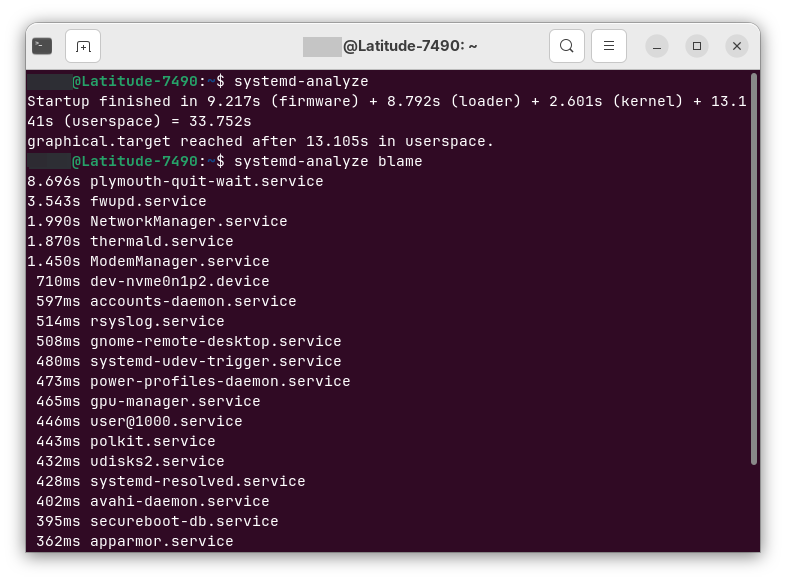
you can disable and mask fwupd.service if you don't need to update any hardware firmware on your computer, ModemManager.service (or you have an old 56k modem lol)
for fwupd you can also remove it
sudo apt purge fwupd
For the 9 seconds of firmware, maybe an option in your bios, because this is the moment when hardware initialized
mine 2.010s (firmware) on my 11 year old laptop
your 9.217s (firmware) more recent computer
1 Like
I have a 7 Sec. Firmware Loadtime. So, not too far away. Where I have a much lower Value is ''loader. @Forpli has there over 8 Sec's. I have 2.8.
1 Like
as you see my bios don't do too many things, but you are also right mine take 2.7 sec for loader (grub)
Do you have any idea why my boot process is taking so long? I went through the settings in the BIOS, but most of them don't mean much to me and I don't know what to change there. "Fast Boot" was even set to "Minimal," so I changed it back to "Thorough" (it was set this way when I bought the laptop, probably the reset few days ago has changed that), but that increased the boot time to 40 seconds.
there are many things, I don't know your Bios, boot order for example, disable TPM...
and for Grub you changed something ?
No, I haven't changed things in grub, just that it is displayed at boot and enabled os-prober. TPM is still enabled. Shall I disable it? I was not sure about that setting. Zorin was set to first boot position in the test.