I wanted to report a major issue after the latest system update on my Zorin OS installation (running on a Dell Inspiron 15 3515).
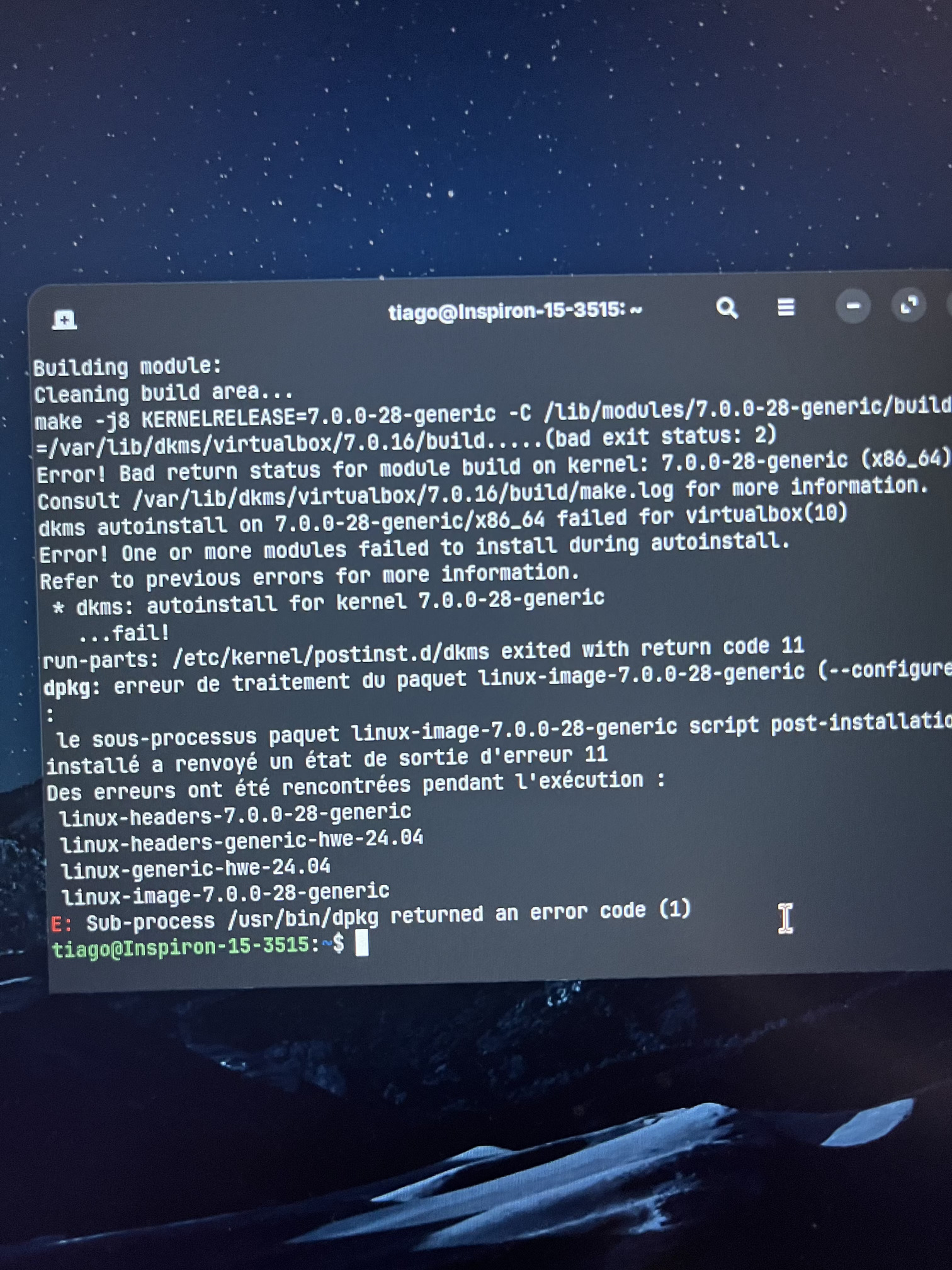
The update tried to install the new kernel 7.0.0-28-generic. However, the compilation of the VirtualBox (v7.0.16) kernel module failed during the DKMS auto-install phase with a "bad exit status: 2". Because of this, dpkg returned an error code (1) and the initramfs/boot image was not properly generated.
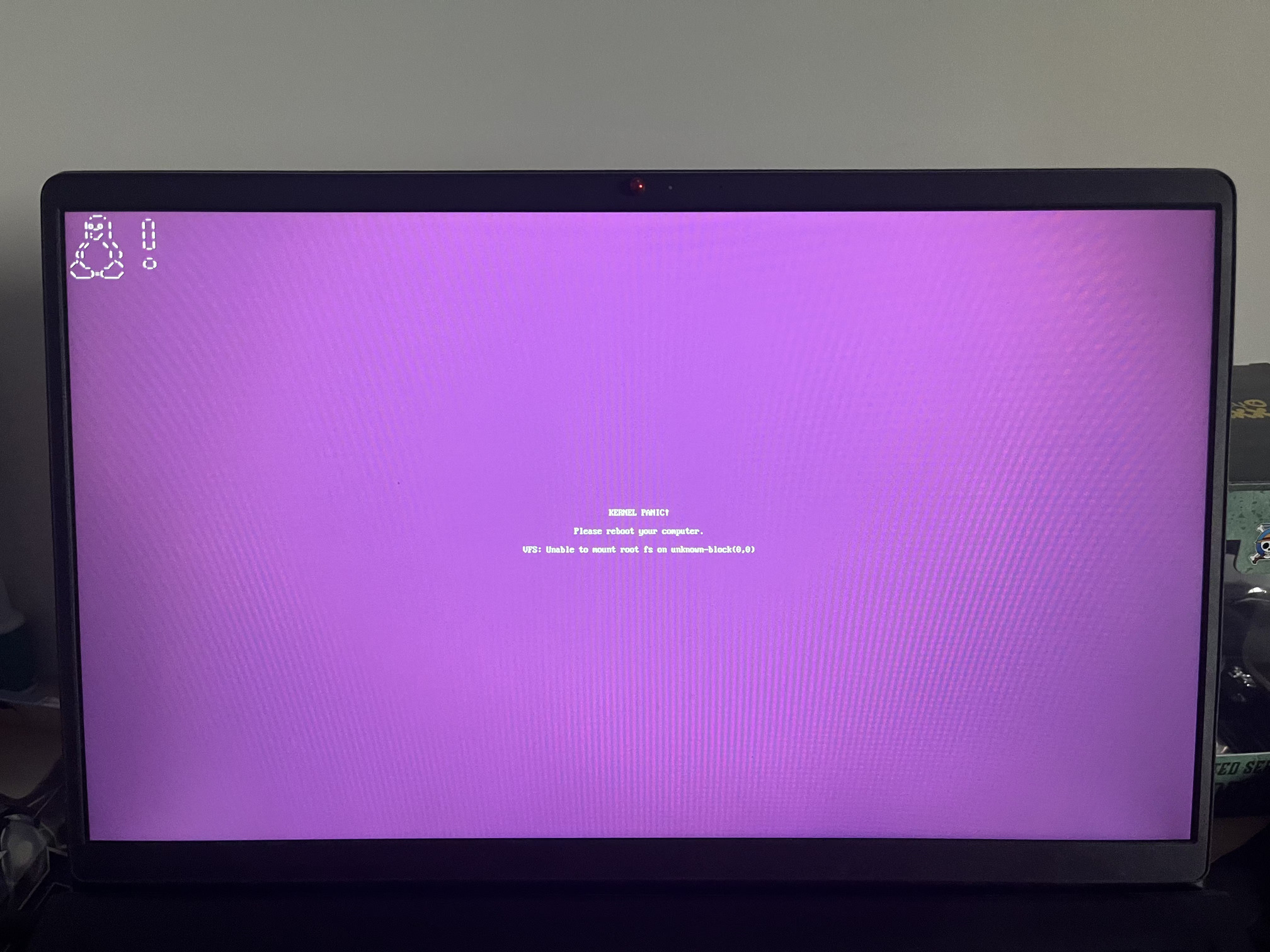
Upon the next reboot, this resulted in a critical Kernel Panic:
"VFS: Unable to mount root fs on unknown-block(0,0)"
I managed to fix it temporarily by booting into an older 6.X kernel via GRUB, purging the 7.0.0-28 packages, and putting "linux-generic-hwe-24.04" on hold.
I am sharing the screenshots of the terminal error during the update and the resulting kernel panic screen to help the dev team or other users facing the same issue.
Your are not the first User who reports this Issue unfortunately. To go back to the older Kernel, You already mentioned. That would be one Option at the Moment.
The other Option would be to uninstall VirtualBox and then go to their Website and download their the current Version for Ubuntu 24.04 /the Base of Zorin 18) or even add their Repository to get continuos Updates:
I too have Virtualbox installed to run certain Windows Programs and experianced the same Kernal panic for the kernal 7.0.0-28-generic update. I tried the 4 commands that was in another post to uninstall, force & fix updates but errored out on dependancy, so in my case I had to roll back with Time-Shift.
So the solution is to remove Virtual Box and upgrade to the newest one? Maybe I will just remove Virtualbox for now, since my system is dual boot with win11.
I find it very odd that zorin has not emailed everyone with an account to notify them... and explain how to fix this issue. If you want to be an OS for the people, not linux wizards, you need better customer support.
Had the same issue but instead of Virtualbox it was due to the Broadcom BCM4360 wifi adapter drivers. Because these are proprietary and unmaintained, they break frequently and require community patches.
I was able to boot to a live install of Zorin on a USB by re-setting my GRUB config to GRUB_TIMEOUT_STYLE=menu and GRUB_TIMEOUT=5, when enables the menu to get to the previous kernel.
I'd second this, but it's a bit of an upstream issue which is a shame because it makes downstream orgs like Zorin look bad when it happens. It would be nice if there was a way to prevent users from auto-updating their kernel due to these types of incompatibilities before they break and cause installs to become unbootable!
Although the devs have posted a pinned reply in the Feedback section (ref: Kernel 7.0.0-28 - Kernel Panic or graphics issues notice - #14 by AZorin) , maybe there should be an "Announcements" section on the forum for such posts. Particularly as there have been so many threads featuring the same kernel 7 woes. Just a thought.
I think this was a particularly unusual kernel adjustment.
Looking at this objectively, it takes time to get reports, pour over them, get to work on figuring out what is going on...
Frankly, I think that the amount of time that passed and the time that a fix (along with a response appeared) was very quick.
I can be critical, but on this one, I not only do not blame the ZorinGroup as this was upstream, but applaud their lightning response.
Good afternoon, I had this same issue and it did not resolve after running sudo apt update && sudo apt dist-upgrade on the older kernel.
The problem stemmed from outdated v4l2loopback virtual webcam module. I was able to fix it by removing the old modules and updating here are the exact commands I ran.
Then after that completed I ran sudo dpkg --configure -a and after reboot was able to boot into the latest 7.0.0-28 just fine. Hope this helps someone.
 .
.