Kernel 7.0.0-28 - Kernel Panic or graphics issues notice

Mod Edit:
I am linking directly at the outset of those post to an important notice from the ZorinGroup in regards to this issue, in this pinned thread:

Now, back to the original beginning:


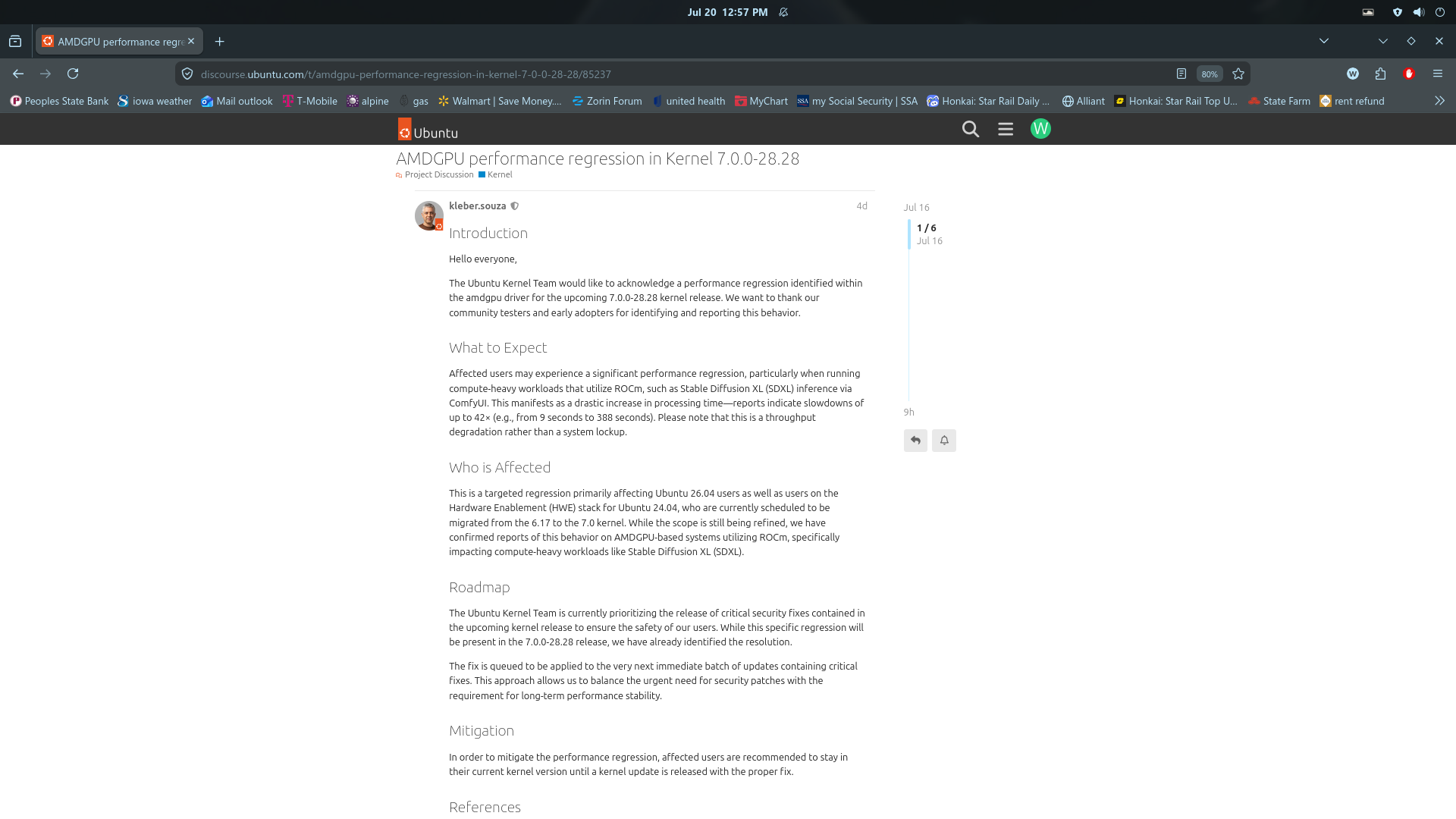
I asked if the 7.0.0-28 generic kernel is safe to use on ubuntu 24.04 systems and here is what i got.

Using Linux kernel 7.0.0-28-generic on Ubuntu 24.04 is not recommended right now. The Ubuntu Kernel Team flagged this specific release (7.0.0-28.28) for an AMD GPU regression. Additionally, users are reporting issues like VirtualBox DKMS module failures, resulting in kernel panics. [1, 2]

Known bugs and issues in 7.0.0-28-generic include:

  • AMD GPU Regression: Breaks or interferes with AMD ROCm compute functionality.

  • VirtualBox DKMS Failure: Fails to compile guest additions, often causing the OS to fail to boot and leading to "unable to mount root fs" errors.

  • Audio Dropouts: Audio glitches have been reported when using specific sound stacks (like Pipewire) on this kernel. [1, 2, 3, 4]

How to Fix or Work Around the Issue:

If the update was already installed and your system is unstable or fails to boot:

  1. Boot into an older kernel: Restart your computer and hold the Shift key (or Esc on some UEFI machines) to bring up the GRUB boot menu.

  2. Select an older version: Go to Advanced options for Ubuntu and select a working kernel from before the 7.0.0-28 update.

once in the older kernel i would remove the 7.0.0.28 or set the grub to only boot the previous kernel

continue to use at your own peril!!!!

1 Like

Completely restart your computer.

As soon as the manufacturer's logo appears (Dell, HP, Lenovo, ASUS, Acer, etc.), repeatedly press the Esc key until a menu appears.

If nothing happens, restart and try repeatedly pressing the Tab key.

If nothing happens, restart and try pressing and holding the Left Shift key until a menu appears.

One of these methods should display the GRUB boot menu.

Choose an older kernel

  • Advanced options for Zorin
  • Press Enter
  • Select the previous kernel version by tapping the down arrow key to navigate the list.
    Do not select Recovery Mode.
  • Press Enter to boot.

You can use the link supplied by @wesoliv429 above to lock in the stable kernel and avoid needing to follow these steps at each boot.

3 Likes

An Advice for People who use the Software Updater Tool: When You see there the 7.0 Kernel Update Packages untick them and install only the other Updates.

1 Like

If you want to investigate the failure further from an older kernel.

You could check if these issues are caused by a third party driver not compatible with the latest major kernel version or drivers installed via the Software Updater --> "Additional Drivers" tab.

These will cause the dkms command to fail during the Kernel installation

To check if you have any third-party drivers installed

sudo dkms status

Take note of the driver name.
Then to remove these from the current kernel.
important: These driver will be removed from your current kernel so if you remove for example a driver for wifi, you will loose access to wifi after the next reboot!!!

sudo dkms remove DRIVERNAME 

Re-run the software updater to re-install the latest kernel and reboot
Then re-install the driver via Software Updater --> "Additional Drivers" tab or via any other way that you originally installed it (also check if the provider have made a new update for the latest kernel)

1 Like

This is a repeat of a similar issue some months ago; can't remember the exact reason. Is this something to do with the Ubuntu base kernel upgrade or is it something Zorin does?

I used the System Updater and ended up with a kernel panic upon boot-up. Was able to revert to the 6.17 kernel.

1 Like

Ubuntu - you can tell by the revision tag at the end (-28Z) which matches the Ubuntu Kernel teams patch.

1 Like

press [esc] and [shift] to enter G-MODE
in GRUB type: [NORMAL] and press ENTER,
Restore version 6 in normal mode.

In terminal

Configurando o sistema para lembrar a versĂŁo correta

  1. Abra o Terminal do Zorin OS.
  2. Vamos editar o arquivo de configuração de inicialização. Digite o comando abaixo e pressione Enter (sua senha será solicitada, e é normal que ela não apareça enquanto você digita): sudo nano /etc/default/grub
  3. O arquivo de texto abrirá no próprio terminal. Use as setas do teclado para descer até encontrar a linha que diz GRUB_DEFAULT=0.
  4. Apague o 0 e escreva a palavra saved, deixando a linha exatamente assim: GRUB_DEFAULT=saved
  5. Logo abaixo dessa linha, crie uma linha nova e adicione o seguinte: GRUB_SAVEDEFAULT=true
  6. Agora vamos salvar as alterações. Pressione as teclas Ctrl + O (letra O), confirme apertando Enter.
  7. Para sair do editor, pressione Ctrl + X.
  8. Por fim, aplique as novas configurações digitando o comando abaixo e pressionando Enter: sudo update-grub

This will restore version 6.

1 Like

Most of the issues here on the forum have always occurred after switching to a new HWE kernel.
Zorin 18 was shipped with HWE kernel 6.14, then it was upgraded to HWE kernel 6.17, and now to HWE 7.0.

I really wish Zorin offered the option to perform these HWE kernel upgrades only when desired, rather than automatically, and that it would also be possible to use one supported kernel - such as e.g. 6.8 GA - throughout the entire Zorin 18 release cycle (and easier for users to setup this in the normal settings). For users with newer hardware, kernel upgrades to higher versions are often beneficial, but less so for users with old hardware.

7 Likes

Oh no :scream:

It sounds worse than it really is.

1 Like

For those worried about the AI search here it is from the Ubuntu forum which I am a member

We've been investigating the issues related to the recent update to the Linux kernel 7.0 in Zorin OS 18 and have just released fixes for them in our repositories around 20 minutes ago. As a result, installing the latest software updates as of now should allow you to upgrade from the Linux kernel 6.17 → 7.0 without experiencing a kernel panic.

If you've already installed the update to the Linux kernel 7.0 and are experiencing a kernel panic at boot, please follow these steps to resolve this issue:

  1. Switch off your computer fully.
  2. Power on your computer and pressing the Esc key to show the boot menu.
    • If you don't see the boot menu after doing this, please try restarting the computer and holding the Shift key instead.
  3. Use the arrow keys to select "Advanced options" under the Zorin item.
  4. Select the Zorin OS option with version "6.17" of the Linux kernel and press Enter to boot it.
  5. When you reach the desktop, open the Terminal (Ctrl+Alt+T) and enter these two commands:
    • sudo apt update
    • sudo apt dist-upgrade
  6. Restart your computer to apply the fixes.

Sources of this issue

Based on our research, it appears that this behaviour stemmed from 2 particular sources, which only affected a subset of systems with the following software installed:

Source 1: VirtualBox

The standard version of the VirtualBox package (as in the Ubuntu 24.04 repositories) isn't natively compatible with the Linux kernel 7.0. In particular, the virtualbox-dkms package (which includes required kernel modules) wasn't updated to include support for it ahead of the roll-out of the Linux kernel 7.0 in the Ubuntu 24.04 repositories.

It appears to have been an oversight by the Ubuntu package maintainers, as they previously backported support for newer kernel versions into the VirtualBox package, even when the underlying upstream version of VirtualBox being used didn't originally have it. It might be on the roadmap for the Ubuntu package maintainers to backport Linux kernel 7.0 support into the VirtualBox package in the Ubuntu 24.04 repositories at a future date. However, due to the initial bug reports we've received from users, we've treated this as a high priority issue and have backported Linux 7.0 support into the standard VirtualBox package ourselves instead of waiting for the Ubuntu team to do so.

Source 2: broadcom-sta-dkms

This package includes kernel modules with hardware drivers to add support for some Broadcom wireless network cards.

Similar to the issue with VirtualBox, the kernel modules in the standard version of this package didn't include support for the Linux kernel 7.0 in the Ubuntu 24.04 repositories. While an updated version of this package with Linux 7.0 compatibility is available in Ubuntu 26.04, it wasn't backported to the Ubuntu 24.04 repositories ahead of the roll-out of the new kernel.

We've gone ahead and backported the newer version of this package into the Zorin OS repositories and tested installing it with the latest Linux 7.0 kernel to ensure it configures cleanly.

Other sources

We couldn't identify any other sources of this issue, so we believe these two fixes should allow users to upgrade to the latest Linux kernel 7.0 normally, without experiencing a kernel panic.

However, if these solutions didn't resolve the issue for you, please let us know more about your experience and system setup, so we could troubleshoot the issue and publish a fix for it. If you experience any errors after running the sudo apt update and sudo apt dist-upgrade commands (as mentioned above), including a screenshot or copy of the text output after running them would be enormously helpful to resolve the issue.

9 Likes

Thanks @AZorin ...... :grin:

1 Like

thanks, i just check the update, and it looks like updates from previous were failed, and restarting the computer last time didn't work, while i check it looks like VirtualBox Kernel Support fix immediately

I encountered the Kernel Panic error this morning,
so booted into 6.17.0.35-generic no probs
and then came across the support fourm

Following your instructions of apt update and apt dist-upgrade, as requested I get the following error/output

Reading package lists... Done
Building dependency tree... Done
Reading state information... Done
Calculating upgrade... Done
The following packages were automatically installed and are no longer required:
libfwupd2 nvidia-firmware-580-580.126.09 slirp4netns
Use 'sudo apt autoremove' to remove them.
0 to upgrade, 0 to newly install, 0 to remove and 0 not to upgrade.
4 not fully installed or removed.
After this operation, 0 B of additional disk space will be used.
Do you want to continue? [Y/n] y
Setting up linux-image-7.0.0-28-generic (7.0.0-28.28~24.04.1) ...
Setting up linux-headers-7.0.0-28-generic (7.0.0-28.28~24.04.1) ...
/etc/kernel/header_postinst.d/dkms:

  • dkms: running auto installation service for kernel 7.0.0-28-generic
    Sign command: /usr/bin/kmodsign
    Signing key: /var/lib/shim-signed/mok/MOK.priv
    Public certificate (MOK): /var/lib/shim-signed/mok/MOK.der

Building module:
Cleaning build area...
KERNELDIR=/lib/modules/7.0.0-28-generic/build make driver...(bad exit status: 2)
Error! Bad return status for module build on kernel: 7.0.0-28-generic (x86_64)
Consult /var/lib/dkms/openrazer-driver/3.11.0/build/make.log for more information.
dkms autoinstall on 7.0.0-28-generic/x86_64 succeeded for nvidia
dkms autoinstall on 7.0.0-28-generic/x86_64 failed for openrazer-driver(10)
Error! One or more modules failed to install during autoinstall.
Refer to previous errors for more information.

  • dkms: autoinstall for kernel 7.0.0-28-generic
    ...fail!
    run-parts: /etc/kernel/header_postinst.d/dkms exited with return code 11
    dpkg: error processing package linux-headers-7.0.0-28-generic (--configure):
    installed linux-headers-7.0.0-28-generic package post-installation script subprocess returned error exit status 11
    dpkg: dependency problems prevent configuration of linux-headers-generic-hwe-24.04:
    linux-headers-generic-hwe-24.04 depends on linux-headers-7.0.0-28-generic; however:
    Package linux-headers-7.0.0-28-generic is not configured yet.

dpkg: error processing package linux-headers-generic-hwe-24.04 (--configure):
dependency problems - leaving unconfigured
dpkg: dependency problems prevent configuration of linux-generic-hwe-24.04:
linux-generic-hwe-24.04 depends on linux-headers-generic-hwe-24.04 (= 7.0.0-28.28~24.04.1); however:
Package linux-headers-generic-hwe-24.04 is not configured yet.

dpkg: error processing package linux-generic-hwe-24.04 (--configure):
dependency problems - leaving unconfigured
Processing triggers for linux-image-7.0.0-28-generic (7.0.0-28.28~24.04.1) ...
/etc/kernel/postinst.d/dkms:

  • dkms: running auto installation service for kernel 7.0.0-28-generic
    Sign command: /usr/bin/kmodsign
    Signing key: /var/lib/shim-signed/mok/MOK.priv
    Public certificate (MOK): /var/lib/shim-signed/mok/MOK.der

Building module:
Cleaning build area...
KERNELDIR=/lib/modules/7.0.0-28-generic/build make driver...(bad exit status: 2)
Error! Bad return status for module build on kernel: 7.0.0-28-generic (x86_64)
Consult /var/lib/dkms/openrazer-driver/3.11.0/build/make.log for more information.
dkms autoinstall on 7.0.0-28-generic/x86_64 succeeded for nvidia
dkms autoinstall on 7.0.0-28-generic/x86_64 failed for openrazer-driver(10)
Error! One or more modules failed to install during autoinstall.
Refer to previous errors for more information.

  • dkms: autoinstall for kernel 7.0.0-28-generic
    ...fail!
    run-parts: /etc/kernel/postinst.d/dkms exited with return code 11
    dpkg: error processing package linux-image-7.0.0-28-generic (--configure):
    installed linux-image-7.0.0-28-generic package post-installation script subprocess returned error exit status 11
    Errors were encountered while processing:
    linux-headers-7.0.0-28-generic
    linux-headers-generic-hwe-24.04
    linux-generic-hwe-24.04
    linux-image-7.0.0-28-generic
    E: Sub-process /usr/bin/dpkg returned an error code (1)

I should point out I also had Virtualbox installed (now removed)

Is there a way to force remove this Kernal and do a fresh upgrade from 6.17? something like
dpkg --remove --force-remove-reinstreq *******?

to further add to this I discovered the PPA for Openrazer wasn't enabled in software & updates so my errors may not impact anyone if they are running an update to date version of openrazer as it looks like this problem was addressed already (hyperlink below)

enabling this and updating OpenRazer allowed the 7.0 dist-upgrade to run,
just reboot successfully into 7.0.0.28-generic

https://www.phoronix.com/news/OpenRazer-3.12.4

1 Like

Yes when I was updating from 6.14 to newer version I also had a similar problem and had to choose the previous kernel and froze the version. I had this issue twice, I think the cause was Nvidia compatibility but I just learned that updating to the new kernel version is not a good idea and not stable.

Hey Timmy, after you resolved openrazor...

Did the Nvidia packages/modules update ok with the new Kernel 7.0?

What Nvidia graphics card are you using? What Nvidia driver version was installed after the update?

Did you use the Zorin Dev recommended command to update?

  • sudo apt update
  • sudo apt dist-upgrade

Thanks for any info!