Since Zorin 18.1 Core updated to Linux Kernel 7.0.0 and fixing the Kernel Panic caused by VirtualBox DKMS (link below),
every time that Software Updater updates the kernel and restarting, the next time I try to start a VirtualBox Virtual Machine, it gives out this error.
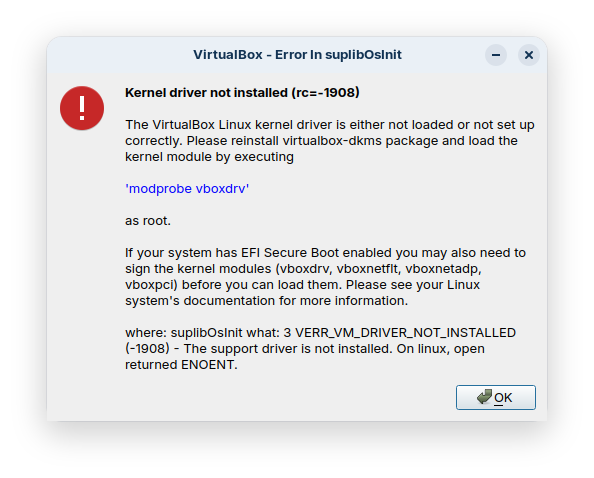
The only solution I have found to fixing this issue is by running sudo apt install linux-headers-$(uname -r) followed by sudo modprobe vboxdrv. If the latter command is executed without the former being done first, the following is observed:
$ sudo modprobe vboxdrv
modprobe: FATAL: Module vboxdrv not found in directory /lib/modules/7.0.0-34-generic
with the current kernel of the OS being listed in the output. This needs to be done every single time the kernel updates.
A copy of the logs for apt is shown below for both software updater and sudo apt install linux-headers-$(uname -r):
$ cat /var/log/apt/history.log
Start-Date: 2026-09-23 11:51:09
Commandline: aptdaemon role='role-commit-packages' sender=':1.2291'
Install: linux-modules-7.0.0-34-generic:amd64 (7.0.0-34.34~24.04.1, automatic), linux-image-7.0.0-34-generic:amd64 (7.0.0-34.34~24.04.1, automatic)
Upgrade: linux-tools-common:amd64 (6.8.0-139.139, 6.8.0-142.142), linux-image-generic-hwe-24.04:amd64 (7.0.0-31.31~24.04.1, 7.0.0-34.34~24.04.1), code:amd64 (1.138.0-1789458761, 1.139.0-1790100840), linux-libc-dev:amd64 (6.8.0-139.139, 6.8.0-142.142)
End-Date: 2026-09-23 11:59:14Start-Date: 2026-09-23 12:00:44
Commandline: aptdaemon role='role-commit-packages' sender=':1.2291'
Remove: linux-modules-7.0.0-30-generic:amd64 (7.0.0-30.30~24.04.1), linux-image-7.0.0-30-generic:amd64 (7.0.0-30.30~24.04.1)
End-Date: 2026-09-23 12:01:33Start-Date: 2026-09-23 12:08:00
Commandline: apt install linux-headers-7.0.0-34-generic
Requested-By: a (1000)
Install: linux-headers-7.0.0-34-generic:amd64 (7.0.0-34.34~24.04.1), linux-hwe-7.0-headers-7.0.0-34:amd64 (7.0.0-34.34~24.04.1, automatic)
End-Date: 2026-09-23 12:12:13
Although this is a minor inconvenience and only happens every few days to few weeks, I would like to know what's likely causing the issue and see if there are any fixes.