Hello,
I'm new to Zorin and and nearly new to Linux in general. I recently re-purposed a laptop (formerly Windows 11) by installing Zorin OS. Everything has been going smoothly except that I have now encountered a problem with my mouse.
This is a Logitech mouse with a receiver (a 'unifying' receiver in fact) which plugs into one of the laptop USB ports. The mouse has been working fine but, after some recent updates (I'm sorry but I can't say specifically which updates), the mouse is not longer working.
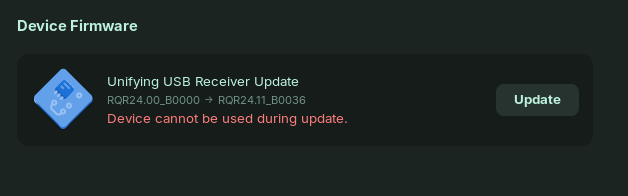
If I unplug the receiver and check for software updates, I'm told the system is up to date. If I plug in the receiver and check the software updates, I get a message (attached) about an update for the receiver. However this update cannot be done while the device is being used.
I've tried turning off the mouse and various restarts but nothing gets the mouse working nor can I force the update to happen. The mouse is the only device connected to the receiver.
Can anyone help?
I note that my problem is similar to, of not the same as, this thread:
However, I was unable to divine an actual solution from that thread.
I'm on Zorin OS 17.3 Core and the output from 'uname -a' is:
Linux pvp-nix 6.8.0-85-generic #85~22.04.1-Ubuntu SMP PREEMPT_DYNAMIC Fri Sep 19 16:18:59 UTC 2 x86_64 x86_64 x86_64 GNU/Linux
I have the same problem with my Logitech mouse. I have a Logitech "wave" keyboard & mouse combo. The keyboard has been great and so was the mouse with Zorin 16. After upgrading to Zorin 17.x (.2 or .3 I think...) the mouse started acting erratically.
So I am going to try the same solution. Because my Logitech mouse was acting erratic I switched to a cheaper wireless mouse that I am using now.
So my question: Can I leave my substitute mouse on and try the solution you described above? The Logitech unifying receiver is still in my computer since I am still using the keyboard. Or do I have to turn off the cheapie mouse as well?