My experience with Zorin OS

Last year around this time, I was first switching to Linux. At first I was going to try Zorin OS. I make the bootable USB, plug it into the laptop. Boot from the drive, NOTHING... I try again, and make a new drive, nothing... I try post on this forum, the consensus being, "Buy a new computer, It must not be linux compatible." I hold out hope, and finally get one distro to work, Arch Linux... The set-up took forever, but I did manage, and have enjoyed that distro since, until recently.

The laptop starts falling apart. So I go and start shopping for a new, looking online the cheapest new laptop is $500. I turn to the used market, a bit later I find a nice looking Dell Latitude 5490. Get it ordered, two weeks later it finally arrives. I unpack it excitedly, and give it a well needed clean. I get windows set-up, and partition the drive. Plug in my Zorin OS 18 bootable usb, I made a week prior. Get to the one-time boot menu, and select the drive with Zorin. It takes a few minutes to load, but boots. I install it, and get my apps installed.

I take the laptop with me the next day, and do some photo editing. It just works, the only thing I notice is the layout of everything is a little odd to me, coming from Arch linux running KDE Plasma as the DE. I manage to customize the taskbar, and it feels better. I then go and try to do a split view, that does not go over well.

So I have to say, really easy to set-up, but Zorin OS really does not feel like windows. I much think my last set-up captured the good side of windows. (Except for all that manual installation of things with commands) The only thing I have to say, is Zorin feels like windows 8 and 11 had a baby. Anyways, after enjoying the shiny and enticing image of Zorin, I feel it falls a little short of what claims.

With that, I am curious why others like this Distro so much? Is it the ease of set-up, or something else?

1 Like

I have long felt this way and I think it is partly due to how popular articles set our expectations.

Zorin OS is GnuLinux, which means it can resemble Windows OS, but is not Windows OS.
It can ease the transfer with familiar layouts and workflow. That is not the same thing as mimicking Windows OS.

This distinction matters. When a person wants to do away with Microsoft but fears learning a new system, they will look up what is the most "Windows-Like."

The ZorinGroup cannot create something that is an operational Windows OS Clone that users can jump on without having to think or learn something new. What they can do is offer a method that eases that learning curve, into bite sized chunks the average user can manage.

For me it is the "something else."

Zorin OS has generally been remarkably stable. This is exceptionally important, especially to new arrivals.
Zorin OS has generally been modular. It is not customized by the ZorinGroup in ways that are hard-coded, locking the user into the Zorin Way of doing things.
Instead, you can easily and safely modify Zorin OS with better results than on many distros that seek a simpler approach. Zorin OS is dynamically written which is much easier for the end user to build their own workflow.

Sadly, I predict this as a changing landscape. As the ZorinGroup adopts a Flatpak centric and Gnome-only base, and moves toward bleeding edge demands, stability and User Workflow become secondary considerations.
Gnome tends to do all it can, like Microsoft, to lock the user into the Gnome Way of doing things. The Gnome Human Interface Guidelines are specifically constructed around this principle: Control apps and the user to ensure that they adhere to the Gnome Way of doing things.
Software developers cutting and pasting dependencies, often unnecessarily, that require bleeding edge, are creating niche demands that end users echo. Zorin OS will try to move away from LTS to meet that demand - giving stability a backseat view.

4 Likes

I have made some Paragraphs to break up the Text Wall for a better Reading Experience.

4 Likes

Well if you are missing Plasma you can open a terminal and enter:

sudo apt install kde-standard

After install at login, select your username and a cog appears lower right, left-click on it and select Plasma, then login.

One good thing about Zorin 18 is that when Plasma gets installed it is the stable 5.27.12 that gets installed.

Or you could replace the Gnome of Zorin for Plasma the hardway, which I did in this video:

:wink:

I think the problem with the Core version is it is still behind in its Windows 7 looks.

I personally think Q4OS gives transitions from Windows to GNU/Linux with Plasma offering readymade Windows styled Global themes, from XP to Windows 11 (Vista and 8 excluded) with its third-party LookSwitcher as a great alternative. It's also an exceptionally stable rolling release. It is the only other distro I use apart from my daily driver, PCLOS Debian based on "trixie" using Plasma 6.3.6.

The point about popularity articles shaping expectations resonates with me. People read "most Windows-like" and expect zero learning curve, then feel let down when it is really just a gentler introduction to GnuLinux. I also appreciate your note on stability mattering most to newcomers, though I am less sure the Flatpak and GNOME direction has to come at the cost of workflow. Modularity is what lets people build their own way of working, and it would be a shame if that got harder. Your Plasma tip is useful to keep in mind for anyone missing it.

2 Likes

Hi and welcome.

Just to add I realised a typo, the version of Plasma that Zorin 18.x supports is 5.27.12 and not 5.27.5.

Anyone trying this, Pling has a problem with Global Themes if the Colour Choice is not a match. This is one area where Q4OS shines with LookSwitcher, ready made Global Themes with LookSwitcher.

My only disappointment with current Q4OS is Flatpak is present by default. Old Stable 5.9 from Sourceforge.net has it as a post-install option, but it does not mean you can't remove it.

I get that it can resemble windows, but will never actually be windows. I really think Zorin is shocking easy to get started with, I just don't think Gnome is the best DE for people switching from windows. I really think KDE Plasma is better, but I have yet to see a distro that uses KDE Plasma and is actually easy for a beginner to set up.

I do agree that media, and a lot of information online, is creating expectations that are simply not valid.

I personally quite like Flatpak, and have been using it for some time, probably like the past 4 years. (To be clear, 3 years using it on ChromeOS, then one year with it running on my arch machine)

I can't fully comment on Gnome though.

I very well, might try it, as I almost managed to kill a $150 external HDD when backing some files up on Zorin... Also good that it is a stable version of KDE Plasma.

That would make sense, it has been a long time since I have touched windows 7, but it was such a nice version and probably one of my favorites, with windows 10 a little higher on the list (as it is newer, and pretty decent)

That might be something I look at, But I am also thinking of looking into CatchyOS. I liked Arch, it ran well, and looked great. The only-thing being the manual configuration of everything, was fine in the moment, but I have no desire to go back and do that again!

100% When I switched to Linux I did expect a little learning curve, but GnuLinux is quite difficult for me to figure out... Probably just a me thing though.

I also agree, stability is critical. I have been enjoying how stable Linux is, here on Zorin OS, and on my old Arch Linux install. I also agree it would be a shame to make it harder to customize things, and hurt the Modularity.

Huh, I rather like Flatpak as I have said either in this reply... Why does everyone not like it?

{Actual Update}
I have tried gaming on Zorin, really just as a joke. The thing is, it went extremely well! SO I am quite happy with that, and think that give Zorin some bragging rights.... That is also on an 8 year old business laptop, so I am truly impressed.

The other thing is, I am struggling to get my printer to work now, as it worked on my arch set-up, but can't get it to work on Zorin... I shall continue to struggle to get the thing to work.

I also would like to apologize for how long this post is.

No need to apologise for length of post.

In answer to why Flatpaks are not liked by me, aoart from introducing bloatware, this post I made some time ago might give you a clue:

It has Advantages and Disadvantanges. But when You are fine with them, You can simply use them. There is nothing wrong with that.

When You like Plasma, Kubuntu could be worth a Look, too.

I looked at the link, am have to say, I do get flatpaks from community projects I use to run some of the equipment I have. They do have a copy on Flathub, but I download from the communities GitHub. I just looked, and I guess they have started pushing Flathub, but then also have a flatpak or appimage to download. So, I guess that project is moving toward Flathub, so that is kind of meh.

Indeed. I did look into Kubuntu, but I don't really like it that much, so I am still running Zorin. I don't mind it, my biggest problem is I can't get my printer to work for the life of me. I installed all the drivers, but can't get the system to assign the driver to the printer. This is important because the photo printing application I use needs a driver to it to actually do anything. So, I just get to fight this printer, and software...

What is your printer, perhaps I can help.

Ya @swarfendor437 is the man to talk to about printers...he is our unoffical printer guy.....lol

1 Like

Well I do make a point of it in my profile.:wink:

2 Likes

It is a Canon Pixma TS3722. I have tried installing the drivers from the Canon website, but that caused a Kernal Panic, so I installed the necessary drivers over the command line (well actually I guess it is a terminal, as this is Linux). It was the "cnijfilter2" driver package.

OK. I will launch my VM of 18.1 and do a video.

What you need to remember is that sadly Canon does not do a GNU/Linux version of Image Garden for Borderless Prints. When I need those I have to boot up Windows! :scream:

1 Like

Well here it is, errors in finding the driver included at start! Please be sure to read the description below the video. (And don't forget to 'Like' please).

1 Like

I do have windows on my machine, with Zorin OS. The thing with borderless printing, is I no longer use windows, as last time I had to print something I wasted a good hour trying to get borderless printing to work on the last printer. I do not use Image Garden, except on mobile. On my computer I have been running VibePrint Studio, one of the best kept secrets in the world of Linux photo processing and printing. The software needs a printer driver to actually work, and also allows for ICC profiles and some rather advanced professional things. I have had this set-up working rather well on my Arch Machine. I just don't have the time, to start from scratch in Arch, as it would take me at least a week, and I would not get to do much with my computer for that time. It also doesn't help I am behind on projects, and stuff as this laptop came in late. I have got the drivers installed, but my Software won't hand the job to CUPS. I am annoyed as I really need to print these photos, and can't.

2 Likes

Now that you have given more information I searched for your issue using Ubuntu 24.04 in the search criteria as that is what Zorin 18 is based on.

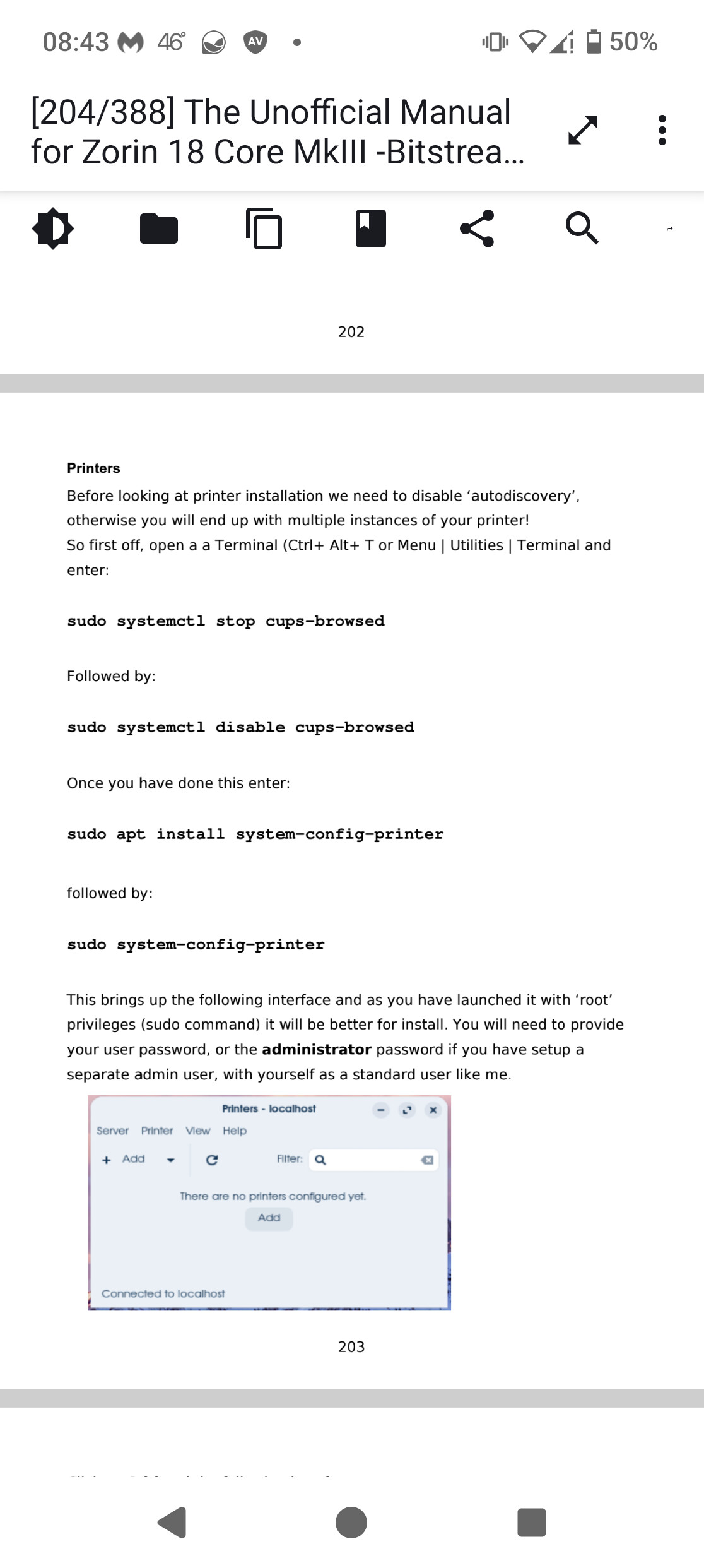
Before I add the result from Brave A.I. is the printer networked? Additionally, before following the video I would delete any entries in printers and perhaps reinstall CUPS and VibePrint Studio. If networked you need to stop CUPS autodiscovery, then disable it:

Here is the Brave A.I. search result via Mojeek:

" The issue likely stems from CUPS defaulting to monochrome or VibePrint Studio ignoring system color settings due to the specific driver limitations of the Canon Pixma TS3722 on Ubuntu 24.04 .

Immediate Troubleshooting Steps:

  • Verify CUPS Default Color Mode:

    • Open a browser and go to localhost:631 .
    • Click on your Canon Pixma TS3722 printer.
    • Go to Maintenance > Modify Printer or check Properties .
    • Ensure the Color Model is set to RGB or CMYK (not Monochrome/Grayscale).
    • If the default is set to monochrome, change it to Color and save. Some applications (like Chrome or VibePrint) may ignore dialog choices and stick to the CUPS default.
  • Check VibePrint Studio Settings:

    • Inside VibePrint Studio , look for a Printer Properties or Preferences button before printing.
    • Ensure Color is selected, not Grayscale or Black & White .
    • If the option is grayed out or missing, the driver may not be exposing color controls correctly to the application.
  • Driver Installation (Critical for Ubuntu 24.04):

    • Ubuntu 24.04’s built-in CUPS driverless support may be incomplete for the TS3722 .
    • Download the official Linux driver (.deb ) from the Canon Support website for your specific model.
    • Install the driver and restart the CUPS service (sudo systemctl restart cups ).
    • Re-add the printer using the Canon-specific driver rather than the generic CUPS driver.
  • Alternative Workaround via Terminal:

    • If the GUI settings fail, you can force color via the command line:
lpadmin -p PRINTER_NAME -o print-color-mode-default=color
  • Replace PRINTER_NAME with your actual printer name from lpstat -p .

  • Check Ink Cartridges:

    • The TS3722 may refuse to print in color if it detects empty or incompatible color cartridges , even if you want to print black-and-white photos. Ensure color ink levels are sufficient if you intend to print color.

If the problem persists, consider using CUPS directly (localhost:631 ) to print test pages, which helps isolate whether the issue is with VibePrint Studio or the CUPS/Driver configuration.

AI-generated answer. Please verify critical facts."

What a breakdown. Thanks for the information!

I have it connected over Wifi, I have the color set-up set to color, not grayscale. The ink is good, they are new cartridges. It is literally the software goes not send stuff over to the printer, I can print documents, but I bought the printer for pictures. As I use an old Epson for documents, as ink is LOT cheaper than the canon. The thing also is still good enough for my massive technical manuals and what-not that I print. It just does not print photos right, which is why I own a Canon printer now.