How to install that ppa and how to undo the installation of nautilus typeahead if I don't like it?
On the github site they run
sudo apt install nautilus
after the ppa is added, but nautilus is already installed on Zorin, because of this I'm not sure and nautilus can't be safely removed in Zorin Core, and @Aravisian wrote here
these commands to install it
sudo apt update && sudo apt full-upgrade
I'm especially interested in how to get rid of the patch and modified nautilus version if I don't like it.
From, what I understand is, that this PPA doesn't bring the Function as a Package itself. It brings the whole Nautilus File Manager including the Function.
Depending on how exactly it is with the Version Numbers, Your current Nautilus Installation could be updated. Or You use the Installation Command.
To undo it, You could remove the PPA and then install/reinstall the Nautilus Version from the Ubuntu Repos.
Would You only remove the PPA the Package would still be installed.
I thought ppa-purge would remove the packages which were installed from the ppa, too. But I'm afraid that the desktop will be removed or other important things.
I'm not sure but I don't think. Also on the Github Page is mentioned when Ubuntu publishes an Update with a higher Number that the PPA Nautilus gets replaced.
Whenever the Ubuntu team releases a new version of nautilus, it'll get install priority over the (older) version in the PPA repository.
The idea is good. For Nautilus, the method is fragile. We replace the system's Nautilus with that of a third-party PPA, which has to be rebuilt with each Ubuntu update, and which often lags. The README announces a version for Ubuntu 24.10; I haven't checked if there is one for 24.04, the basis of Zorin 18. And it's the whole file manager that we entrust to someone else.
The ppa shows a version for ubuntu noble, and if I'm right, the installation (in a live session) with sudo apt install nautilus worked. In nautilus, there was a setting then to enable or disable typeahead. But I'm not sure what should be the difference to the normal nautilus. Perhaps it has not worked. I had to disable the search in subfolders to stop the search in all folders.
But yes, you have to trust that developer. I'm not sure yet if I'll actually install it on my system.
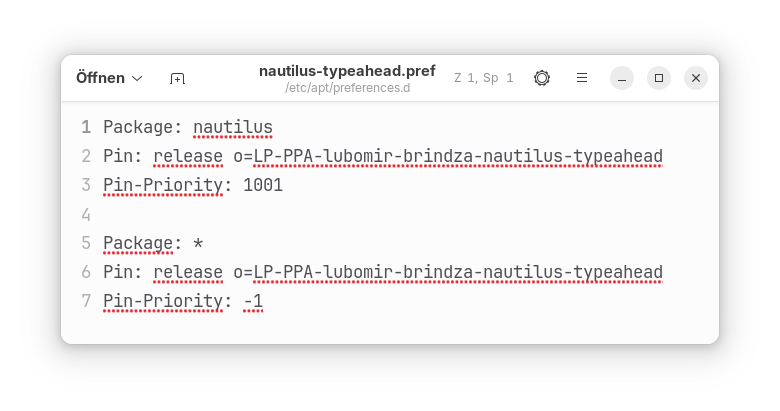
Perhaps I could set a pin priority for the ppa so that nautilus is not overwritten by ubuntu or zorin updates as shown here:
That was my question a few hours ago. When you come from Windows, you are used to it and miss it.
I just notice, I seem to have to disable typeahead, then I can jump to the folders I like by typing the first letters and even move with the arrows to the next folders around and while the search in subfolders is enabled. That didn't work before in Nautilus.
I like that you can turn it on or off, so it is a feature and not a must.
What I like about the nautilus typeahead package is that you don't have to wait when you want to select special folders with the arrow keys, e.g. when you have reached the /usr/share/themes folder and press "z" to select a zorin theme.
In nemo or thunar, one of the Zorin themes is selected and you can't move with the arrow keys to the folder you like. You have to wait until the search field at the bottom disappears (~3s) or use the mouse to choose another folder.
I really like the nautilus typeahead patch and I'm considering to install it on my system together with a file for a high apt pin priority.
Edit: I found out, when you press the esc key, the search field disappears and you can move with the arrow keys. But it is cumbersome.
In the default nautilus file manager (not nautilus typeahead), you can't wait. The search field doesn't disappear and is kept. Because of this, you often can't move to other folders (I don't understand why you can sometimes move with or , but not or ) . You can only stop and remove the search field by pressing esc, then the arrows work.
Here someone has tried to change that behavior in thunar. But it seems to be hardcoded in gtk (gtktreeview.c), you must compile. But I'm not sure if that is right on current Zorin versions.
I'm not sure if it is possible to have two versions of the file manager on the system, the original one and a self compiled one.
It's not just me who doesn't like that behavior:
Here you find a discussion about getting this feature back in nautilus which has been removed a few years ago:
I wish Zorin would offer an own modified version of nautilus with the function of nautilus typeahead. Then users who like it can use it, and others use the normal version as now. Unfortunately, the Zorin Group never acted on the feedback and requests regarding this matter. That's why I'm not getting my hopes up that this will happen.
As a precaution, I disabled other packages from this ppa. At the moment, only nautilus is available for ubuntu noble in the paa.
I like it! Finally, it's just the way I've always wanted a file manager in Linux to behave. Hopefully, it won't cause any problems.
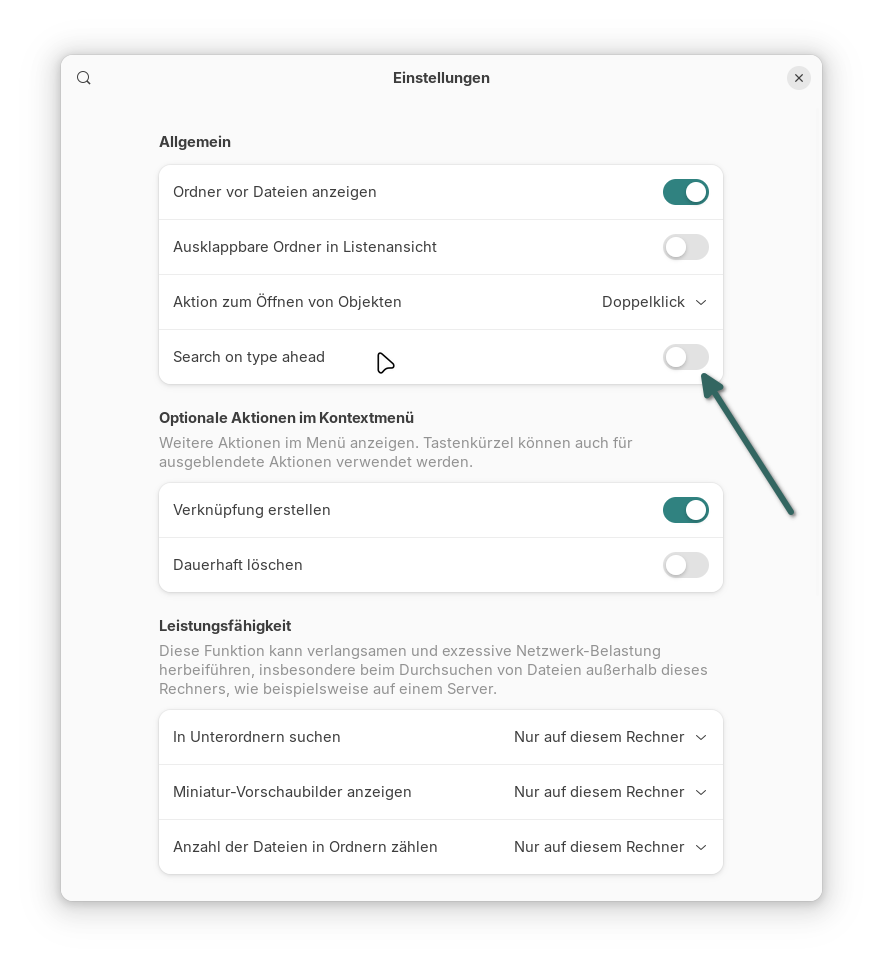
Note: To activate the new function, you must disable "Search on type ahead" in the nautilus settings. When "Search on type ahead" is enabled, you have the normal nautilus behavior.
Is my apt preferences file correct? Or shall I remove the second part and set as Package= * in the first part? I'm not sure if I'll get the right dependencies for nautilus in the future if I lock something with pin priority -1. Or will I get all packages from that ppa that nautilus needs for the installation?
I want to prevent other packages than nautilus being installed on my system if they are added to the PPA later.
Do you think, they will not publish other packages in that ppa because the ppa is named nautilus-typeahead? Then I could simplify my file to be sure that I'll get everything from there.
But the PPA is named like this because they offer a Nautilus version with this typeahead Function already in Nautilus. And they use as Base the Nautilus Versions from the different Ubuntu Systems. So, You get the same Nautilus but with this included Function.
Of Course theoretically they could at any Time put other Stuff in it. But when this is the Case, the Question is if it would be needed to make this Nautilus run. And when this is the Case, You would need these additional Package/s anyway.
For anyone else who's looking for this feature:
I just realized that the dolphin file manager offers this by default and doesn't have the timer as thunar and nemo so that you can move with the arrow keys instantly to other folders. That might be a slightly safer alternative to this PPA.
Nourpon's new file manager, Odysseus, also offers this feature, but it requires adding a PPA. You can enable it in the Odysseus preferences > general > type to go to a file. Turn that slider on.
Do you think the nautilus typeahead patch is unsafe? Should I be worried that files won't be saved properly, will be lost, or that the system will be damaged because of it?
I haven't read about problems so far.

 or
 , but not
 or
 ) . You can only stop and remove the search field by pressing esc, then the arrows work.