it can be done via terminal tho
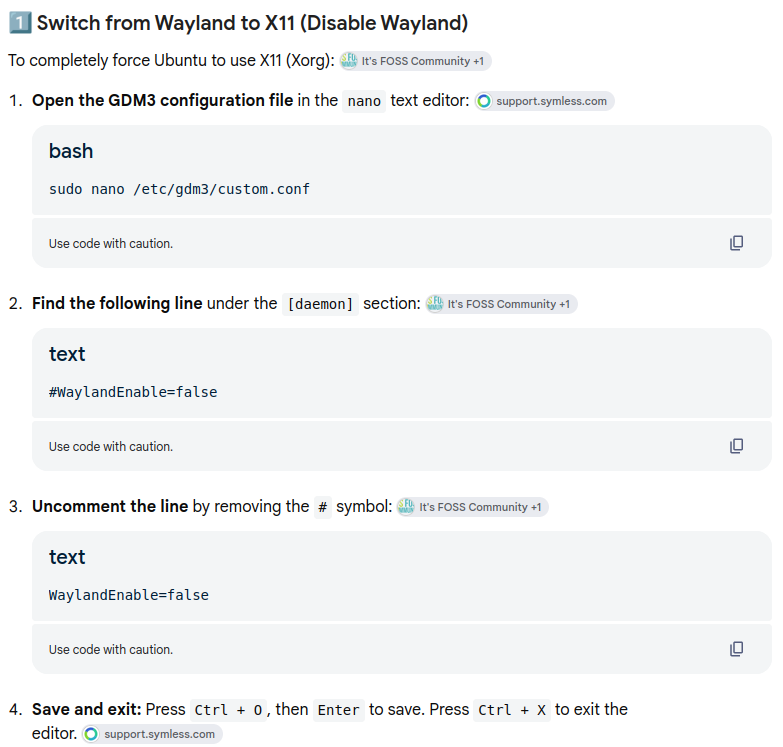
uncommenting that line will make it X11
You might have automatic login activated, then you don't see the gear in the login screen. You could disable the automatic login or you follow @wesoliv429 advise.
To check wether you have actual WM X11 or Wayland:
echo $XDG_SESSION_TYPE
Ya thats what is was....Thanks @JustZorin knew it was something simple...lol
If you are running Zorin Lite, you don't see a cog wheal. So, are you on Zorin Core or Lite?
In a post far above I explained, too, how to disable auto login, but it seemed not to help.
If it hadn't been so simple, I wouldn't have known either! 
And we see as @Forpli says: Zorin Lite doesn't show the cog wheal for general!
Do I undestand that right:
But both GPUs are still hardware implemented? Or did you eliminate the NVIDIA GPU?
There is a known problem with regressions in the Linux firmware and AMD GPUs:
AMD is the new, NVIDIA is the old. I switched back to NVIDIA after a lot of trial and error on the AMD and never really figured out how to switch between X11 and Wayland; my understanding is that I'm using Core since that's what I downloaded off the website but I've never switched between the two previously so I may need to tinker a bit with it when I get home (I'm at work rn)
And the NVIDIA GPU at it's own is working now?
I had to reinstall the drivers I'd uninstalled when trying with AMD but yes, it's being picked up normally by my system and not defaulting to llvmpipe, everything runs the same as it did before thankfully.
OK, corrected GPU situation:
Yes exactly 
Very good, that your system is back working now!
But you want to have your new faster AMD GPU working.
Your problems with the AMD GPU look like a known bug. The Ubuntu Team is working on it.
But there is a Workaround for AMD GPUs from @Nourpon available as I wrote above. Handling regression in linux-firmware & amd_gpu
You could try that. But if you like to do so I would recommend to do a Timeshift Backup of your OS with the old NVIDIA card. So, if to go back to the NVIDIA card you still have all your driver implementaion still available.
If the system is up to date with the last linux-firmware the problem was resolved, I added a solution in the topic
Could you please provide us System Info over Settings - System - Info- System Details.
There we can see your Linux kernel and Zorin Implementation Core or Lite.
There would be the Option to try a Combination of a newer Kernel and newer Mesa Drivers for the AMD GPU. Do You want try that?
Second person with AMD problems.
If you feel like something fun, purger the Nvidia drivers, install the AMD card, start up the computer, log into service mode (Shift Key on startup) and install some older AMD drivers. That is what saved me from a blank screen.
wget https://repo.radeon.com/amdgpu-install/6.0/ubuntu/focal/amdgpu-install_6.0.60000-1_all.deb
sudo apt update
sudo apt install ./amdgpu-install_6.0.60000-1_all.deb
sudo amdgpu-install --usecase=rocm
The latest drivers are: amdgpu-install_31.60.316000-1_all.deb
Or option B - The @Ponce-De-Leon Fix
That can also work, i did some light reading.
Kind Regards 
If I have some time to tonight I could give it a shot