Feb 12th, 2018

1 Like
OK, I just checked SL site again, apparantly, they have a new version of the Starbook, called the Horizon.

StarBook Horizon – Star Labs®.
From what I can tell, its still far cheaper then the StarFighter notebooks. My only concern, is that its missing details on the GPU that is used. For now however, you can choose a nice 8-core CPU (will run anything you need), 1TB of storage, (likely all the storage you'll need) and you can select Zorin OS Core or PRO, whichever you prefer. Choose your countries power plug, choose the level of packing security you want, and how long your warranty is.
You don't need the EXTRAS, unless your sure you need something there. Basically, your getting a notebook for less then 1500 dollars, and in this economy, thats a steal I think. You may want to contact SL, to request what GPU the Starbook Horizon uses. If it uses integrated GPU, and your not a gamer, its perfectly fine.
1 Like
Yes, Vega is an older Graphics. But that is not a Problem. I have a Ryzen 3200G that uses Vega, too and it runs fine.
The good Thing about AMD Graphics on Linux is that the Drivers for it are included in the Kernel. So, You don't need to care about extra Driver Packages. You can theoretically use extra Packages, they exist. AMD offers them for download. But it isn't neccessary.
3 Likes
thanks for this
1 Like
thanks for this i will ask them
thanks 
ok so they said they use this
Intel® UHD Graphics
1.35GHz Frequency
does that sound like they are answering the correct question .. and is that integrated of not ?
That is integrated graphics indeed, it does it through the CPU. Modern Integrated graphics is fine, and should even handle light gaming, as well as photo production, light video production, online streaming, and general computer usage.
Unless your going to be doing highly graphical modern first person shooter games like, Doom The Dark Ages, or high graphical 3rd person games like, Shadow Of The Tomb Raider, or games like CyberPunk, then you don't need a dedicated GPU.
You said its using UHD integrated, thats stands for Ultra HD, which usually means 4K resolution. If the computer can process 4K resolution, that shows its got some power behind it. If you love streaming 4K, that computer is going to have no problem with it.
Either way, that computer is going to be better then what you have now for sure.
Like @StarTreker already wrote: It is an iGPU. And when You don't play Games or work with Graphic-intense Stuff, it is fine for basic Use Case.
But I want add one Thing to that: In BIOS, You can set up how many RAM the iGPU can use. I would definetely take a Look at this. Because by default it is mostly not very much set up. Depending how much RAM it has, I would think that at least 2 Gig's would be the least. Better would be 4. Or when possible 6.
1 Like
so is this something i would need to ask them : " how many RAM can the iGUP use/ what is it set up to use." and or is this changable
If You can ask them, it would be worth to ask in my Opinion. Then You definetely know it.
Here's what I'd do, if I were in your shoes. Plan to buy the computer, tell them that you want to have them to do all the setting up for you with getting Zorin OS installed, and the BIOS work.
Tell them if the I-GPU can use up to 8GB of RAM, that you would like it set to use 8GB of RAM, out of your total RAM supply. This will set you up for success. This way you don't have to worry about it, being a bit of a newbie to computers and all.
I haven't heard you decide on which version of Zorin OS you want to go with. You select it from the dropdown box of course. If you are not a heavy computer user, and your willing to install some software yourself, you can save 60 bucks, and just have them install Zorin OS Core.
To recap, Star Labs will know what the max amount of RAM, that the I-GPU can be set to. In 2026 modern era, you really want to be aiming at 8GB of RAM for the I-GPU if you can. The computer comes with a total of 32GB of RAM.
If the I-GPU uses 8GB, that still leaves your system with 24GB of RAM, which is more then enough. I think this is the best option for you. Thats why I directed you to Star Labs in the first place. They do it all for you, so you don't have to. And you can be setup right away. 
thanks for this - if i can get the money together i like the idea of a 'ready made' thing .. although it is a bummer that it doenst have things like ethernet port in the machine itself as it means carrying around adapters,etc ... just have ethernet cables in diff locations in the house. .. but hey.
Will ask them those questions.
I am really grateful for all the support. I hope its not frustrating when people are new and hardly know what any of the lingo is or means.
I'm not a gamer but i do view a lot of educational videos/ live zoom courses, live fitness class videos, etc on varying platforms, Music writing programmes, Screen record a lot. Who knows if i might record video material to upload, etc if offering my own courses online but sounds like it would handle all that no probs as none of it would be high graphic stuff.
2 Likes
This is absolutely worth saving up money for! When I buy a new computer in the future, its going to be a Star Labs machine.
BTW, one of the things that makes the new Starbook Horizon special, is it comes with an aluminum case like my machine does, that is excellent in the aiding of getting rid of internal heat, along with its fans. (Increases total life of computer)
Yes, but that seems to be the way notebooks have been going these days, due to popularity with WIFI. You know how notebooks used to come with CD/DVD/Blueray disk drives, till post 2012, when they stopped? Ethernet is the latest iteration of that.
FYI, now knowing your requirements, under the EXTRAS dropdown box, you can buy an ethernet adapter...
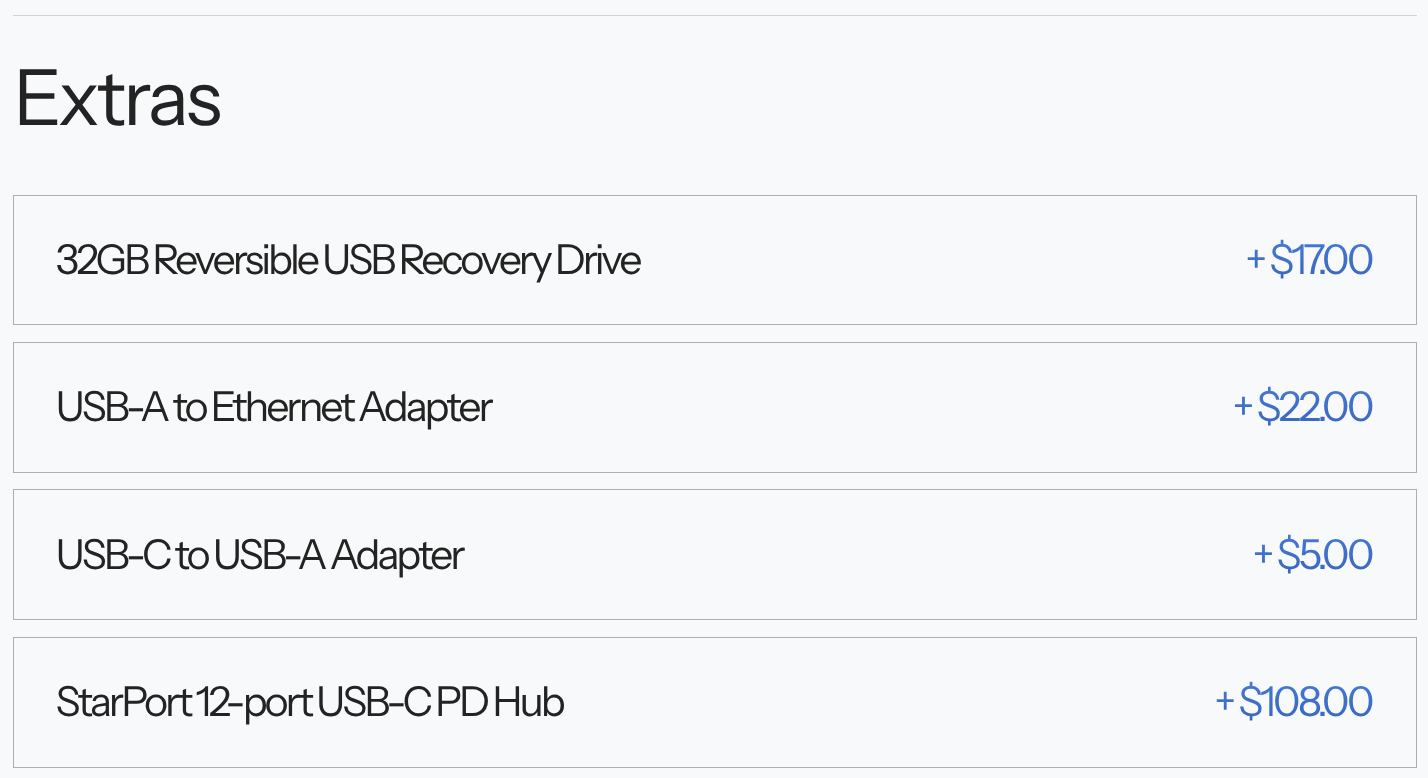
Were happy to help!
You are on the right forum website, we don't discriminate here, like some other forum websites do, against newbies. We were all newbies once, we know what it is like. I had the fortunate experience, in getting my early computer training, in public school.
I actually almost went into the computer science education in collage. In the end, I decided that it would be funner and more rewarding, to go into the small engine mechanics sciences, and I started my small engine shop shortly after that. I also so lawncare on the side as well.
Knowing that alone, has confirmed that I have steered you in the right direction.
Dude, thats so cool! I love getting educated, glad you help other's to learn new things. You especially peeked my ears, and raised my eyes, when you said, "music writing programmes." We have some people interested in music production here, maybe you'll have fun in collaborating ideas?
Its been fun helping and communicating with you. Feel free to ask for help again, should you need. Have a truly wonderful rest of your day, and evening. 
2 Likes
@0Picass0 8 Gb RAM seems a little low for the latest versions of Zorin, I recently installed it on a HP (or something like that) with 8 Gb and it was very laggy! I'd recommend 16 Gb at least..
@aspen101 I'm running Zorin OS 18 on a Thinkpad T940s (dual-boot with Win 10, 16 Gb RAM, 512 Gb SSD, intel core i7, integrated graphics card Intel UHD Graphics 620) and it works fine! It doesn't have an ethernet port though. What kind of software do you need on it? Oh I see in a later post that you use zoom (that works fine), I imagine everything else would be fine but be aware that that laptop doesn't have a super fancy webcam (it works though)!
2 Likes
Thanks for the comment, @Leonos , as they say: "your milage may vary", and "horses for courses!". This HP only has 8GB but it doesn't lag, neither do my others. It would be easy to add more RAM, if necessary, so it is alays worth considering the cheaper option, especially in today's crisis. Power-users and Gamers will certainly need more, so it is good to point that out. Thanks.
2 Likes
@Leonos Do you mean T490s?
For cost reasons, I opted for 8 GiB of RAM in my recent refurbished devices, but I made sure the RAM was upgradeable. Many laptops no longer offer this option at all, and the RAM is soldered in place; in that case, it would be better to go with a bit more RAM from the start.
2 Likes
When You don't do intense Video Editing it should be fine.
We all started at one Point and didn't know about Stuff. That is normal. Some People might know more than others but no one knows everything. This here is a Forum and it exists to help. So, ask Questions when You don't know something or didnt found an Answer.
2 Likes
asked starlabs what the max RAM the I-GPU could be set to and could it be set to 8GB on ordering.
Their response was
"2GB for aperture and 160MB for DVMT"
so not sure if i asked the correct question as that seems very low compared to what you were suggesting would be good.
Its tricky as i'm asking them things with no idea what the thing I'm asking means haha! just asking based on your helpful suggestions of info to find out.
1 Like
I've never had issues with 8 GB... ... ....