I have a PC with Intel® Core™ i3-1110G4 Processor
which has Intel® Smart Sound Technology integrated audio DSP
Zorin 18 installs everything is working including touch screen but sound does not work. The only option in sound settings is 'Dummy Output'
You can try to follow the steps here shown at chapter "dummy output" and install pavucontrol:
sudo apt install pavucontrol
Thanks for the link but after trying all the suggestions on that page the only sound option is 'Dummy Output'. In the COnfiguration tab of Pulse Volume Control I see the worrying 'No cards available for configuration'
Hi and welcome to the forum.
Your system I believe to be fairly recent, also we see quite a few issues here (and on Ubuntu forums) relating to no sound from Intel audio DSP's.
You will need the correct driver for that "sound card".
Have you been to Software Updates>Additional Drivers to search for audio driver?
If none listed, I am guessing it could mean you need to install a more recent linux kernel than the standard kernel currently provided with ZorinOS 18 Core.
Other users here may comment on that.
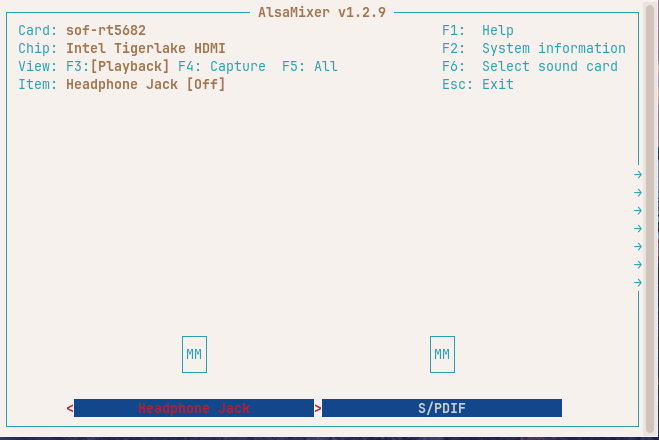
In the meantime, let's check what alsamixer displays about your soundcards?
Open terminal typing Ctrl+Alt+T
type:
alsamixer
Hit F6 to show soundcards.
Does alsamixer see more than one soundcard?
Post a screenshot.
Welcome to the Forum!
Could You post the Output of sudo lshw -C multimedia please?
response from lshw -C multimedia
*-usb:1
description: Video
product: USB2.0 HD UVC WebCam
vendor: Quanta
physical id: 4
bus info: usb@3:4
version: 0.02
serial: 0x0001
capabilities: usb-2.01
configuration: driver=uvcvideo maxpower=500mA speed=480Mbit/s
*-multimedia
description: Multimedia audio controller
product: Tiger Lake-LP Smart Sound Technology Audio Controller
vendor: Intel Corporation
physical id: 1f.3
bus info: pci@0000:00:1f.3
logical name: card0
logical name: /dev/snd/controlC0
logical name: /dev/snd/hwC0D2
logical name: /dev/snd/pcmC0D0c
logical name: /dev/snd/pcmC0D0p
logical name: /dev/snd/pcmC0D100c
logical name: /dev/snd/pcmC0D1c
logical name: /dev/snd/pcmC0D1p
logical name: /dev/snd/pcmC0D2p
logical name: /dev/snd/pcmC0D3p
logical name: /dev/snd/pcmC0D4p
logical name: /dev/snd/pcmC0D5p
logical name: /dev/snd/pcmC0D99c
version: 20
width: 64 bits
clock: 33MHz
capabilities: pm msi bus_master cap_list
configuration: driver=sof-audio-pci-intel-tgl latency=64
resources: irq:171 memory:a6874000-a6877fff memory:a6900000-a69ffff
The output from aplay -l
aplay -l
**** List of PLAYBACK Hardware Devices ****
card 0: sofrt5682 [sof-rt5682], device 0: smart373-spk () []
Subdevices: 1/1
Subdevice #0: subdevice #0
card 0: sofrt5682 [sof-rt5682], device 1: Headset ()
Subdevices: 1/1
Subdevice #0: subdevice #0
card 0: sofrt5682 [sof-rt5682], device 2: HDMI1 () []
Subdevices: 1/1
Subdevice #0: subdevice #0
card 0: sofrt5682 [sof-rt5682], device 3: HDMI2 ()
Subdevices: 1/1
Subdevice #0: subdevice #0
card 0: sofrt5682 [sof-rt5682], device 4: HDMI3 () []
Subdevices: 1/1
Subdevice #0: subdevice #0
card 0: sofrt5682 [sof-rt5682], device 5: HDMI4 ()
Subdevices: 1/1
Subdevice #0: subdevice #0
@Ponce-De-Leon @zabadabadoo @Forpli
I added snd_intel_dspcfg.dsp_driver=3 to grub file
GRUB_CMDLINE_LINUX_DEFAULT="quiet splash snd_intel_dspcfg.dsp_driver=3"
Before this I had no sound. Now I have clicks
From DuckDuckGo websearch using "Intel® Smart Sound Technology integrated audio DSP Ubuntu 24.04 No sound"
DuckDuckGo AI suggested the following:
Install the necessary firmware for Intel audio devices using:
sudo apt install firmware-sof-signed
This can help with driver recognition.
Edit the GRUB configuration. In the GRUB_CMDLINE_LINUX_DEFAULT line. to include
snd-intel-dspcfg.dsp_driver=1
Then run sudo update-grub and reboot.
I see you did something similar, but driver=3 instead of driver=1
You may also want to see what Pulse Audio Volume Control finds. Note Z18 comes with Pipewire instead of Pulse Audio.
You can install that with:
sudo apt install pavucontrol
I had a very similar issue with Intel Tiger Lake sound card which some of those on this discussion helped me fix. For me it was an acpi problem and adding acpi=noirq in the grub program fixed it.
Nick, was it this thread you are refering to?
Yes. The discussion went down a number of rabbit holes but the acpi was the end result. I had disabled acpi because it was causing a black screen hangup during the boot process.
From another websearch, this time using "Tiger Lake-LP Smart Sound Technology Audio Controller Ubuntu 24.04"
I see grub config term:
snd-intel-dspcfg.dsp_driver=1
..is also mentioned as solution here:* https://askubuntu.com/questions/1515372/sound-isnt-working-after-ubuntu-installing
A post was split to a new topic: Zorin OS 18: It Only Shows Dummy Sound
This topic was automatically closed 90 days after the last reply. New replies are no longer allowed.