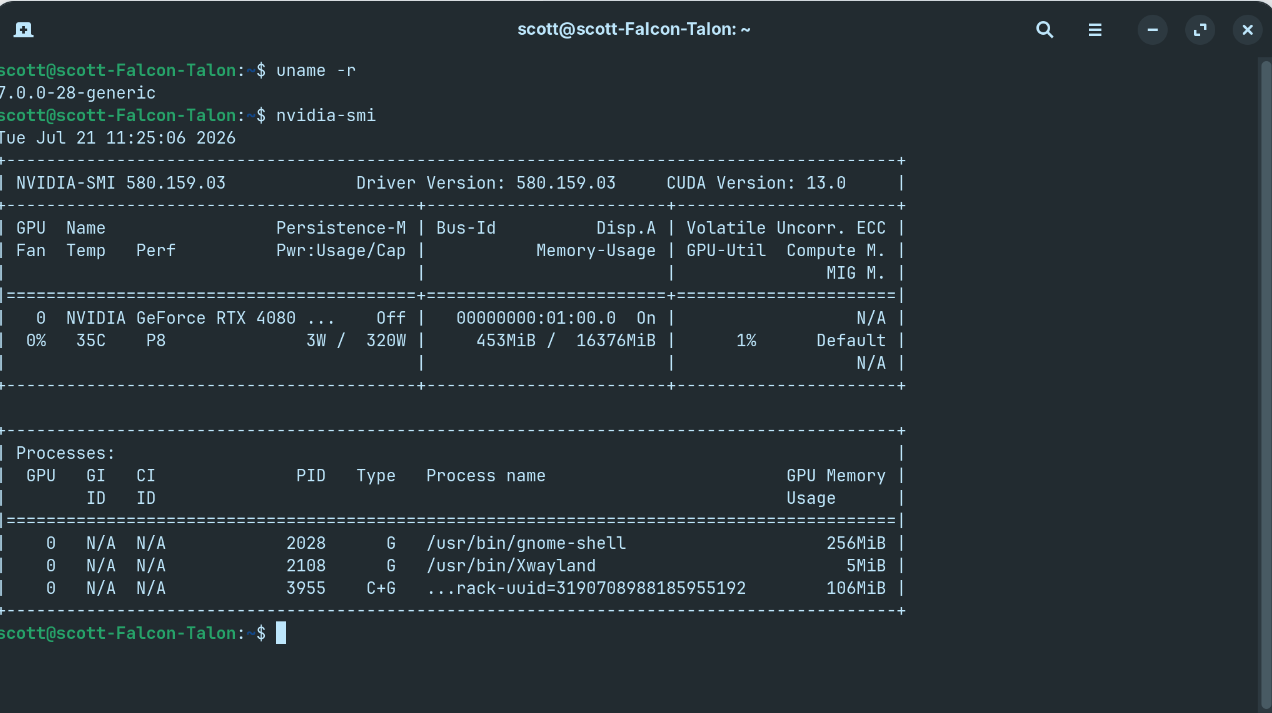
Here is what worked for me after the Kernel fiasco....
I used Timeshift to restore to a time before the kernal 7.0 update fiasco these past few days and rebooted....
I un-installed Oracle Virtualbox and for good measure I re-booted.
I opened the terminal and ran the two commands that the Zorin Devs recommended to install the new 7.0 Kernel:
sudo apt update
sudo apt dist-upgrade
AND THE NVIDIA DRIVERS NOW WORK UNDER THE NEW 7.0 KERNEL FOR MY RTX 4080 SUPER!!!
FYI - Here is my output during the 7.0 upgrade from the terminal:
scott@scott-Falcon-Talon:~$ sudo apt dist-upgrade
Reading package lists... Done
Building dependency tree... Done
Reading state information... Done
Calculating upgrade... Done
The following packages were automatically installed and are no longer required:
libb2-1 libdouble-conversion3 libetonyek-0.1-1 libfmt9 libfwupd2 libgsoap-2.8.132t64 liblzf1 libmd4c0 libpcre2-16-0 libqt6core6t64 libqt6dbus6t64 libqt6gui6t64 libqt6help6 libqt6network6t64 libqt6opengl6t64 libqt6printsupport6t64 libqt6qml6
libqt6qmlmodels6 libqt6quick6 libqt6sql6-sqlite libqt6sql6t64 libqt6statemachine6 libqt6waylandclient6 libqt6waylandcompositor6 libqt6waylandeglclienthwintegration6 libqt6waylandeglcompositorhwintegration6 libqt6widgets6t64 libqt6wlshellintegration6
libqt6xml6t64 libspdlog1.12 libtpms0 libts0t64 libvncserver1 nvidia-firmware-580-580.126.09 nvidia-firmware-580-580.142 python3-packaging qt6-gtk-platformtheme qt6-qpa-plugins qt6-translations-l10n qt6-wayland zorin-os-feedback
Use 'sudo apt autoremove' to remove them.
The following NEW packages will be installed:
libllvm19 linux-headers-7.0.0-28-generic linux-hwe-7.0-headers-7.0.0-28 linux-hwe-7.0-tools-7.0.0-28 linux-image-7.0.0-28-generic linux-modules-7.0.0-28-generic linux-modules-nvidia-580-7.0.0-28-generic linux-objects-nvidia-580-7.0.0-28-generic
linux-signatures-nvidia-7.0.0-28-generic linux-tools-7.0.0-28-generic
The following packages will be upgraded:
accountsservice gir1.2-accountsservice-1.0 libaccountsservice0 libarchive13t64 libde265-0 libde265-0:i386 libfreerdp-client3-3 libfreerdp-server3-3 libfreerdp3-3 libjbig2dec0 libntfs-3g89t64 libsqlite3-0 libsqlite3-0:i386 libwinpr3-3 libxfont2
linux-generic-hwe-24.04 linux-headers-generic-hwe-24.04 linux-image-generic-hwe-24.04 linux-libc-dev linux-modules-nvidia-580-generic-hwe-24.04 linux-tools-common ntfs-3g python3-idna remmina remmina-common remmina-plugin-rdp remmina-plugin-secret
remmina-plugin-vnc snapd tar wget
31 upgraded, 10 newly installed, 0 to remove and 0 not upgraded.
Need to get 589 kB/384 MB of archives.
After this operation, 683 MB of additional disk space will be used.
Do you want to continue? [Y/n] y
Get:1 Index of /ubuntu noble-security/main amd64 accountsservice amd64 23.13.9-2ubuntu6.1 [71.6 kB]
Get:2 Index of /ubuntu noble-security/main amd64 libaccountsservice0 amd64 23.13.9-2ubuntu6.1 [64.0 kB]
Get:3 Index of /ubuntu noble-security/main amd64 gir1.2-accountsservice-1.0 amd64 23.13.9-2ubuntu6.1 [5,312 B]
Get:4 Index of /ubuntu noble-security/main amd64 libarchive13t64 amd64 3.7.2-2ubuntu0.8 [383 kB]
Get:5 Index of /ubuntu noble-security/main amd64 libjbig2dec0 amd64 0.20-1ubuntu0.24.04.1 [65.2 kB]
Fetched 589 kB in 1s (458 kB/s)
Extracting templates from packages: 100%
Preconfiguring packages ...
(Reading database ... 332120 files and directories currently installed.)
Preparing to unpack .../tar_1.35+dfsg-3ubuntu0.3_amd64.deb ...
Unpacking tar (1.35+dfsg-3ubuntu0.3) over (1.35+dfsg-3ubuntu0.2) ...
Setting up tar (1.35+dfsg-3ubuntu0.3) ...
(Reading database ... 332120 files and directories currently installed.)
Preparing to unpack .../00-ntfs-3g_1%3a2022.10.3-1.2ubuntu3.2_amd64.deb ...
Unpacking ntfs-3g (1:2022.10.3-1.2ubuntu3.2) over (1:2022.10.3-1.2ubuntu3.1) ...
Preparing to unpack .../01-libntfs-3g89t64_1%3a2022.10.3-1.2ubuntu3.2_amd64.deb ...
Unpacking libntfs-3g89t64:amd64 (1:2022.10.3-1.2ubuntu3.2) over (1:2022.10.3-1.2ubuntu3.1) ...
Preparing to unpack .../02-libsqlite3-0_3.45.1-1ubuntu2.7_amd64.deb ...
De-configuring libsqlite3-0:i386 (3.45.1-1ubuntu2.6), to allow configuration of libsqlite3-0:amd64 (3.45.1-1ubuntu2.7) ...
Unpacking libsqlite3-0:amd64 (3.45.1-1ubuntu2.7) over (3.45.1-1ubuntu2.6) ...
Preparing to unpack .../03-libsqlite3-0_3.45.1-1ubuntu2.7_i386.deb ...
Unpacking libsqlite3-0:i386 (3.45.1-1ubuntu2.7) over (3.45.1-1ubuntu2.6) ...
Preparing to unpack .../04-wget_1.21.4-1ubuntu4.4_amd64.deb ...
Unpacking wget (1.21.4-1ubuntu4.4) over (1.21.4-1ubuntu4.3) ...
Preparing to unpack .../05-accountsservice_23.13.9-2ubuntu6.1_amd64.deb ...
Unpacking accountsservice (23.13.9-2ubuntu6.1) over (23.13.9-2ubuntu6) ...
Preparing to unpack .../06-libaccountsservice0_23.13.9-2ubuntu6.1_amd64.deb ...
Unpacking libaccountsservice0:amd64 (23.13.9-2ubuntu6.1) over (23.13.9-2ubuntu6) ...
Preparing to unpack .../07-gir1.2-accountsservice-1.0_23.13.9-2ubuntu6.1_amd64.deb ...
Unpacking gir1.2-accountsservice-1.0:amd64 (23.13.9-2ubuntu6.1) over (23.13.9-2ubuntu6) ...
Preparing to unpack .../08-libarchive13t64_3.7.2-2ubuntu0.8_amd64.deb ...
Unpacking libarchive13t64:amd64 (3.7.2-2ubuntu0.8) over (3.7.2-2ubuntu0.7) ...
Preparing to unpack .../09-libde265-0_1.0.15-1ubuntu0.1_i386.deb ...
De-configuring libde265-0:amd64 (1.0.15-1build3), to allow configuration of libde265-0:i386 (1.0.15-1ubuntu0.1) ...
Unpacking libde265-0:i386 (1.0.15-1ubuntu0.1) over (1.0.15-1build3) ...
Preparing to unpack .../10-libde265-0_1.0.15-1ubuntu0.1_amd64.deb ...
Unpacking libde265-0:amd64 (1.0.15-1ubuntu0.1) over (1.0.15-1build3) ...
Preparing to unpack .../11-libfreerdp-client3-3_3.30.0+dfsg-0ubuntu0.24.04.1_amd64.deb ...
Unpacking libfreerdp-client3-3:amd64 (3.30.0+dfsg-0ubuntu0.24.04.1) over (3.5.1+dfsg1-0ubuntu1.6) ...
Preparing to unpack .../12-libfreerdp-server3-3_3.30.0+dfsg-0ubuntu0.24.04.1_amd64.deb ...
Unpacking libfreerdp-server3-3:amd64 (3.30.0+dfsg-0ubuntu0.24.04.1) over (3.5.1+dfsg1-0ubuntu1.6) ...
Preparing to unpack .../13-libfreerdp3-3_3.30.0+dfsg-0ubuntu0.24.04.1_amd64.deb ...
Unpacking libfreerdp3-3:amd64 (3.30.0+dfsg-0ubuntu0.24.04.1) over (3.5.1+dfsg1-0ubuntu1.6) ...
Preparing to unpack .../14-libwinpr3-3_3.30.0+dfsg-0ubuntu0.24.04.1_amd64.deb ...
Unpacking libwinpr3-3:amd64 (3.30.0+dfsg-0ubuntu0.24.04.1) over (3.5.1+dfsg1-0ubuntu1.6) ...
Preparing to unpack .../15-libjbig2dec0_0.20-1ubuntu0.24.04.1_amd64.deb ...
Unpacking libjbig2dec0:amd64 (0.20-1ubuntu0.24.04.1) over (0.20-1build3) ...
Selecting previously unselected package libllvm19:amd64.
Preparing to unpack .../16-libllvm19_1%3a19.1.1-1ubuntu1~24.04.2_amd64.deb ...
Unpacking libllvm19:amd64 (1:19.1.1-1ubuntu1~24.04.2) ...
Preparing to unpack .../17-libxfont2_1%3a2.0.6-1+deb13u1build0.24.04.2_amd64.deb ...
Unpacking libxfont2:amd64 (1:2.0.6-1+deb13u1build0.24.04.2) over (1:2.0.6-1build1) ...
Selecting previously unselected package linux-modules-7.0.0-28-generic.
Preparing to unpack .../18-linux-modules-7.0.0-28-generic_7.0.0-28.28~24.04.1_amd64.deb ...
Unpacking linux-modules-7.0.0-28-generic (7.0.0-28.28~24.04.1) ...
Selecting previously unselected package linux-image-7.0.0-28-generic.
Preparing to unpack .../19-linux-image-7.0.0-28-generic_7.0.0-28.28~24.04.1_amd64.deb ...
Unpacking linux-image-7.0.0-28-generic (7.0.0-28.28~24.04.1) ...
Preparing to unpack .../20-linux-generic-hwe-24.04_7.0.0-28.28~24.04.1_amd64.deb ...
Unpacking linux-generic-hwe-24.04 (7.0.0-28.28~24.04.1) over (6.17.0-40.40~24.04.1) ...
Preparing to unpack .../21-linux-image-generic-hwe-24.04_7.0.0-28.28~24.04.1_amd64.deb ...
Unpacking linux-image-generic-hwe-24.04 (7.0.0-28.28~24.04.1) over (6.17.0-40.40~24.04.1) ...
Selecting previously unselected package linux-hwe-7.0-headers-7.0.0-28.
Preparing to unpack .../22-linux-hwe-7.0-headers-7.0.0-28_7.0.0-28.28~24.04.1_all.deb ...
Unpacking linux-hwe-7.0-headers-7.0.0-28 (7.0.0-28.28~24.04.1) ...
Selecting previously unselected package linux-headers-7.0.0-28-generic.
Preparing to unpack .../23-linux-headers-7.0.0-28-generic_7.0.0-28.28~24.04.1_amd64.deb ...
Unpacking linux-headers-7.0.0-28-generic (7.0.0-28.28~24.04.1) ...
Preparing to unpack .../24-linux-headers-generic-hwe-24.04_7.0.0-28.28~24.04.1_amd64.deb ...
Unpacking linux-headers-generic-hwe-24.04 (7.0.0-28.28~24.04.1) over (6.17.0-40.40~24.04.1) ...
Preparing to unpack .../25-linux-tools-common_6.8.0-136.136_all.deb ...
Unpacking linux-tools-common (6.8.0-136.136) over (6.8.0-134.134) ...
Selecting previously unselected package linux-hwe-7.0-tools-7.0.0-28.
Preparing to unpack .../26-linux-hwe-7.0-tools-7.0.0-28_7.0.0-28.28~24.04.1_amd64.deb ...
Unpacking linux-hwe-7.0-tools-7.0.0-28 (7.0.0-28.28~24.04.1) ...
Preparing to unpack .../27-linux-libc-dev_6.8.0-136.136_amd64.deb ...
Unpacking linux-libc-dev:amd64 (6.8.0-136.136) over (6.8.0-134.134) ...
Selecting previously unselected package linux-signatures-nvidia-7.0.0-28-generic.
Preparing to unpack .../28-linux-signatures-nvidia-7.0.0-28-generic_7.0.0-28.28~24.04.1_amd64.deb ...
Unpacking linux-signatures-nvidia-7.0.0-28-generic (7.0.0-28.28~24.04.1) ...
Selecting previously unselected package linux-objects-nvidia-580-7.0.0-28-generic.
Preparing to unpack .../29-linux-objects-nvidia-580-7.0.0-28-generic_7.0.0-28.28~24.04.1_amd64.deb ...
Unpacking linux-objects-nvidia-580-7.0.0-28-generic (7.0.0-28.28~24.04.1) ...
Selecting previously unselected package linux-modules-nvidia-580-7.0.0-28-generic.
Preparing to unpack .../30-linux-modules-nvidia-580-7.0.0-28-generic_7.0.0-28.28~24.04.1_amd64.deb ...
Unpacking linux-modules-nvidia-580-7.0.0-28-generic (7.0.0-28.28~24.04.1) ...
Preparing to unpack .../31-linux-modules-nvidia-580-generic-hwe-24.04_7.0.0-28.28~24.04.1_amd64.deb ...
Unpacking linux-modules-nvidia-580-generic-hwe-24.04 (7.0.0-28.28~24.04.1) over (6.17.0-40.40~24.04.1) ...
Selecting previously unselected package linux-tools-7.0.0-28-generic.
Preparing to unpack .../32-linux-tools-7.0.0-28-generic_7.0.0-28.28~24.04.1_amd64.deb ...
Unpacking linux-tools-7.0.0-28-generic (7.0.0-28.28~24.04.1) ...
Preparing to unpack .../33-python3-idna_3.6-2ubuntu0.2_all.deb ...
Unpacking python3-idna (3.6-2ubuntu0.2) over (3.6-2ubuntu0.1) ...
Preparing to unpack .../34-remmina-plugin-rdp_1.4.43+dfsg-0ubuntu0.24.04.1_amd64.deb ...
Unpacking remmina-plugin-rdp:amd64 (1.4.43+dfsg-0ubuntu0.24.04.1) over (1.4.35+dfsg-0ubuntu5.2) ...
Preparing to unpack .../35-remmina-plugin-vnc_1.4.43+dfsg-0ubuntu0.24.04.1_amd64.deb ...
Unpacking remmina-plugin-vnc:amd64 (1.4.43+dfsg-0ubuntu0.24.04.1) over (1.4.35+dfsg-0ubuntu5.2) ...
Preparing to unpack .../36-remmina-plugin-secret_1.4.43+dfsg-0ubuntu0.24.04.1_amd64.deb ...
Unpacking remmina-plugin-secret:amd64 (1.4.43+dfsg-0ubuntu0.24.04.1) over (1.4.35+dfsg-0ubuntu5.2) ...
Preparing to unpack .../37-remmina_1.4.43+dfsg-0ubuntu0.24.04.1_amd64.deb ...
Unpacking remmina (1.4.43+dfsg-0ubuntu0.24.04.1) over (1.4.35+dfsg-0ubuntu5.2) ...
Preparing to unpack .../38-remmina-common_1.4.43+dfsg-0ubuntu0.24.04.1_all.deb ...
Unpacking remmina-common (1.4.43+dfsg-0ubuntu0.24.04.1) over (1.4.35+dfsg-0ubuntu5.2) ...
Preparing to unpack .../39-snapd_2.76+ubuntu24.04.1_amd64.deb ...
Unpacking snapd (2.76+ubuntu24.04.1) over (2.75.2+ubuntu24.04) ...
Setting up libwinpr3-3:amd64 (3.30.0+dfsg-0ubuntu0.24.04.1) ...
Setting up linux-objects-nvidia-580-7.0.0-28-generic (7.0.0-28.28~24.04.1) ...
Setting up snapd (2.76+ubuntu24.04.1) ...
Installing new version of config file /etc/apparmor.d/usr.lib.snapd.snap-confine.real ...
snapd.failure.service is a disabled or a static unit not running, not starting it.
snapd.gpio-chardev-setup.target is a disabled or a static unit not running, not starting it.
snapd.snap-repair.service is a disabled or a static unit not running, not starting it.
Setting up libllvm19:amd64 (1:19.1.1-1ubuntu1~24.04.2) ...
Setting up linux-hwe-7.0-headers-7.0.0-28 (7.0.0-28.28~24.04.1) ...
Setting up wget (1.21.4-1ubuntu4.4) ...
Setting up libntfs-3g89t64:amd64 (1:2022.10.3-1.2ubuntu3.2) ...
Setting up remmina-common (1.4.43+dfsg-0ubuntu0.24.04.1) ...
Setting up libsqlite3-0:amd64 (3.45.1-1ubuntu2.7) ...
Setting up libsqlite3-0:i386 (3.45.1-1ubuntu2.7) ...
Setting up linux-libc-dev:amd64 (6.8.0-136.136) ...
Setting up linux-headers-7.0.0-28-generic (7.0.0-28.28~24.04.1) ...
/etc/kernel/header_postinst.d/dkms:
- dkms: running auto installation service for kernel 7.0.0-28-generic
Sign command: /usr/bin/kmodsign
Signing key: /var/lib/shim-signed/mok/MOK.priv
Public certificate (MOK): /var/lib/shim-signed/mok/MOK.der
applying patch thunk-Kbuild.patch...patching file Kbuild
Building module:
Cleaning build area...
unset ARCH; [ ! -h /usr/bin/cc ] && export CC=/usr/bin/gcc; env NV_VERBOSE=1 'make' -j16 NV_EXCLUDE_BUILD_MODULES='' KERNEL_UNAME=7.0.0-28-generic IGNORE_XEN_PRESENCE=1 IGNORE_CC_MISMATCH=1 SYSSRC=/lib/modules/7.0.0-28-generic/build LD=/usr/bin/ld.bfd CO
NFIG_X86_KERNEL_IBT= modules.......
Signing module /var/lib/dkms/nvidia/580.159.03/build/nvidia.ko
Signing module /var/lib/dkms/nvidia/580.159.03/build/nvidia-modeset.ko
Signing module /var/lib/dkms/nvidia/580.159.03/build/nvidia-drm.ko
Signing module /var/lib/dkms/nvidia/580.159.03/build/nvidia-uvm.ko
Signing module /var/lib/dkms/nvidia/580.159.03/build/nvidia-peermem.ko
Cleaning build area...
nvidia.ko.zst:
Running module version sanity check.
- Original module
- No original module exists within this kernel
- Installation
- Installing to /lib/modules/7.0.0-28-generic/updates/dkms/
nvidia-modeset.ko.zst:
Running module version sanity check.
- Original module
- No original module exists within this kernel
- Installation
- Installing to /lib/modules/7.0.0-28-generic/updates/dkms/
nvidia-drm.ko.zst:
Running module version sanity check.
- Original module
- No original module exists within this kernel
- Installation
- Installing to /lib/modules/7.0.0-28-generic/updates/dkms/
nvidia-uvm.ko.zst:
Running module version sanity check.
- Original module
- No original module exists within this kernel
- Installation
- Installing to /lib/modules/7.0.0-28-generic/updates/dkms/
nvidia-peermem.ko.zst:
Running module version sanity check.
- Original module
- No original module exists within this kernel
- Installation
- Installing to /lib/modules/7.0.0-28-generic/updates/dkms/
depmod...
dkms autoinstall on 7.0.0-28-generic/x86_64 succeeded for nvidia
- dkms: autoinstall for kernel 7.0.0-28-generic
...done.
Setting up ntfs-3g (1:2022.10.3-1.2ubuntu3.2) ...
Setting up linux-modules-7.0.0-28-generic (7.0.0-28.28~24.04.1) ...
Setting up remmina (1.4.43+dfsg-0ubuntu0.24.04.1) ...
Setting up libjbig2dec0:amd64 (0.20-1ubuntu0.24.04.1) ...
Setting up python3-idna (3.6-2ubuntu0.2) ...
Setting up libfreerdp3-3:amd64 (3.30.0+dfsg-0ubuntu0.24.04.1) ...
Setting up linux-headers-generic-hwe-24.04 (7.0.0-28.28~24.04.1) ...
Setting up remmina-plugin-vnc:amd64 (1.4.43+dfsg-0ubuntu0.24.04.1) ...
Setting up libaccountsservice0:amd64 (23.13.9-2ubuntu6.1) ...
Setting up libde265-0:amd64 (1.0.15-1ubuntu0.1) ...
Setting up libde265-0:i386 (1.0.15-1ubuntu0.1) ...
Setting up linux-tools-common (6.8.0-136.136) ...
Setting up libarchive13t64:amd64 (3.7.2-2ubuntu0.8) ...
Setting up libxfont2:amd64 (1:2.0.6-1+deb13u1build0.24.04.2) ...
Setting up accountsservice (23.13.9-2ubuntu6.1) ...
Setting up linux-hwe-7.0-tools-7.0.0-28 (7.0.0-28.28~24.04.1) ...
Setting up linux-tools-7.0.0-28-generic (7.0.0-28.28~24.04.1) ...
Setting up linux-image-7.0.0-28-generic (7.0.0-28.28~24.04.1) ...
I: /boot/vmlinuz.old is now a symlink to vmlinuz-6.17.0-40-generic
I: /boot/initrd.img.old is now a symlink to initrd.img-6.17.0-40-generic
I: /boot/vmlinuz is now a symlink to vmlinuz-7.0.0-28-generic
I: /boot/initrd.img is now a symlink to initrd.img-7.0.0-28-generic
Setting up linux-image-generic-hwe-24.04 (7.0.0-28.28~24.04.1) ...
Setting up remmina-plugin-secret:amd64 (1.4.43+dfsg-0ubuntu0.24.04.1) ...
Setting up gir1.2-accountsservice-1.0:amd64 (23.13.9-2ubuntu6.1) ...
Setting up linux-generic-hwe-24.04 (7.0.0-28.28~24.04.1) ...
Setting up libfreerdp-server3-3:amd64 (3.30.0+dfsg-0ubuntu0.24.04.1) ...
Setting up libfreerdp-client3-3:amd64 (3.30.0+dfsg-0ubuntu0.24.04.1) ...
Setting up remmina-plugin-rdp:amd64 (1.4.43+dfsg-0ubuntu0.24.04.1) ...
Setting up linux-signatures-nvidia-7.0.0-28-generic (7.0.0-28.28~24.04.1) ...
Setting up linux-modules-nvidia-580-7.0.0-28-generic (7.0.0-28.28~24.04.1) ...
linux-image-nvidia-7.0.0-28-generic: constructing .ko files
/usr/bin/ld.bfd: warning: --package-metadata is empty, ignoring
/usr/bin/ld.bfd: warning: --package-metadata is empty, ignoring
/usr/bin/ld.bfd: warning: --package-metadata is empty, ignoring
/usr/bin/ld.bfd: warning: --package-metadata is empty, ignoring
/usr/bin/ld.bfd: warning: --package-metadata is empty, ignoring
/usr/bin/ld.bfd: warning: --package-metadata is empty, ignoring
/usr/bin/ld.bfd: warning: --package-metadata is empty, ignoring
/usr/bin/ld.bfd: warning: --package-metadata is empty, ignoring
/usr/bin/ld.bfd: warning: --package-metadata is empty, ignoring
/usr/bin/ld.bfd: warning: --package-metadata is empty, ignoring
/usr/bin/ld.bfd: warning: --package-metadata is empty, ignoring
/usr/bin/ld.bfd: warning: --package-metadata is empty, ignoring
nvidia-drm.ko: OK
nvidia-modeset.ko: OK
nvidia-peermem.ko: OK
nvidia-uvm.ko: OK
nvidia.ko: OK
Setting up linux-modules-nvidia-580-generic-hwe-24.04 (7.0.0-28.28~24.04.1) ...
Processing triggers for shared-mime-info (2.4-4) ...
Processing triggers for install-info (7.1-3build2) ...
Processing triggers for desktop-file-utils (0.27-2build1) ...
Processing triggers for initramfs-tools (0.142ubuntu25.8) ...
update-initramfs: Generating /boot/initrd.img-6.17.0-40-generic
Processing triggers for hicolor-icon-theme (0.17-2) ...
Processing triggers for gnome-menus (3.36.0-1.1ubuntu3) ...
Processing triggers for libc-bin (2.39-0ubuntu8.7) ...
Processing triggers for man-db (2.12.0-4build2) ...
Processing triggers for dbus (1.14.10-4ubuntu4.1) ...
Processing triggers for linux-image-7.0.0-28-generic (7.0.0-28.28~24.04.1) ...
/etc/kernel/postinst.d/dkms:
- dkms: running auto installation service for kernel 7.0.0-28-generic
- dkms: autoinstall for kernel 7.0.0-28-generic
...done.
/etc/kernel/postinst.d/initramfs-tools:
update-initramfs: Generating /boot/initrd.img-7.0.0-28-generic
/etc/kernel/postinst.d/zz-update-grub:
Sourcing file `/etc/default/grub'
Generating grub configuration file ...
Found theme: /usr/share/grub/themes/zorin/theme.txt
Found linux image: /boot/vmlinuz-7.0.0-28-generic
Found initrd image: /boot/initrd.img-7.0.0-28-generic
Found linux image: /boot/vmlinuz-6.17.0-40-generic
Found initrd image: /boot/initrd.img-6.17.0-40-generic
Found linux image: /boot/vmlinuz-6.17.0-35-generic
Found initrd image: /boot/initrd.img-6.17.0-35-generic
Warning: os-prober will be executed to detect other bootable partitions.
Its output will be used to detect bootable binaries on them and create new boot entries.
Found Windows Boot Manager on /dev/nvme0n1p1@/EFI/Microsoft/Boot/bootmgfw.efi
Adding boot menu entry for UEFI Firmware Settings ...
done