On my old MacBook Pro I upgraded from version 17 to 18, using the upgrade app. Upgrading finished without any issues. Rebooting went well as well, I unlocked the disk, but before arriving at the login, I ran into the "Oh No! Something has gone wrong" screen.
I managed to solve it and want to share the steps, in case somebody has the same problem.
What I did is press Esc during boot and select in Grub the failsafe boot, then in the menu (I think via "advanced options") I enabled networking and went into a root shell.
Hi @xtoph,
I was also stuck, then tried to follow your method. I've no idea what Grub is, but pressed Esc during boot, then selected the Zorin recovery option, second line on list). Then went into Advanced, did the networking and root shell, then your commands, and it WORKED!
I have a feeling most of that was in the workaround Zorin sent that failed, so I don't know if the method was slightly different or whether using it a second time helped.
Hi @swarfendor437 . What I meant was which screen is the Grub mentioned by @xtoph? Is it just the Zorin screen with 4 options to chose from that I used, or is it something different?
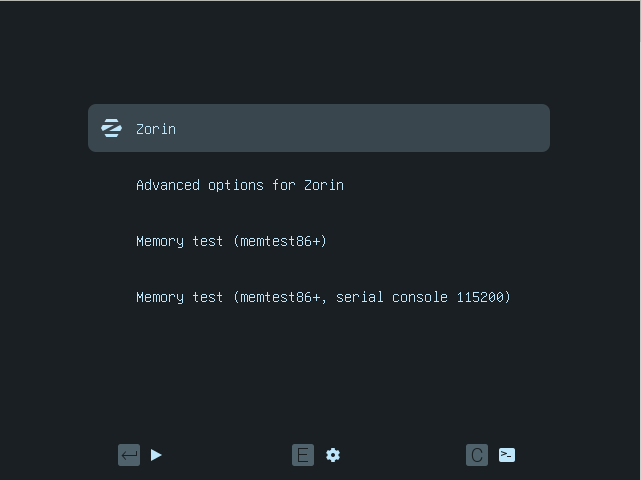
He meant the same as you used. Grub is the black screen at boot where you can select Zorin, advanced options for Zorin or if you have other OS also the other OS, e.g. Windows.
This is an old grub photo of an earlier Zorin version
Just a comment of a one-off "Something went wrong" after I'd got the process going. I was trying to boot from a USB stick with Ventoy (can't remember why now) and pressed F11 to change the boot order, and, instead of using the USB, it carried on to Zorin, which then put up the OOPS screen, before carrying on, but with a completely different Zorin layout, with the task bar tiny and top right instead of large and bottom centre. Later boots gave the correct desktop layout. Not relevant to anything , but strange happenings!
I managed to get the " Ooops, Something went wrong" twice, my fault both times. I tried installing the wrong Node-Red. The first time i played around with various things, gave up and re-installed OS 18. Yesterday I managed to make the same mistake, tried a few things but nothing helped. Today sorted it by going in recovery and a prompt and used sudo snap remove node-red-rpi-lwl and all up and running again in no time. Good feeling when you manage to fix it without re-installing.