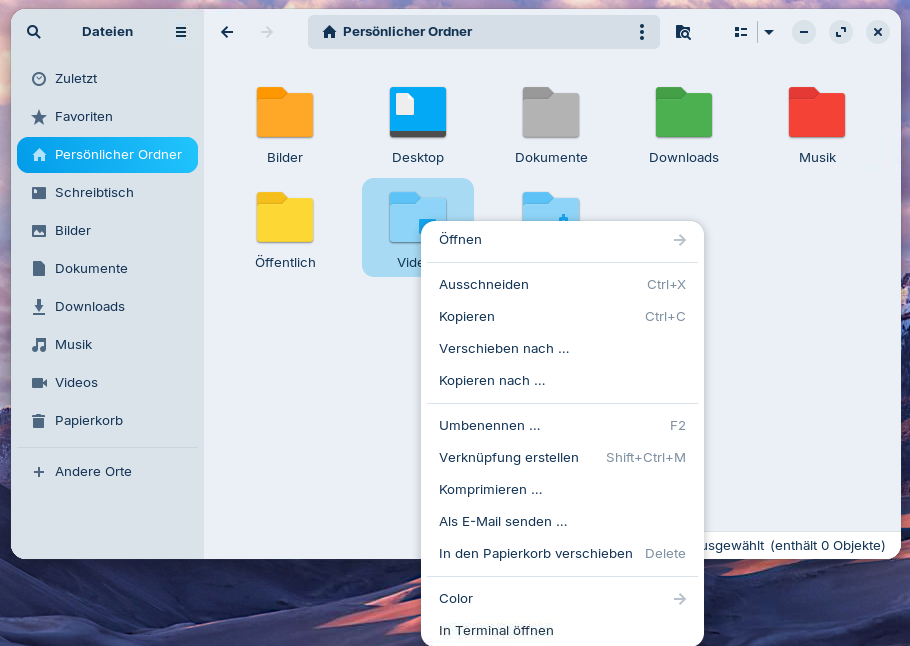
Sarebbe utile poter personalizzare Nautilus in modo che:
si possa aggiungere un pulsante "+" alla barra di Nautilus per aggiungere facilmente una nuova scheda in Nautilus (come avviene in Windows explorer) o aprire una nuova finestra di Nautilus (senza dover usare le scorciatoie da tastiera CTRL + T e CTRL + N).
si possa personalizzare il colore di una singola cartella di file da tasto destro del mouse (di default, come avviene in Linux Mint). Potreste cortesemente implementare queste comode funzioni in un prossimo aggiornamento?
You can change the colors of single folders by rightclicking on the folder and select "color" (in Zorin 17: "folder-color"). Then you can choose a color you like for the folder.
I don't know, but I used the beta upgrade, and I add problem with nautilus and folder-color like many other people, so for now I know you can install it from sources but I don't know if it work or not and I will not test for you lol
if your nautilus is freezing it probably mean it's installed, but Zorin lock the access because of a bug, so try what I say, it take 5 seconds and maybe it will help
I just tested the new r3 .iso. With this .iso the folder-color has been removed.
You can install it with
sudo apt install folder-color
Then logout and login again and open nautilus. When you right-click on a folder you can see "color" now in the context menu. Be aware that it can cause problems. But you can test and remove it if it doesn't work well.