Apologies for rushing ahead as well as posting here, I was getting desperate!
1 Like
I know it is sometimes not possible to install applications when there is no other choice, but personally if I were still using Thunderbird I would install the .deb package if available.
For Thunderbird, you would be better installing the tarball - I made a video for this very purpose:

I see tauon is only available as a flatpak, so can't help you there - is there any way of backing up your playlists, music files etc?
I like the fact that it has milkdrop visualisation - which is also available as ProjectM with qmmp - worth taking a look at that.
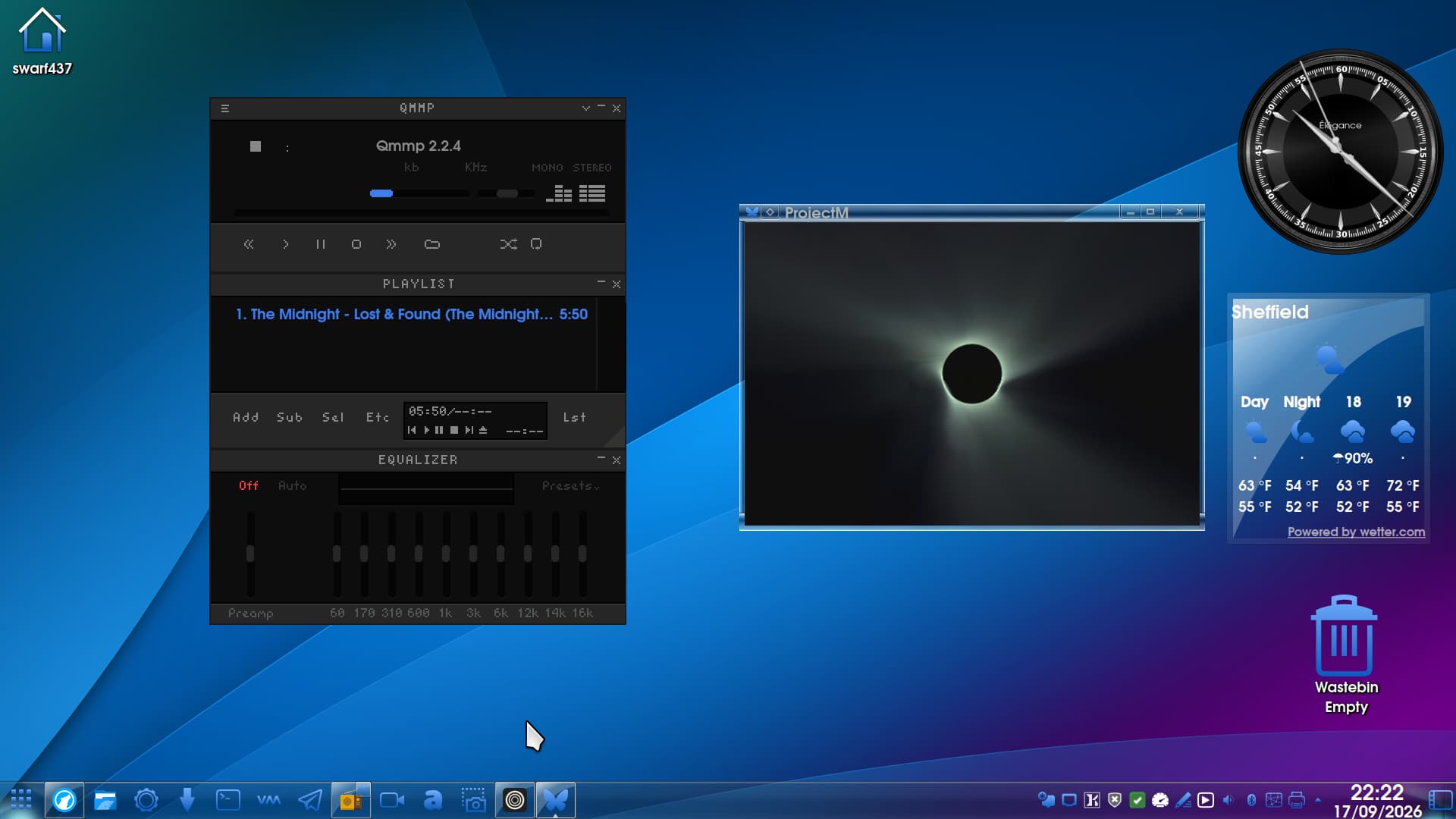
But does not have internet audio streaming options. You could also try some alternatives listed here:
2 Likes
Thanks for all this, much appreciated. Is this all suggesting flatpaks are not the way to go?
1 Like
This appears to be a very recent thing.
Many browsers that are Flatpak wrapped are affected, and this includes other net-access or protocol applications.
Whatever command Gemini suggested most likely cleared out or reset a stale CUPS socket/symlink, which let bwrap finish mounting cleanly for Thunderbird.
Tauon has an optional Discord Rich Presence integration for streaming, which would include a symlink for Discord - which you do not have installed, so that symlink leads to a target that does not exist.
Since this bubblewrap regression in the updates; it results in the application failing instead of purging the irrelevant command.
If you prefer to stick with Tauron, you can try:
flatpak override --user --user com.github.taiko2k.tauonmb --nofilesystem=xdg-run/discord-ipc-0
Given the broad reaching nature of this, I am tempted to PIN This topic.
The realistic tactic may be to not try individually sussing out each Flatpak fix until Flathab patches this; but to simply suggest users switch to an APT version that does not come with an "Everything bundled into one complex jumble."
5 Likes
Did a Brave A.I. search and got the same clearer results that @Aravisian has posted - his is more clearer in listing the issues.
Anyhoo:
" The inability to launch Flatpak applications like Tauon and Thunderbird on Ubuntu 24.04 following the September 17, 2026 update is primarily caused by a bug in bubblewrap versions older than 0.12.0 , which fails to resolve symbolic links for system sockets like /var/run/cups/cups.sock (Issue #6831). Additionally, Tauon users may encounter specific origin mismatch errors preventing installation or updates, while Thunderbird may fail to launch due to stale desktop entries or sandbox permission conflicts triggered by system changes.
To resolve these issues, execute the following steps:
-
Repair Flatpak Installation : Open a terminal and run
sudo flatpak repairto fix broken runtime or application states. -
Update System and Runtimes : Run
sudo apt update && sudo apt upgradeto ensure bubblewrap is updated to version 0.12.0 or higher, then runflatpak updateto refresh all Flatpak apps and runtimes. -
Fix Tauon Origin Errors : If the error persists for Tauon , verify the remote configuration using
flatpak remote-info flathuband ensure the app is installed from the correct Flathub origin. -
Reset Thunderbird Permissions : If Thunderbird still fails to open, reset its sandbox overrides by running
flatpak override --reset org.mozilla.Thunderbird(or the specific ESR ID) and restart the application.
AI-generated answer. Please verify critical facts."
Please note that personally speaking I never save emails to the computer. I keep them on IMAP so I get a repopulated mailbox. I don't know where Thunderbire flatpak versions stores its settings within its sandbox.
Installing from a tarball is better, especially if you want to import the configuration folders if migrating from Windows, but hey, I am not up to speed with Flatpaks as I always avoid them ... and snaps - if I were running Zorin as my daily, Flatpak and Snap/d would get the boot. 
2 Likes
^^ this is precisely what it did 
2 Likes
Thanks for this, it's all starting to make sense. I nuked Tauon as part of all the diagnosis earlier but I will try follow these steps and get it back tomorrow after the first coffee of the day...
1 Like
Every time I see your avatar, I chuckle.
2 Likes
Hi, First we need to establish which version of Firefox got installed, Flatpak, or did you install from the Store thinking it was APT? Canonical (Ubuntu) have been doing naughties and installing Snap versions of Firefox. It would be good to know if you installed from the Store or elsewhere.
Personally I prefer installing via a tarball:

See also:
3 Likes
Can you remember which option? There is a drop down arrow to choose from different types of installation.
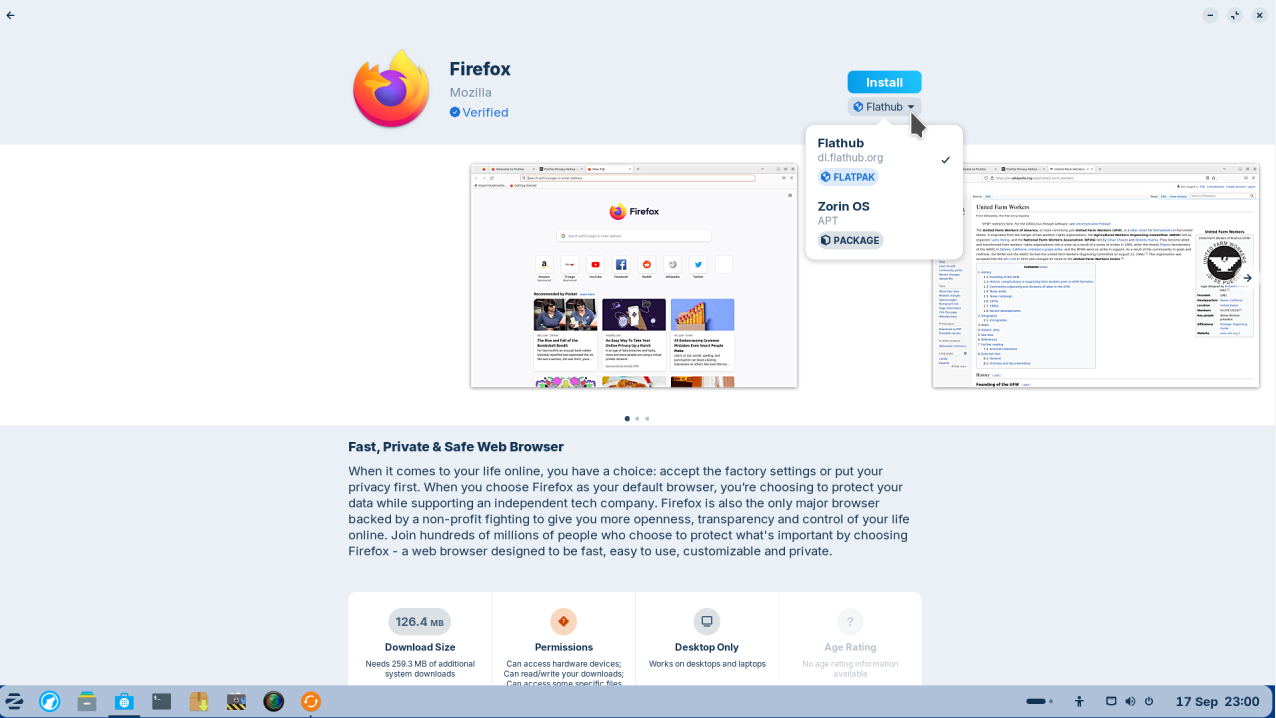
1 Like
Afterward this Zorin Update the flatpak problem occured:
for info to find the update part which triggered the flatpak problem:

3 Likes
So you have a checkmark against APT and Flathub?
1 Like
Can you upload a screenshot?
1 Like
Do you have saved passwords and bookmarks - do you have backups of passwords? Personally i would look at a fresh install of Firefox but I would opt for the tarball method, at least then you would get updates alongside the system ones.
The fact that you have two instances suggests each are cancelling the other one out.
1 Like
Let's go with the Flatpak as the issue. See if this possible solution helps:
3 Likes
had Firefox installed with flatpak. I got it back running with my bookmarks.
- within the store I clicked on Firefox wastebasket and was asked to delete or keep my data: I choose: keep
- I reinstalled Firefox over the store again, but now with the Zorin OS APT package and have my bookmarks available.
- but no guaranty that this works always
2 Likes
A pretty good lesson : "avoid flatpak if you can..."
5 Likes
I have certainly learned a lot tonight.
2 Likes
Just curious if you can choose Advanced Recovery option from the GRUB menu at boot time (if you have a GRUB menu at boot time - if you used EFI boot installation of Zorin, keep pressing the Esc key repeatedly at power up time. Then choose advanced options and see if booting to an earlier kernel solves the issue.
If we can get it sorted, I strongly advise you install Timeshift and setup snapshots to be taken 3 times a day - this is not cumulative - each day, 3 new snapshots replace the previous days in a cycle.
If this does not work, I strongly advise you remove the Flathub one using the Software remove/uninstall option (if available).
If APT is definitely showing then I am wondering if Snap has taken over. Zorin installs Snapd at point of install, so I strongly advise you remove Snap at least:
1 Like