I have a similar problem, something was updated on my Zorin and when I started my computer again the screen remained black. After researching on the Internet I entered through grub in a "recovery" session, I uninstalled the drivers, I restarted however it still does not enter correctly, I can only enter the session in "recovery", here everything works fine, when I use the command " nvidia-smi" the box appears with information about the graph and the controller, it also appears that it is "on demand". I don't want to turn off the -secure boot- because I have two SSDs on my computer, one with Zorin and the secondary one with Windows 11, I'm new to Zorin, so there are still things that I depend on Windows (especially in some games). How could I solve this? I would greatly appreciate your help, thank you!
I have moved you to a new topic since you are looking for a solution to keep secure boot enabled.
The steps you need to follow are to enroll MOK, then add signed Nvidia drivers so that Secure Boot does not block initialization of Nvidia at boot.
Oh no, it seems that the secure boot is already disabled. XDI think I'm too new, I don't understand too much :C
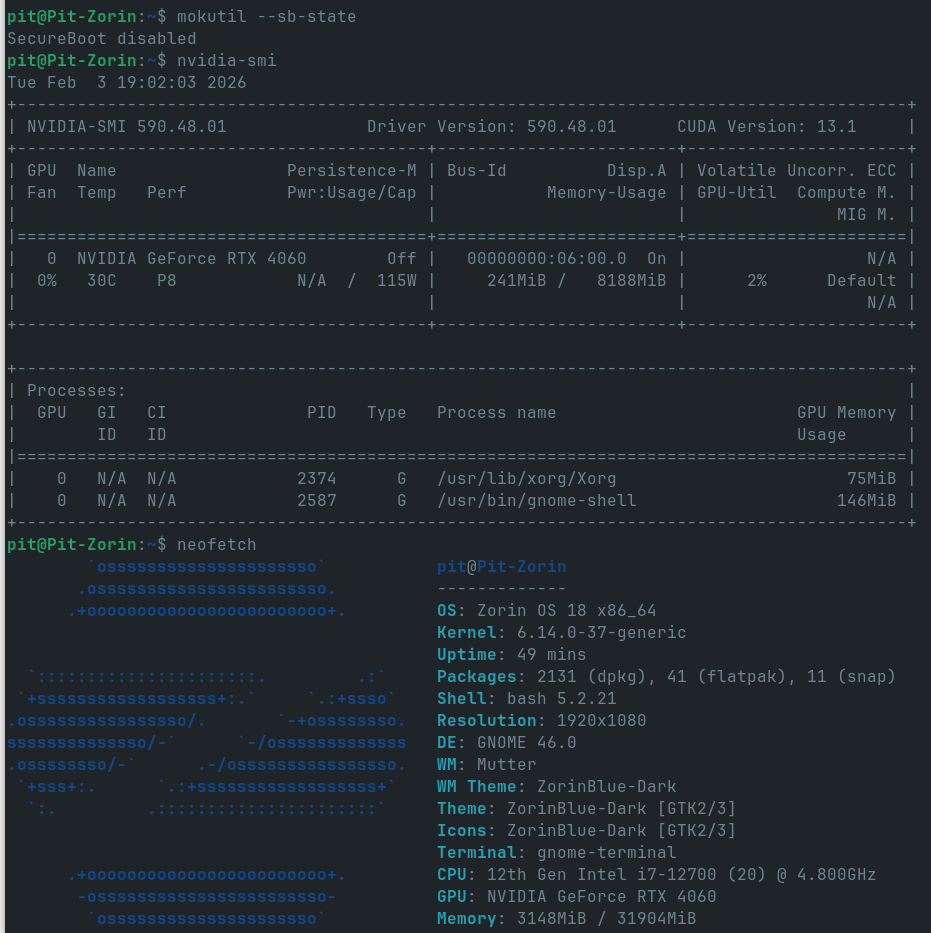
(i'm on a "recovery session")
Well, if you wanted it enabled, the steps still apply. 
You can enable it in your BIOS settings under the security tab.
As far as the having to move through the recovery menu just to boot- let's address that.
I see you are on the 590 driver. I do not recommend it. I tried it out, too, when it was released. Typical Nvidia, it had compositor conflicts on a massive level.
And it conflicted with the kernel.
What I recommend doing:
sudo apt remove --purge '^nvidia-.*' '^libnvidia-.*'
This will remove all configurations safely.
Then
sudo apt update && sudo apt install nvidia-driver-580 nvidia-dkms-580
Once it is complete (Watch for and report any errors in this thread), fully shut down the computer and let it sit a moment before booting.
This is a fully cycle boot.
This is necessary because Nvidia likes to not dump its vRAM. It gets me all the time that I reboot and can't, because Nvidia holds the vRAM open... Next GPU I am getting is AMD.
thank you! i'll try!

Now you have about 10 minutes on the home screen, it doesn't go beyond that. What should I do to make a correct diagnosis? To be able to know what is wrong
This is exactly what happens to me when Nvidia fails to purge vRAM. It hangs at the plymouth throbber, because the GPU hangs on init.:
Just hold the power button down - keep holding it down after it shuts down for about twenty seconds, then power back up.
And I have had it take two or three tries...
I already did what you recommended, I have restarted it 5 times, sometimes leaving the computer off for several minutes between on and on, now the logo appears for a couple of seconds and then the screen appears completely black. I'll keep trying but... I don't know how long my patience lasts, thank you very much!
Well, it sounds like my patience would have run out. It can take a few tries... but not ten minutes of trying.
Are you able to boot into Grub menu
Advanced Options - then look at the Kernel list
If you have more than one kernel - select the Earlier Kernel and boot
If that works fine - I recommend rolling back to that kernel and testing normal boot:
the same thing, the Zorin logo lasts a couple of seconds and then a black screen. Thanks anyway!
Alright - and if you try the -37 kernel, by the Advanced Options, does it boot?
I can only enter on "recovery" mode :C
Yes, I know, but the other attempts did not lead to reaching the desktop.
Did this one lead to reaching the desktop? Even though you needed to go through recovery menu to do it...

Ok, I think we can conclude - it is not the kernel
And I think likely not the nvidia drivers.
Let's see if it is due to modesetting. Please follow this guide to set nomodeset
Once done, remember to run
sudo update-grub
Then fully cycle down and up and test booting normally.
The same thing keeps happening to me, a couple of seconds and then the black screen, thank you very much for your time! I'll stop trying for today, maybe I'll continue tomorrow
I understand the frustration. A break can do wonders. This is an odd one...
This topic was automatically closed 90 days after the last reply. New replies are no longer allowed.