Hi guys I just installed zorin lite 17.3 on my Asus Vivobook go 12 after putting a clean Win11TinyHome on it, but it took up soo much dischspace and was a little sluggish.. But after installing Zorin Lite, my boot time is now 55sec before I can use the laptop. and just to say, all my other laptops running zorin lite also have almost identical slow boot - but this is my newest laptop, just recieved it yesterday after online new puchase, and the rest are like 10-15years old laptops, so I thought this would be better.. and just to campare, I used to use an old broken lenovo from 2010 with win10 (before11) and on the org hdd it took 5-10min for me to use it, then I swapped the hdd to an sdd, just pure cloning, and then it was 33sec from pressing start button till I could use it.. but this 55sec on a brand new laptop seems crazy... anyone got any help ideas? much apreciated here from Denmark
Hi. I used xubuntu for my search criteria as that is what Zorin Lite is a fork of. Brave A.I. via Mojeek gives:
" Identify Boot Bottlenecks
Use systemd-analyze time to check your current boot phases. For example:
Startup finished in 4.245s (firmware) + 2.123s (loader) + 6.567s (kernel) + 12.456s (userspace) = 25.391s
Then run systemd-analyze blame to find slow services. On your system, common culprits include:
NetworkManager-wait-online.servicee2scrub_reap.serviceapport.service- Mount units like
mnt-2C58207458203EC8.mount
Disable Unnecessary Services
Stop non-essential services from starting at boot:
- Disable network wait:
sudo systemctl disable NetworkManager-wait-online.service - Disable logging and crash reporting:
sudo systemctl disable apport.service - Disable disk scrubbing:
sudo systemctl disable e2scrub_reap.service - For mount units (e.g.,
mnt-*.mount), edit/etc/fstaband addx-systemd.automountor removeautoto delay mounting.
Optimize GRUB and Kernel Parameters
Edit /etc/default/grub :
GRUB_CMDLINE_LINUX_DEFAULT="quiet splash noresume discard=async mitigations=off"
Then run: sudo update-grub

mitigations=offimproves speed but reduces security—use only if acceptable.
Enable Parallel Boot and System Optimization
Edit /etc/systemd/system.conf :
DefaultTimeoutStartSec=10s
DefaultTimeoutStopSec=10s
JoinControllers=cpu,cpuacct,blkio,memory
Save and restart systemd: sudo systemctl daemon-reload
Optimize Disk and Filesystem
Ensure your system uses an SSD. Add noatime to your /etc/fstab :
UUID=xxxxx / ext4 defaults,noatime 0 1
Enable fstrim.timer for SSD health: sudo systemctl enable fstrim.timer
Reduce GRUB Timeout
Set GRUB_TIMEOUT=2 in /etc/default/grub to reduce visible delay. Run sudo update-grub .
Final Check
Reboot and verify with:
systemd-analyze time
systemd-analyze blame
systemd-analyze plot > boot-plot.svg
Open boot-plot.svg in a browser to visualize improvements.
Expected Result
With these changes, a 55-second boot time can be reduced to 20–25 seconds on typical hardware. Prioritize disabling NetworkManager-wait-online.service , apport.service , and e2scrub_reap.service for the biggest gains.
AI-generated answer. Please verify critical facts."
cool thanks - I will try  it's crazy I tried installing ChromeOs FLex on my old macbook air from 2011 and it had like a boot time from press to ready on like 15-17sec I will def try your AI generated responce
Are Secure Boot and Fast Boot in BIOS disabled? Is Your BIOS in UEFI or Legacy Mode? What Tool did You use to create the Bootstick? When You go into BIOS and look there for something like ''Boot Order'' is there ''ubuntu'' on first Position?
Hi Ponce-De-Leon
okay, so Secure Boot is active in the bios, and I cannot turn it off, the "setting" is greyed out. I cannot see if I am in UEFI or Legacy mode. I used Rufus to create the stick. And Yes Ubuntu is in first position, well its the only option
vivobook@VivoBook:~$ systemd-analyze time
Startup finished in 4.680s (firmware) + 24.297s (loader) + 6.536s (kernel) + 14.878s (userspace) = 50.393s
graphical.target reached after 14.844s in userspace
vivobook@VivoBook:~$
THE BLAME FOUND SOME, though the most suggestions are not as high on the list
vivobook@VivoBook:~$ systemd-analyze blame
10.516s NetworkManager-wait-online.service
3.537s snapd.seeded.service
3.284s snapd.service
2.425s blueman-mechanism.service
2.377s systemd-rfkill.service
2.228s lightdm.service
2.174s plymouth-quit-wait.service
1.378s accounts-daemon.service
1.373s avahi-daemon.service
1.245s networkd-dispatcher.service
1.236s NetworkManager.service
1.144s systemd-logind.service
1.063s dev-mmcblk0p2.device
1.057s udisks2.service
899ms upower.service
794ms ModemManager.service
790ms apparmor.service
762ms grub-common.service
711ms gpu-manager.service
681ms e2scrub_reap.service
677ms bluetooth.service
652ms secureboot-db.service
637ms systemd-resolved.service
634ms polkit.service
607ms lm-sensors.service
Yes so I did cut the time down by 10sec with AI suggestions.
though the other two after network, I did not touch, it would only give me 1sec each.
I went into the grub file but did not see these lines:
DefaultTimeoutStartSec=10s
DefaultTimeoutStopSec=10s
JoinControllers=cpu,cpuacct,blkio,memory
There was only a: DefaultTime=0
so yes.. But from looking at the screen, I get the Asus "bios" logo very fast and then it goes away, and it takes like 20sec before the Zorin Logo appears and with it the asus logo reappers
Usually on ASUS computers when you select at secure boot settings "Other OS" then secure boot is disabled automatically.
You can check in Zorin if secure boot is enabled with
mokutil --sb-state
It's pretty high, do you have an external disk or usb key connected at boot ?
terminal says secure boot disabled - weird when bios says active
It is often difficult to see in the BIOS settings if it is turned on or off.
nope absolutly nothing just this pure clean computer, I could almost use it aas a chromebook for my work  witch is kinda my idea, just running linux. though if we can reduce loader, it would be awesome, since often as an electrician, I have people on the phone and then, I will go to the car and take out the laptop turn it on and check mail or what not
Loader time (GRUB delay), show us the content of your GRUB
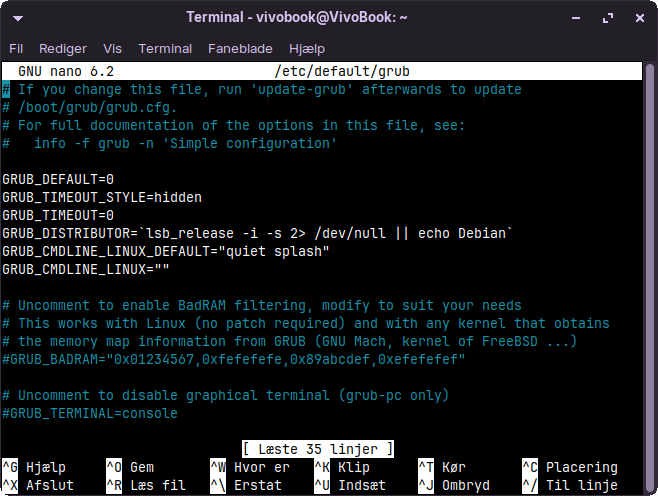
it seem ok, give me the result of
systemd-analyze critical-chain
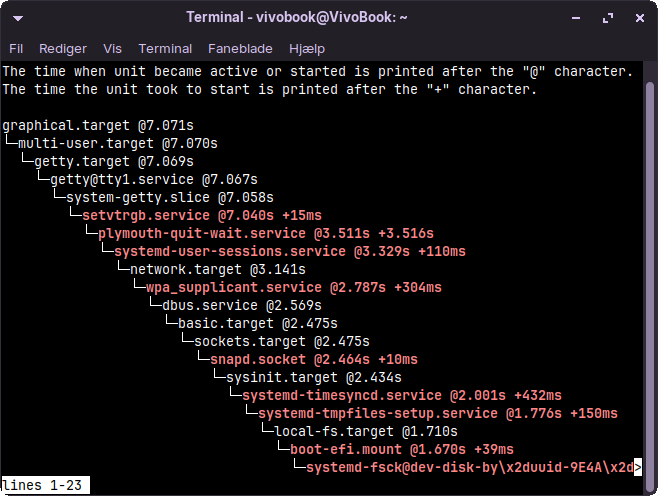
try this
sudo systemctl disable NetworkManager-wait-online.service
if you don't want to use snap packages do this
sudo systemctl disable snapd.service snapd.socket snapd.seeded.service
reboot and see
I did sudo systemctl disable NetworkManager-wait-online.service and it did nothing but maby because the first I did after the first post was
sudo disable NetworkManager-wait-online.service
and it did cut 10sec off my boot time
okay so I diasabled the snap also and it gave me some extra
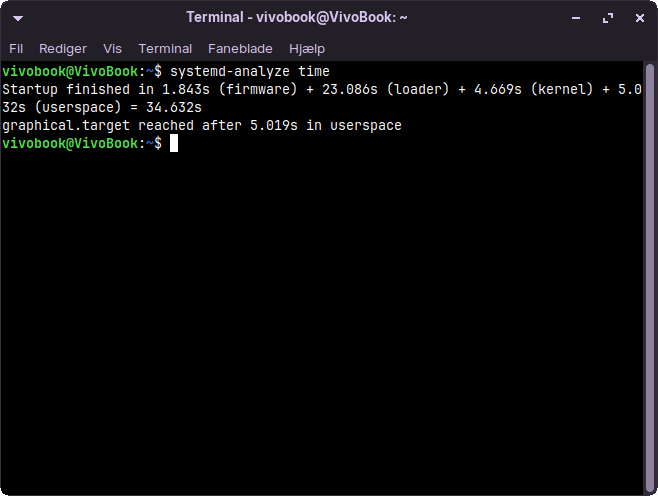
if we just could get that Loader down, it would be awesome
it's better but I still don't understand for the loader, maybe someone have a better idea.
my old laptop, 11 years old
systemd-analyze
Startup finished in 1.989s (firmware) + 2.610s (loader) + 2.499s (kernel) + 8.772s (userspace) = 15.872s
graphical.target reached after 8.747s in userspace.