I see in October/November 2025 someone chose to answer a similar question, but privately rather than share the answer. I'm trying to get away from MS this is my 1st venture into the Linux world, my MS account is locked I saved my e-mails in a .pst file before I lost access to Outlook, tried numerous search parameters, focussing on Zorin, Ubuntu, Linux, some solutions but with incomplete sets of instructions. Any assistance greatly appreciated, but preferrable with complete sets of instrucgtions please. An old codger who wants to ditch MS for good.
Hello and welcome,
you can try with evolution mail (included in Zorin), there is a extension (included also) to do that, unfortunately I can't test for you I don't have any pst
File > Import

Maybe translate or describe the Menu Points? Only to know where to look for this I mean.
1 Like
Hi and welcome to Linux and Zorin! @Maximus_Decimus
What @Nourpon said is probably the easy way to get to your emails. I'm still really new to Linux myself and I get that you like step by step instructions because so do I and I think I can help you because it's not difficult.
Have your .pst file ready on a USB or the like, paste the file into Zorin wherever you can find it.
Evolution is pre-installed, so search for it. Just click on the Z for Zorin and type: evol
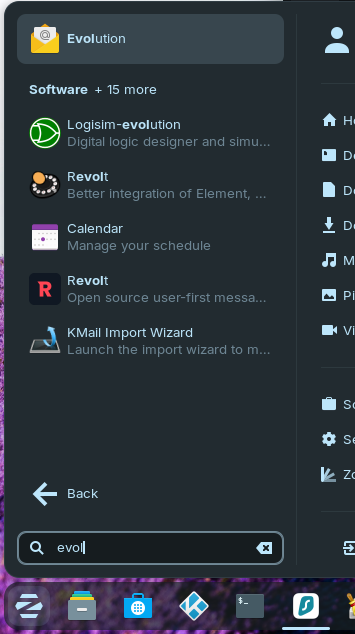
- Open Evolution .
- Go to File > Open Data File... (or Import).
- Select your .pst file.
- Open it
If you get an error and can't open it then you need to add a package that contains the plugins you need.
Go back to the search and type: terminal (I recommend that you right click on it and pin it to the task bar). In the Terminal type:
sudo apt install -y evolution evolution-plugins evolution-plugin-pstimport
and type in your password when prompted. Then follow the instructions above again and you should be able to access your emails. It's probably an idea to pin Evolution to the taskbar too, or to the desktop, if you prefer a shortcut.
I hope this helps.
2 Likes